

Seeing HTTPS at the beginning of a website address can make you feel more comfortable entering a password, making a payment or sharing personal information. However, even a website with a valid HTTPS connection can be fraudulent, distribute malicious software or collect information for harmful purposes.
HTTPS protects the connection between your browser and the server it communicates with. It helps prevent unauthorized parties from reading or modifying information while it travels across the network. What it does not establish is whether the website operator is trustworthy, whether the content is accurate or whether the service will handle your information responsibly.
Understanding this difference can help you avoid phishing scams, fraudulent online stores and other threats without overlooking the genuine security benefits of HTTPS.
What Does HTTPS Actually Protect?
HTTPS stands for Hypertext Transfer Protocol Secure. It combines the standard HTTP protocol used to exchange web content with Transport Layer Security (TLS), which protects communication across a network.
When a properly configured HTTPS connection is established and validated, it provides three important protections:
- Encryption: Helps prevent unauthorized third parties from reading the information exchanged between your browser and the server.
- Data integrity: Helps prevent undetected modification of information while it is being transmitted.
- Server authentication: Helps your browser verify that it is communicating with a server authorized to use the hostname in the website address.
Mozilla’s documentation on Transport Layer Security explains how these protections work together to secure web communication.
For example, if you sign in to an online account using a properly validated HTTPS connection, someone monitoring the network should not ordinarily be able to read the password being transmitted.
However, the server receiving that password must be able to process the submitted information. If the receiving website is operated by a scammer, HTTPS does not prevent that scammer from collecting it.
Think of HTTPS as a securely sealed delivery package. It protects the contents during transportation, but it does not establish whether the recipient deserves your trust.
What Does an HTTPS Certificate Prove?
Websites typically establish authenticated HTTPS connections using digital certificates issued by certificate authorities. These certificates are commonly called SSL certificates, although modern HTTPS connections use TLS rather than the older SSL protocols.
When your browser establishes a normal certificate-authenticated HTTPS connection, it checks information such as whether the certificate covers the requested hostname, whether it is within its validity period and whether its certificate chain leads to a trusted authority.
Domain Validation Is Not Business Verification
Many websites use domain validation (DV) certificates. These certificates establish that the applicant has demonstrated control over the relevant domain through an accepted validation process.
They do not independently establish whether the applicant operates a legitimate business, provides reliable services or has permission to represent another company.
For example, Let’s Encrypt’s certificate documentation explains that its certificates use domain validation. Making HTTPS widely accessible is beneficial for internet security, but a valid certificate is not an endorsement of the website’s activities.
What About Certificates That Verify Organizations?
Organization Validation (OV) and Extended Validation (EV) certificates involve additional checks concerning the applicant’s organizational identity. However, these checks do not continuously monitor website content, guarantee responsible business practices or prevent a website from being compromised after a certificate is issued.
The Australian Cyber Security Centre’s guidance on certificates and TLS describes these certificate types and their different validation requirements.
Regardless of the certificate type, users still need to consider whether the website is the intended destination and whether the requested action is appropriate.
Why Dangerous Websites Can Use HTTPS?
HTTPS is a communication technology, not a system for determining whether every website is honest. A website operator who controls a domain and satisfies certificate issuance requirements can potentially establish a valid HTTPS connection, even if the website serves a deceptive purpose.
The FBI’s Internet Crime Complaint Center has published a warning about criminals using HTTPS-enabled websites in phishing campaigns. Attackers exploit the assumption that an encrypted connection automatically makes a website trustworthy.

1. Phishing Websites Can Encrypt Stolen Information
A phishing website may imitate a bank, email service, delivery company or social media platform. It can display a convincing login form and establish a valid HTTPS connection for its own domain.
If a visitor submits account credentials, the encrypted connection can deliver those credentials directly to the party operating the fraudulent website. The encryption may function as intended even though the destination is harmful.
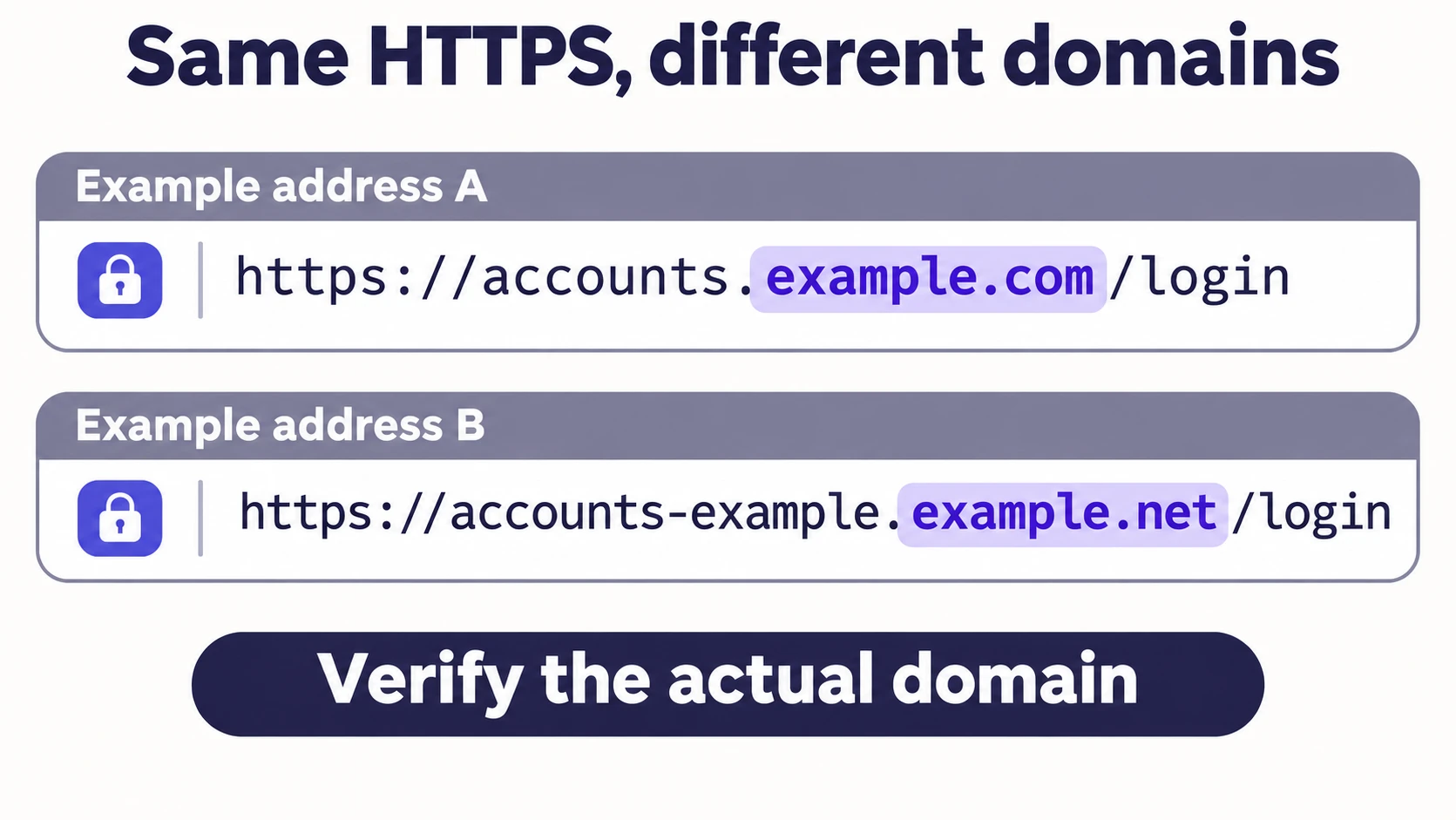
Consider these two fictional addresses:
https://accounts.example.com/loginhttps://accounts-example.example.net/login
Both addresses begin with HTTPS, but they use different underlying domains: example.com and example.net. In a real situation, verifying which domain actually belongs to the intended organization is more important than recognizing familiar words such as “accounts” or “login.”
These addresses are illustrative examples, not identified phishing websites.
2. Fraudulent Online Stores Can Have Valid Certificates
A deceptive online store can use HTTPS throughout its product pages and checkout process. It may also display professional photographs, customer testimonials and payment-security symbols.
HTTPS does not verify whether the advertised products exist, whether reviews are genuine or whether the seller will deliver an order.
Before purchasing from an unfamiliar store, independently check its business identity, contact details, return policies, reputation and available payment protections.
3. HTTPS Can Deliver Malicious Downloads
An encrypted connection does not inspect every file for malicious behavior. A harmful installer, document or browser extension can be transmitted over HTTPS just as a legitimate file can.
Attackers may also display deceptive installation prompts on compromised websites. Our guide to spotting fake browser updates explains why unexpected software installation requests should be verified through the application’s official update mechanism.
4. Previously Trustworthy Websites Can Be Compromised
A legitimate website may experience a security incident involving vulnerable software, stolen administrator credentials or unauthorized changes to its content.
Its HTTPS certificate and encrypted connections may continue working normally while harmful content is being distributed.
For this reason, recognizing a familiar website is useful but does not eliminate the need to consider unexpected downloads, redirects or requests for sensitive information.
What HTTPS Can and Cannot Protect Against?
The following comparison separates the protections provided by a properly validated HTTPS connection from risks that require additional security measures.
| Security Risk | Does HTTPS Help Protect Against It? | What You Should Know |
|---|---|---|
| Network interception of passwords | Yes, during protected transmission | The receiving service can still process the submitted information. |
| Unauthorized modification of transmitted data | Yes | TLS provides integrity protection for the connection. |
| Server impersonation for the requested hostname | Yes, through authentication | This depends on successful certificate validation and does not prevent users from choosing a different, deceptive domain. |
| Phishing websites | Not by itself | A deceptive website can establish its own valid HTTPS connection. |
| Malicious downloads | No | Encrypted transmission does not establish file safety. |
| Fraudulent online stores | No | Encryption does not guarantee honest business practices. |
| Data breaches or misuse at the receiving service | Not by itself | HTTPS does not replace server security, access controls or responsible data handling. |
The key distinction is where the protection applies. HTTPS protects communication between the endpoints of a TLS connection. It does not guarantee the safety of everything that happens before information is sent or after it is received.
HTTPS also does not make browsing completely anonymous. Depending on the network configuration and privacy technologies in use, network observers may still obtain information such as destination IP addresses, connection timing or domain-related metadata.
What Browser Security Indicators Really Mean?
Browsers provide different indicators to communicate connection security and potential threats. Their appearance can vary depending on the browser, platform and software version.
Some browsers use a traditional padlock, while Chrome uses a site information or controls indicator for ordinary secure connections. These indicators should not be interpreted as recommendations to trust a website’s operator.
Google Chrome’s connection security guidance explains the meaning of its security indicators and advises users to check the website address before sharing sensitive information.
It is also important to distinguish three different situations:
- Unencrypted connection: The website is using HTTP, which does not provide the same transport protections as HTTPS.
- Certificate or privacy error: The browser cannot establish sufficient trust in the attempted HTTPS connection. Possible causes include expired certificates, incorrect certificate configuration or network-related problems.
- Dangerous-site warning: A browser’s threat detection system has identified a suspected security risk, such as phishing or malicious content. Such a warning can appear even when HTTPS is available.
Important: Do not bypass certificate errors or dangerous-site warnings to enter passwords, payment details or other sensitive information. Verify the intended website independently and resolve the security issue before proceeding.
If your browser displays a connection-security warning, read our explanation of why your browser says Not Secure to understand possible causes and appropriate precautions.
The absence of a warning does not establish that a website is free from threats. Browser security systems are valuable defensive tools, but they cannot guarantee detection of every harmful website.
How to Check an HTTPS Website Before Trusting it?
When a website asks you to sign in, make a payment, download software or provide personal information, use HTTPS as one requirement within a broader verification process.
- Verify the actual domain: Examine the website address carefully and compare it with an independently confirmed address for the organization.
- Use a trusted entry point: Open the organization’s verified website, a previously verified bookmark or its official application instead of following an unexpected message link.
- Check browser security warnings: Confirm that the connection is protected and that the browser is not displaying certificate or malicious-site warnings.
- Evaluate the request: Consider whether the website has a legitimate reason to request the password, verification code, payment, file download or account permission.
- Verify unfamiliar businesses and downloads: Use independent information to confirm the seller’s identity or locate the software publisher’s official distribution channel.
The Federal Trade Commission’s phishing prevention guidance recommends contacting organizations through independently known websites or contact details when unexpected messages request sensitive actions.
For additional domain, login and identity-verification techniques, follow our guide to checking whether a website is legitimate before entering your password.
These precautions reduce risk, but no single verification method guarantees that a website is completely safe.
What if You Already Shared Information?
If you suspect that an HTTPS-enabled website was fraudulent after interacting with it, your next action depends on what you shared or allowed.
- Only visited the website: Leave the page and review whether any unexpected downloads, permissions or browser changes occurred.
- Entered a password: Access the genuine service through a trusted route, change the affected password and review active sessions and account security settings. Change the password on other accounts where it was reused.
- Shared payment information: Contact your bank or card provider using its independently verified contact details and follow its fraud-response instructions.
- Installed suspicious software: Treat the device as potentially compromised, disconnect it from the network if appropriate and seek security assistance. Use another trusted device for sensitive account recovery.
For work accounts or managed devices, promptly inform your organization’s IT or security team and follow its incident-response procedures.
Our guide on what to do after clicking a suspicious link provides more detailed recovery guidance for different situations.
Final Thoughts
HTTPS remains a fundamental part of web security. It protects data during transmission, helps authenticate the requested hostname and reduces the risk of unauthorized interception or modification.
However, a protected connection is not the same as a trustworthy destination. Phishing websites, fraudulent stores, malicious downloads and compromised services can all exist behind valid HTTPS connections.
Before sharing sensitive information or downloading software, check both the connection and the destination. HTTPS helps protect how your information travels. You still need to decide whether the recipient should receive it.

Tech Bonafide is the editorial identity of TechBonafide, an independent technology publication covering AI, software, cybersecurity, gadgets, and emerging technology.