
You upgraded to a 5G smartphone, subscribed to a compatible mobile plan and now see the 5G icon at the top of your screen. Yet websites load at roughly the same speed, videos still buffer and downloading apps does not feel noticeably faster. What happened to the promised improvement?
5G can feel no faster than 4G because the network generation is only one factor affecting mobile internet performance. Available spectrum, signal quality, network congestion, carrier infrastructure, smartphone compatibility and the applications you use all influence the experience.
In some situations, a strong 4G LTE connection can even outperform a weak or congested 5G connection. Understanding why this happens can help you identify the problem without unnecessarily replacing your phone or upgrading your mobile plan.
Why 5G is Not Always Faster Than 4G?
5G is the fifth generation of mobile network technology, while 4G LTE belongs to the previous generation. Although 5G introduces improvements in network capacity, efficiency and responsiveness, these capabilities do not guarantee a faster connection at every location.
Your actual experience depends on how the mobile operator has deployed its network and how much capacity is available when you connect.
The 5G icon is not a speed measurement. It indicates network availability or connectivity according to your phone and carrier configuration, rather than guaranteeing a particular download speed.
There is evidence that 5G improves performance overall. In its Mobile Matters 2025 research, UK communications regulator Ofcom reported an average download time of 0.3 seconds for a 2 MB file over 5G, compared with 0.7 seconds over 4G. The analysis used UK crowdsourced measurements collected between October 2024 and March 2025.
That finding demonstrates a measurable improvement, but it also illustrates why a small download may not feel dramatically different to an individual user. It is a regional research result, not a speed guarantee for every 5G network.
Different Types of 5G Deliver Different Speeds
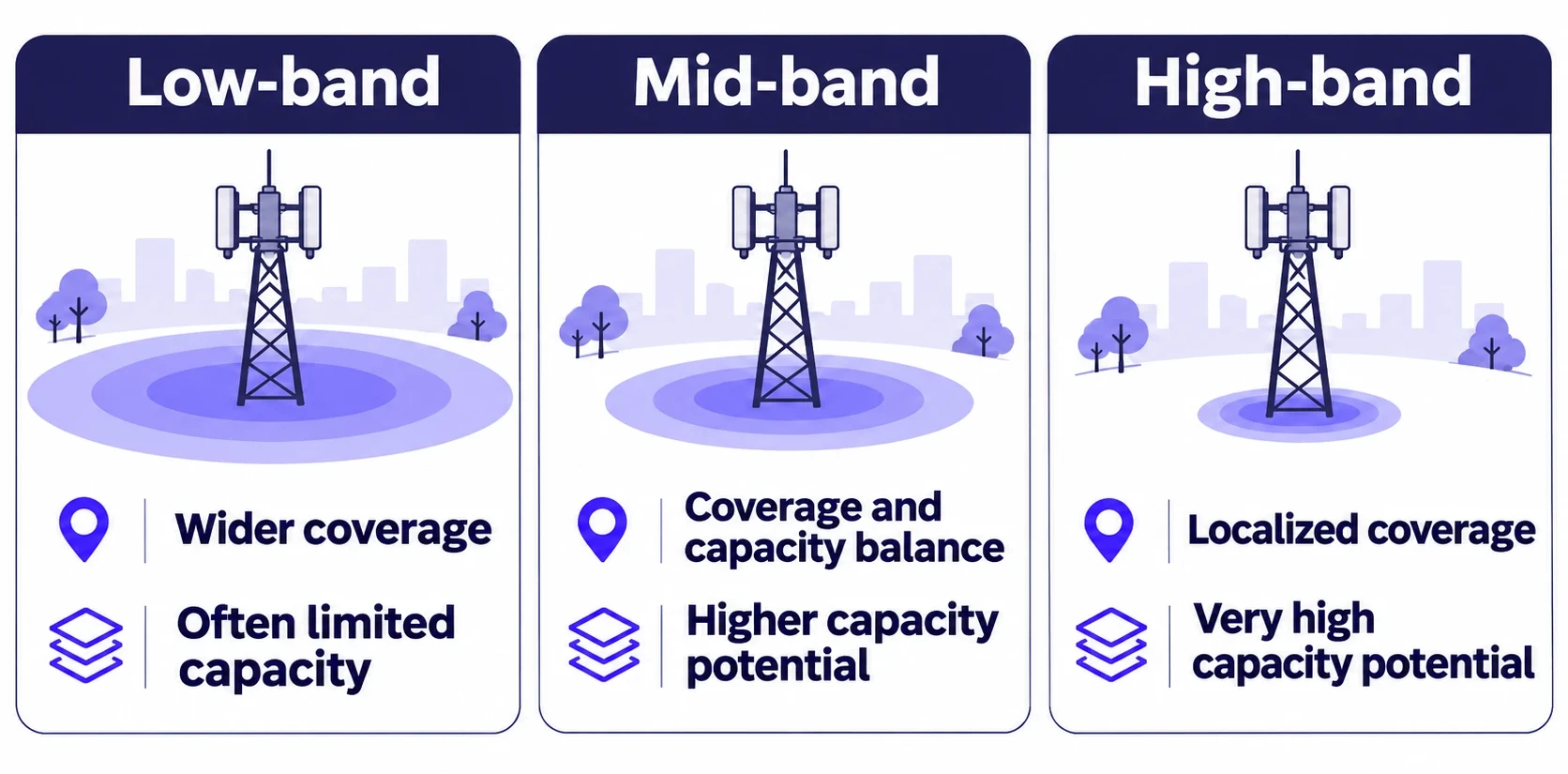
Not every 5G connection uses the same radio frequencies or network configuration. Mobile operators deploy different frequency bands to balance geographical coverage, building penetration and network capacity.
Low-Band 5G
Low-band 5G generally uses frequencies below 1 GHz. These frequencies are useful for covering large areas and reaching many indoor locations.
However, where the operator has only a narrow amount of spectrum available, the improvement over an established 4G network may be modest.
A phone connected to low-band 5G may therefore show good signal strength without delivering substantially higher download speeds.
Mid-Band 5G
Mid-band 5G provides a useful balance between coverage and capacity. Operators can often deploy wider radio channels in these frequencies, allowing more data to be transferred when network conditions are favorable.
This is one reason mid-band deployments can provide a more noticeable improvement over 4G, particularly for large downloads and other demanding activities.
High-Band 5G
High-band 5G, often associated with millimeter wave or mmWave technology, can support very high data rates using wide channels. Its signals generally have shorter practical coverage and greater difficulty passing through obstacles.
As a result, this type of 5G is often deployed in targeted locations rather than used as the only coverage layer across an entire region.
The following comparison summarizes the typical coverage and capacity trade-offs described in Ericsson’s explanation of 5G spectrum.
| 5G type | Typical coverage characteristics | Potential performance advantage |
|---|---|---|
| Low-band | Wide coverage and generally better indoor reach | May offer a modest speed improvement over 4G |
| Mid-band | Balance between coverage and capacity | Can provide a substantial improvement with sufficient spectrum |
| High-band | More localized coverage and greater sensitivity to obstacles | Can deliver very high speeds under favorable conditions |
These are general characteristics, not fixed speed rankings. Actual performance also depends on channel bandwidth, network load, equipment and signal conditions.
Seven Real Reasons Your 5G Feels Slow
1. Limited or Shared Spectrum
A carrier can deploy 5G without giving it a large amount of additional radio spectrum. If a network has limited channel bandwidth, its potential speed improvement may also be limited.
Some operators use dynamic spectrum sharing, commonly called DSS, which allows 4G LTE and 5G New Radio to use the same frequency allocation. This helps operators introduce 5G while continuing to support existing LTE users.
However, sharing spectrum does not create additional radio capacity by itself. Depending on the deployment and demand, the resulting 5G connection may offer a smaller performance improvement than a deployment with substantial dedicated spectrum.
Ericsson’s technical explanation of 5G network migration describes how operators can combine shared, repurposed and newly allocated frequencies.
2. Network Congestion
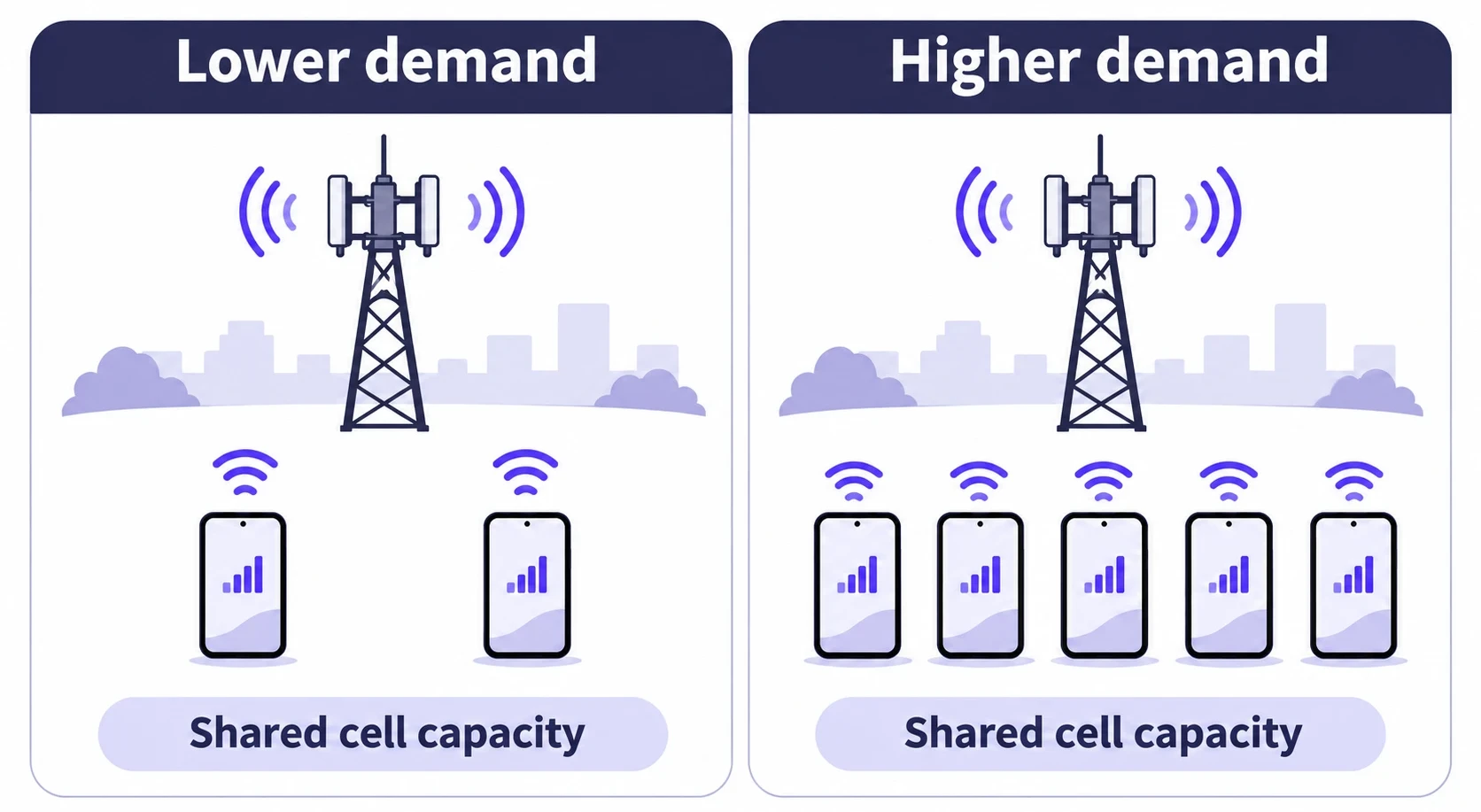
Mobile network capacity is shared among connected users. When many people simultaneously stream videos, download files or upload content, the available resources must be distributed among them.
This is why mobile internet may feel slower at busy railway stations, shopping centers, stadiums or during evening peak hours.
Even a phone displaying full signal bars can experience slow downloads when its serving cell is heavily loaded. Signal strength and available network capacity are different things.
3. Weak Signals and Building Obstructions
Walls, coated windows, surrounding buildings and distance from the mobile tower can reduce signal quality. Higher-frequency connections are generally more sensitive to these obstructions.
A phone may perform well outdoors but become noticeably slower inside the same building. In areas with inconsistent 5G coverage, it may also move between available network technologies.
If your 5G connection improves significantly near a window or outside, local signal conditions are a possible explanation.
4. Standalone vs. Non-Standalone 5G
5G networks can operate using different architectures.
Non-standalone 5G (NSA) combines 5G radio access with existing LTE infrastructure and a 4G core network in its commonly deployed form.
Standalone 5G (SA) uses 5G radio access and a dedicated 5G core network without requiring an LTE anchor for the standalone connection.
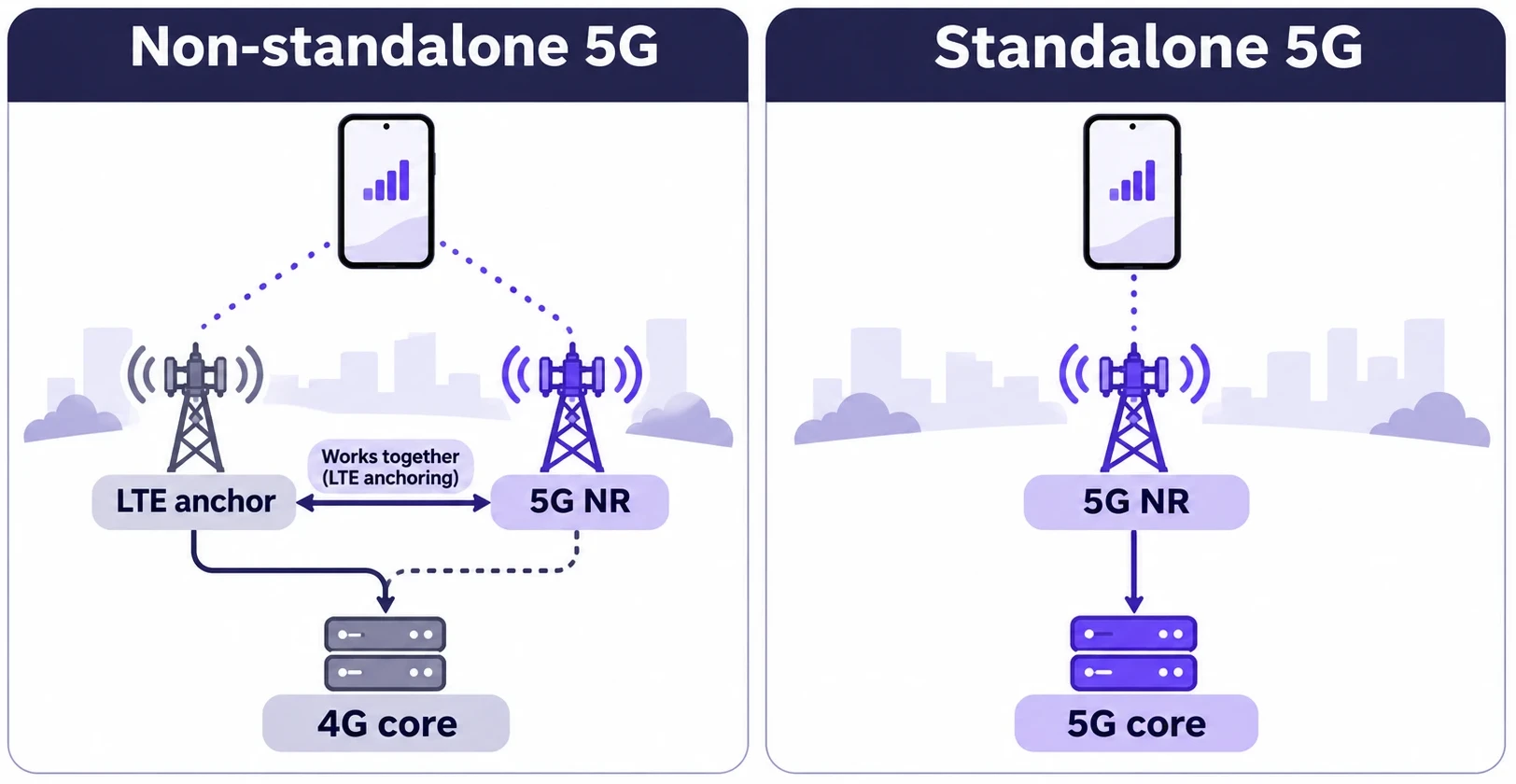
Standalone deployments can enable improved responsiveness and additional network capabilities. However, standalone 5G is not automatically faster than every non-standalone connection. Available spectrum, network configuration and congestion remain important.
The rollout of these networks also varies by carrier and region. TechBonafide’s earlier coverage of EE’s standalone 5G expansion provides a historical example of this transition.
5. Network Infrastructure Bottlenecks
Your smartphone’s connection to a mobile tower is only one part of the journey that internet data must complete.
The cell site needs a connection, known as backhaul, to the operator’s wider network. Traffic then travels through other network systems before reaching the internet service you are using.
If any part of that path has insufficient capacity or excessive demand, a fast wireless connection alone cannot eliminate the bottleneck.
Consumers generally cannot determine from signal bars or a single speed test whether the underlying problem is radio congestion, backhaul capacity or another network component.
6. Smartphone Compatibility and Settings
Two smartphones that support 5G may not support the same frequency bands, combinations of radio channels or carrier-specific network features.
Imported phones, different regional models and devices using older modem hardware may have different connection capabilities even when they display the same 5G icon.
Automatic network selection can also affect the connection. For example, compatible iPhones can switch to LTE when using 5G would not provide a noticeably better experience.
Battery-saving settings and the selected mobile data SIM can also influence network behavior, depending on the device.
7. Carrier Plans and Data Restrictions
Access to a 5G network does not necessarily mean access to unrestricted mobile data speeds.
Depending on the provider and subscription, a plan may include speed limits, usage thresholds, congestion-related prioritization or separate restrictions for activities such as hotspot use.
Check the actual terms of your mobile plan before assuming that a slow connection is caused by the phone or local network infrastructure.
These technical and commercial differences help explain why the consumer experience varies despite substantial industry investment. The broader context is discussed in TechBonafide’s analysis of 5G investment and deployment challenges.
Why Everyday Apps May Not Feel Faster on 5G?
A faster internet connection does not automatically make every smartphone activity faster. Once an application has enough bandwidth to operate comfortably, other factors may become more important.
Download speed, usually measured in megabits per second (Mbps), describes how quickly data can be received. Latency, typically measured in milliseconds (ms), describes communication delay. Connection stability also affects how consistently an application responds.
Different activities benefit from these improvements in different ways.
| Activity | Main performance factors | When 5G may help |
|---|---|---|
| Messaging and email | Responsiveness and connectivity | When the existing connection is slow or unreliable |
| Web browsing | Latency, server response and page processing | When network delays contribute to slow loading |
| Video streaming | Sustained bandwidth and stability | When 4G cannot consistently support the selected video quality |
| Large file downloads | Available download throughput | When 5G delivers substantially greater throughput |
| Online gaming | Latency, jitter and packet loss | When 5G provides a more responsive and stable connection |
| Video calls | Upload speed, latency and stability | When the connection better handles two-way communication |
For example, if your existing 4G connection already streams a video at the selected quality without buffering, switching to 5G may not visibly improve playback. A website may also remain slow because its server or your phone takes time to process the page.
The improvement is more likely to become noticeable during large data transfers or when 5G resolves a genuine capacity or connection-quality limitation.
How to Compare 4G and 5G Speeds Fairly?
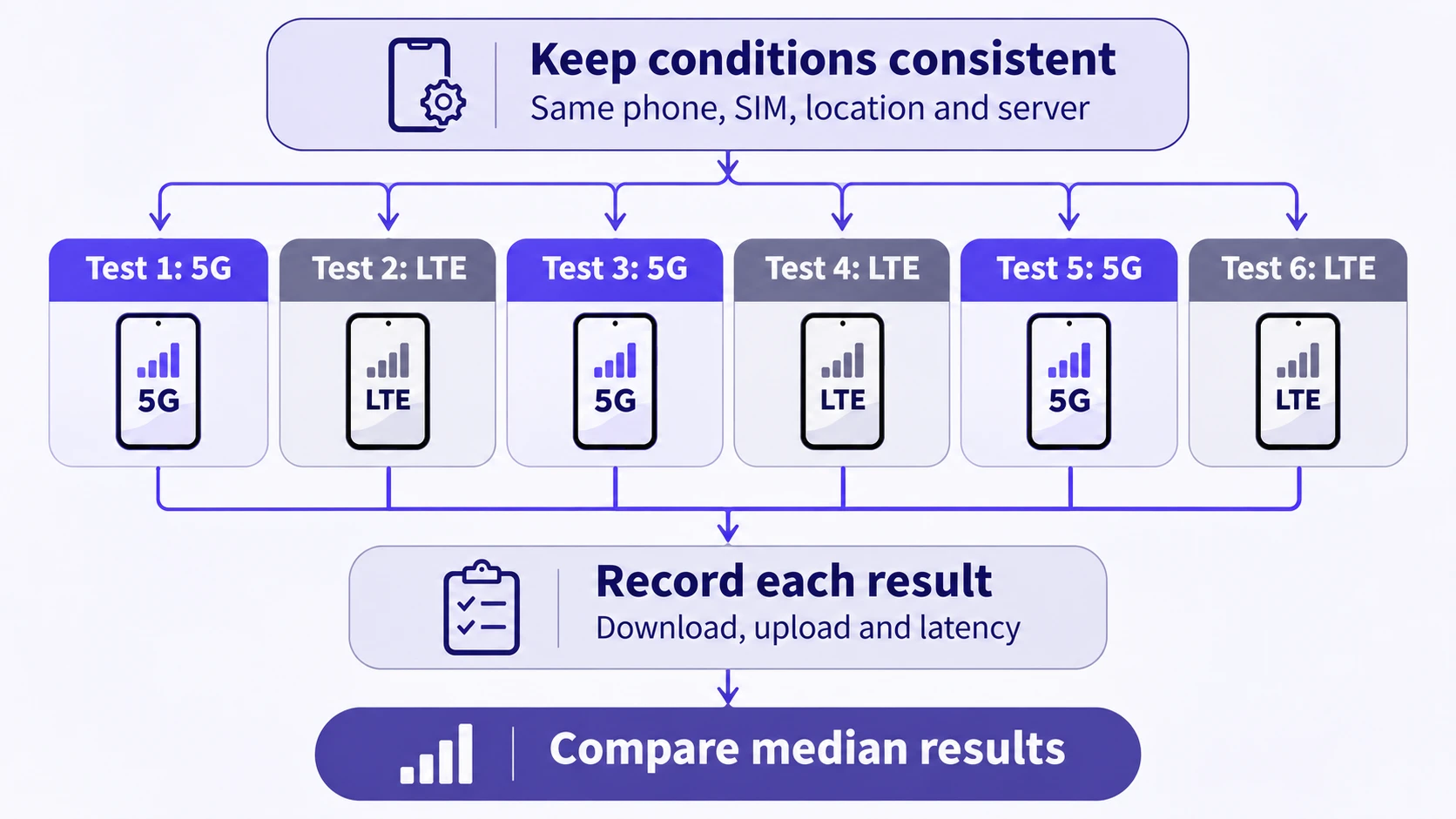
A single speed test is not enough to determine which network consistently performs better. Mobile conditions change over time, so comparing results requires keeping as many variables as possible the same.
Important: Mobile speed tests can consume considerable data, particularly on fast connections. Check your remaining mobile data allowance and any applicable usage charges before running repeated tests.
- Use the same smartphone and SIM: This reduces differences caused by modem hardware, carrier plans and device capabilities.
- Turn off Wi-Fi: Confirm that your internet traffic is using mobile data.
- Keep the location consistent: Stay in the same position, with the phone held in approximately the same orientation.
- Control background activity: Pause large downloads, cloud backups and other unnecessary data transfers.
- Test with 5G enabled: Use a reputable speed-testing service and record download speed, upload speed and latency. Record the network mode and displayed connection indicator.
- Switch to LTE: Allow the connection to settle and repeat the test using the same service and server, where possible.
- Alternate and repeat: Run at least three tests for each network mode if your data allowance permits. Alternate between modes to reduce the effect of changing network conditions.
- Compare typical results: Use the middle result, or median, for each metric instead of relying on the highest recorded speed.
 Repeat the comparison at another time of day or location if you suspect congestion or coverage problems. Keep each location’s results separate rather than combining them into one misleading average.
This procedure compares the connection modes available to your phone. It is not a laboratory benchmark and cannot isolate every difference in spectrum or network architecture. A displayed 5G indicator alone also does not independently confirm that all test traffic used 5G radio resources.
If LTE repeatedly performs better in the same location, you have a practical reason to prefer it there, even if 5G offers greater potential performance elsewhere.
How to Fix Slow 5G on Your Phone?
1. Refresh the Mobile Connection
Temporarily enable airplane mode and then disable it, or power your phone off and back on.
This allows the device to establish its mobile connection again. It may help when a temporary connectivity problem is affecting performance, but it cannot add network capacity or fix poor coverage.
2. Test in Another Location
Compare your connection in your usual indoor location, near a window and outdoors in a safe area.
If the outdoor connection performs consistently better, the indoor environment may be contributing to the problem. If the connection is slow only during busy periods, congestion is another possibility.
Check your carrier’s coverage and service-status information for your area. A coverage map is a useful starting point, but it does not guarantee a particular speed inside every building.
3. Check Your iPhone 5G Settings
On a compatible iPhone with supported 5G service, open Settings > Cellular > Cellular Data Options > Voice & Data. Depending on your region, Cellular may be labeled Mobile Data. Dual SIM users may need to select their mobile data line first.
Apple provides the following network options where supported:
- 5G Auto: Uses automatic network selection to balance performance and battery consumption.
- 5G On: Prefers using 5G whenever it is available, which may increase battery consumption.
- LTE: Restricts the connection to LTE even where 5G is available.
Use these options to compare performance, then restore your preferred network setting. For model requirements and configuration differences, consult Apple’s official 5G instructions.
4. Check Your Android 5G Settings
On supported Google Pixel phones, open Settings > Network & internet > SIMs, select your carrier and locate Preferred network type.
Where the carrier and device expose the relevant options, compare 5G with LTE. Restore your normal preferred network type after testing.
Other Android manufacturers may organize these controls differently, and some carriers restrict which network modes can be selected.
For the documented Pixel settings path and additional troubleshooting, refer to Google’s mobile connectivity guide.
5. Check Software, SIM and Carrier Compatibility
Install supported system updates and check whether your provider recommends any carrier configuration updates for your device.
Confirm that your specific smartphone model supports the carrier’s local 5G frequencies, that the correct SIM is selected for mobile data and that your subscription is properly provisioned for 5G.
If your phone was purchased in another country, check the exact regional model rather than relying only on its advertised 5G compatibility.
6. Isolate Application-Specific Problems
If one app feels slow but other apps and websites work normally, the issue may not be the mobile network itself.
Compare another website or app. If you use a personal VPN, its server or connection may also influence performance. Compare another VPN server or, if safe and permitted, briefly test non-sensitive traffic without the VPN. Restore the VPN afterward.
Do not disable required workplace security controls merely to improve a speed test.
7. Contact Your Mobile Carrier
If the issue persists, contact your provider with specific information instead of simply reporting that 5G is slow.
Include your phone model, approximate affected location, time of day, whether you were indoors or outdoors and the results of your 4G and 5G comparisons.
Ask whether the area has an outage, known capacity problems or account-related restrictions. Also confirm whether your phone and plan support the 5G features deployed in that area.
A factory reset is not a sensible first response to a problem that may originate in the mobile network.
Identify the Problem From Your Symptoms
The following troubleshooting table can help you narrow down the most likely explanations before making changes to your device or mobile subscription.
| What you notice | Possible explanation | What to check first |
|---|---|---|
| Full signal bars but slow downloads | Congestion, limited spectrum, interference or another bottleneck | Repeat tests at a different time |
| Fast outdoors but slow indoors | Signal attenuation or inconsistent indoor coverage | Compare indoor and outdoor performance |
| 4G is consistently faster at home | Better local LTE conditions or limited 5G resources | Alternate between LTE and 5G tests |
| Speeds decline after heavy monthly usage | Possible plan threshold or speed restriction | Review plan terms and data usage |
| One app is slow but other services work | Application, server or routing limitation | Compare unrelated apps and websites |
| Good download speed but gaming still lags | Latency, jitter, packet loss or game-server issues | Check responsiveness and connection stability |
| 5G is unreliable in several locations | Device compatibility, provisioning or broader network issues | Confirm device support and contact the carrier |
These symptoms provide diagnostic clues, not definitive proof of a particular fault. Several network limitations can produce similar results.
When Does It Make Sense to Use 4G Instead?
There is nothing inherently wrong with using LTE when it delivers the better practical experience.
Consider using 4G temporarily when 5G coverage is inconsistent, repeated tests show better LTE performance or your phone consumes noticeably more battery while trying to maintain its 5G connection.
Keeping 5G enabled generally makes more sense when your local network provides reliable coverage, better throughput or improved responsiveness for the activities you perform.
Automatic network selection is a reasonable everyday starting point for most users. You can then choose LTE manually when your own comparisons show a consistent advantage and your device and carrier allow it.
If you are considering paying more for a 5G plan or replacing a compatible phone, first determine whether the improvement is available in the places where you regularly use mobile data.
Conclusion
5G can provide faster downloads, greater network capacity and improved responsiveness, but those advantages depend on the actual network deployment and connection conditions. Limited spectrum, congestion, indoor signal problems, infrastructure bottlenecks, device compatibility and subscription restrictions can all reduce the improvement you experience.
Rather than judging performance by the 5G icon, compare 4G and 5G under consistent conditions, check your phone and carrier settings and identify which connection works best for your daily activities.
The better mobile network is ultimately the one that provides the most reliable and useful performance where you need it, regardless of the generation displayed on your phone.

Tech Bonafide is the editorial identity of TechBonafide, an independent technology publication covering AI, software, cybersecurity, gadgets, and emerging technology.