

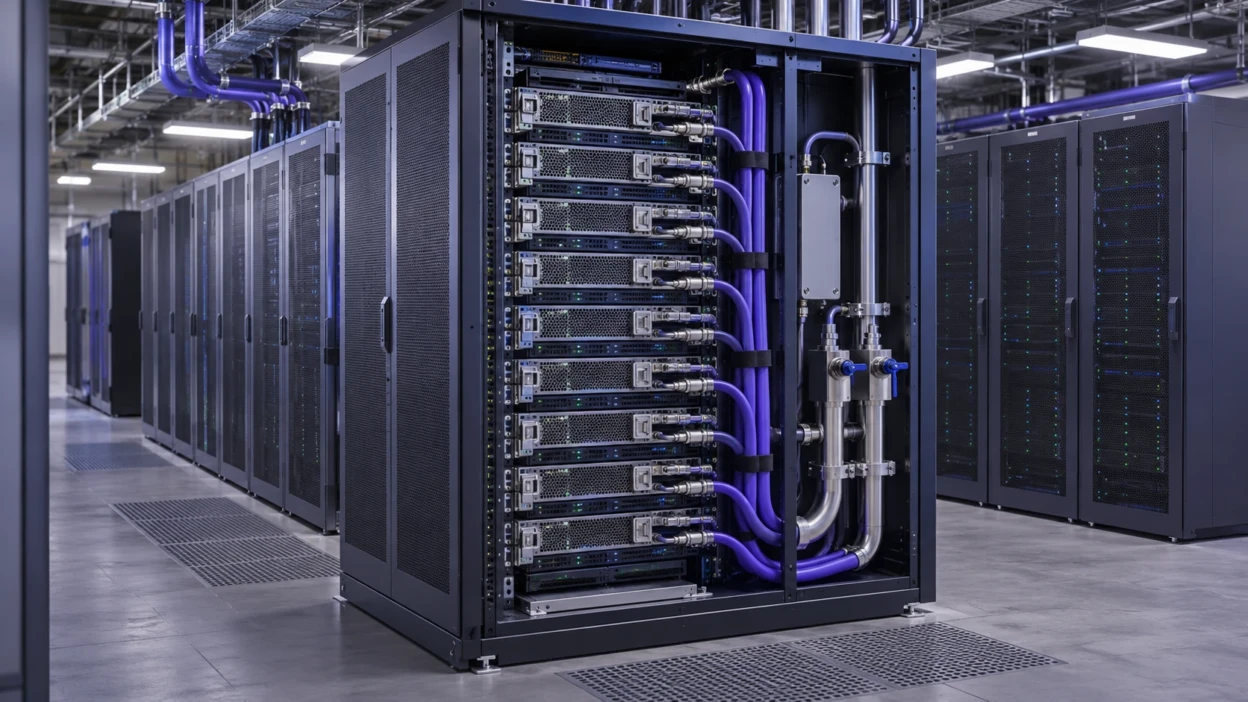
Artificial intelligence depends on powerful servers that generate enormous amounts of heat. As data centers pack more GPUs and other processors into each rack, removing that heat becomes a major engineering challenge. Traditional air cooling can still handle many workloads, but it becomes harder to use efficiently when heat is concentrated in a small space.
Liquid cooling matters for AI data centers because it moves heat away from high-power processors more directly than conventional air cooling. It can support denser server installations, help maintain safe operating temperatures, and reduce some cooling-related electricity use when the complete system is designed correctly.
However, liquid cooling does not eliminate heat, guarantee lower operating costs, or make water consumption disappear. Its real value depends on the servers, cooling equipment, facility design, climate, and operational requirements.
Why AI Servers Need More Cooling?
Every server consumes electricity to operate its processors, memory, storage, and networking equipment. Nearly all the electricity consumed by the equipment ultimately becomes heat that the data center must remove.
AI systems make this challenge more difficult because they often use powerful graphics processing units, or GPUs, working together in tightly packed servers. These processors perform the calculations required for tasks such as training language models, generating images, and serving AI applications.
The important issue is not only how much electricity a data center consumes. It is also how much heat is produced in a particular rack and how effectively that heat can travel away from individual components.
Traditional cooling systems use fans, airflow management, and air-conditioning equipment to carry heat away. As processor and rack power density increases, they may require greater airflow, larger heat exchangers, and additional mechanical infrastructure.
ASHRAE’s data center engineering guidance identifies the increasing heat density of processors and accelerators as an important reason for adopting alternative cooling technologies.
The challenge also varies by workload. Training clusters may operate at high utilization for extended periods, while inference clusters can experience more variable demand. TechBonafide’s guide to training versus inference data center design explains why those workload differences affect infrastructure planning.
The wider electricity demand is also growing. A 2026 Lawrence Berkeley National Laboratory report estimated that US data centers could account for 11.8% of national electricity use by 2030 in its reference case. That is a model-based projection, not a measurement of future consumption. The report considers computing equipment and cooling-system performance as part of its analysis.
These pressures make effective thermal management an important part of AI infrastructure planning rather than a secondary building service.
How Liquid Cooling Works in an AI Data Center?
Liquid cooling uses a circulating fluid to collect and transport heat from computing equipment. Depending on the design, the liquid may contact a metal cooling plate attached to a processor, absorb heat from server exhaust air, or surround suitable electronic components in a specialized cooling fluid.
The basic idea is simple: collect heat near its source, move it through a controlled cooling system, and release it elsewhere.
Cold Plates Capture Heat From Processors
In a common direct-to-chip design, a metal cold plate sits against a GPU or CPU through a thermal interface material. Coolant flows through small channels inside the plate, collecting heat conducted from the processor.
The liquid normally remains inside a sealed flow path rather than touching the electronic circuits. It then travels through hoses and rack manifolds that connect multiple servers to the cooling infrastructure.
Water-based fluids with suitable additives are commonly used, although the correct coolant depends on the equipment design and material compatibility.
The Coolant Distribution Unit Transfers Heat
A coolant distribution unit, usually called a CDU, manages the circulation of coolant between the IT equipment and the facility cooling infrastructure. In many designs, it contains pumps, control equipment, sensors, and a heat exchanger.
The heat exchanger allows the warmer server-side coolant to transfer heat to a separate facility-side liquid loop without requiring the two fluids to mix. This separation helps operators control pressure, temperature, and fluid quality for sensitive IT equipment.
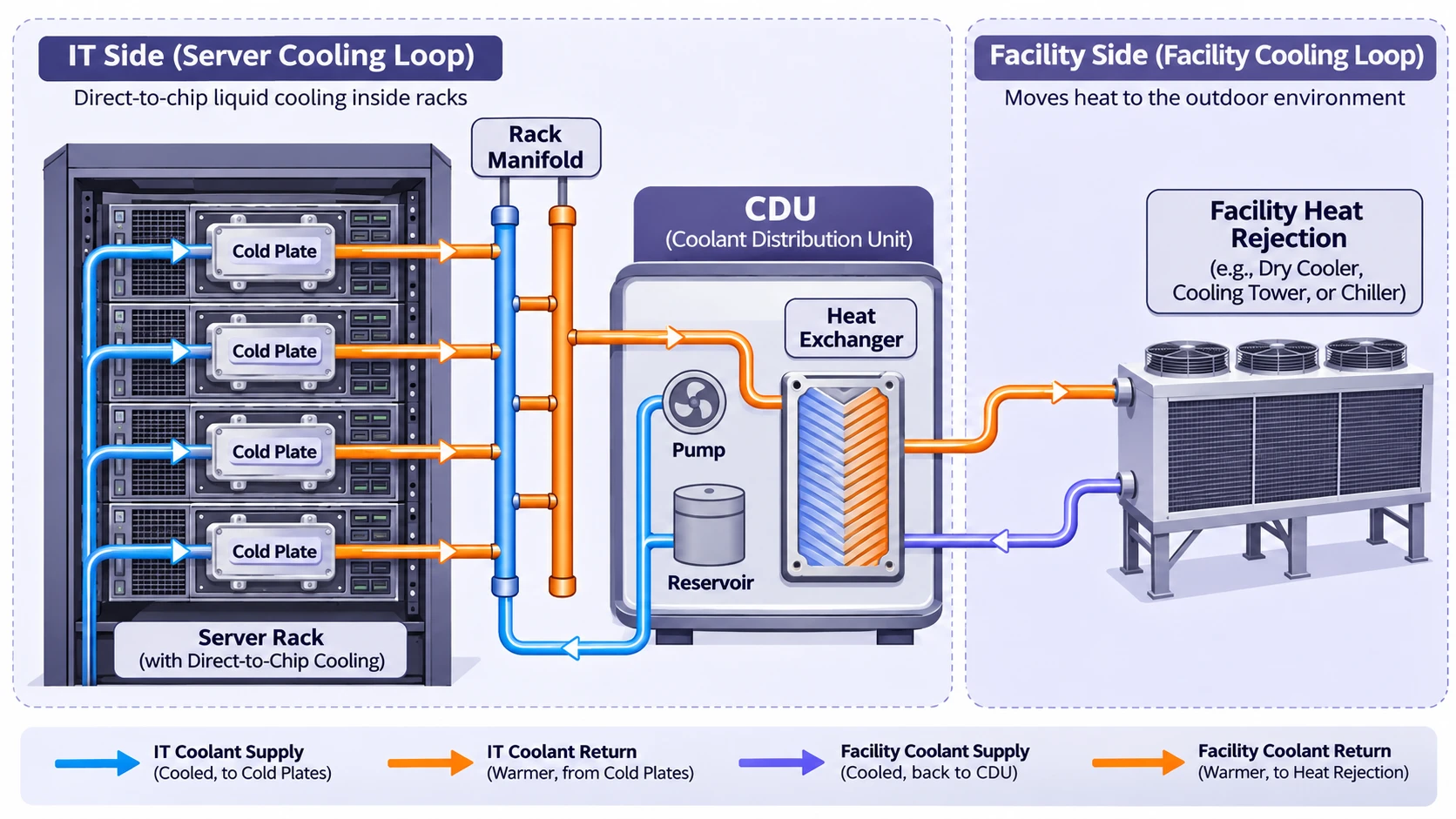
A typical cooling path works as follows:
- GPUs and CPUs generate heat while processing AI workloads.
- Cold plates absorb heat from the processors and transfer it to circulating coolant.
- Warm coolant travels through the server and rack manifolds toward the CDU.
- A heat exchanger transfers the collected heat to the facility cooling system.
- The facility releases the heat through suitable equipment, such as a dry cooler, cooling tower, or chiller-assisted system.
- The cooled server-side fluid returns to the processors, and the cycle continues.
The exact architecture varies between facilities. Some designs use different heat exchanger arrangements or specialized cooling fluids, but the essential task remains the same: move heat safely away from the computing equipment.
The Open Compute Project’s liquid-cooling guidelines provide additional engineering detail about coolant temperatures, flow rates, hardware integration, and reliability requirements.
Types of Liquid Cooling Used in Data Centers
Liquid cooling is not one universal technology. Different approaches capture heat at different points, and each has distinct infrastructure and maintenance requirements.
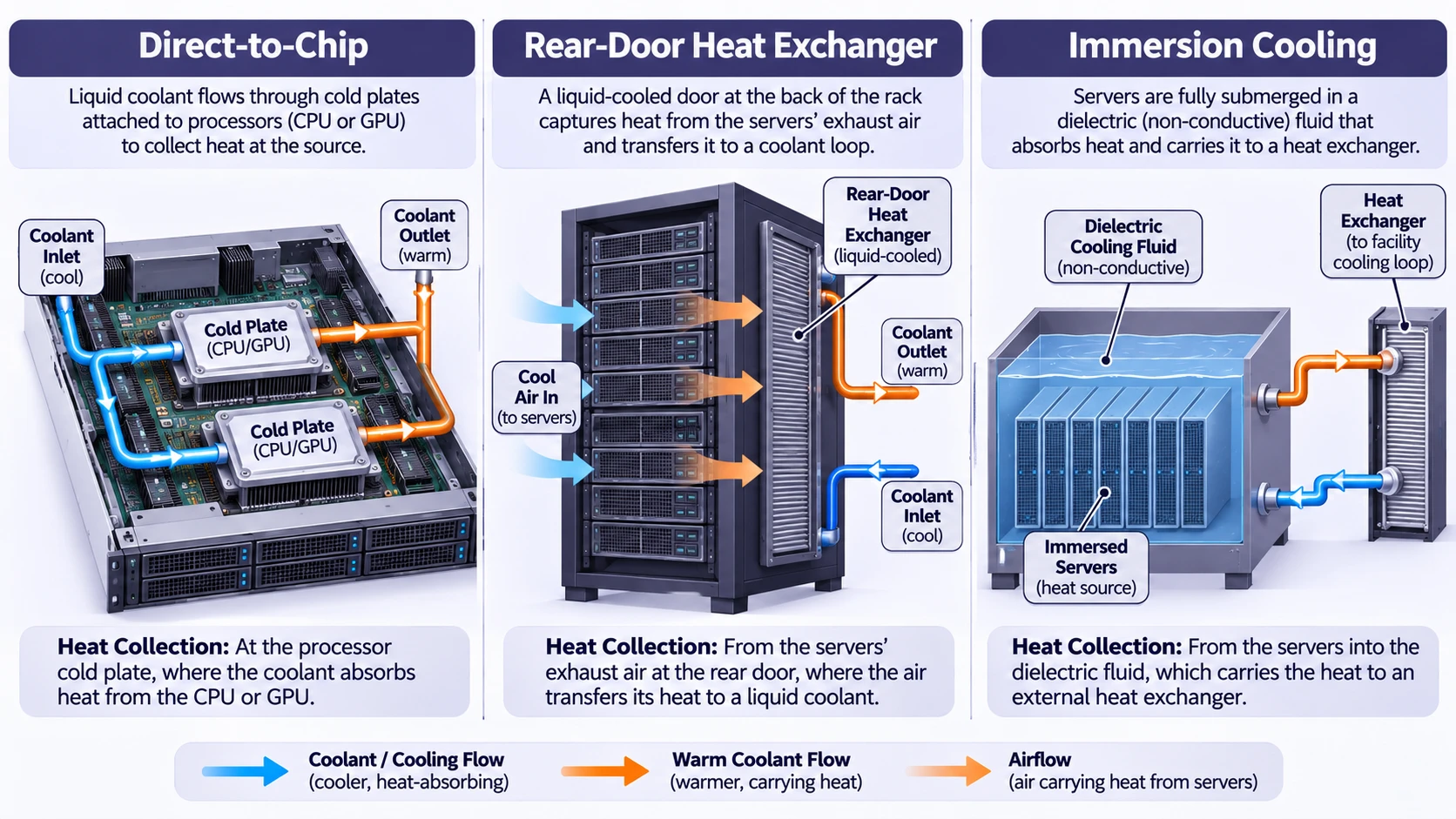
Direct-to-Chip Liquid Cooling
Direct-to-chip cooling, also called direct liquid cooling, places cold plates against high-power components such as GPUs and CPUs. Coolant circulates through the plates and carries heat toward a distribution system.
This approach is particularly relevant to dense AI servers because it removes heat close to the components producing it. However, some memory, power, networking, or storage components may still depend on airflow.
Direct-to-chip cooling therefore often operates alongside conventional air cooling rather than replacing it completely.
Rear-Door Heat Exchangers
A rear-door heat exchanger uses a liquid-cooled heat exchanger mounted at the back of a server rack. Warm exhaust air passes through it, allowing heat to move from the air into the liquid.
This can reduce the amount of heat entering the surrounding room and may be useful when adapting existing air-cooled racks. Unlike direct-to-chip cooling, the liquid does not normally collect heat directly from processors.
Its effectiveness depends on rack airflow, the exchanger design, coolant conditions, and the surrounding facility.
Immersion Cooling
Immersion cooling places compatible computing equipment in a specially designed tank or enclosure containing electrically nonconductive cooling fluid.
The fluid absorbs heat from the immersed hardware and transfers it to another cooling system. Single-phase systems circulate liquid without intentionally boiling it during normal operation. Two-phase systems use evaporation and condensation as part of the heat-transfer process.
Immersion cooling can remove heat from a wide range of components, but it requires compatible hardware, fluid handling, service procedures, and specialized infrastructure. Not every standard server is suitable for immersion.
| Cooling Method | Where Heat Is Captured | Potential Advantage | Main Consideration |
|---|---|---|---|
| Direct-to-chip | At selected processors through cold plates | Targeted cooling of high-power components | Liquid-compatible servers, plumbing, and possible remaining air cooling |
| Rear-door heat exchanger | In the warm air leaving a rack | Removes rack exhaust heat without requiring processor cold plates | Airflow and exchanger capacity remain important |
| Immersion | Around compatible immersed electronics | Broad contact with heat-producing components | Specialized fluids, enclosures, hardware compatibility, and service methods |
The best method depends on how much heat must be removed, the physical space available, the existing infrastructure, and the cost of installing and operating the system.
Benefits of Liquid Cooling for AI Data Centers
The strongest reason to consider liquid cooling is its ability to manage concentrated heat. That capability can produce several practical benefits when the rest of the facility is designed to support it.
- Higher computing density: More powerful server configurations may fit into available rack space without exceeding supported thermal conditions.
- Better temperature control: Removing heat close to processors can help maintain temperatures within the hardware’s operating limits during demanding workloads.
- Potentially lower cooling overhead: A suitable design may reduce dependence on server fans or energy-intensive refrigeration, although pumps and other equipment still consume power.
- More facility design options: Higher-temperature coolant systems may allow certain facilities to use dry coolers or other heat-rejection approaches more frequently.
- Opportunities for heat reuse: Some systems can deliver warm fluid at temperatures useful for building or district heating, provided a practical heat-reuse connection exists.
A real example is NVIDIA’s GB200 NVL72 rack-scale system. Its design brings together 72 Blackwell GPUs and a liquid-cooling architecture intended to support dense AI computing. NVIDIA also documented its liquid-cooled rack design contributions to the Open Compute Project.
This demonstrates how liquid cooling is integrated into commercial AI infrastructure. It does not establish that every liquid-cooled installation will achieve the same energy savings, performance, or operating costs.
Cooling also influences reliability. If processors cannot remain within their required temperature limits, systems may reduce performance or require protective shutdowns. Effective thermal design helps avoid these situations, but liquid cooling is only one part of a reliable computing platform.
Does Liquid Cooling Save Energy and Water?
Liquid cooling can improve energy efficiency, but the result depends on the complete cooling system rather than the use of liquid alone.
Traditional air-cooled facilities consume electricity through fans, air handlers, pumps, chillers, and other mechanical equipment. Liquid-cooled facilities can reduce some of those demands, but they introduce or increase others, including coolant circulation and control systems.
For example, a design that uses sufficiently warm coolant may be able to reject heat through a dry cooler without mechanical refrigeration under suitable outdoor conditions. Another system with lower coolant-temperature requirements may still need significant chiller capacity.
Operators should therefore compare actual cooling energy under equivalent IT loads and environmental conditions. Power usage effectiveness, or PUE, can help describe the relationship between total facility energy and IT equipment energy, but it does not explain every environmental impact or reveal how much useful computing work is completed.
Water consumption requires a separate assessment.
A closed-loop system circulates coolant repeatedly, but this does not automatically mean the entire facility consumes no water. If a cooling tower relies on evaporation to release heat, the facility may still need replacement water. Dry cooling can reduce direct evaporative water demand but may introduce energy or performance trade-offs, especially in challenging weather conditions.
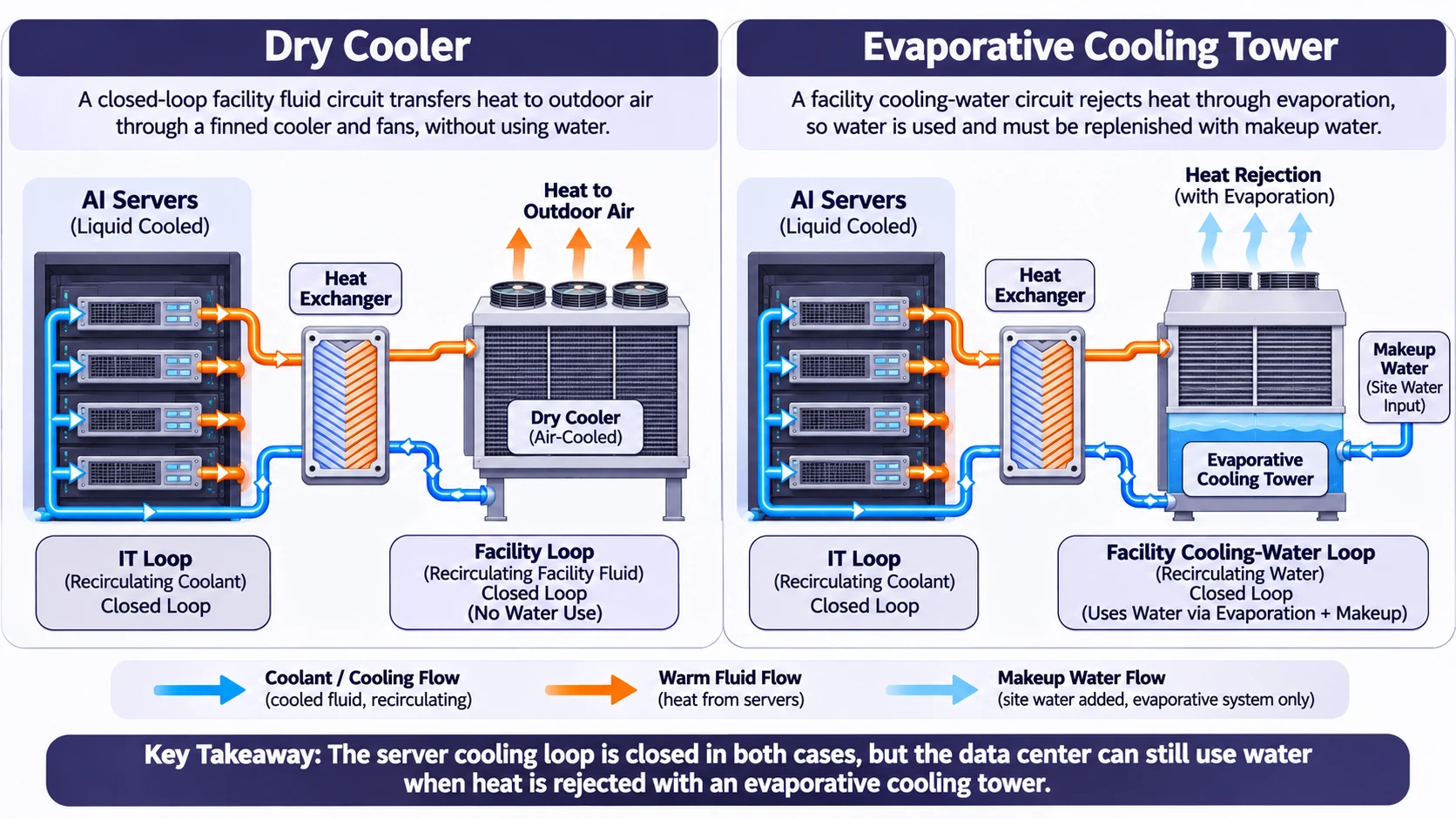
The International Energy Agency’s analysis of AI infrastructure highlights this tension between electricity efficiency and water efficiency. It also identifies water stress as an important concern for locations hosting AI data centers.
These issues affect communities as well as operators. TechBonafide has separately covered OpenAI’s data center commitments concerning electricity and water use.
A responsible comparison should consider facility electricity consumption, on-site water use, local water availability, heat-rejection methods, and the practical lifetime of the equipment. Neither liquid cooling nor air cooling is automatically the most sustainable option in every location.
Risks and Limitations of Liquid Cooling
Liquid cooling creates new engineering and maintenance responsibilities. Moving heat through pipes and cooling plates can work effectively, but the system must be designed for reliable operation around valuable electrical equipment.
The main concerns include:
- Leaks: Damaged connections, hoses, or other components can allow coolant to escape, potentially affecting equipment or operations.
- Condensation: Coolant surfaces below the surrounding air’s dew point can develop moisture, creating a risk near electronics.
- Fluid quality: Incompatible materials, contamination, corrosion, or deposits can reduce reliability and heat-transfer performance.
- Maintenance complexity: Technicians may need specialized procedures for fluid connections, isolation, draining, and hardware replacement.
- Additional infrastructure: CDUs, pumps, manifolds, piping, monitoring systems, and facility heat-rejection equipment increase design requirements.
- System failures: Loss of flow or inadequate cooling capacity can create thermal problems even when the servers themselves remain powered.
The Open Compute Project’s guidance on leak detection and intervention discusses prevention, sensors, monitoring, and response methods for liquid-cooled infrastructure.
Important: A liquid-cooled rack should not be treated as a standalone drop-in upgrade. Installing incompatible cooling equipment or operating without validated flow, pressure, leak response, and heat-rejection capacity can damage servers or cause outages. Hardware and facility specifications should be reviewed, and the complete system should be professionally commissioned before production use.
Redundancy and monitoring are especially important where AI services must remain continuously available. Facilities need a defined response when pumps fail, coolant temperatures rise, or leak sensors activate.
These risks do not make liquid cooling inherently unsuitable. They mean its reliability depends on engineering discipline, ongoing inspection, and a clear operational plan.
How to Evaluate a Liquid-Cooling Design?
For an organization planning a new AI cluster or upgrading an existing data center, the correct decision starts with the actual equipment and facility requirements.
- Identify the workload and thermal load. Review the proposed servers, GPU configurations, rack power requirements, supported operating conditions, and expected workload patterns.
- Confirm hardware compatibility. Check whether the servers support direct liquid cooling, immersion, or another method. Verify approved fluids, connection types, flow requirements, and temperature ranges with the equipment suppliers.
- Evaluate the entire heat-rejection path. Determine how heat will travel from the processors to the outdoor environment or an approved heat-reuse system. Confirm the capacity of CDUs, piping, pumps, and facility cooling equipment.
- Review reliability and service requirements. Plan leak detection, fault alarms, isolation procedures, redundancy, maintenance access, and safe responses to cooling-system failures.
- Compare energy, water, and cost. Evaluate capital expenditure, electricity demand, water consumption, maintenance, usable rack capacity, and equipment lifetime under equivalent assumptions.
- Validate the completed installation. Require documented commissioning and acceptance checks against vendor specifications before placing production workloads on the system.
For existing facilities, retrofitting can be more difficult than installing liquid cooling in a newly designed building. Space, piping routes, electrical capacity, structural support, and the ability to keep existing workloads running can all influence the decision.
The key question is not whether liquid cooling is more advanced than air cooling. It is whether the chosen solution can manage the required thermal load reliably and economically within the specific facility.
Is Traditional Air Cooling Becoming Obsolete?
No. Air cooling remains a practical choice for many servers and data centers. Not every computing workload generates enough concentrated heat to justify liquid-cooling infrastructure.
General-purpose computing systems, lower-density racks, and some AI inference deployments can continue to operate with well-designed airflow and conventional cooling equipment, provided their thermal requirements are met.
Even facilities using direct-to-chip cooling often retain fans or room-level air cooling for components that are not connected to the liquid loop.
The future is therefore likely to include different cooling methods within the same industry and sometimes within the same building. High-density AI systems may increasingly require liquid cooling, while other workloads continue using air cooling or hybrid arrangements.
The right choice should follow verified hardware specifications and facility conditions rather than a general assumption that every new data center must use liquid cooling.
Conclusion
Liquid cooling matters for AI data centers because modern processors can generate more concentrated heat than conventional air-cooling arrangements can efficiently handle in some high-density deployments. By collecting heat closer to GPUs and CPUs, liquid-based systems can support powerful server configurations and offer additional options for managing cooling energy.
However, liquid cooling is not a universal solution. Its benefits depend on compatible hardware, reliable coolant circulation, sufficient facility heat rejection, water-management decisions, and maintenance planning.
For data center operators, the most useful approach is to evaluate the entire cooling system rather than choosing a technology based on headline efficiency claims. When properly matched to the workload and facility, liquid cooling can become an important foundation for dependable AI computing.

Tech Bonafide is the editorial identity of TechBonafide, an independent technology publication covering AI, software, cybersecurity, gadgets, and emerging technology.