


TheTechyX.com is a technology website that publishes beginner-friendly tutorials, computing guides, and articles about everyday digital problems. It also provides a collection of four free browser-based tools for passwords, downloads, screen measurements, and storage conversions.
But how useful are these resources, and what should readers know about privacy before using them?
The website offers accessible explanations of familiar technology subjects, but its published policies and technical advice still need to be evaluated carefully. Its privacy policy says the tools process information locally, while also describing advertising, analytics, and other forms of visitor-data collection.
This review examines the site’s publicly accessible pages, tutorials, free tools, editorial standards, and privacy statements. It combines public-page research with four basic functionality checks documented through screenshots on November 13, 2026. The testing covers selected tool inputs and results, not a comprehensive software-security audit or independent verification of the website’s data-handling practices.
What Is TheTechyX.com?
TheTechyX.com presents itself as a technology publication focused on making complicated subjects easier for general readers to understand.
Its main navigation includes Tech News, AI, Gadgets, How-To, Apps & Software, Reviews, and Tools.
The published articles cover subjects such as password security, internet speed, cybersecurity for small businesses, Windows support, storage capacity, screen resolution, and conversational artificial intelligence.
These are practical topics for people who use technology regularly but do not necessarily have technical training.
For example, someone wondering why a 1 TB drive appears to have less available capacity can find an explanation of storage units. Another reader trying to understand the difference between Mbps and MB/s can learn why an advertised internet speed does not match the download speed displayed by an application.
The website also lists several broader content sections as “Coming soon.” That means its current article collection should not be confused with a fully developed archive of gadget reviews, software testing, or technology news.
Based on the accessible material, its strongest immediate use is introductory learning rather than specialist technical research.
How Useful Are the Technology Tutorials?
A good technology tutorial should do more than define a term. It should explain the problem, identify the correct technical details, and help readers apply the information safely.
TheTechyX provides articles on several common computing questions. Some include formulas, practical examples, and references to external documentation.
However, the quality of an individual article matters more than the number of articles available.
Two published guides illustrate why readers should check technical explanations before acting on them.
Password Security: Useful Advice With a Consistency Problem
The website’s article, How Long Should a Password Be?, explains password length, randomness, password managers, and account protection.
Its main discussion recommends using long, unique passwords and changing them when there is evidence of compromise rather than following an arbitrary calendar.
That approach broadly agrees with modern password-security guidance.
However, the article’s FAQ provides conflicting advice. One answer recommends changing passwords every 90 days, despite the main body discouraging scheduled changes.
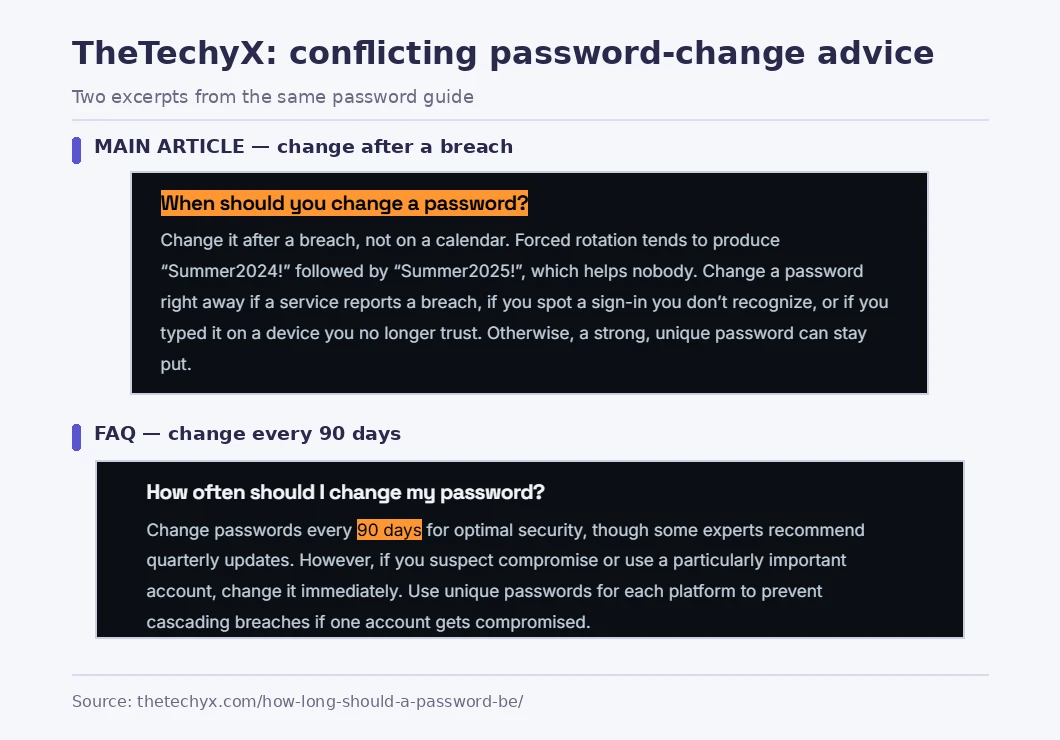
This is an important inconsistency because readers often jump directly to an FAQ for a quick answer.
The current NIST Digital Identity Guidelines, SP 800-63B, state that password-verifying services must not require periodic password changes without a reason. They must require a change when there is evidence that a password has been compromised.
For readers, the practical lesson is to prioritize long, unique passwords, use a suitable password manager, and change passwords promptly when compromise is suspected or confirmed.
The inconsistency does not establish that every TheTechyX article is inaccurate. It does show why individual security recommendations should be checked against current standards rather than accepted solely because they appear in a detailed guide.
Storage Explanations: Check the Unit Labels
Another useful example is the site’s Data Storage Converter guide.
The article explains the difference between decimal and binary storage measurements, including why Windows may display approximately 931 GiB of capacity for a drive advertised as 1 TB, although some interfaces label the binary quantity as GB.
The underlying distinction is important and generally explained correctly in the article’s main discussion.
However, some of its quick-reference and FAQ wording mixes decimal labels with binary relationships. A statement that one terabyte equals 1,024 gigabytes in binary calculation is not technically precise when using standardized unit names.
The correct distinction is:
- 1 TB = 1,000 GB using decimal prefixes.
- 1 TiB = 1,024 GiB using binary prefixes.
- A drive containing 1,000,000,000,000 bytes represents approximately 931.3 GiB.
The NIST reference on binary prefixes explains the standardized terminology.
This may appear to be a small distinction, but accurate labels matter when comparing storage devices, preparing backups, or interpreting operating-system measurements.
Readers can still find the guide helpful, provided they check whether a calculation uses base 1,000 or base 1,024 and whether the units are labelled correctly.
TheTechyX.com Free Tools: What Is Available?
The website’s Free Tech Tools directory lists four utilities. The publisher describes them as free to use, without registration, and designed to run inside the browser.
Each addresses a common computing task, although the value of the results depends on the inputs and assumptions.
| Free Tool | What It Is Designed to Do | Important Limitation |
|---|---|---|
| Strong Password Generator | Create randomly generated passwords with selectable character settings. | Published randomness and local-processing claims have not been independently audited. |
| Download Time Calculator | Estimate download duration using file size and internet speed. | Real downloads depend on network conditions and server performance. |
| Screen PPI Calculator | Calculate pixel density from display resolution and physical size. | PPI does not measure all aspects of display quality. |
| Data Storage Converter | Convert data sizes between common storage units. | Results must use clearly defined decimal or binary units. |
These tools serve different purposes. Understanding their limitations helps readers decide when an online calculator is sufficient and when a more specialized solution is preferable.
Strong Password Generator
The Strong Password Generator displays controls for password length, uppercase and lowercase letters, numbers, symbols, and avoiding visually similar characters.
The tool’s page says it uses crypto.getRandomValues(), a browser feature designed to produce cryptographically strong random values.
The method itself is documented by MDN Web Docs.
However, the existence of a secure browser API does not prove that a particular password generator uses it correctly. That requires examining the implementation and checking how the generated values are handled.
TheTechyX also states that generated passwords remain on the user’s device. This is a privacy claim from the website, not a conclusion established by independent network testing.
For important accounts, a well-maintained password manager with a built-in generator is usually the more convenient choice because it can generate, save, and later autofill unique credentials.
For a closer look at password storage options, TechBonafide explains the differences in its password manager versus browser password saving comparison.
Never paste an existing account password into an unfamiliar online tool merely to see whether it is strong.
Download Time Calculator
The Download Time Calculator accepts a file size and internet speed to estimate how long a transfer might take.
The underlying calculation is straightforward:
Download time in seconds = File size in megabits ÷ Connection speed in Mbps
For example, a decimal 1 GB file contains 8,000 megabits.
At a constant transfer speed of 100 Mbps, the theoretical download time is 80 seconds.
That does not mean the file will finish downloading in exactly 80 seconds.
Actual results may vary because of Wi-Fi conditions, network congestion, server limits, transfer overhead, and other activity using the connection.
The calculator is therefore best treated as a planning tool. It can help estimate download times for games, system updates, software installers, and large files, but it cannot predict every network condition.
Screen PPI Calculator
The Screen PPI Calculator uses screen width and height in pixels together with the display’s diagonal measurement in inches.
PPI stands for pixels per inch. It describes how densely pixels are packed into a display.
The standard calculation is:
PPI = √(pixel width² + pixel height²) ÷ diagonal size in inches
As a reference example, a 24-inch monitor with a resolution of 1920 × 1080 has approximately 92 PPI.
A higher PPI generally means pixels are packed more closely together. However, perceived sharpness also depends on viewing distance, screen scaling, eyesight, and the content being displayed.
PPI alone cannot tell you whether a display has accurate colours, good contrast, low input lag, or suitable brightness.
The calculator can support display comparisons, but it should not be used as the only basis for buying a monitor or laptop.
Data Storage Converter
The Data Storage Converter is designed to convert between common data-size units.
Its practical value comes from simplifying calculations that people often confuse when dealing with downloads, storage drives, memory, and backups.
A particularly important distinction is the difference between decimal and binary measurements.
For example, a device marketed as having 1 TB of capacity normally refers to one trillion bytes. When that same quantity is expressed in binary units, it is approximately 931.3 GiB.
Before relying on any conversion result, check the original unit, the requested output unit, and whether the calculator uses decimal or binary measurements.
This prevents misunderstandings when comparing drive capacities or planning storage requirements.
Tool Testing Results: Four Basic Checks
To evaluate the practical accuracy of TheTechyX.com’s free tools, four basic functionality checks were carried out on November 13, 2026. The results were documented with screenshots and compared against independently calculated reference values.
All four tools produced the expected results for the selected test inputs.
| Tool | Test Input | Observed Result | Outcome |
|---|---|---|---|
| Download Time Calculator | 1 GB file at 100 Mbps | 1 minute 20 seconds at full speed; 1 minute 40 seconds at approximately 80% speed. | Passed |
| Screen PPI Calculator | 1920 × 1080 resolution, 24-inch display | 91.8 pixels per inch. | Passed |
| Data Storage Converter | 1 TB using decimal units | 1,000,000,000,000 bytes, approximately 931.322575 GiB. | Passed |
| Strong Password Generator | 20-character length with uppercase letters, lowercase letters, numbers, and symbols enabled | Three different 20-character passwords were generated, each containing the selected character types. | Passed |
These findings show that the four tools performed correctly in the documented basic checks. The download calculator’s results matched its stated speed assumptions, while the storage converter correctly distinguished decimal and binary measurements.
The password generator produced three different 20-character outputs using the selected character settings. However, these observations do not independently establish the security of its random-number generation.
Testing limitations: These checks were limited to selected inputs and visible results. They were not a comprehensive examination of the tools’ source code, security, browser network activity, or data-handling practices. Claims about local processing and password privacy remain the website publisher’s statements rather than independently audited findings.
TheTechyX.com Privacy Policy: What Does It Say?
Privacy deserves attention because even a simple online calculator involves loading content from a website.
TheTechyX’s Privacy Policy, marked as updated November 1, 2026, describes several categories of information.
According to the policy, visitors may provide an email address when subscribing to the newsletter or submit personal details through the contact form.
The website also says it may collect technical information through cookies and analytics, including browser details, visited pages, and time spent on the site.
It describes possible use of third-party services for advertising, traffic measurement, affiliate referrals, and email delivery.
The policy states that the operator does not sell personal information. That is its published commitment, not an independently audited finding.
Does Browser-Based Processing Mean Complete Privacy?
Not necessarily.
The website says its four free tools process entered values inside the browser and do not send those values to its servers.
If implemented as described, local processing can reduce the need to transmit sensitive calculator inputs.
However, this is different from saying the entire website collects no information.
Loading a webpage normally involves network requests, and advertising or analytics systems may receive information related to page visits, depending on the site’s actual configuration and the visitor’s browser settings.
It is useful to distinguish three separate questions:
- Tool input privacy: Are values entered into the calculator transmitted elsewhere?
- Website analytics: What information is collected when someone opens or uses a page?
- Third-party tracking: Can advertising, analytics, or affiliate providers collect additional information?
A privacy claim about the first question does not automatically answer the other two.
The public privacy policy provides statements about intended data handling. It does not independently prove how every script, service, or network request behaves.

How Can Readers Examine a Browser Tool’s Privacy Behaviour?
Readers with basic technical knowledge can inspect some website activity using their browser’s developer tools.
For example, Chrome provides a Network panel that records requests made while a page is open.
A simple inspection involves these steps:
- Open the tool in a current desktop browser.
- Open the browser’s developer tools and select the Network panel.
- Refresh the page while the panel is recording.
- Use only harmless sample values to interact with the calculator.
- Inspect the requests made during the interaction, including their destinations and any visible submitted data.
- Check whether unexpected network activity occurs when the tool’s inputs change.
Google’s official Chrome DevTools Network panel documentation explains how to examine requests, payloads, headers, and responses.
This is useful as an initial inspection, not a complete security audit.
A single browsing session cannot prove that data is never transmitted or stored under different conditions. It also cannot establish how server-side systems retain information.
Readers should avoid using real passwords, payment details, private files, or confidential business information as test inputs.
Editorial Standards, Transparency and Reliability
A technology website’s reliability depends on more than its design or the presence of legal pages.
TheTechyX publishes an About page, contact information, and an editorial policy. Its visible articles include author attribution and publication dates.
These features make it easier to identify the intended publisher and understand its stated approach.
The Editorial Policy says the publication aims to distinguish research-based reviews from hands-on testing, use reliable sources, disclose commercial relationships, and correct confirmed errors.
It also acknowledges possible AI assistance with research, outlining, and editing, while stating that human editors review published articles.
These are useful commitments, but a policy describes an intended process. It does not independently establish that every article followed that process.
The publicly inspected About page provides a contact email, but it does not clearly identify a registered operating company or a detailed editorial management team.
A visible author byline is helpful for accountability, although it does not establish the author’s qualifications or confirm that claimed testing occurred.
The same distinction applies to commercial disclosures. The site states that advertising and affiliate links help support its tools and content. Readers should examine individual product recommendations for clear disclosures and evidence.
For a broader method of evaluating publishers, TechBonafide’s guide explains how to check whether a technology website is trustworthy before following its advice.
Advantages and Limitations
TheTechyX’s main advantage is its focus on common technology questions.
Rather than requiring specialist knowledge, the accessible articles attempt to explain concepts such as password length, internet speed, screen sharpness, and storage measurement in straightforward language.
The tools directory also brings several common calculations into one location.
Its limitations are equally important.
The article archive is relatively narrow, several advertised content sections remain under development, and the published privacy claims have not been independently established through a technical audit.
The identified inconsistencies in password and storage explanations also show that editorial accuracy should be assessed at the individual-article level.
The following distinction is useful:
| Reader’s Need | Is TheTechyX a Suitable Starting Point? |
|---|---|
| Understand a common computing term | Yes, where an accessible explanation is available. |
| Estimate a download time or screen PPI | Potentially, after checking the formula and assumptions. |
| Learn basic password-security concepts | Yes, with verification against current security guidance. |
| Make an expensive gadget purchase | Not as the sole source; seek model-specific testing. |
| Follow consequential security instructions | Verify against official documentation first. |
| Handle sensitive passwords or confidential data | Prefer established tools with appropriate security assurance. |
The website can be useful without being the definitive source for every technical decision.
Is TheTechyX.com Safe and Legitimate?
The accessible website provides identifiable content, published policies, contact information, and a directory of free tools.
These are useful facts, but they do not establish complete security or guarantee the accuracy of its advice.
A full assessment of website security would require more than reading public pages. It could involve examining browser scripts, network requests, software dependencies, server configuration, and how personal information is handled.
Those tests were not performed for this review.
Therefore, the available evidence does not justify either a blanket claim that the website is completely safe or an accusation that it is malicious.
Readers should use normal precautions, particularly before entering private information or following instructions that could affect device security.
It is also important to check the precise web address. Search results include another similarly named publication at thetechysx.com. The two addresses are different, and their relationship has not been established through the public information reviewed here.
For help recognizing deceptive addresses, TechBonafide provides a practical guide to checking whether a website is legitimate before entering a password.
Who Should Use TheTechyX.com?
The website is most relevant to people looking for simple explanations of familiar technology problems.
A student learning about network speeds or storage measurements may find its introductory content useful. A home computer user can explore articles about Windows support or password security. Small-business readers may find the cybersecurity topics helpful as background reading.
However, the required level of verification depends on what the reader intends to do.
Understanding a definition has different consequences from changing account-security settings, buying expensive hardware, or modifying a business system.
For low-risk learning, a clear explanation may be enough.
For consequential decisions, check the original technical sources, compare relevant alternatives, and confirm the instructions match the product or software version involved.
If a tutorial recommends changing settings, deleting files, installing software, or modifying security controls, understand the consequences and prepare a suitable backup or recovery path first.
Final Verdict: Is TheTechyX.com Worth Using?
TheTechyX.com offers accessible technology articles and four listed free browser tools. Its public pages establish that these resources are available to explore, while its policies explain how the operator says it handles editorial decisions, advertising, and visitor information.
The site is a reasonable starting point for basic technology explanations and everyday calculations.
However, readers should not mistake published privacy promises for a completed security audit or assume every technical recommendation has been independently validated.
The password-guidance inconsistency and imprecise storage-unit wording demonstrate why even otherwise helpful explanations can benefit from closer verification.
The most practical approach is to use TheTechyX.com for introductory learning, check calculator assumptions, and confirm important privacy or security advice against reliable primary sources before acting on it.

Tech Bonafide is the editorial identity of TechBonafide, an independent technology publication covering AI, software, cybersecurity, gadgets, and emerging technology.