

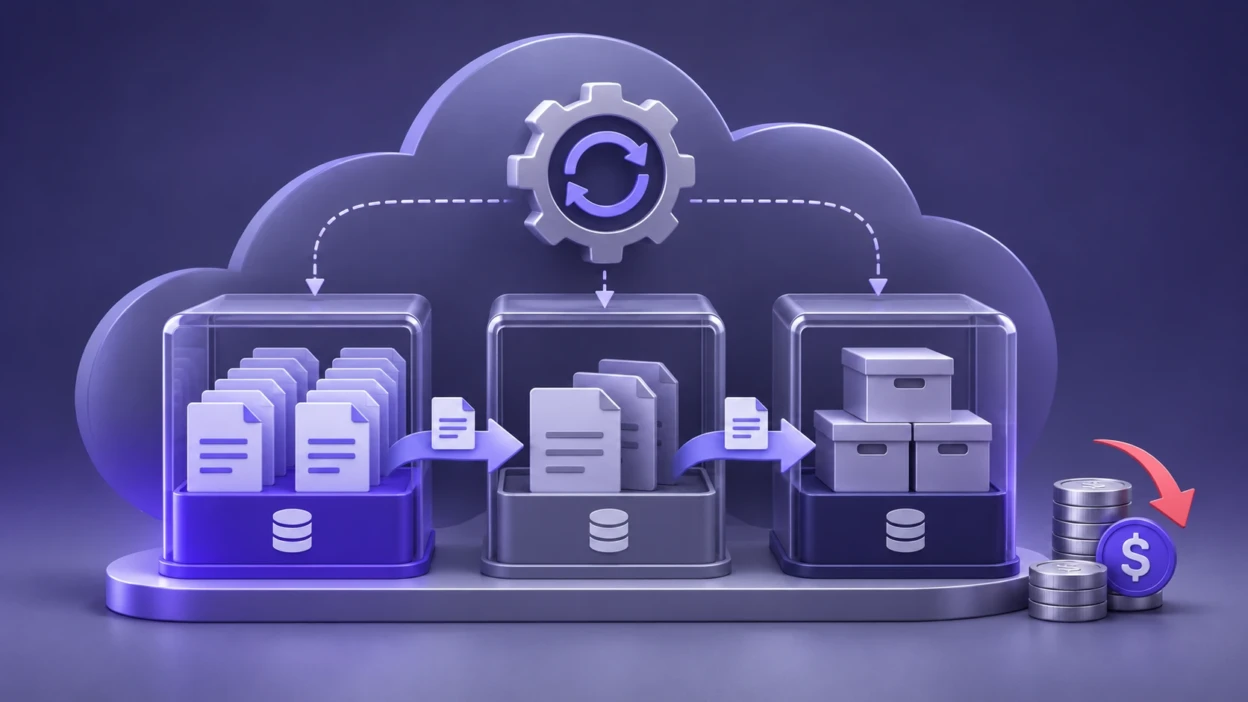
Amazon S3 storage costs can grow quietly as application logs, backups, reports and older object versions accumulate. Much of this data may no longer need the same level of access as recently uploaded files, but it can continue generating storage charges.
Amazon S3 Lifecycle rules help reduce these costs by automatically moving eligible objects into more economical storage classes, expiring data that is no longer required and cleaning up incomplete multipart uploads. The key is to match each rule to how frequently the data is accessed, how long it must be retained and how quickly it needs to be recovered.
This guide explains how to configure lifecycle rules for Amazon S3 general purpose buckets, estimate potential savings and avoid changes that could increase your bill or make important data unavailable.
How Do Amazon S3 Lifecycle Rules Work?
An S3 Lifecycle configuration contains rules that determine what happens to matching objects as they age. You can apply rules to an entire bucket or limit them using filters such as object key prefixes, tags and object sizes, depending on the selected action.
Lifecycle management provides several useful actions:
- Transition: Move eligible objects into another supported storage class.
- Expiration: Remove current objects or make them noncurrent, depending on the bucket’s versioning configuration.
- Noncurrent version management: Transition or permanently remove older versions of objects.
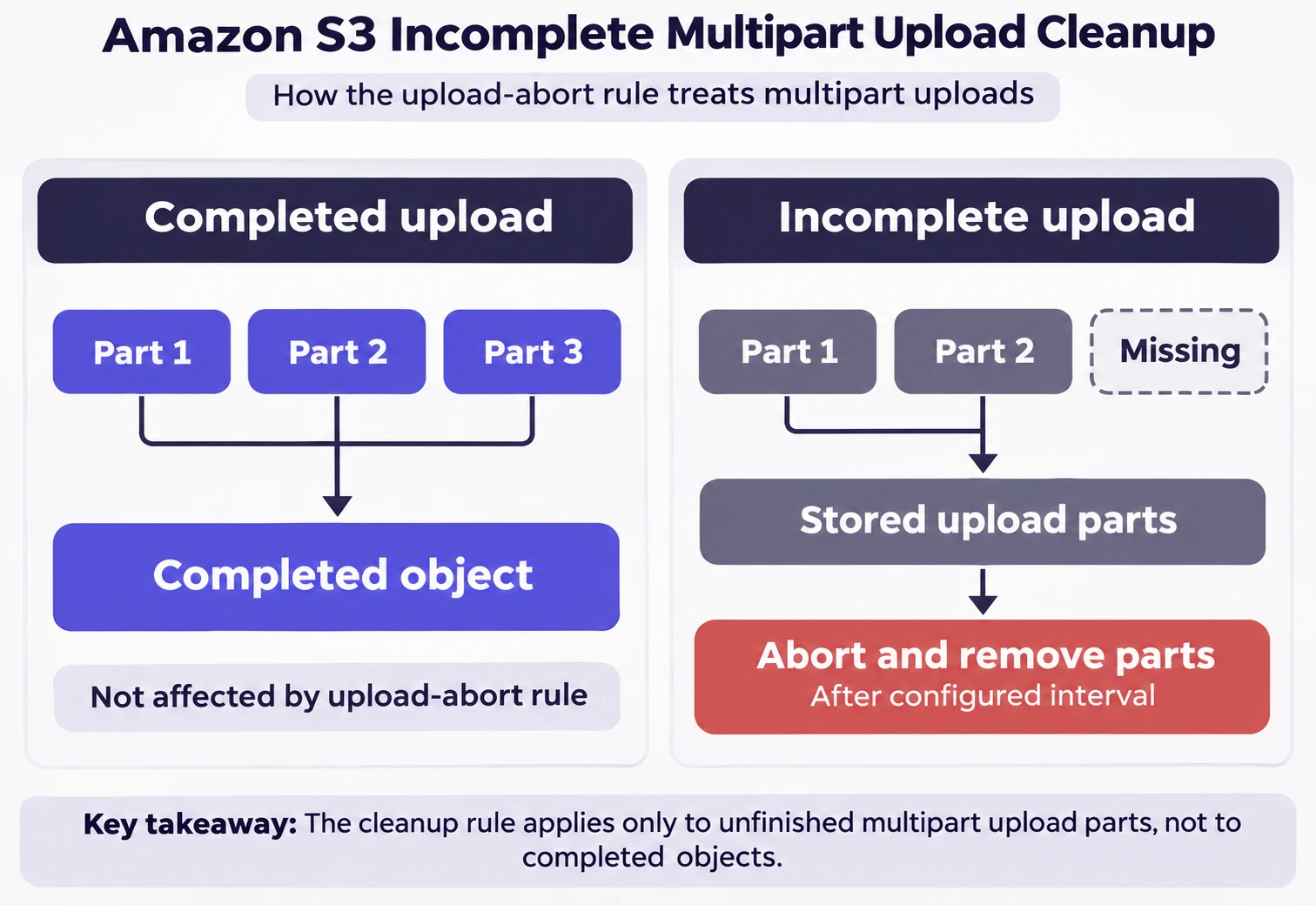
- Incomplete multipart upload cleanup: Abort unfinished uploads and remove their stored parts.
Ordinary lifecycle transitions are based on object age, not the time since an object was last downloaded. Noncurrent version rules use the time since a version became noncurrent. If access patterns are unpredictable, S3 Intelligent-Tiering may be more suitable than a fixed transition schedule.
Understanding these actions is important because object storage behaves differently from traditional disks and shared file systems. Our guide to object, block and file storage explains those architectural differences.
Choose the Right S3 Storage Class
Choosing a cheaper storage class is not simply a matter of finding the lowest price per gigabyte. You must also consider access speed, retrieval costs, storage duration requirements and resilience.
The following comparison covers the main storage classes relevant to lifecycle-based cost optimization.
| Storage class | Suitable workload | Data access | Minimum billed duration |
|---|---|---|---|
| S3 Standard | Frequently accessed data | Milliseconds | None |
| S3 Intelligent-Tiering | Changing or unknown access patterns | Milliseconds in instant-access tiers; optional archive tiers require restoration | None |
| S3 Standard-IA | Infrequently accessed data requiring quick retrieval | Milliseconds | 30 days |
| S3 One Zone-IA | Infrequently accessed, recreatable data | Milliseconds | 30 days |
| S3 Glacier Instant Retrieval | Rarely accessed archives requiring immediate retrieval | Milliseconds | 90 days |
| S3 Glacier Flexible Retrieval | Long-term archives with flexible recovery times | Minutes to hours | 90 days |
| S3 Glacier Deep Archive | Long-term records that rarely need recovery | Hours | 180 days |
These durations represent minimum storage billing periods, not mandatory data retention policies. Deleting, overwriting or transitioning objects too early can result in additional charges.
On July 16, 2026, AWS removed the previous 30-day waiting requirement for lifecycle transitions from S3 Standard to Standard-IA and One Zone-IA. Objects can now become eligible for those transitions from day zero. The 30-day minimum billing duration in the destination storage classes still applies.
S3 One Zone-IA also stores data within a single Availability Zone. Use it only when the loss of that zone would be acceptable or the data could be recreated from another reliable source.
Review the official Amazon S3 storage class comparison before choosing a destination.
Plan Lifecycle Rules Around Your Data
Before creating a rule, identify which objects are suitable for cheaper storage and which must remain immediately available. Start with object counts, storage consumption, object sizes, access activity, recovery requirements and approved retention periods.
Amazon S3 Storage Lens can help identify buckets with growing storage usage, older object versions and incomplete multipart uploads. Some detailed metrics require paid advanced features.
A useful lifecycle policy separates workloads instead of applying one schedule to every object in a bucket.
Example Lifecycle Schedule for Application Logs
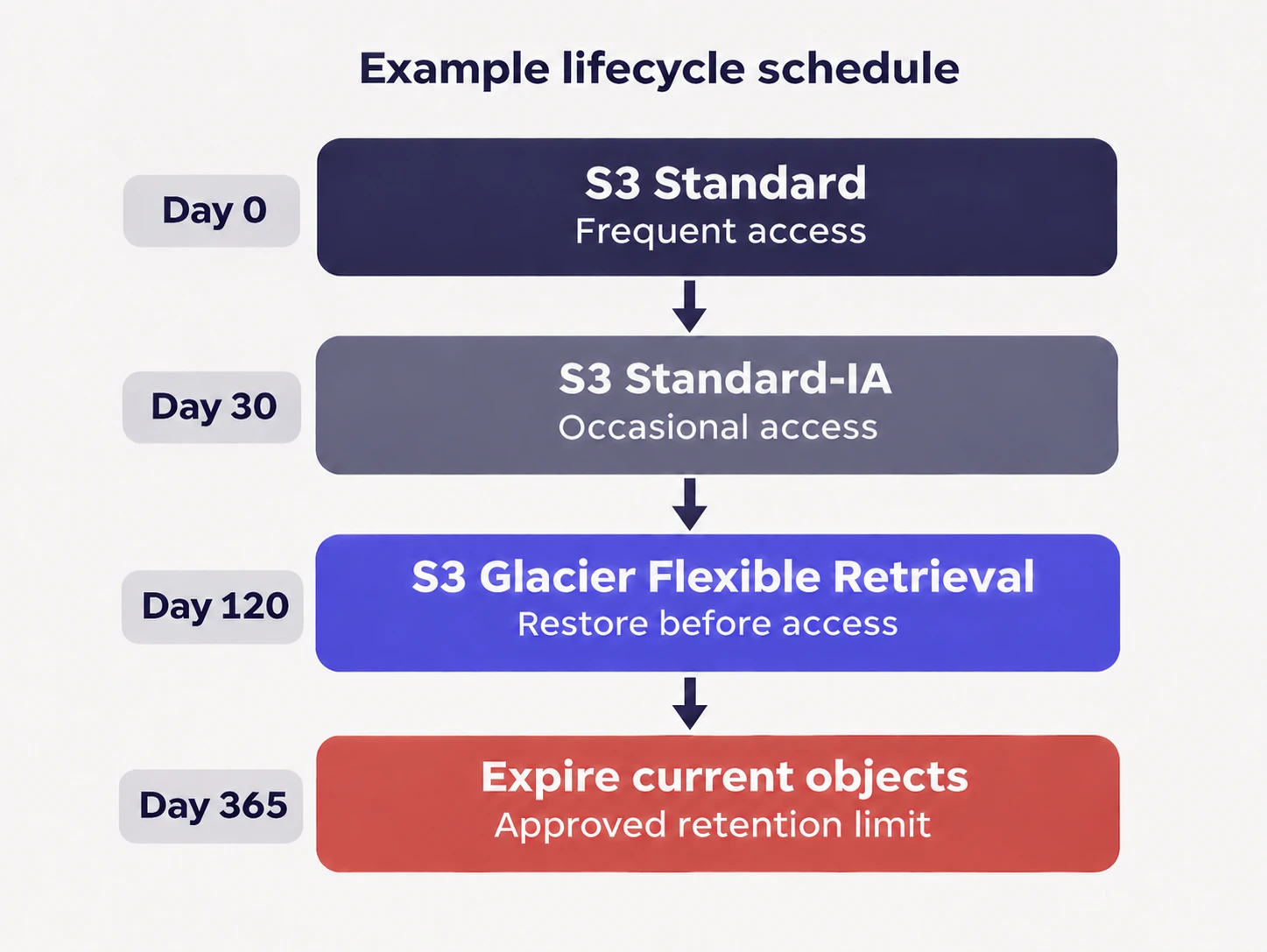
Suppose an application produces logs that are frequently accessed during their first month, occasionally reviewed during the following months and retained for a total of 365 days. An illustrative lifecycle schedule could look like this:
| Object age | Action | Reason |
|---|---|---|
| Day 0 | Initially store in S3 Standard | Support frequent log access |
| Day 30 | Transition to S3 Standard-IA | Reduce storage costs while retaining immediate access |
| Day 120 | Transition to S3 Glacier Flexible Retrieval | Archive logs that rarely need immediate access |
| Day 365 | Expire current objects | Apply the approved retention limit |
This example assumes that the application initially writes objects to S3 Standard, the objects qualify for transitions and the organization has approved a one-year retention period. The final expiration action behaves differently in versioned and nonversioned buckets.
Do not use the same schedule for customer records, disaster recovery backups or compliance data without checking their individual retention and recovery requirements.
Important: New lifecycle rules can apply to existing objects as well as future uploads. An expiration rule may immediately make older matching objects eligible for deletion. Permanently deleted objects cannot be recovered through S3 Lifecycle. Confirm retention requirements, recovery copies, versioning, Object Lock settings and the exact rule scope before enabling any destructive action.
Calculate the Potential Cost Savings
A lower storage rate does not automatically mean a lower total bill. Every proposed transition should be evaluated against the costs of moving, storing and retrieving the affected objects.
Use this simplified calculation:
Estimated net savings = storage charges avoided − additional transition, retrieval, request, monitoring, metadata and early-deletion charges.
Include any additional restore-copy storage or data transfer charges relevant to your workload. Compare both options over the same period using the rates for your bucket’s AWS Region from the Amazon S3 pricing page.
An Illustrative Cost Calculation
Imagine that moving 1,000 GB of rarely accessed data into another storage class reduces its monthly storage charge by $10. Suppose the one-time lifecycle transition charges total $5, and expected additional retrieval and request charges amount to $2 per month.
- Monthly storage savings: $10.
- Additional monthly charges: $2.
- Estimated recurring net savings: $8 per month.
- One-time transition charges: $5.
- Estimated first-month net savings: $3, assuming a full month at the destination rate.
Over six full months, the estimated net savings would be $43, assuming the workload and charges remain unchanged and no other additional fees apply.
These are hypothetical USD amounts used to explain the calculation, not current AWS regional prices, measured results or a guaranteed saving.
Why Small Objects Can Reduce Your Savings?
S3 charges for individual lifecycle transition requests. Moving millions of tiny files can therefore cost more than moving the same volume of data in fewer, larger files.
Since September 2024, the default lifecycle transition behavior excludes objects smaller than 128 KB. Older configurations may retain the previous behavior until they are modified, and custom settings can change the threshold.
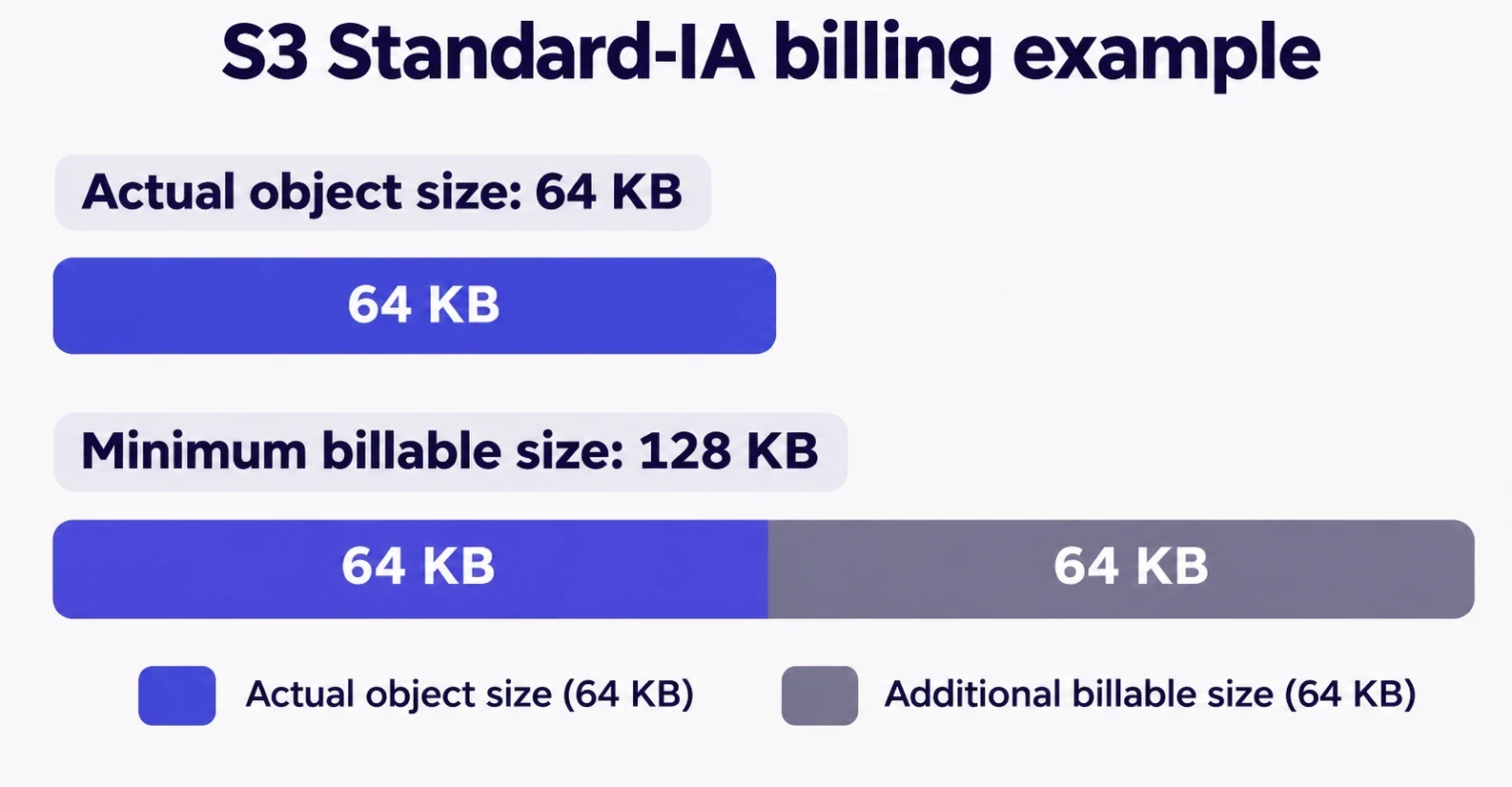
Standard-IA, One Zone-IA and Glacier Instant Retrieval also have a minimum billable object size of 128 KB. Glacier Flexible Retrieval and Glacier Deep Archive instead add 40 KB of billable metadata per archived object, split between S3 Standard and the destination archive class.
Review the S3 lifecycle transition considerations before migrating large collections of small objects.
How to Create an S3 Lifecycle Rule?
The following walkthrough uses the AWS Management Console and applies to S3 general purpose buckets. You need access to the correct AWS account, permission to inspect and modify the bucket’s lifecycle configuration, and approval from the data owner.
Step 1: Review the Existing Configuration
Open the Amazon S3 console and select the relevant bucket. Review its existing lifecycle rules, versioning status, replication settings, object retention requirements and storage classes. Record or export the existing lifecycle configuration before changing it.
Use a dedicated test bucket containing disposable sample objects to validate the intended behavior. A saved configuration can help restore rule settings, but it cannot restore permanently deleted data.
Step 2: Create a Rule and Limit Its Scope
Open the bucket’s Management tab and select Create lifecycle rule. Enter a descriptive rule name, such as application-logs-transition.
Choose a limited rule scope and enter the appropriate object key prefix, such as logs/application/. Add a tag or object size filter when appropriate. Check that the matching objects belong only to the intended workload.
Step 3: Configure Storage Class Transitions
Under Lifecycle rule actions, select Transition current versions of objects between storage classes. For the illustrative log schedule, configure S3 Standard-IA at 30 days and S3 Glacier Flexible Retrieval at 120 days after object creation.
Start with a transition-only rule in the test environment. Make sure the application can still retrieve the objects within its required recovery time after they change storage class.
Step 4: Configure Expiration Separately
After the retention schedule and recovery process have been approved, create a separate expiration rule for the same intended workload. For the log example, select Expire current versions of objects and enter 365 days after object creation.
Review the expiration filter independently. A transition size filter should not accidentally become an expiration condition if smaller objects are also supposed to follow the approved retention policy.
Step 5: Review and Enable the Rules
Review the rule scope, transition schedule, expiration settings and overlapping rules before saving each configuration. Begin with a small, approved production subset rather than enabling an unproven policy across an entire bucket.
The configured actions will become eligible according to the lifecycle schedule. Actual transitions and deletions are asynchronous and may not occur immediately.
For exact console options and configuration details, refer to the official AWS lifecycle configuration instructions.
Reduce Hidden S3 Storage Costs
Transitioning current objects is only one part of lifecycle optimization. Older versions and abandoned uploads can also contribute to storage consumption.
Manage Noncurrent Object Versions
In a versioning-enabled bucket, replacing an object can leave its previous version in storage. Expiring the current object generally creates a delete marker while retaining the previous object version as noncurrent. This means that ordinary expiration may not remove all the underlying stored data.
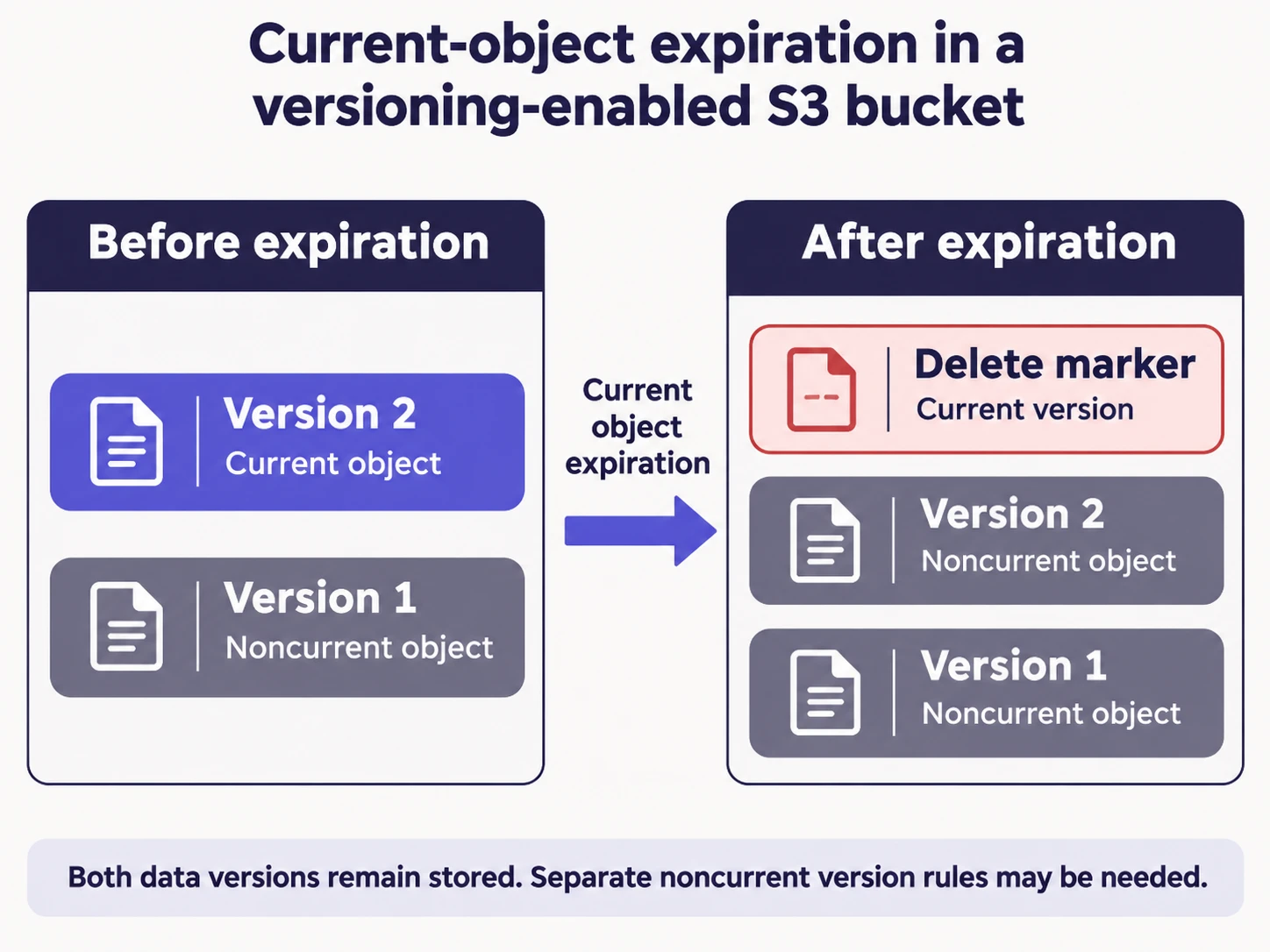
Use separate noncurrent version rules to transition or permanently expire older versions according to approved recovery and retention requirements. Where appropriate, configure how many newer noncurrent versions should remain protected from that expiration rule.
Object Lock, legal holds and replication status can affect lifecycle eligibility. Review these settings before modifying version retention.
Abort Incomplete Multipart Uploads
Multipart uploads allow large objects to be uploaded in separate parts. If an upload is abandoned before completion, its stored parts can continue generating charges.
Create a dedicated lifecycle rule to abort incomplete multipart uploads after an appropriate period, such as seven days after initiation, if that interval is longer than the application’s legitimate upload and retry window.
This cleanup action removes unfinished upload parts rather than completed objects. Use the appropriate prefix scope because this action does not support tag-based filtering.
AWS provides additional lifecycle configuration examples for both noncurrent version management and multipart upload cleanup.
Verify Lifecycle Rules and Cost Savings
A lifecycle rule is not successful simply because it appears in the bucket configuration. Confirm that the expected objects change storage classes, that required data remains recoverable and that the total storage-related bill improves.
- Review object storage classes in the S3 console or through S3 Inventory reports.
- Inspect noncurrent versions and incomplete uploads separately.
- Perform an approved retrieval or archive restoration test using representative sample data.
- Compare AWS Cost Explorer or billing reports before and after the change, allowing for transition charges and reporting delays.
- Account for changes in stored data volume, retrieval activity and application usage before attributing savings to the lifecycle policy.
Where possible, compare storage-related costs per unit of data alongside the total bill. A growing workload may still have a higher overall bill despite becoming more cost-efficient.
If the results are unexpected, inspect overlapping rules, object filters, minimum storage durations and replication status. The AWS lifecycle troubleshooting documentation explains common causes of unexpected costs and delayed actions.
If a rule is unsafe, disable or correct it promptly and verify the state of affected objects. Disabling a rule does not reverse completed transitions or permanent deletions. Restoring an archived object may require additional time, requests and storage charges.
Include these checks in regular FinOps and cloud cost management reviews so that lifecycle policies remain aligned with changing application requirements.
Common S3 Lifecycle Mistakes to Avoid
- Applying rules to the entire bucket without reviewing its contents: Different workloads can have different retention and availability requirements.
- Assuming object age means time since last access: Frequently downloaded older objects may still qualify for an ordinary age-based transition.
- Ignoring minimum storage billing periods: Early deletion, overwriting or further transitions may create additional charges.
- Archiving data needed immediately: Flexible Retrieval and Deep Archive require restoration before normal object access.
- Overlooking old object versions: Current-object expiration alone may leave noncurrent versions consuming storage.
- Using overly aggressive upload cleanup: A short abort period could interrupt legitimate long-running multipart uploads.
- Assuming a disabled rule reverses its actions: Completed lifecycle actions require separate recovery or migration procedures where recovery is possible.
Lifecycle management should complement a broader strategy for identifying and removing unused cloud resources safely, rather than replacing workload ownership and data retention reviews.
Conclusion
Amazon S3 Lifecycle rules can reduce ongoing storage costs by matching data to suitable storage classes, enforcing approved retention periods and cleaning up storage that is no longer needed. The most effective policy balances storage rates with retrieval costs, recovery speed, object size and minimum billing requirements.
Start with a small, well-defined workload, test its transition and recovery behavior, and add expiration only when retention requirements are confirmed. Measure the total financial and operational results before expanding the policy to other buckets.

Tech Bonafide is the editorial identity of TechBonafide, an independent technology publication covering AI, software, cybersecurity, gadgets, and emerging technology.