Choosing between object, block, and file storage shapes performance, cost, security, and how easily your systems scale. Each model stores data differently, so the best fit depends on access patterns, latency goals, and operational complexity. This guide explains the tradeoffs clearly so you can map the right storage type to the right workload.
What Is Object Storage?
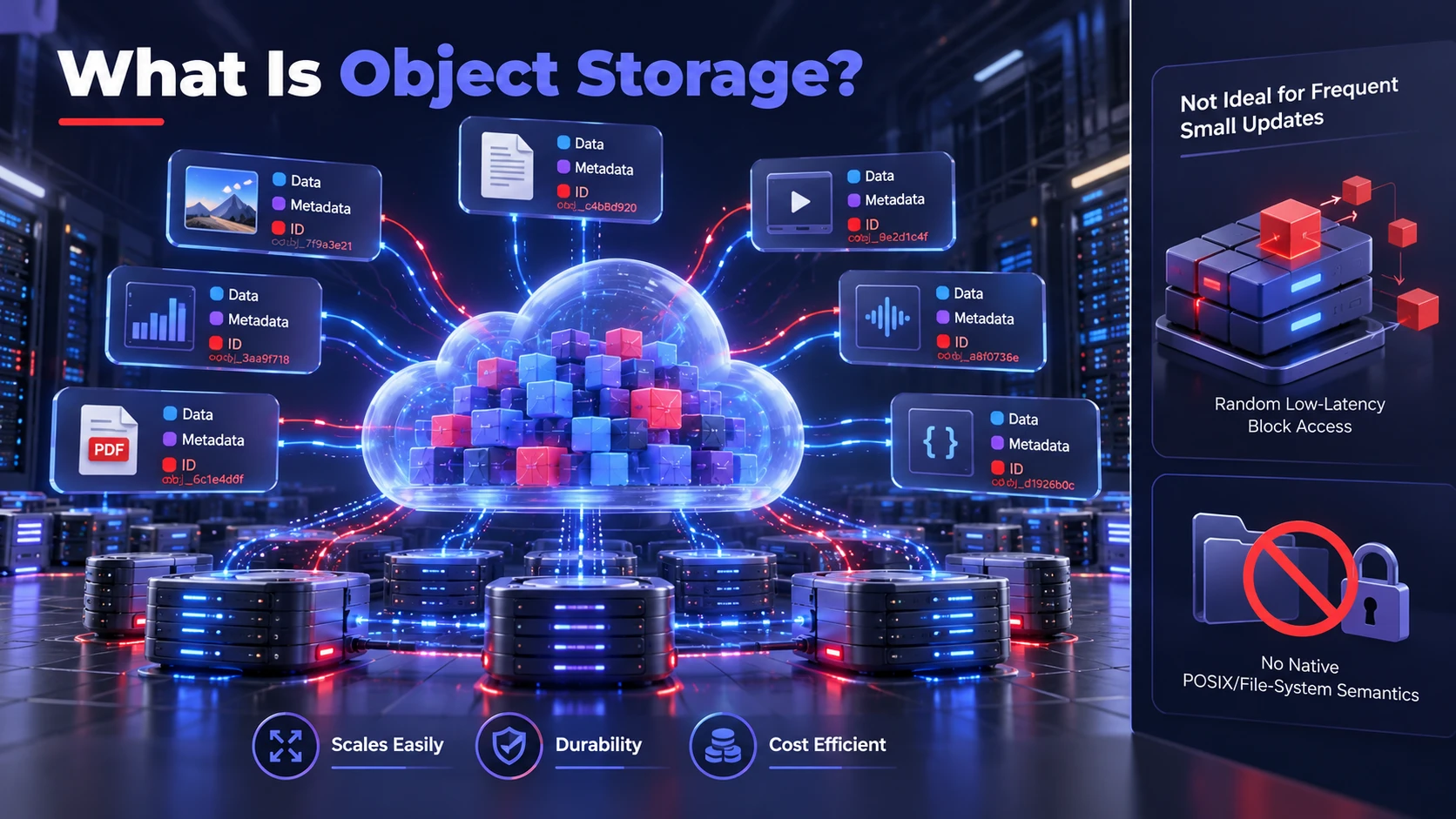
Object storage keeps data as discrete objects inside a flat namespace. Each object typically includes the data itself, rich metadata, and a unique identifier used to retrieve it. This model is designed for massive scale and durability with simpler capacity growth than traditional hierarchical file systems.
Object storage is generally optimized for scalable, durable object access and can support high aggregate throughput. However, workloads requiring frequent small updates, low-latency random I/O, or traditional disk operations are often better suited to block storage. Actual performance depends on the storage service, network, request pattern, and application design.
Strengths of Object Storage
- Scales Easily: Capacity grows without needing to redesign directory trees or volumes.
- Metadata Rich: Custom metadata supports search, lifecycle policies, and governance.
- Durability Focused: Replication and erasure coding are commonly used to withstand failures.
- Cost Efficient For Large Data: Pricing models typically favor large repositories such as backups and media libraries.
Those strengths are most valuable when data is written and read as whole objects and when growth is unpredictable.
Limitations to Consider
- Higher Latency: Network and protocol overhead can be noticeable for small, frequent updates.
- Not Ideal For In Place Updates: Many designs treat updates as object rewrites, which adds overhead.
- POSIX Compatibility Gaps: Applications expecting file locking and standard file semantics may need adaptation.
If your applications demand block level operations or tight file system semantics, object storage often becomes a secondary tier rather than the primary one.
What Block Storage is?
Block storage presents raw storage volumes to a host, similar to a virtual disk. Data is stored in fixed size blocks and addressed by location rather than by name. Operating systems layer a file system on top, which gives applications the behavior they expect from local disks.
This model is commonly used for latency sensitive workloads and transactional systems. It supports fine grained reads and writes, which makes it suitable for databases, VM boot volumes, and performance intensive applications. Block storage often shines when predictable IOPS and low latency are non negotiable.
Strengths of Block Storage
- Low Latency Performance: Optimized for random I O with strong IOPS characteristics.
- Flexible File Systems: You can format volumes with the file system your OS and apps require.
- Strong Fit For Databases: Fine grained updates work well for OLTP and indexing patterns.
These advantages are most obvious when applications rely on synchronous writes, consistent latency, and fast recovery behavior.
Limitations to Consider
- Scaling Requires Workload Planning: Block storage capacity and performance can often be expanded, sometimes without interrupting running workloads. However, volume limits, provisioned IOPS, throughput ceilings, file system resizing, and application requirements must be considered before scaling.
- Sharing Is Harder: Multi host access needs cluster file systems or shared disk coordination.
- Operational Overhead: Snapshots, replication, and backups are powerful but require careful design.
Block storage can become expensive at scale, especially when large datasets do not require low latency access.
What File Storage is
File storage organizes data into hierarchical directories and files. Network file services commonly expose that structure through protocols such as NFS or SMB, allowing clients to access shared files using familiar paths. However, locking, permissions, consistency, and POSIX compatibility vary by protocol and implementation.
File storage is often chosen when many clients need to work on the same dataset with standard tools and minimal application change. It can also act as a shared layer for container platforms and content management systems. Performance varies widely based on architecture, throughput limits, and metadata handling.
Strengths of File Storage
- Simple Sharing: Many users and systems can access the same directories concurrently.
- Familiar Workflows: Works well with existing applications built for file paths and mounts.
- Access Controls: Permissions and directory structures help enforce least privilege practices.
File storage is typically the easiest option when the workload depends on shared folders and standard file operations.
Limitations to Consider
- Metadata Bottlenecks: Large directory trees can stress metadata services and reduce responsiveness.
- Scaling Can Be Complex: Expanding capacity and throughput often requires careful architecture choices.
- Not Always Optimal For Massive Archives: Very large datasets can be more cost effective in object storage.
When growth is extreme or access is primarily through API driven workflows, file storage can become harder to operate at scale.
Key Differences That Matter for Workloads
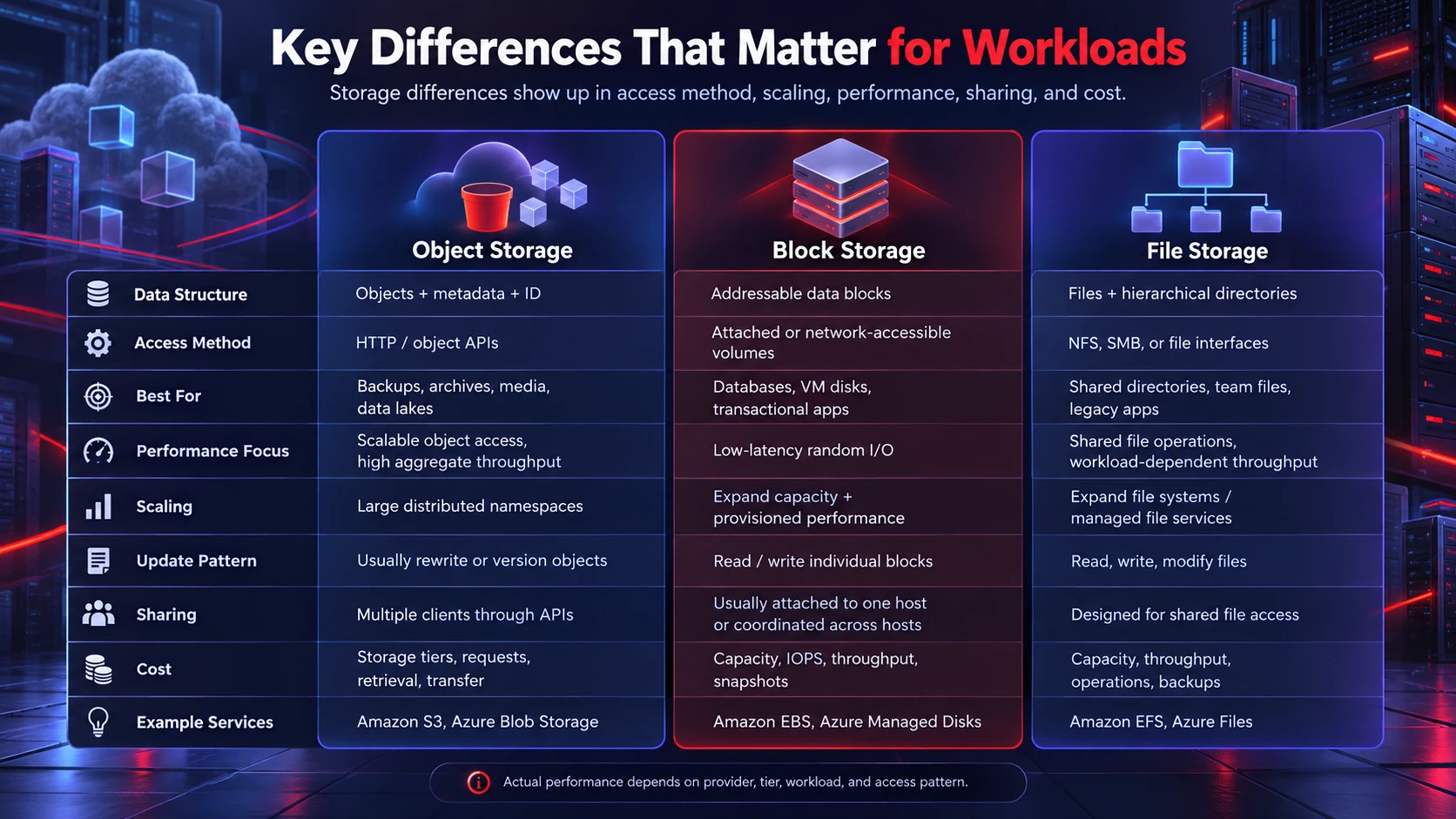
The practical differences show up in how data is accessed, how it scales, and what reliability and governance features are easiest to apply. Matching the model to your I O pattern reduces cost and prevents performance surprises. The table below summarizes the core tradeoffs.
| Category | Object Storage | Block Storage | File Storage |
|---|---|---|---|
| Data Structure | Objects with metadata and identifiers | Addressable data blocks | Files and hierarchical directories |
| Access Method | Object APIs, commonly HTTP-based | Attached or network-accessible block volumes | NFS, SMB, or other file interfaces |
| Best For | Backups, archives, media, data lakes | Databases, VM disks, transactional workloads | Shared directories, team files, legacy applications |
| Performance Focus | Scalable object requests and aggregate throughput | Low-latency random I/O and predictable performance | Shared access, file operations, and workload-dependent throughput |
| Scaling | Large distributed object namespaces | Expand volumes and provision performance within service limits | Expand file systems or managed file services within their limits |
| Update Pattern | Usually replace or create object versions | Read and write individual blocks | Read, write, and modify files |
| Sharing | Multiple clients through APIs | Typically attached to one host or coordinated across hosts | Designed for shared file access |
| Cost Considerations | Storage tiers, requests, retrieval, transfer | Capacity, IOPS, throughput, snapshots | Capacity, throughput, operations, and backups |
| Example Services | Amazon S3, Azure Blob Storage | Amazon EBS, Azure Managed Disks | Amazon EFS, Azure Files |
These comparisons describe general storage characteristics rather than guaranteed performance levels. Actual latency, throughput, durability, concurrency, and pricing depend on the cloud provider, service tier, workload configuration, and access pattern. The best choice should therefore be validated against application requirements instead of relying on storage categories alone.
For a provider-backed explanation of these differences, AWS offers a detailed guide to block, object, and file storage, including data organization, application compatibility, performance, and typical use cases.
How to Choose The Right Storage Type?
The fastest way to choose is to start with the workload characteristics and map them to the storage model that aligns with access patterns. Latency, concurrency, and change frequency usually matter more than raw capacity numbers. Use the criteria below to narrow your options.
Choose Object Storage When
- Data Is Mostly Immutable: Datasets such as backups, logs, images, and video are typically written once and read many times.
- You Need Massive Scale: Growth is large, continuous, or uncertain and you want simpler expansion.
- API Driven Access Is Preferred: Applications and pipelines interact over REST style interfaces.
- Lifecycle Policies Matter: Tiering, retention, and automated deletion reduce long term cost and risk.
This is also a common choice for analytics repositories where throughput and parallel reads matter more than low millisecond latency.
Object storage also plays an important role in modern analytics architectures because data lakes commonly hold large volumes of structured, semi-structured, and unstructured data. To understand how these repositories differ from curated analytical systems, read our comparison of data lake vs. data warehouse, which covers data organization, transformation, analytics performance, and governance.
Choose Block Storage When
- Latency Is Critical: The workload needs consistent low latency and strong IOPS for random I O.
- Workloads Are Transactional: Relational databases and queueing systems benefit from fine grained writes.
- You Need Boot And System Volumes: Operating systems and VM roots require disk like behavior.
- Application Expects Local Disks: You want compatibility without changing application storage logic.
Block storage is best when performance and control outweigh the management effort of volumes, snapshots, and replication.
Choose File Storage When
- Multiple Clients Need Shared Data: Teams and services work against the same directory structures.
- Applications Require File Semantics: File locks, permissions, and path based access are fundamental.
- Lift And Shift Is A Priority: You want the least disruptive move for legacy or shared workstation workflows.
- Content Repositories Are Central: Home directories, creative assets, and shared project folders are the core use case.
File storage is the practical option for shared file workflows, especially when retraining users or rewriting software is not realistic.
Businesses comparing infrastructure options may also need to evaluate technologies such as network-attached storage (NAS), storage area networks (SAN), and hybrid solutions. Our guide to enterprise data storage options explores these broader approaches and how they can support different organizational requirements.
Storage Selection Checklist
Before choosing a storage service, evaluate the workload against these practical requirements:
- Access Pattern: Determine whether applications need object-level API requests, block-level random I/O, or shared file operations.
- Performance Requirements: Define acceptable latency, IOPS, throughput, and performance consistency under peak load.
- Concurrency: Identify how many clients must read or modify the same data and whether shared locking or coordination is required.
- Growth Expectations: Estimate capacity growth, object or file counts, and future performance requirements.
- Total Cost: Compare storage capacity, provisioned performance, API requests, data retrieval, transfers, snapshots, and management costs.
- Recovery Requirements: Define backup frequency, recovery point objectives (RPO), recovery time objectives (RTO), and disaster recovery expectations.
- Application Compatibility: Confirm whether existing tools require mounted file paths, POSIX-style behavior, or direct volume access.
If you are choosing between managed cloud services, the AWS storage service decision guide provides additional criteria for matching application workloads to object, block, and file storage options. It is useful for comparing service capabilities after identifying the access and performance requirements of your application.
Common Architecture Patterns
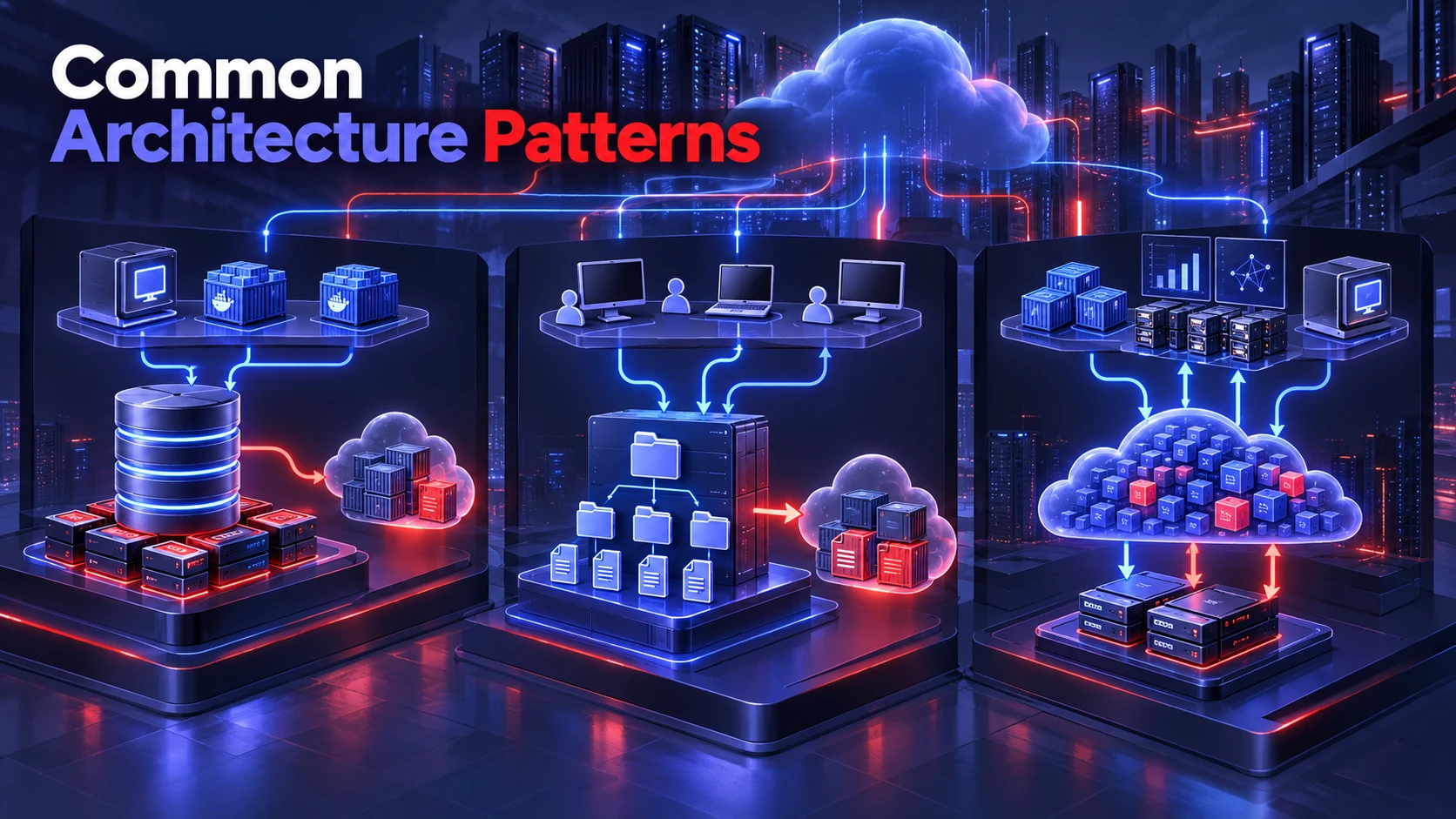
Many environments use a mix of all three types rather than choosing a single winner. The goal is to place each dataset on the storage tier that matches its value and performance profile. A layered approach also improves resilience and cost control.
- Database On Block With Object Backups: Production data stays on block volumes while backups and exports land in object storage.
- Shared File For Collaboration With Object Archive: Active project folders live on file storage and older revisions move to object tiers.
- Analytics With Object Data Lake And Block Scratch: Durable datasets remain in object storage while short lived compute scratch uses block volumes.
Storage requirements also depend on the computing environment. Virtual machines commonly use block volumes for boot disks and persistent application data, while containerized applications may rely on persistent volumes and shared file services depending on the workload. Our containers vs. virtual machines comparison explains how these deployment models differ in architecture, performance, and operational management.
Cloud providers implement these storage models through different services and interfaces. Microsoft’s Azure Storage documentation introduces Azure Blob Storage, managed disks, and file storage options, helping readers understand how the general object, block, and file categories translate into actual cloud products.
These patterns reduce cost while keeping performance where it is needed.
Cost Considerations for Object, Block, and File Storage
Storage cost is not determined by capacity alone. Two services holding the same amount of data can produce different monthly bills because of performance provisioning, access frequency, request charges, network transfers, and data protection requirements.
- Object Storage Costs: Include stored capacity, storage class, API requests, retrieval charges where applicable, data transfers, and lifecycle operations. Archive tiers can reduce storage costs but may increase retrieval time and expense.
- Block Storage Costs: Depend on provisioned capacity, performance tiers, IOPS, throughput, snapshots, and the pricing model of the selected service. Paying for performance that applications rarely use can increase costs.
- File Storage Costs: Can include stored capacity, provisioned or metered throughput, file operations, backups, and data transfers. Shared access can simplify operations, but workload intensity and service configuration affect pricing.
To compare options fairly, calculate total monthly cost using expected data volume, access frequency, peak throughput, backup retention, retrieval requirements, and data movement. Revisit these estimates as workloads evolve because the cheapest storage tier is not always the lowest-cost solution overall.
Storage optimization works best when it is part of a broader cloud cost management process. Our guide to FinOps and cloud cost optimization explains how cost visibility, resource ownership, tagging standards, budgets, and regular reviews help teams reduce unnecessary cloud spending without compromising business requirements.
Security, Compliance, and Governance Considerations
Security features exist across all three models, but the operational controls look different. Object storage often emphasizes bucket policies, encryption, immutability options, and retention policies. Block and file storage commonly focus on network segmentation, host access controls, and snapshot governance.
Regardless of type, prioritize encryption at rest and in transit, least privilege access, and audit logging. Also define data classification rules so sensitive datasets do not drift into weaker controls. Strong governance prevents untracked shares, orphaned volumes, and long lived public objects.
Security controls should be paired with a tested data recovery strategy. Replication can improve availability, but it does not automatically protect against accidental deletion, corrupted data, or malicious changes. Define recovery point objectives and recovery time objectives for each workload, maintain appropriately isolated or immutable backups, and test restoration procedures regularly. Object versioning, block snapshots, and file-system backups can each support recovery, but their capabilities and limitations depend on service configuration.
Choosing a durable storage service is only one part of protecting business data. Organizations also need to verify that backups can be restored within their recovery objectives. Our guide on testing the effectiveness of data backup solutions explains why backup validation and recovery testing should be included in an organization’s data protection strategy.
Operational Factors That Change the Decision
Storage choices are also influenced by backup windows, recovery time objectives, and how your team manages infrastructure. Object storage can simplify capacity planning, but it may require application changes or gateways for legacy software. Block and file deployments can be straightforward at first, but can become management heavy at scale.
Storage selection should begin with a review of application dependencies, access patterns, performance requirements, recovery objectives, and budget constraints. Teams should document these requirements, compare suitable service configurations, and test representative workloads before migration. This approach helps identify compatibility issues, prevent unnecessary spending, and reduce performance surprises after deployment.
Conclusion
Object, block, and file storage solve different data access problems. Object storage is generally a strong choice for scalable repositories, backups, media, and data lakes. Block storage supports workloads that need disk-like access, predictable random I/O, and fine-grained updates. File storage works well for shared directories, collaborative applications, and systems that depend on familiar file operations.
The best storage architecture often combines more than one model. Evaluate workload performance, concurrency, application compatibility, recovery requirements, and total cost before selecting a service. For important production systems, validate the decision through testing and regular capacity reviews rather than assuming one storage type is universally best.
Frequently Asked Questions
Is Object Storage Better Than File Storage for Backups?
Object storage is often a strong fit for backups because it scales easily and supports retention and lifecycle controls. It also works well for long term durability and cost management. File storage can still make sense when backup tools require mounted paths or specific file semantics.
Can You Run Databases Directly on Object Storage?
Most databases are designed for block level reads and writes with predictable latency. Object storage usually introduces higher latency and whole object update behavior that does not align with database engines. A common approach is running the database on block storage and writing backups or exports to object storage.
When Should You Use File Storage in a Cloud Native Setup?
File storage is useful when multiple services need shared access to the same files and the applications expect path based operations. It is also practical for content repositories and team collaboration workflows. For purely API driven services and large immutable datasets, object storage is often simpler to scale.