
Shadow AI happens when employees use AI tools without formal approval, oversight, or clear rules. It often starts with good intent, but it can quietly expand risk across data security, compliance, and operational reliability.
What Shadow AI Means In The Workplace?
Shadow AI is any AI use that sits outside official IT and governance processes. It includes public chatbots, browser extensions, built-in AI features in SaaS apps, and personal accounts used for work tasks.
It differs from sanctioned AI because logging, access controls, data handling, and vendor due diligence are missing or inconsistent. That gap makes it hard to know where business data goes and how outputs are created.
Why Shadow AI Spreads So Fast?
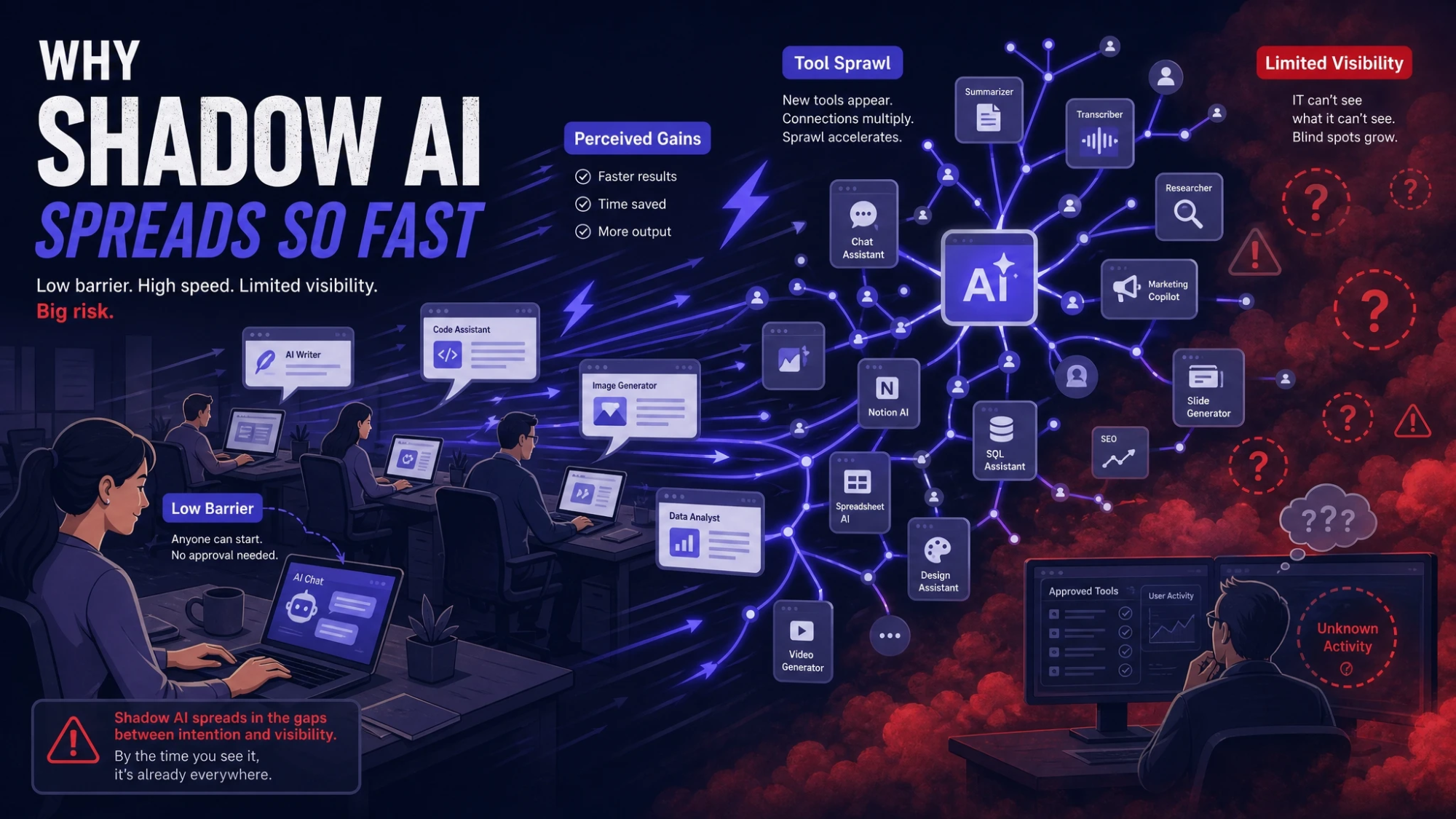
AI tools reduce friction on writing, analysis, coding, and support work. When official options lag or feel restrictive, people look for faster paths that match day-to-day deadlines.
Procurement cycles can be slow, and policies may be unclear or overly broad. Shadow AI then becomes the default because it is easy to start and hard to detect.
- Low barrier to entry: Sign-up takes minutes and most tools work in a browser.
- Perceived productivity gains: Employees see quick wins in drafting, summarizing, and troubleshooting.
- Tool sprawl in SaaS: Many platforms add AI features automatically, sometimes enabled by default.
- Limited visibility: IT may not see usage if it happens on personal accounts or unmanaged devices.
Once these behaviors normalize, teams can rely on unsanctioned AI in core workflows without realizing the downstream impact.
Data Security Risks You Cannot Ignore
The biggest risk is sensitive data leaving controlled systems. Prompts may include customer details, source code, financials, contracts, internal strategy, or regulated personal data.
Even when a tool claims it does not train on data, you still need to verify retention, logging, subprocessors, and breach notification terms. Without that, the organization cannot confidently assess exposure or respond to incidents.
- Prompt leakage: Users paste confidential data into prompts that get stored, reviewed, or processed outside approved regions.
- Credential exposure: AI-assisted troubleshooting can lead to sharing API keys, tokens, or configuration secrets.
- Shadow integrations: Browser plugins and connectors can request broad permissions to email, docs, and CRM records.
- Unmanaged endpoints: Personal devices may lack EDR, disk encryption, and DLP controls needed for enterprise data.
Reducing security risk requires both technical controls and clear, usable guidance that employees can follow under time pressure.
Compliance And Legal Exposure
Shadow AI can create compliance issues when regulated data is processed without a lawful basis, documented controls, or proper vendor agreements. Data residency, retention, and access logging can all fall out of alignment with policy requirements.
Legal exposure also includes intellectual property and confidentiality obligations. Some AI tools can produce outputs that are hard to attribute or validate, which complicates ownership and contract commitments.
- Privacy obligations: Personal data may be processed without meeting consent, notice, or minimization requirements.
- Records retention: Prompts and outputs may not be captured in systems of record or may be stored longer than allowed.
- Third-party risk: Vendor terms may permit broad data use, vague subprocessors, or limited audit rights.
- IP concerns: Teams may unknowingly upload proprietary materials or accept outputs that create licensing uncertainty.
Compliance teams need an AI intake path that is fast enough to compete with self-service sign-ups.
Quality And Operational Risks From Unverified Outputs
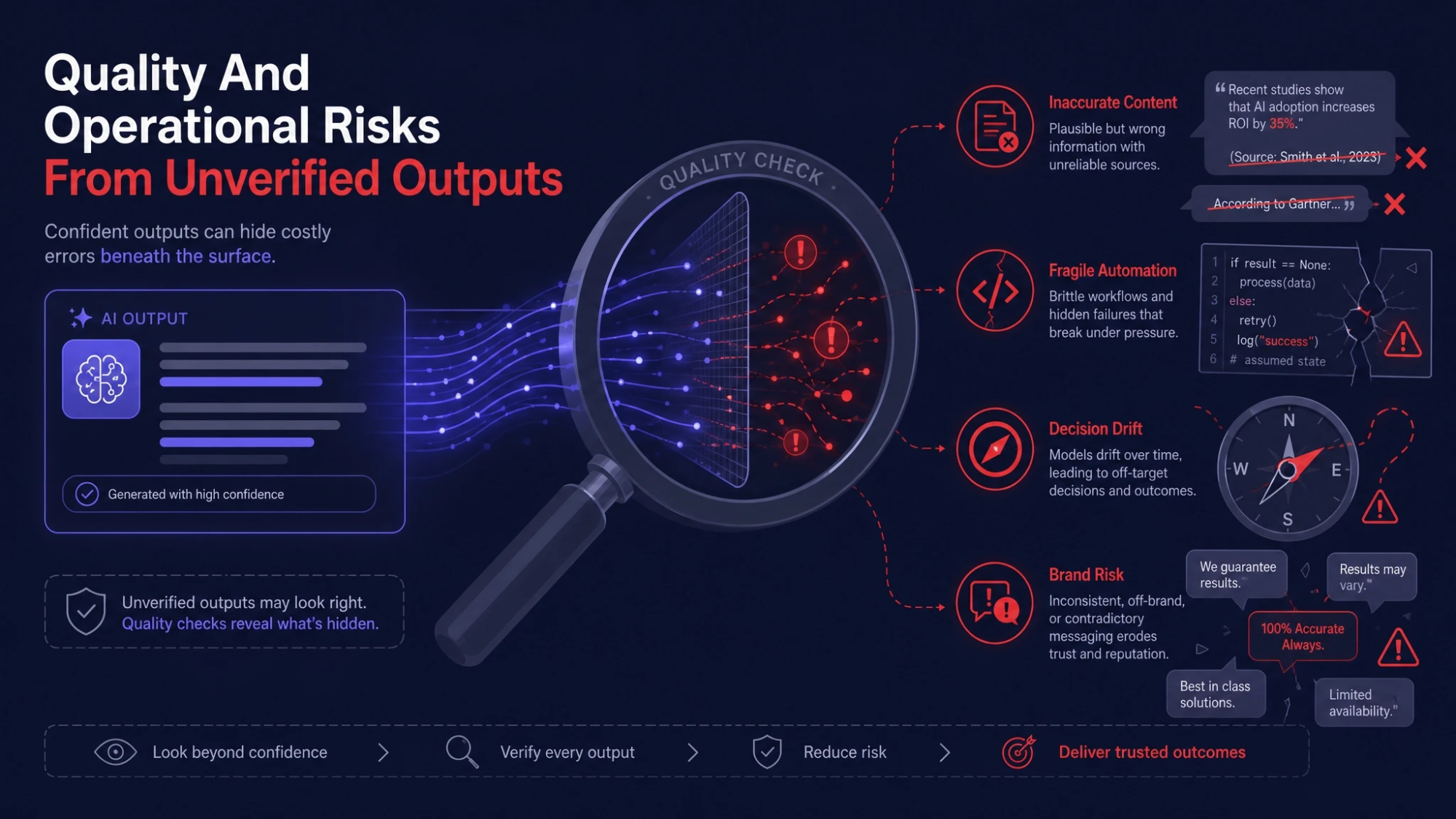
AI output quality can vary, and errors can look confident. When shadow tools feed customer communications, reporting, code changes, or policy content, mistakes can scale quickly.
Operational risk rises when there is no standard evaluation, no approved prompt patterns, and no accountability for validation. Over time, inconsistent AI use can fragment processes across teams.
- Inaccurate content: Drafts can include wrong facts, broken citations, or misleading claims.
- Fragile automation: AI-generated scripts or macros may work once but fail silently later.
- Decision drift: Teams may rely on AI summaries that omit key context or bias interpretations.
- Brand risk: Tone and messaging can become inconsistent across channels without guardrails.
To manage these risks, organizations should standardize review checkpoints and define what tasks require human approval.
How To Detect Shadow AI Without Breaking Trust?
Detection should focus on systems and patterns, not surveillance of individuals. The goal is to understand where AI is being used, what data is involved, and which tools create the highest risk.
Start with visibility that respects privacy while protecting business data. Then pair it with communication that explains the reason for controls and offers approved alternatives.
- Map AI-capable apps: Inventory SaaS platforms and identify built-in AI features that may already be enabled.
- Review network and identity signals: Use SSO logs, CASB insights, and DNS patterns to spot emerging AI services.
- Classify data pathways: Identify where sensitive data is most likely to be copied into prompts from email, tickets, docs, and repos.
- Run a lightweight user survey: Ask teams what tools they use, for which tasks, and what outcomes they need.
This approach surfaces real workflow needs so governance can support productivity rather than only blocking tools.
Governance Controls That Actually Work
Effective governance balances speed and safety. Employees adopt shadow tools when official options are slow, so the governance model must be practical and quick to follow.
At Tech Bonafide, the focus is often on turning governance into an enablement system through clear policies, secure architecture, and managed rollout plans. A strong baseline reduces risk while keeping teams moving.
- Approved tool list: Maintain a short, reviewed list with clear allowed use cases and data rules.
- Data handling rules: Define what data is prohibited in prompts and what needs masking or anonymization.
- Access and logging: Prefer SSO, role-based access, audit logs, and centralized administration.
- Vendor due diligence: Review retention, training use, subprocessors, security controls, and incident commitments.
- Human review gates: Require review for customer-facing content, regulated decisions, and production code changes.
Once controls are set, align them with training and simple checklists so teams can apply them consistently.
Policy And Training That People Will Follow
Policies fail when they are long, vague, or written only for edge cases. Keep guidance short and task-based, and make it easy to find within the tools employees use.
Training should focus on what to do, not only what to avoid. Teams need safe prompt habits, verification methods, and a clear path to request new tools.
- Allowed tasks: Specify safe uses such as drafting internal notes with non-sensitive inputs.
- Restricted tasks: Call out areas like regulated advice, HR decisions, and customer data processing without approval.
- Verification habits: Require source checks, unit tests, peer review, and documentation of assumptions.
- Escalation path: Provide a fast intake form and response SLA for AI tool requests.
When employees see a clear and fast route to safe enablement, shadow use usually declines.
Risk Assessment Checklist For Business Leaders
A short checklist helps leaders prioritize what to fix first. Focus on where sensitive data meets unmanaged tools, and where outputs affect customers or regulated outcomes.
| Risk Area | What To Check | Recommended Control |
|---|---|---|
| Data Exposure | Prompt inputs include customer data, source code, financials, or credentials | DLP rules, masking guidance, approved tools with retention limits |
| Compliance | Processing of regulated data lacks documented basis and vendor agreements | AI intake workflow, DPIA where needed, contract and subprocessor review |
| Quality And Accuracy | Outputs used in customer content, reports, or code without validation | Human review gates, testing requirements, standardized prompt templates |
| Access And Oversight | Personal accounts and unmanaged devices used for business work | SSO enforcement, device management, audit logging and monitoring |
Use this table to identify the highest-impact gaps, then address them in a phased rollout rather than trying to fix everything at once.
Building A Safe Path To AI Adoption
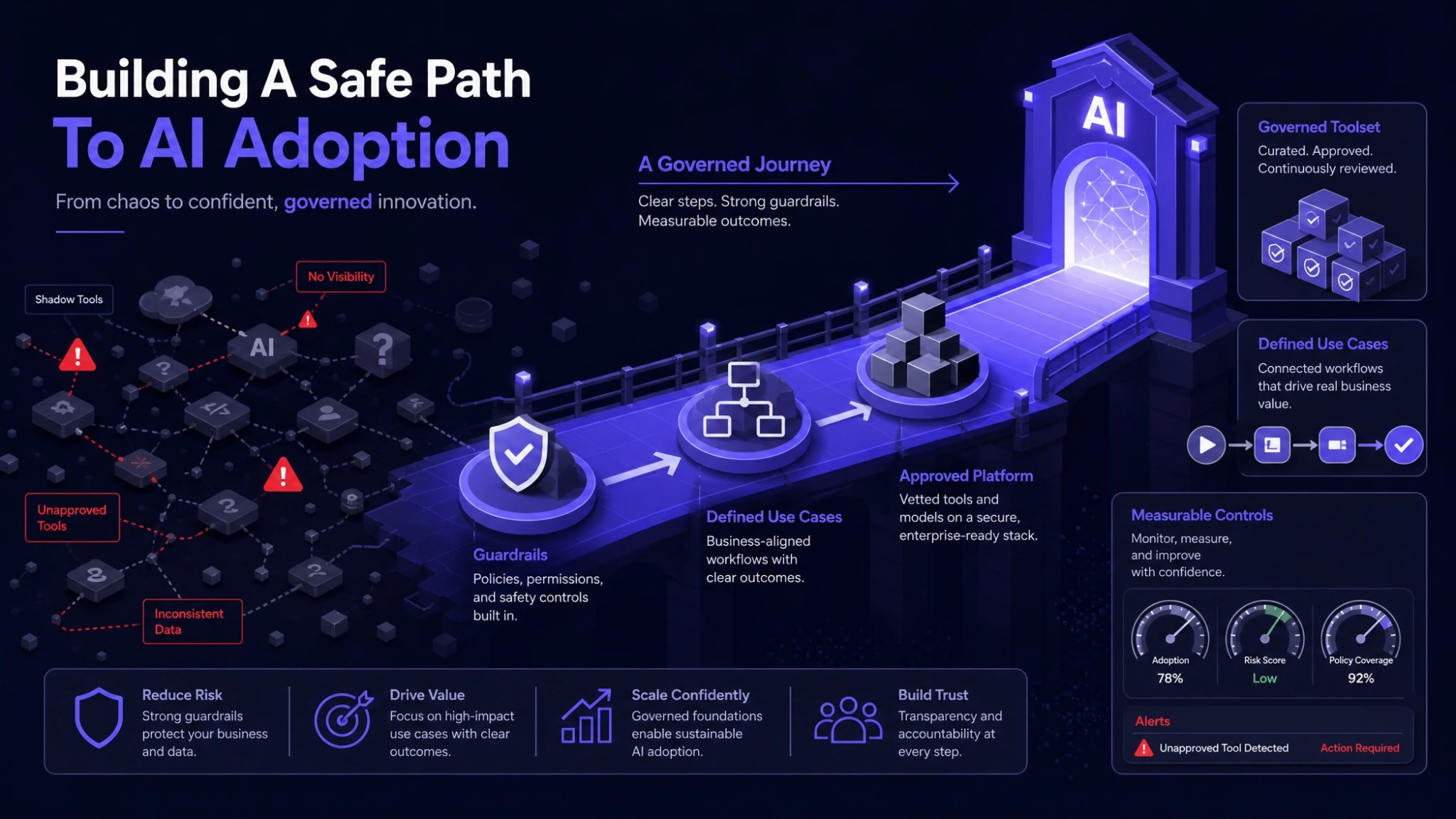 Shadow AI is often a signal that teams need better tools and clearer rules. A safe adoption path includes approved platforms, defined use cases, and measurable controls.
Tech Bonafide typically supports this kind of transition through practical security and governance guidance that fits modern cloud stacks. The key is to make the secure path the easiest path for employees.
- Define priority use cases: Select a small set of high-value workflows and document expected inputs and outputs.
- Choose a governed toolset: Standardize on tools that support enterprise controls and admin visibility.
- Implement guardrails: Apply DLP, access controls, logging, and review requirements for high-risk tasks.
- Measure and iterate: Track adoption, incidents, time saved, and quality signals to refine policy and training.
This approach reduces unsanctioned usage while keeping productivity benefits that made AI attractive in the first place.
Conclusion
Shadow AI at work introduces hidden risk when tools are used without governance, visibility, or clear data rules. The most serious impacts show up in data leakage, compliance gaps, and unreliable outputs that affect customers and operations.
Manage it by improving visibility, approving secure tools, and making policies easy to follow. When governance is built as enablement, teams can use AI confidently without putting the business in avoidable danger.
Frequently Asked Questions
How Do You Differentiate Shadow AI From Approved AI Use
Approved AI use is covered by policy, vendor review, access controls, and logging that your organization can audit. Shadow AI bypasses those controls, often through personal accounts, unmanaged devices, or unreviewed integrations.
What Data Should Never Go Into AI Prompts
Avoid putting secrets and sensitive information into prompts, including credentials, customer personal data, payment data, confidential contracts, and proprietary source code. If a task requires such data, use an approved tool with documented retention and security controls.
Can You Reduce Shadow AI Without Banning AI Tools
Yes, when the approved path is faster and clearer than the unofficial one. Provide a short list of sanctioned tools, simple data handling rules, and a quick request process so teams can adopt AI safely without delays.