Small language models, often called SLMs, are compact AI systems built to understand and generate text while running with limited compute and memory. They focus on practical, on-device tasks such as summarizing, rewriting, classifying, and answering questions with low latency and better privacy.
What Is A Small Language Model?
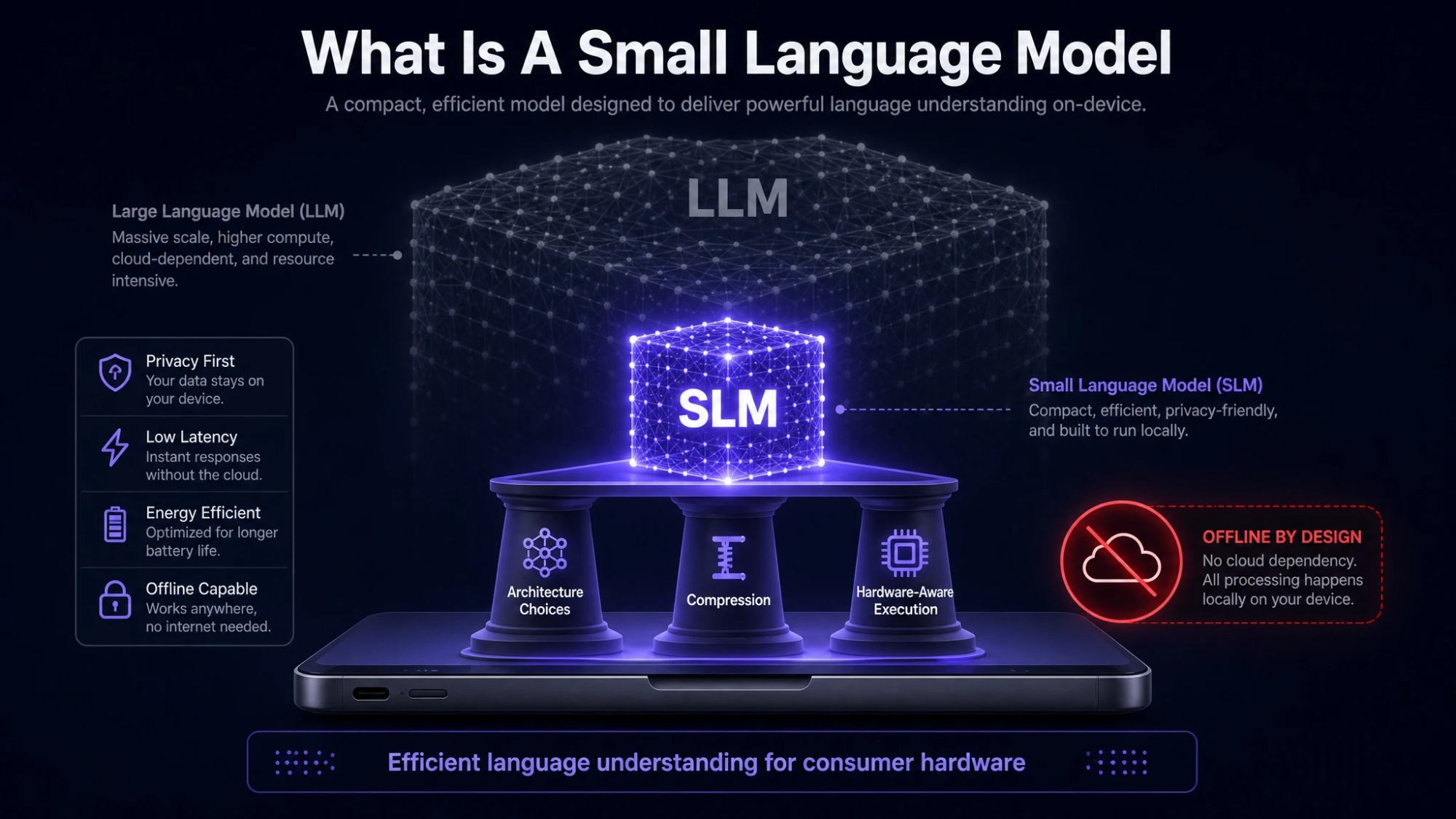
A small language model is a transformer-based model with fewer parameters and a smaller runtime footprint than large language models. The goal is to deliver useful language understanding while fitting within the constraints of consumer hardware such as phones, laptops, and edge devices.
SLMs are typically optimized for efficiency through architecture choices, compression, and hardware-aware execution. That balance makes them suitable for offline or limited-connectivity environments where cloud calls are slow, costly, or not permitted.
Why SLMs Matter For Phones And Laptops?
On-device AI shifts performance and control closer to the user. When the model runs locally, response time can drop sharply because the device avoids round trips to a remote server.
Local execution also reduces data exposure by keeping prompts and outputs on the device. That matters for sensitive notes, emails, customer data, and internal documents where compliance and trust are priorities.
- Lower Latency: Shorter response times for interactive writing, search, and assistive features.
- More Privacy: Inputs stay local, which reduces the risk of data leakage through network transmission.
- Offline Capability: Useful in flights, remote work, or secure environments with restricted internet access.
- Cost Control: Less dependence on recurring API usage for everyday tasks.
These benefits come with tradeoffs, but for many workflows the speed and privacy gains are worth it.
How SLMs Run Locally On Consumer Hardware?
Running an SLM on a phone or laptop depends on careful optimization across the model, the runtime, and the hardware. The core idea is to reduce memory bandwidth, keep compute predictable, and use accelerators efficiently.
Modern devices include multiple compute engines such as CPU cores, integrated GPUs, and neural processing units. On-device runtimes route parts of inference to the best available engine while managing memory and thermal limits.
Model Size And Parameter Count
Parameter count affects quality, memory use, and speed. Fewer parameters usually means faster inference and lower RAM use, but it can reduce reasoning depth and long context performance.
SLMs aim for strong task performance within a tight budget. They often rely on fine-tuning for a narrower set of tasks rather than trying to be universal.
Quantization
Quantization reduces the precision of model weights and activations, often from 16-bit or 32-bit to 8-bit, 6-bit, or 4-bit formats. This cuts memory usage and can improve speed on hardware that supports low-precision math.
Good quantization preserves most of the model’s usefulness while shrinking disk size and RAM needs. Poor quantization can hurt accuracy, especially on tasks that rely on subtle language cues.
Pruning And Distillation
Pruning removes less useful weights or neurons to reduce compute. Distillation trains a smaller student model to mimic the outputs of a larger teacher model, helping the SLM retain capability with fewer parameters.
These techniques are common in production SLM pipelines because they improve efficiency without requiring major hardware changes.
Efficient Inference Runtimes
Local inference relies on optimized kernels for matrix multiplication and attention. Runtimes also manage caching of attention keys and values to speed up generation for longer responses.
On laptops, GPU acceleration can be significant when drivers and runtime support are solid. On phones, NPU support can provide strong efficiency and battery life improvements when available.
SLMs Versus LLMs Key Differences
SLMs and LLMs share the same broad family of architectures, but they target different deployment goals. LLMs are often optimized for broad generality and deep reasoning, while SLMs emphasize responsiveness and local execution.
The right choice depends on constraints such as latency requirements, privacy policy, budget, and the complexity of tasks.
| Category | Small Language Model | Large Language Model |
|---|---|---|
| Typical Deployment | On-device or edge | Cloud or high-end servers |
| Latency | Low and consistent | Variable due to network and load |
| Privacy | Data can stay local | Data often leaves device |
| Cost Profile | Upfront optimization and setup | Ongoing usage-based compute cost |
This comparison clarifies why SLMs are increasingly used for personal productivity features and enterprise endpoints.
What SLMs Are Good At?
SLMs perform best when tasks are well-scoped and prompts are clear. They can deliver strong accuracy for short to medium inputs and repetitive business tasks where speed matters.
- Summarization: Condensing notes, meeting transcripts, and documents into actionable bullet points.
- Text Transformation: Rewriting, polishing tone, fixing grammar, and translating shorter passages.
- Classification: Tagging messages, routing support tickets, and detecting intent.
- Extraction: Pulling entities, dates, requirements, and key fields from text.
- Local Search Assist: Helping query local files when paired with a retrieval layer.
These strengths align with everyday device workflows where users expect instant responses.
What SLMs Struggle With?
Smaller models can be less reliable for deep reasoning, long-context synthesis, and complex multi-step planning. They may also be more sensitive to ambiguous prompts or domain-specific jargon when not tuned for it.
On-device constraints also limit context window size and output length unless the model and runtime are carefully optimized. If the device is under heavy load, throttling can slow generation noticeably.
Key Requirements For Running SLMs On Phones And Laptops
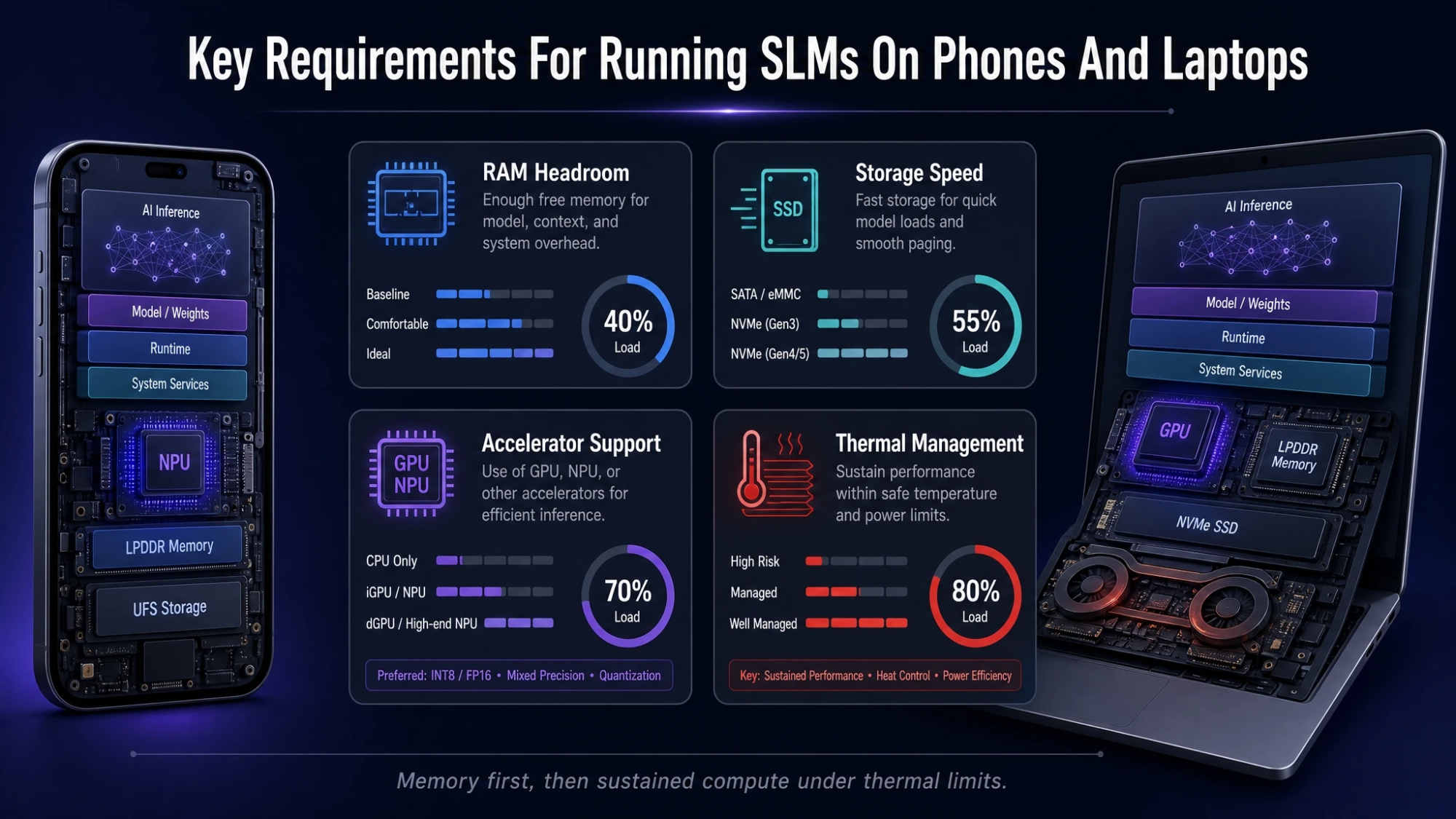
Hardware and software setup determines whether on-device inference feels smooth or frustrating. Memory is often the first bottleneck, followed by sustained compute under thermal limits.
- RAM Headroom: Enough memory for the model, runtime buffers, and the rest of the operating system.
- Storage Speed: Fast SSD or flash improves load time and reduces stutter during paging.
- Accelerator Support: GPU or NPU support can improve throughput and power efficiency.
- Thermal Management: Sustained generation can heat devices and reduce speed over time.
These constraints influence model choice, quantization level, and the maximum acceptable context length.
How To Choose The Right SLM For Your Use?
Selection should start with the tasks you need and the hardware you have. A smaller, well-tuned model often beats a larger but poorly optimized one in real user experience.
- Define The Workload: Identify whether you need summarization, rewriting, extraction, coding help, or multilingual support.
- Set Privacy Requirements: Decide what must remain on-device and what can be processed remotely.
- Check Device Limits: Match model size and quantization to available RAM, storage, and accelerator support.
- Evaluate Quality: Test with your own prompts and documents to measure accuracy, tone, and consistency.
- Plan For Updates: Choose a setup that can be refreshed as better small models and runtimes arrive.
A structured selection approach reduces wasted time and avoids deploying a model that feels fast but produces unreliable outputs.
Deployment Patterns That Make On Device AI Practical
Many teams use hybrid patterns that keep sensitive text local while still benefiting from stronger models when needed. A common approach is to start locally and only escalate to remote compute for complex requests.
Another pattern is pairing an SLM with retrieval, where the model answers using snippets from local documents rather than relying on internal memory alone. This improves factual grounding and reduces hallucinations for company content.
Security And Trust Considerations
Running locally improves privacy, but it does not eliminate risk. Devices can be lost, malware can read files, and model outputs can still leak sensitive information if users paste it into untrusted apps.
Strong policies help, including device encryption, app sandboxing, and access controls for local knowledge bases. When building on-device AI features, Tech Bonafide’s practical engineering focus can help teams think through security, model selection, and performance tradeoffs without adding unnecessary complexity.
Conclusion
A small language model is designed to deliver useful language capabilities with tight memory and compute budgets, making it a strong fit for phones and laptops. Techniques such as quantization, distillation, and optimized runtimes enable fast, private, and often offline AI experiences.
The best results come from matching the model to the task, respecting device constraints, and using hybrid or retrieval patterns when accuracy needs a boost. With the right setup, SLMs can bring reliable AI assistance to everyday workflows without constant cloud dependence.
Frequently Asked Questions
Do Small Language Models Work Without Internet Access?
Yes, if the model and runtime are installed on the device, it can run fully offline. Some features may still need internet access, such as syncing files or retrieving remote data sources. Offline performance depends on hardware limits and how aggressively the model is optimized.
Are SLMs Always More Private Than Cloud Models?
Local inference can keep prompts and outputs on the device, which reduces exposure in transit. Privacy still depends on device security, app permissions, and how data is stored. Encryption, secure enclaves, and strong endpoint controls remain important.
How Much RAM Do I Need To Run A Small Language Model On A Laptop?
RAM needs vary based on model size and quantization level, but having extra headroom matters more than the absolute minimum. If the system starts swapping to disk, speed drops and the experience can feel unstable. Testing on the target device is the most reliable way to confirm fit.