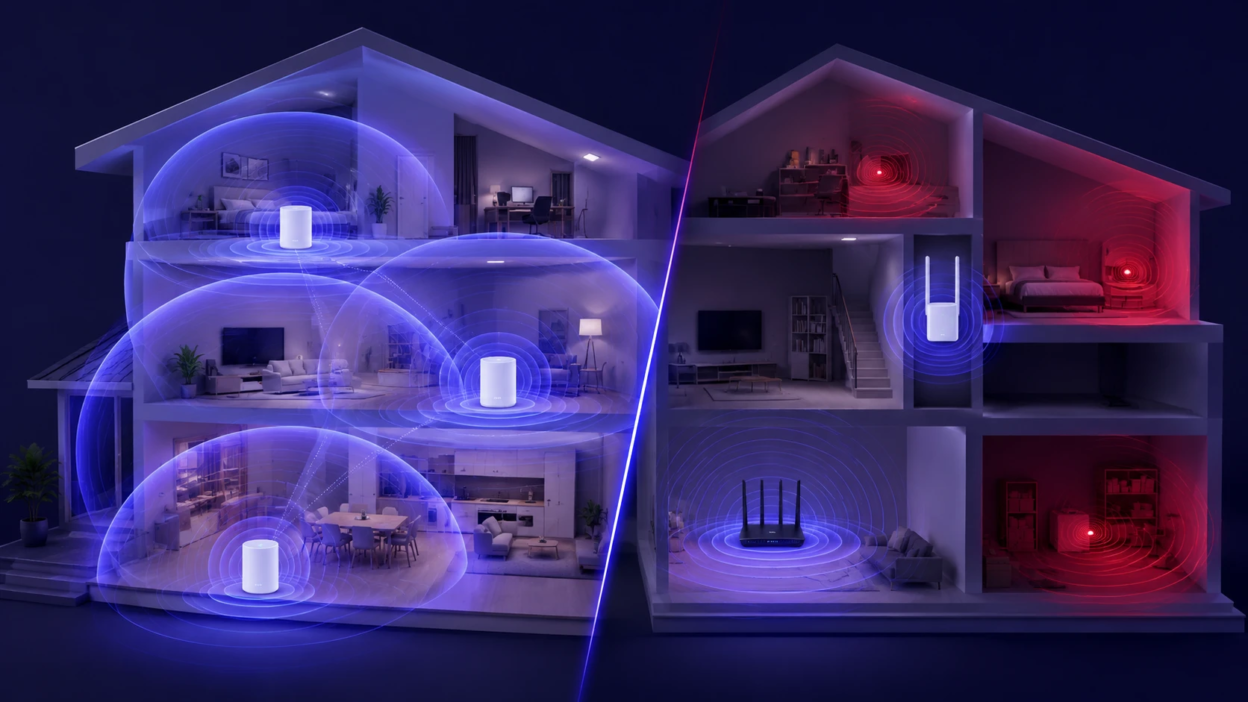
Dead zones happen when walls, distance, and interference weaken your router’s signal until devices drop to slow speeds or disconnect. The two most common fixes are mesh Wi-Fi systems and Wi-Fi extenders, but they solve the problem in very different ways. Choosing the right one depends on your home layout, internet plan, and how many devices you expect to stay stable at once.
Why Wi Fi Dead Zones Happen?
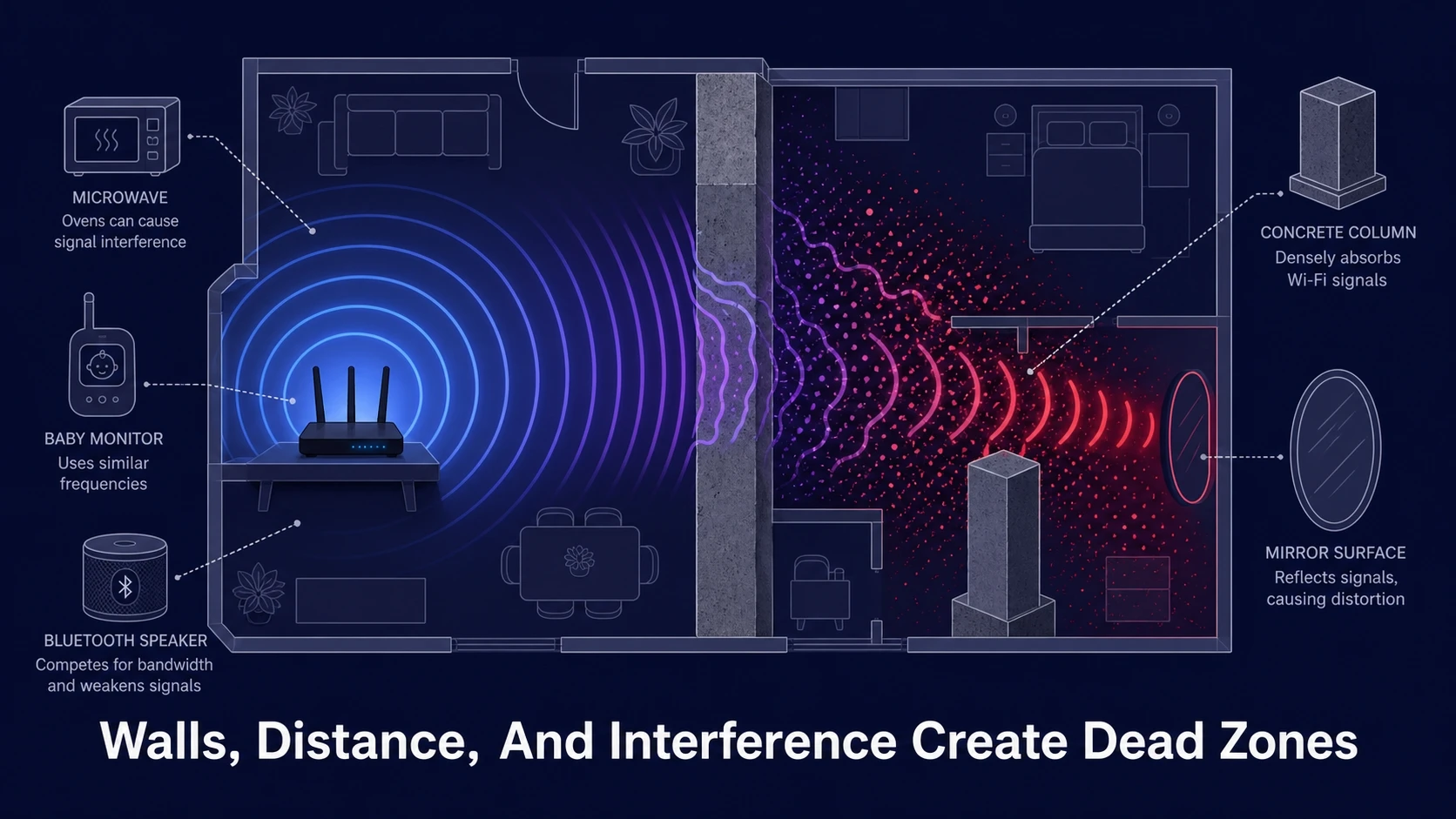
A single router can only push reliable signal so far, especially on 5 GHz where speed is higher but range is shorter. Thick walls, metal ductwork, fireplaces, mirrors, and floor-to-floor distance absorb or reflect radio waves and create weak spots.
Interference also matters. Nearby networks, Bluetooth gear, baby monitors, and even microwaves can add noise, forcing your Wi-Fi to retransmit data and lowering real throughput.
Mesh Wi Fi And Wi Fi Extender Basics
A Wi-Fi extender repeats a router’s signal and rebroadcasts it under the same or a different network name. It is usually placed halfway between the router and the dead zone so it can still receive a usable signal to repeat.
A mesh Wi-Fi system uses multiple nodes that work as one coordinated network. Nodes communicate with each other to extend coverage, and your devices can roam between nodes more smoothly than with many traditional extenders.
Mesh Wi Fi Vs Wi Fi Extender Coverage Differences
Extenders improve coverage by stretching the existing network outward, but the extender still depends on the quality of the signal it receives. If the extender is fed a weak or noisy signal, it can only repeat that weak or noisy link.
Mesh nodes are designed to create a stronger blanket of coverage by placing access points closer to where you use devices. When nodes have a good connection between them, the network typically stays more consistent across rooms and floors.
Speed And Latency Impact
Many extenders reduce practical speed because they receive and transmit on the same channel, which can cut throughput on that hop. Some newer extenders use dual-band or tri-band designs that can lessen the hit, but placement still makes or breaks results.
Mesh systems vary based on whether they have a dedicated wireless backhaul band or use shared airtime. With a good backhaul, mesh often maintains higher speeds in far rooms and keeps latency steadier for video calls, cloud gaming, and smart home control.
Roaming And Connection Stability
With extenders, devices often cling to the original router until the signal becomes unusable, then switch late and cause drops. If the extender broadcasts a different network name, switching can be even more disruptive.
Mesh networks are built to guide clients toward the best node using features such as band steering and fast roaming. Results still depend on client devices, but the experience is usually smoother when walking around the house on a call.
Setup And Management
Extenders can be quick to deploy, especially if your router supports WPS or a guided app. Troubleshooting is often manual, since channel selection, placement, and separate SSIDs can complicate tuning.
Mesh systems are typically app-driven with unified management, automatic updates, and built-in optimization tools. If you manage multiple devices, guest networks, parental controls, and basic security settings are usually easier to keep consistent.
When A Wi Fi Extender Is The Better Choice?
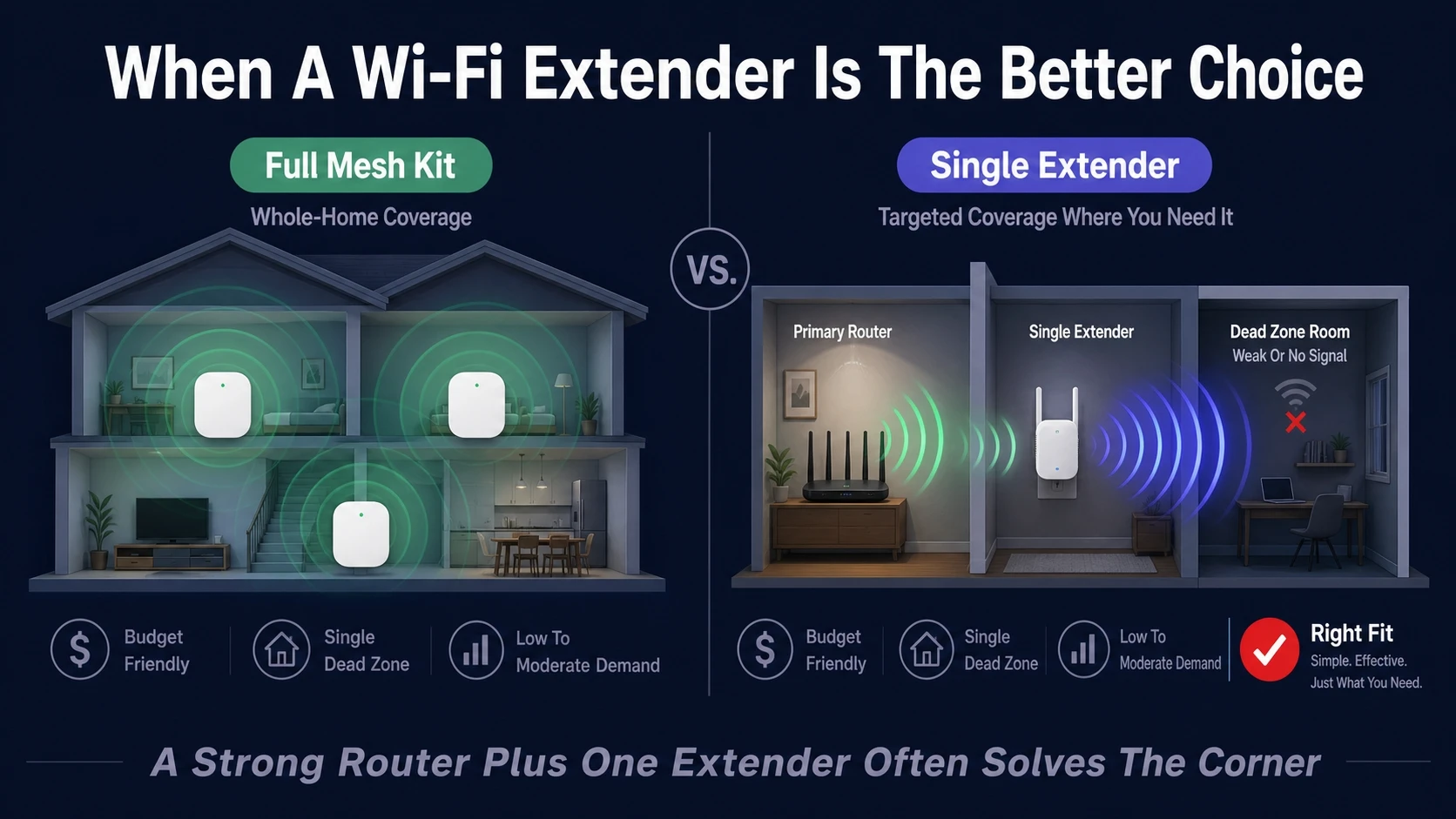
An extender can be the right fit when the dead zone is small and you only need coverage in one nearby room. It is also practical when your router is already strong and well-placed, but a corner of the home needs just a bit more signal.
- Budget Constraints: Extenders cost less upfront than most full mesh kits.
- Single Problem Area: A garage office or back bedroom can be improved without redesigning the network.
- Low To Moderate Demand: Web browsing and light streaming tolerate more throughput loss than gaming or large uploads.
- Good Midpoint Placement: You can place the extender where it still receives a strong signal from the router.
If you go this route, placement and configuration are the difference between a real fix and a new bottleneck.
When Mesh Wi Fi Is The Better Choice?
Mesh is usually the stronger option when dead zones appear across multiple rooms or floors, or when many devices need stable bandwidth. It also helps when the router cannot be centrally located, which is common in homes where the modem is tied to one wall outlet.
- Whole Home Coverage Needs: Multiple nodes can be placed to cover hard areas without relying on one stretched signal.
- Higher Performance Goals: Video calls, 4K streaming, cloud backups, and gaming benefit from steadier latency.
- More Devices: Mesh kits are often built to handle more simultaneous clients with better scheduling.
- Simpler Ongoing Management: A single app and unified settings reduce upkeep.
Mesh is not automatically perfect, but it is usually more predictable for larger spaces and tougher layouts.
Key Differences At A Glance
| Factor | Wi Fi Extender | Mesh Wi Fi |
|---|---|---|
| Best Use | One or two weak spots | Whole home or multi-floor coverage |
| Typical Speed Outcome | Often reduced on the repeated hop | More consistent, especially with strong backhaul |
| Roaming Experience | Can be sticky and disruptive | Smoother handoff in one network |
| Management | Basic, may require manual tuning | Central app, unified settings and updates |
Use the table as a starting point, then verify your home’s constraints before buying hardware.
How To Choose Based On Your Home Layout?
Start with square footage and floors, but focus on where the signal struggles. Long hallways, L-shaped layouts, and finished basements are common trouble areas.
Also consider building materials. Plaster, brick, concrete, tile, and metal-backed insulation tend to block Wi-Fi more than drywall, which pushes the decision toward mesh or wired backhaul.
Apartment And Small Homes
If the space is compact and the router is centrally placed, an extender may be enough to cover a single back room. If neighbors’ networks crowd the airwaves, a modern mesh kit with better radio management can still be worth it.
Multi Floor Homes
Floors and stairwells often weaken signal more than a single interior wall. Mesh nodes placed on each level tend to outperform a single extender, especially when the dead zone is directly above or below the router.
Outdoor And Garage Areas
Garages and patios are tricky because exterior walls can be dense and reflective. Mesh can help if a node can be placed inside near the exterior wall, but the best results often come from running Ethernet to an access point when possible.
Placement Tips That Actually Matter
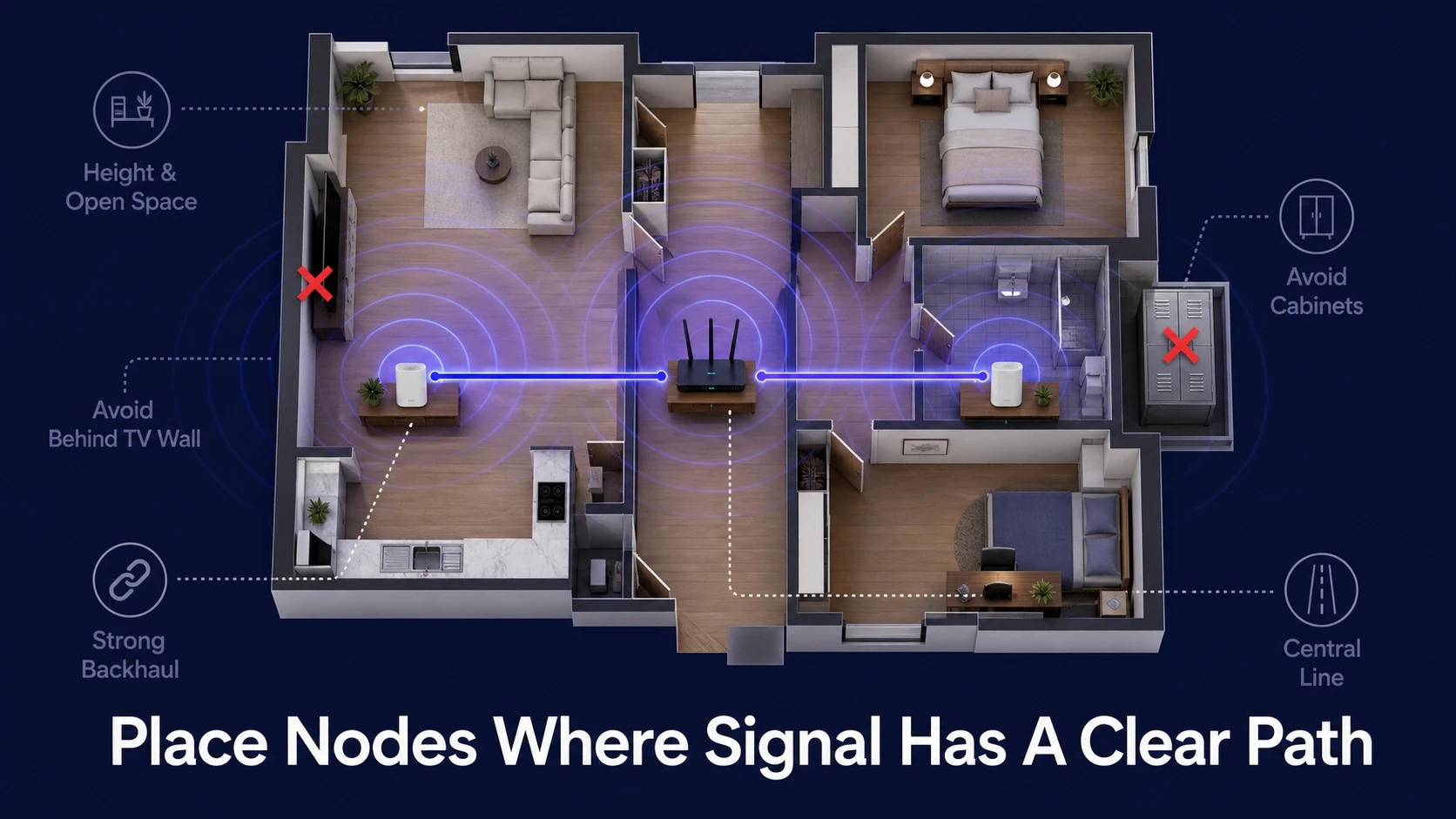
Bad placement is the top reason people think their extender or mesh kit does not work. You want a clear path between devices and the node that serves them, and a strong link between nodes or between extender and router.
- Keep Devices In The Open: Avoid putting nodes behind TVs, inside cabinets, or next to large metal surfaces.
- Move Away From Interference: Keep distance from cordless phone bases, microwaves, and dense clusters of smart home hubs.
- Aim For Strong Backhaul: Place mesh nodes where they still show a strong connection to the main node.
- Prefer Height And Central Lines: A shelf or console in a central corridor usually beats a corner on the floor.
After placement, run speed tests in the problem areas, then adjust one node at a time to isolate improvements.
Ethernet Backhaul And Wired Options
If you can run Ethernet, you can dramatically improve either approach. A mesh system with Ethernet backhaul reduces wireless congestion and stabilizes speeds across nodes.
With an extender, wired links are less common, but a wired access point can replace an extender entirely and deliver better throughput. If you are unsure what your home supports, Tech Bonafide-style networking guidance focuses on practical wiring paths, router placement, and realistic upgrade plans instead of quick fixes.
Cost And Long Term Value
Extenders cost less, but the trade-off can be lower speeds, more troubleshooting time, and uneven performance as you add devices. Mesh costs more upfront, but it can reduce frustration and scale better as your household adds smart TVs, cameras, and work devices.
Also factor in support and updates. Mesh vendors tend to ship more frequent firmware improvements through the app, which can help stability and security over time.
Common Mistakes To Avoid
Most Wi-Fi upgrades fail because the root cause is not identified. Dead zones can come from poor router placement, a congested channel, an outdated router, or an ISP modem-router combo doing too much work.
- Buying Before Testing: Check router location, reboot habits, and basic channel congestion first.
- Placing An Extender In The Dead Zone: The extender must receive a strong signal to repeat it well.
- Mixing Too Many Network Names: Multiple SSIDs can cause devices to latch onto the wrong access point.
- Ignoring Router Capability: If the router is underpowered, adding an extender may not fix the core limitation.
A small amount of planning prevents spending twice on upgrades that do not match your space.
Conclusion
Mesh Wi-Fi usually fixes dead zones better when coverage problems span multiple rooms, floors, or many devices competing for bandwidth. A Wi-Fi extender makes sense when the weak area is limited, the router signal is still strong at the extender location, and the performance expectations are modest.
If you want the cleanest experience, start by optimizing router placement and then choose hardware based on layout and backhaul options. When you need a more tailored plan, Tech Bonafide’s networking resources can help you map coverage, reduce interference, and choose gear that fits your home rather than guessing.
Frequently Asked Questions
Does A Wi Fi Extender Always Cut Speed?
Many extenders reduce throughput because they repeat traffic over the same wireless channel. Dual-band and tri-band models can reduce the impact, but placement and signal quality still control results.
Is Mesh Wi Fi Worth It If I Already Have A Good Router?
Mesh can still be worth it if your dead zones are caused by distance, floors, or dense materials rather than a weak router. If only one corner is affected and you can place an extender in a strong-signal midpoint, the extender may be enough.
Should I Use One SSID Or Separate Names?
With mesh, a single SSID is usually best because it supports smoother roaming. With extenders, a single SSID can work on modern gear, but separate names may help you force devices onto the stronger signal when roaming is inconsistent.