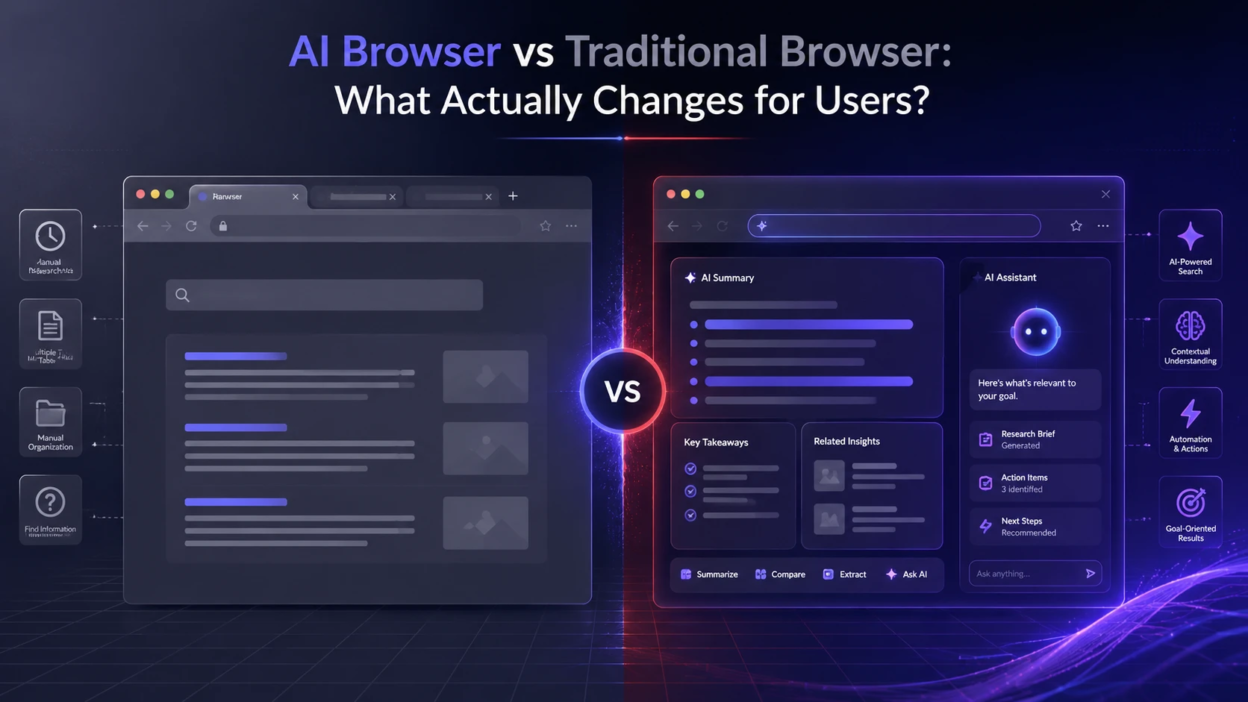
Browsers used to be simple gateways to websites. Now a new category is emerging that adds built-in assistance, automation, and summarized answers directly inside the browsing flow. Understanding what changes at the user level helps you decide whether the shift is worth it or whether the classic approach still fits better.
What An AI Browser Is?
An AI browser is a web browser that includes an integrated AI layer designed to help you complete tasks while you browse. Instead of only rendering pages, it can interpret content, extract key points, and help you act on what you find.
This can show up as a side panel assistant, page summaries, writing support, tab organization, or actions that work across multiple sites. The defining difference is that the browser becomes a workflow tool, not only a viewer.
What A Traditional Browser Does Well?

A traditional browser focuses on speed, standards, and compatibility. It loads pages, manages cookies, supports extensions, and stays out of the way while websites do the heavy lifting.
This model gives users predictable behavior and clear boundaries. Most automation, note taking, or research help happens through add-ons, separate apps, or the websites themselves.
Core Differences Users Notice First
The biggest changes are felt in how you search, read, and switch between tasks. AI features reduce the friction of finding meaning and taking action, but they also add new layers of processing and settings.
- Reading Experience: AI browsers can summarize long pages and highlight key claims, while traditional browsers rely on your own scanning and bookmarking.
- Search Behavior: AI browsers often blend web results with synthesized answers, while traditional browsers keep search as a separate engine-driven experience.
- Task Flow: AI browsers can draft text, rewrite snippets, and create checklists without leaving the page, while traditional browsers usually require switching tools.
- Tab Management: AI browsers may auto-group tabs by topic and suggest closures, while traditional browsers offer manual groups and history-based recovery.
- Learning Curve: AI browsers introduce prompts, modes, and permissions, while traditional browsers stay familiar and minimal.
These differences matter most for research-heavy, reading-heavy, and multi-tab workflows. The value is lower when browsing is mostly quick visits and simple searches.
How Searching And Discovery Changes?
Traditional browsing keeps discovery linear. You search, open results, compare sources, and build your own understanding page by page.
With an AI browser, discovery can become conversational. The assistant may answer questions based on the open page, compare multiple open tabs, and suggest follow-up queries that stay close to your goal.
- Fewer Context Switches: You can ask about an article while staying on it, rather than copying text into a separate tool.
- Faster Skimming: Summaries reduce time spent deciding whether a page is worth reading in full.
- Deeper Navigation: AI can point to specific sections, definitions, or data points inside a page.
The tradeoff is that synthesized answers can blur what is directly stated versus what is inferred. Users need to confirm critical details on the source page, especially for high-stakes decisions.
Writing And Communication Inside The Browser
Traditional browsers depend on web apps for writing assistance. Any improvement to emails, documents, or form inputs comes from the website editor, extensions, or separate writing tools.
AI browsers can offer inline writing support across many sites. That may include rewriting a paragraph, changing tone, fixing grammar, or shortening a message without leaving the current tab.
- Consistency Across Sites: The same writing help can follow you from email to support forms to notes.
- Drafting Support: You can generate a structured outline or a concise reply based on what is on the page.
- Language Help: Translation and simplification can be available wherever text is selected.
This convenience depends on permissions to read selected text or page content. Users should review what data is being processed and which inputs are sent to remote services.
Productivity And Automation Features
Automation in traditional browsing is largely extension-based. Users assemble their own toolset, and each extension has its own interface and limitations.
AI browsers aim to make automation feel native. Some can turn a browsing goal into a sequence of actions, such as collecting details across pages, extracting tables into notes, or building a quick summary from multiple sources.
- Topic Workspaces: Tabs, notes, and saved snippets can be grouped automatically by subject.
- Action Suggestions: The browser may propose next steps like saving a page, creating a task list, or drafting a response.
- Information Extraction: Key details like names, dates, and requirements can be pulled into a compact view.
Automation can reduce repetitive browsing chores, but it can also feel intrusive if suggestions are too frequent. Good controls and clear toggles matter.
Privacy And Security What Changes In Practice?

Traditional browsers already deal with sensitive data through cookies, passwords, and trackers. The user risk profile is mostly about websites, extensions, and tracking networks.
AI browsers add a new factor, which is content processing. If a browser summarizes a page or helps write based on what you see, the system may need access to page text, selected snippets, or form content.
- Data Flow Clarity: Users should know what stays on-device and what is sent to cloud services.
- Permission Granularity: The best setups allow per-site controls for AI reading and writing features.
- Enterprise Considerations: Work accounts may require stricter controls for sensitive documents and internal portals.
Security still depends on fundamentals like sandboxing, update cadence, and phishing protection. AI can help flag suspicious pages, but it does not replace careful verification of URLs and login prompts.
Performance And Reliability Differences
Traditional browsers are optimized for broad compatibility and predictable performance. They tend to behave consistently across sites because their core job is rendering and standards compliance.
AI browsers may use extra CPU, memory, or network calls for analysis and generation. Some users will feel that as heavier tab usage, more battery drain, or added latency when an assistant is active.
Reliability also changes because AI output can vary. A summary can miss nuance, and an automated action can misread a page layout, especially on dynamic sites.
Side By Side Comparison Table
| User Area | AI Browser | Traditional Browser |
|---|---|---|
| Reading Long Pages | Summaries, highlights, quick extraction of key points | Manual scanning, reader mode, bookmarks |
| Multi Tab Research | Can compare open tabs and consolidate notes | Relies on tab groups and manual note taking |
| Writing Across Sites | Inline rewriting, tone shifts, drafting assistance | Depends on site editors or extensions |
| Privacy Controls | Adds AI data handling settings and permissions | Focuses on cookies, trackers, and extension risk |
This comparison is most useful when mapped to your daily browsing habits. The right choice depends on whether assistance outweighs added complexity.
Compatibility Extensions And Control
Traditional browsers have mature extension ecosystems and stable developer tools. Users can shape the browser into almost any workflow, but that requires selecting and maintaining multiple add-ons.
AI browsers may support common extensions, but their core differentiator is built-in capability. Users who want maximum control might still prefer the modular approach of a traditional browser.
- Extension Risk Management: Fewer extensions can reduce attack surface, but only if built-in features meet your needs.
- Customization Depth: Traditional setups often allow deeper UI tweaks and advanced settings.
- Portability: Bookmarks and passwords are easy to sync on both, but AI workflows may not transfer cleanly between browsers.
Control is a key part of trust. Users should look for clear toggles, transparent settings, and the ability to disable AI features entirely when needed.
Who Benefits Most From An AI Browser?

AI browsers shine when browsing is part of knowledge work. People who read many pages, synthesize information, and write frequently inside the browser tend to see the biggest improvement.
Users who prioritize a lean interface, minimal background processing, or strict separation between browsing and automation may prefer a traditional browser. For many, a hybrid approach works well, using an AI browser for deep research and a traditional one for routine tasks.
Conclusion
An AI browser changes browsing from passive viewing to active assistance. You get faster understanding, smoother writing help, and smarter organization, but you also take on extra settings, potential performance cost, and new privacy decisions.
A traditional browser still wins on predictability, compatibility, and a clean separation of concerns. The best choice is the one that matches how often you research, write, and manage complex tab sessions.
Frequently Asked Questions
Is An AI Browser Replacing Search Engines?
No. It usually sits on top of search by summarizing results, answering questions from pages, and helping you navigate faster. Search engines and websites still provide the underlying content and rankings.
Can I Disable AI Features In An AI Browser?
Many AI browsers provide toggles to disable assistants, summaries, or inline writing tools. Before switching, check whether controls are global, per-site, or tied to account sign-in.
Does An AI Browser Make Browsing Less Private?
It can, depending on how the AI system processes page text and whether it sends data to cloud services. Reviewing permissions, limiting AI access on sensitive sites, and using strong privacy settings reduces risk.