Hybrid cloud and multi-cloud often get used as if they mean the same thing. They do not, and choosing the wrong approach can create avoidable cost, security gaps, and operational drag.
This guide breaks down what each model is, where they overlap, and when each one fits best. It also covers the governance and architecture decisions that make either strategy succeed.
Hybrid Cloud Meaning
Hybrid cloud combines on-premises or private infrastructure with one or more public cloud environments in a coordinated architecture. The environments do not need to host identical workloads or constantly move data between each other, but they are managed or integrated in ways that support shared business and technical requirements.
The defining trait is the coordinated use of private or on-premises resources and public cloud services. Depending on the architecture, that coordination can include networking, identity, security policy, monitoring, workload management, and data integration across environments.
Multi-Cloud Meaning
Multi-cloud means using cloud services from more than one cloud provider. For example, an organization might run some workloads on AWS, others on Microsoft Azure, and others on Google Cloud. The environments may support different workloads and do not need to be tightly integrated with one another.
The defining trait is provider diversity. Multiple clouds may be tightly integrated, loosely connected, or operated independently, and the environment may result from deliberate strategy, mergers and acquisitions, or separate teams adopting different providers.
Key Differences That Matter in Practice
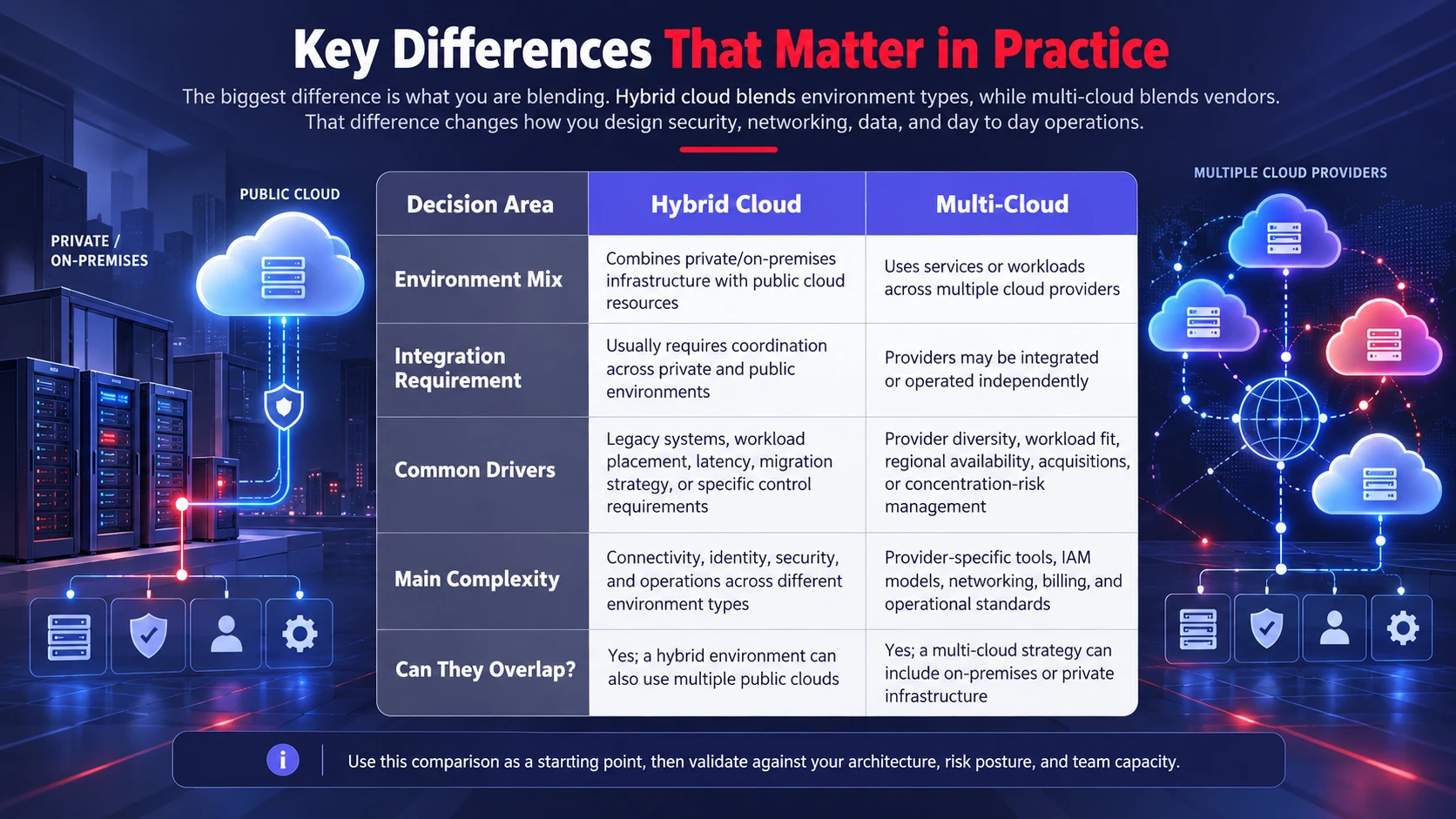
The biggest difference is what you are blending. Hybrid cloud blends environment types, while multi-cloud blends vendors.
That difference changes how you design security, networking, data, and day to day operations.
| Decision Area | Hybrid Cloud | Multi-Cloud |
|---|---|---|
| Environment Mix | Combines private/on-premises infrastructure with public cloud resources | Uses services or workloads across multiple cloud providers |
| Integration Requirement | Usually requires coordination across private and public environments | Providers may be integrated or operated independently |
| Common Drivers | Legacy systems, workload placement, latency, migration strategy, or specific control requirements | Provider diversity, workload fit, regional availability, acquisitions, or concentration-risk management |
| Main Complexity | Connectivity, identity, security, and operations across different environment types | Provider-specific tools, IAM models, networking, billing, and operational standards |
| Can They Overlap? | Yes; a hybrid environment can also use multiple public clouds | Yes; a multi-cloud strategy can include on-premises or private infrastructure |
Use this comparison as a starting point, then validate against your architecture, risk posture, and team capacity.
When Hybrid Cloud Makes the Most Sense
Hybrid cloud can fit when business or technical requirements justify keeping some workloads on-premises or in private infrastructure while using public cloud services elsewhere. Common reasons include legacy dependencies, migration timing, latency requirements, specialized hardware, existing infrastructure investments, or specific security and compliance constraints.
It also fits when you want cloud elasticity while keeping certain systems or sensitive datasets on controlled infrastructure.
- Data Residency And Sovereignty Requirements: Workloads or datasets may need to remain in approved locations or under specific operational controls. Depending on the requirement, that may be satisfied through private infrastructure, edge environments, or approved public-cloud regions.
- Latency-Sensitive Workloads: Processing that requires fast local response can remain on-premises or at the edge, while public-cloud services handle workloads that can tolerate additional network latency or benefit from elastic capacity.
- Legacy Dependencies: Older applications tied to specific hardware, networks, or licensing can coexist with cloud native services.
- Gradual Modernization: Teams can refactor in phases while maintaining stable operations and predictable change windows.
These benefits appear only when the integration layer is designed well. That means consistent identity, network segmentation, and observability across both sides.
When Multi-Cloud is the Better Choice
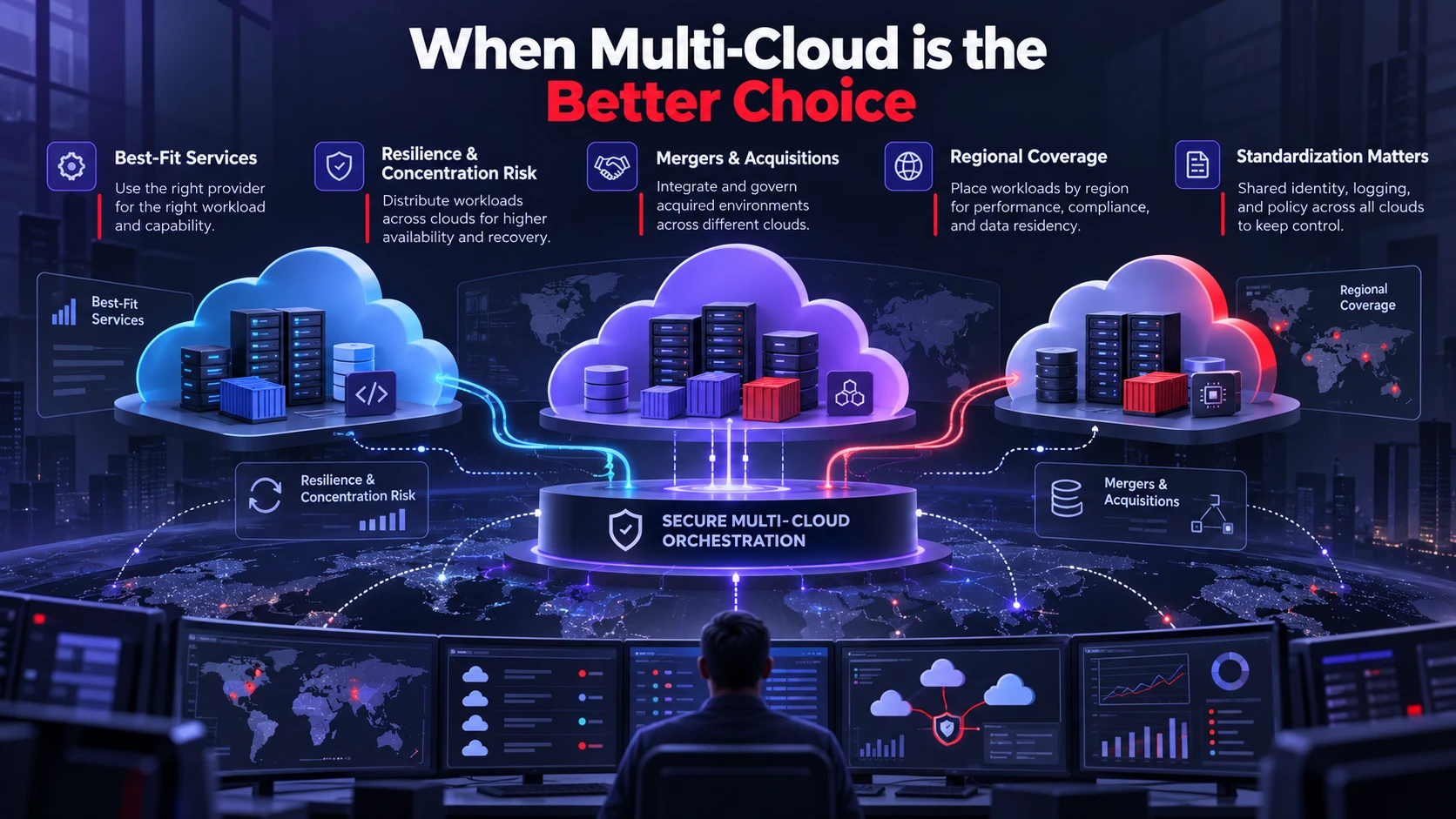
Multi-cloud is a strategy choice, not a default. It makes sense when you have clear reasons to distribute workloads across providers and the operational maturity to manage it.
Multi-cloud can reduce dependence on a single provider, but simply using two providers does not automatically create resilience. Concentration risk is reduced only when critical workloads, data, operational processes, or recovery plans are deliberately designed so that a disruption at one provider does not create the same business impact.
- Best Fit Services: Teams pick platform services that match requirements, such as analytics, AI, or managed databases, without forcing a single vendor for everything.
- Resilience And Concentration Risk: Critical services can be distributed or given cross-provider recovery options when the business benefit justifies the additional architecture, testing, data replication, and operational complexity.
- Mergers And Acquisitions: Multiple clouds may already exist and must be governed rather than rushed into consolidation.
- Regional Coverage: Workloads can be placed where a provider has the right regions, compliance posture, or network performance.
The upside depends on standardization. Without shared patterns for identity, logging, and policy, multi-cloud becomes a collection of separate IT islands.
Security and Compliance Considerations
Hybrid cloud security often centers on consistent controls across private and public environments. The hard parts are shared identity, secure network paths, and ensuring the same policy intent is enforced everywhere.
Multi-cloud security often centers on variance. Each provider has different IAM constructs, logging formats, and security services, so teams must normalize controls and auditing.
- Identity And Access Management: Centralize or federate identity where practical, enforce least privilege, protect privileged accounts, and use consistent joiner, mover, and leaver processes across environments.
- Policy As Code: Codify guardrails for encryption, network exposure, and resource tagging so changes are reviewed and repeatable.
- Audit Readiness: Standardize logs, retention, and evidence collection so compliance checks do not become manual fire drills.
- Data Classification: Define what data can live where, then enforce it using storage policies, DLP controls, and workload placement rules.
For a broader identity-first security model, our guide to Zero Trust security explains how least privilege, strong authentication, device controls, segmentation, and continuous monitoring reduce the impact of compromised identities across cloud environments.
Before expanding either model, document how identity, network segmentation, encryption, logging, data classification, incident response, and privileged access will work across every environment. Controls should be defined before workload growth makes inconsistencies harder to discover and correct.
Cost and Performance Tradeoffs
Hybrid-cloud economics depend on the full cost of both environments. Keeping some workloads on existing infrastructure may reduce variable public-cloud charges, but total cost also includes hardware refreshes, facilities, staffing, licensing, networking, support, and integration. Compare total cost of ownership rather than assuming that retaining on-premises workloads is automatically cheaper.
Multi-cloud can improve workload fit when different providers offer useful regions, services, commercial terms, or technical capabilities. It can also increase cost through duplicated tooling, cross-cloud data transfer, separate commitments, provider-specific skills, and additional governance. Performance gains depend on workload placement and architecture rather than the number of providers alone.
- Network And Data Transfer: Plan for bandwidth, latency, and egress fees, especially for data heavy analytics and backup replication.
- License And Support Models: Validate how existing enterprise licenses apply across clouds and whether vendor support overlaps or duplicates.
- Right Sizing Discipline: Establish sizing standards and review cycles so workloads do not drift into overprovisioned states.
- FinOps Governance: Create tagging, showback, and budget alerts so teams understand cost drivers and can act early.
Cost control improves when allocation and ownership are built into the architecture. A consistent tagging or labeling strategy, cost-center mapping, showback or chargeback reporting, and regular optimization reviews make it easier to understand which teams and workloads are driving spend.
For a deeper explanation of allocation, tagging, budgets, ownership, and optimization, our guide to FinOps and cloud cost control explains how engineering and finance can manage cloud spending together.
Operational Complexity and Team Readiness
Hybrid cloud often adds complexity around connectivity, identity, observability, and operations across on-premises and public-cloud environments. Multi-cloud adds another dimension because teams must also account for differences in provider tooling, IAM models, networking, APIs, billing, and managed services.
The actual operational burden depends on architecture, automation, standardization, workload count, and team skills. Whichever model you choose, ownership and escalation paths should match your staffing and on-call capacity.
- Tool Consolidation: Standardize monitoring, incident response, configuration management, and ticketing workflows.
The same governance problem can appear at the application layer. Our guide to SaaS sprawl explains how duplicated tools, unclear ownership, fragmented access controls, and overlapping platforms increase cost and operational risk. - Reference Architectures: Maintain approved patterns for networking, identity, encryption, observability, and CI/CD so teams do not reinvent core platform decisions for every workload.
- Skills And Training: Invest in platform engineering practices, not just provider specific certifications.
- Change Management: Use gated deployments, clear rollback plans, and configuration drift detection to reduce surprises.
Operational readiness is often the deciding factor. A simpler cloud strategy that the team can run well beats a complex strategy that only looks good on paper.
How to Choose Between Hybrid Cloud and Multi-Cloud?
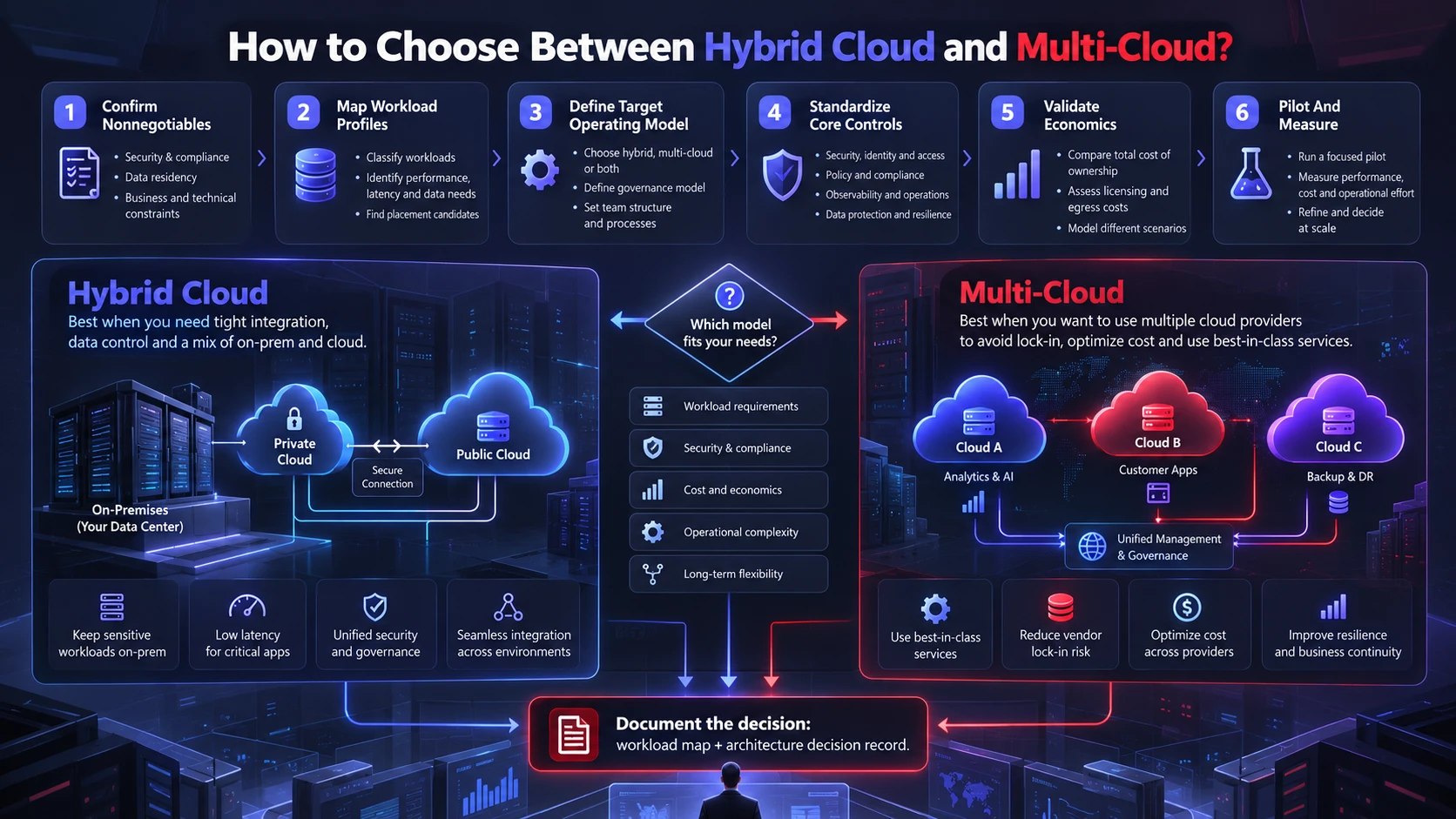
Start with constraints, then move to business outcomes. The goal is not to pick a trend, but to select a model that you can operate securely at scale.
Work through the decision in a structured way and document tradeoffs so stakeholders align early.
- Confirm Nonnegotiables: Document compliance, data residency, latency, contractual, hardware, and operational requirements that constrain or influence where each workload can run.
- Map Workload Profiles: Group applications by sensitivity, integration needs, uptime targets, and modernization readiness.
Runtime architecture also affects portability and operations. If workload packaging is part of the decision, our containers vs virtual machines comparison explains the tradeoffs in portability, security boundaries, resource use, and operational complexity. - Define Target Operating Model: Decide who owns platforms, security guardrails, deployment pipelines, and incident response across environments.
- Standardize Core Controls: Implement shared identity, logging, encryption standards, network segmentation, and policy as code.
- Validate Economics: Model total cost including staffing, support, data transfer, and tooling, not only compute pricing.
- Pilot And Measure: Run a limited scope rollout with success metrics, then expand using the same patterns and governance.
Document the final decision as a workload map and architecture decision record that explains placement, ownership, security controls, recovery requirements, expected cost, and the reason each workload belongs in its selected environment. This makes future reviews and migrations easier to manage.
Common Mistakes to Avoid
Hybrid and multicloud environments become harder to operate when boundaries, ownership, security controls, cost allocation, and platform standards are defined inconsistently. Addressing those gaps early reduces rework as workloads and teams expand.
Avoid these traps early to keep the program manageable.
- Choosing Multi-Cloud Without Standardization: Multiple providers without shared guardrails often leads to fragmented security and unpredictable costs.
- Treating Hybrid Cloud As A Simple Network Connection: Without unified identity, monitoring, and policy enforcement, hybrid becomes hard to troubleshoot and audit.
- Ignoring Data Location And Movement: Large datasets can be expensive and slow to move across regions, environments, or cloud providers. Model latency, transfer frequency, replication requirements, and egress charges before distributing tightly coupled workloads.
- Underestimating Skills Requirements: More platforms require more operational knowledge, stronger documentation, and better automation.
Once you remove these blockers, the strategy becomes easier to execute and easier to explain to leadership.
Conclusion
Hybrid cloud combines private or on-premises infrastructure with public-cloud services when workloads benefit from coordinated use of different environment types. Multi-cloud uses services across multiple cloud providers when provider diversity, workload fit, regional availability, or concentration-risk management justifies the additional operational complexity.
Neither model is automatically more modern, resilient, secure, or cost-effective. Start with workload requirements and business constraints, then compare integration effort, security, data movement, operating skills, recovery design, and total cost. Some organizations will ultimately use both approaches in a hybrid-multicloud architecture.
Frequently Asked Questions
Is Hybrid Cloud the Same As Multi-Cloud?
No. Hybrid cloud blends private and public environments with integration, while multi-cloud uses multiple public cloud providers. A business can use one without the other, or combine both.
Can A Business Use Both Hybrid Cloud and Multi-Cloud?
Yes. This is often described as a hybrid-multicloud architecture: an organization retains on-premises or private infrastructure while also using services from multiple public-cloud providers. It can support different workload requirements, but it adds networking, identity, security, cost, observability, and operational complexity that must be governed consistently.
Which Model is Easier to Secure and Manage?
Neither is automatically easier. Hybrid cloud needs consistent controls across private and public systems, while multi-cloud needs normalization across providers. The simpler option is the one your team can operate with clear ownership, automation, and auditing.