
Data loss rarely announces itself. A laptop fails, ransomware encrypts a share, a cloud account gets locked, or a simple mistake wipes the wrong folder. The 3-2-1 backup rule is a practical way to design backups that still work when one layer fails.
What The 3 2 1 Backup Rule Means?
The 3-2-1 backup rule is a simple framework for reducing single points of failure. It works for personal files and business systems because it focuses on redundancy and separation.
It means keeping three copies of important data, stored on two different types of media, with one copy kept offsite. Each part addresses a different failure mode.
- Three Copies: Keep the original data plus two backups to protect against corruption, deletion, and device failure.
- Two Media Types: Store backups on different storage types so one shared weakness does not take everything down.
- One Offsite Copy: Keep at least one backup outside the main location to survive theft, fire, floods, and ransomware that spreads locally.
Once the rule is clear, the real work is mapping it to your devices, accounts, and recovery needs.
Why This Rule Still Works For Personal And Business Data?
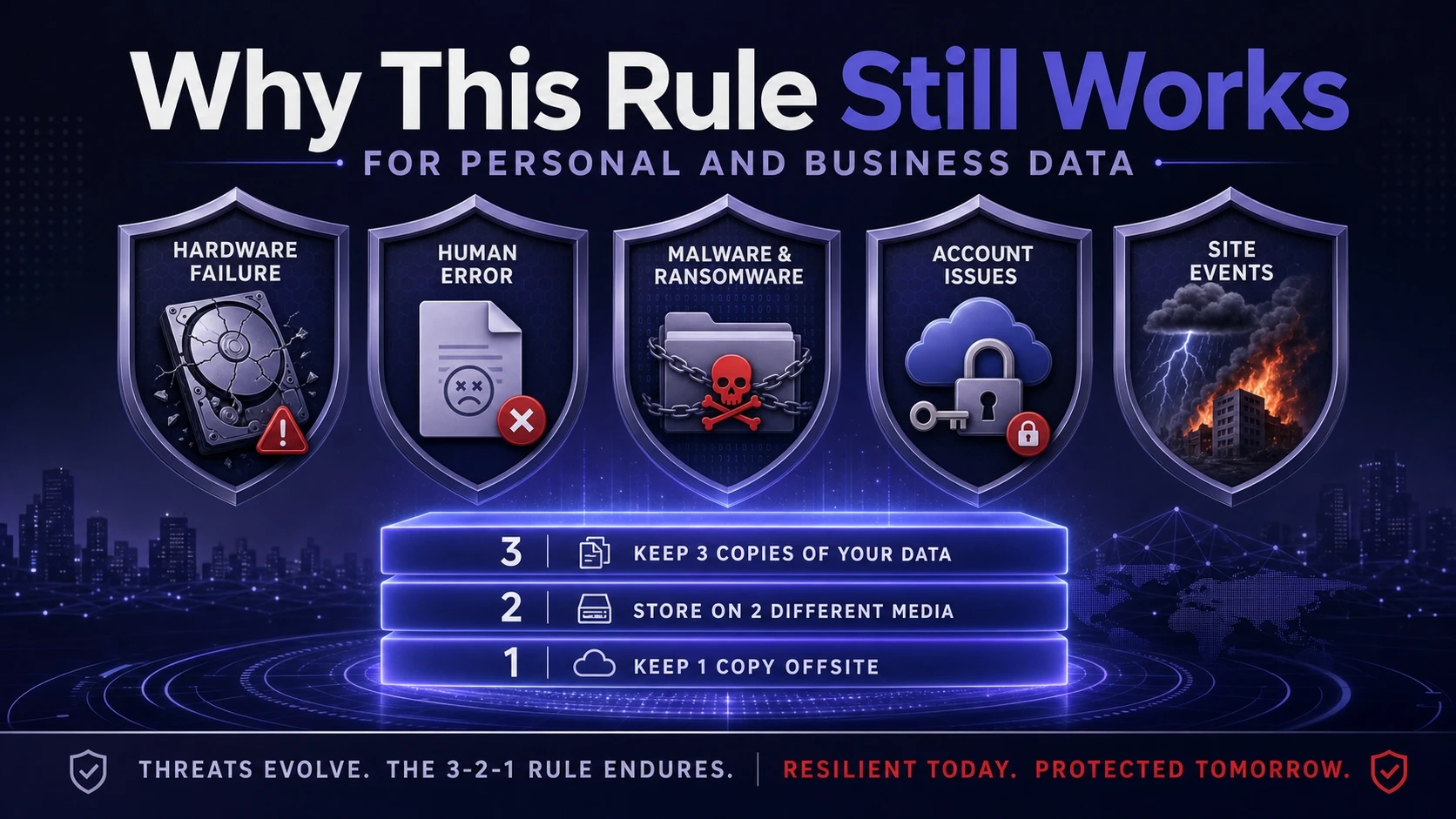
Most failed backup plans break for the same reasons. They rely on a single device, a single cloud account, or one sync tool that was never designed as a true backup.
For businesses, the risks expand to compliance, downtime, and customer trust. For individuals, the cost is often irreplaceable photos, documents, or years of creative work.
- Hardware Failure: Drives die without warning, and SSDs can fail in ways that make recovery harder.
- Human Error: Accidental deletion and overwriting are common, especially in shared folders.
- Malware And Ransomware: Encryption can spread to attached drives and mapped network shares.
- Account Issues: Cloud access can be lost due to lockouts, billing failures, or compromised credentials.
- Site Events: Power incidents, theft, and environmental damage can wipe local devices at once.
The rule is popular because it is easy to remember, but it is also flexible enough to fit many environments.
Three Copies Without Confusion
Three copies does not mean three different versions scattered everywhere. It means three recoverable copies with a clear purpose and a known restore path.
For personal data, the original might be a laptop, and the two backups could be an external drive and a cloud backup vault. For business data, the original might be production storage, and backups might include a local backup repository and a cloud or secondary site copy.
- Primary Copy: The working data used daily, such as a workstation, NAS, file server, or SaaS data set.
- Backup Copy One: A fast restore option stored locally to recover quickly from common issues.
- Backup Copy Two: A separated copy designed to survive larger incidents and hostile events.
Clarity matters most at restore time, so labeling, retention policies, and ownership should be defined early.
Two Different Media Types That Reduce Shared Risk
Two media types prevents one class of failure from taking everything down. It also helps reduce the chance that a single misconfiguration breaks every copy.
Media type can mean different physical storage, different systems, or different storage platforms. The goal is diversity, not complexity.
| Backup Medium | Strength | Watchouts |
|---|---|---|
| External HDD Or SSD | Low cost and fast restore for large files | Prone to theft and malware if always connected |
| NAS Or Local Backup Server | Centralized backups and quick recovery for teams | Needs access control and snapshot protection |
| Cloud Backup Storage | Offsite resilience and scalable retention | Bandwidth limits and account security requirements |
| Immutable Or WORM Storage | Strong protection against ransomware tampering | Requires policy planning and lifecycle management |
Choose two that fit your recovery speed, budget, and threat model, then standardize how backups are created and verified.
One Offsite Copy That Can Actually Be Restored
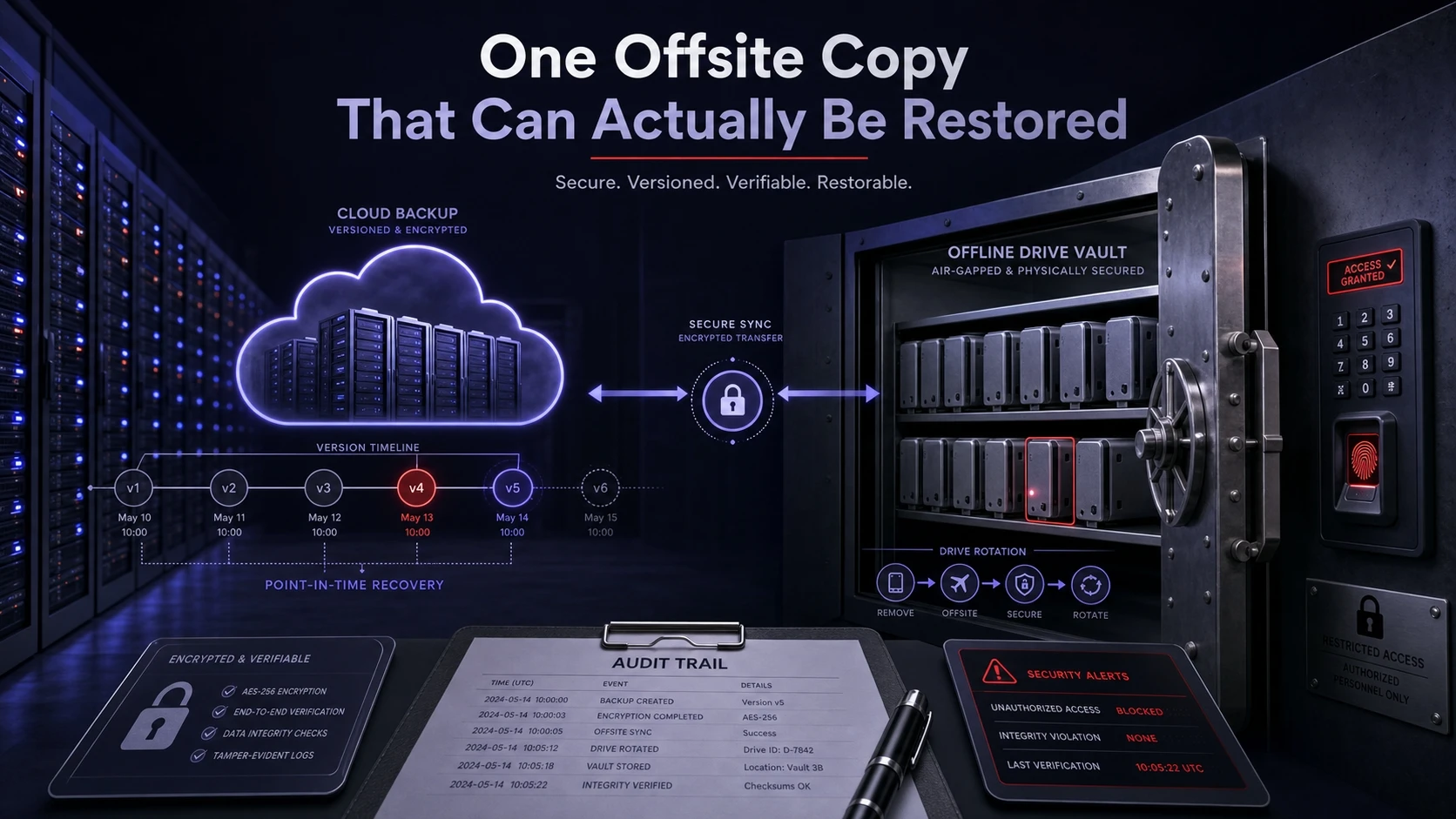
Offsite is the part many people think they have, but often do not. File sync is not the same as backup, and a single cloud folder does not guarantee recovery from mass deletion or encryption.
A true offsite backup should support versioning and retention, and it should be protected with strong authentication. For businesses, it should also support audit trails and predictable recovery time.
- Cloud Backup With Versioning: Keeps historical versions and supports point in time recovery.
- Second Location Storage: A separate office, data center, or trusted location with controlled access.
- Offline Rotation: A drive rotation stored disconnected to protect against network threats.
Offsite is only valuable if credentials, encryption keys, and restore procedures are documented and tested.
How To Apply The 3 2 1 Backup Rule Step By Step?
A workable plan starts with what matters most and ends with regular restore testing. Keep the process simple so it survives staff changes and busy schedules.
- Define Critical Data: List what must be recoverable, including documents, photos, finance files, source code, databases, and SaaS records.
- Set Recovery Targets: Decide how much data loss is acceptable and how quickly you need to restore to normal operations.
- Select Two Media Types: Pair a fast local option with a separated platform such as cloud backup or offline rotation.
- Automate Backup Jobs: Schedule backups, enable versioning, and avoid manual steps that can be skipped.
- Protect Backup Access: Use strong passwords, MFA, least privilege roles, and separate admin accounts for backup systems.
- Test Restores Regularly: Restore random files and full systems to confirm integrity and measure recovery time.
After the first full cycle, refine retention and monitoring so failures are detected early.
Personal Data Setup That Stays Simple
Personal backups fail when they are too manual. A lightweight routine with automation and occasional checks is usually enough.
A common approach is local backup software to an external drive plus an offsite cloud backup. Add a monthly restore check to confirm the plan still works.
- Protect Photos And Videos: Use a local backup plus a cloud backup with version history so accidental deletion can be reversed.
- Secure Password Vaults: Back up encrypted vault files and store recovery codes offline.
- Include Mobile Devices: Ensure phone data is included through device backups and exported copies of critical items.
For readers who want guidance selecting backup tools and hardening accounts, Tech Bonafide regularly publishes practical security and storage explainers that focus on clear setups and risk reduction.
Business Data Setup That Handles Real Operational Risk
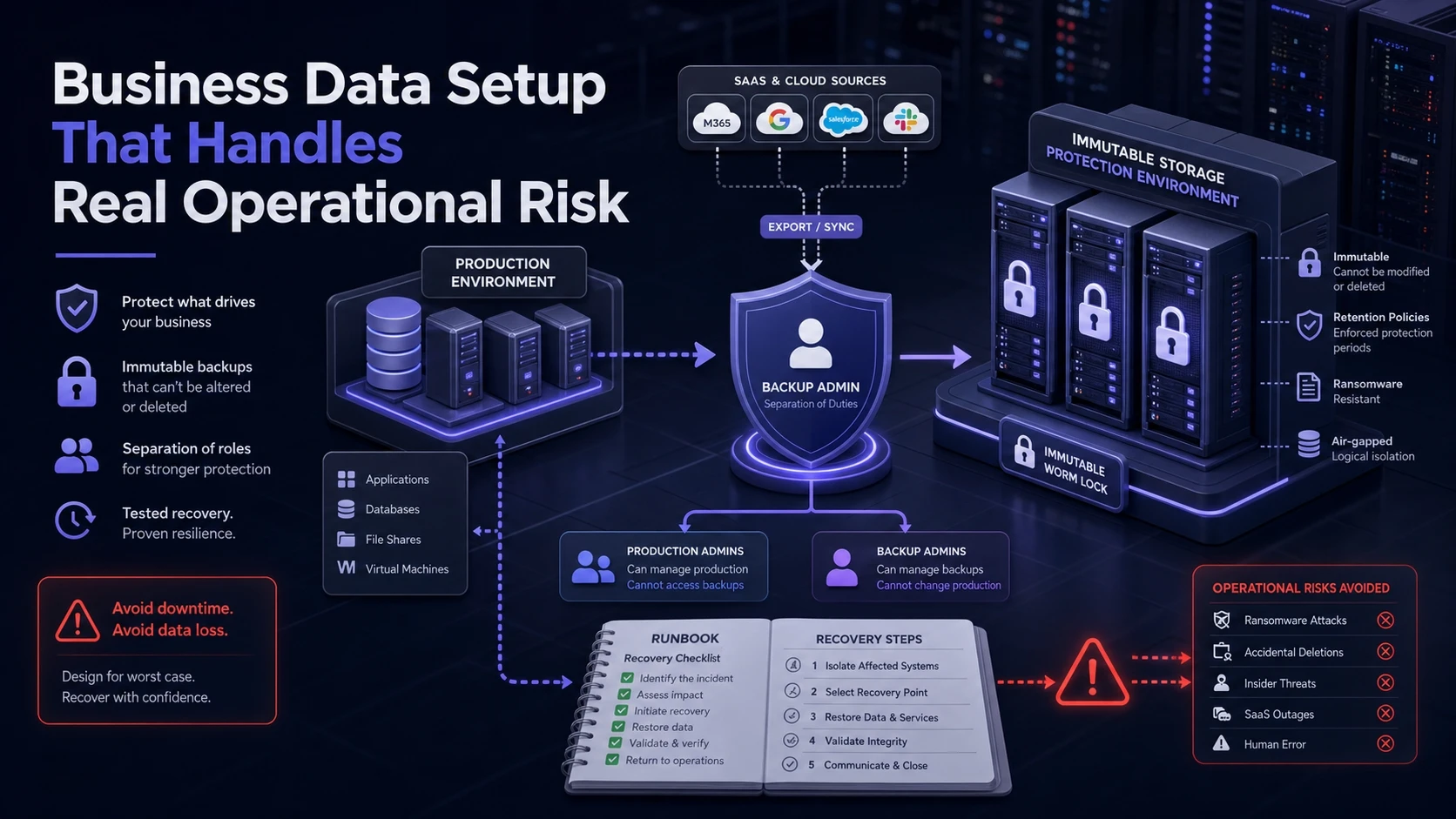
Business backups need more than copies. They need controls, documentation, and proof that restores meet the required recovery time.
Most teams benefit from centralized backup management, protected backups, and a tested incident workflow. This is where immutable storage, snapshots, and role separation become important.
- Use Snapshots And Backups Together: Snapshots support quick rollbacks, while backups protect against storage failure and site incidents.
- Separate Backup Admin Roles: Prevent the same credentials from controlling production and backups.
- Back Up SaaS Data: Export or protect critical cloud app data so you are not fully dependent on a single provider retention policy.
- Document Runbooks: Keep restore instructions, keys, and contacts accessible during an outage.
If you need an actionable checklist for backup hardening and recovery planning, Tech Bonafide can be a helpful reference point, especially for SMB security basics and operational IT guidance.
Common Mistakes That Break The 3 2 1 Backup Rule
The framework is simple, but implementation details can quietly undermine it. Most failures show up only during a crisis.
- Always Connected External Drives: A drive that is always plugged in can be encrypted by ransomware.
- No Versioning Or Retention: Backups that keep only the latest state can preserve the damage instead of the healthy data.
- Unmonitored Backup Jobs: Scheduled jobs can fail for weeks due to expired credentials, full disks, or permission changes.
- Single Cloud Account Dependency: One account without MFA, alerts, and recovery codes can become a single point of failure.
- No Restore Testing: Backups that have never been restored are assumptions, not protection.
Fixing these issues usually requires small policy changes rather than expensive new hardware.
Conclusion
The 3-2-1 backup rule works because it spreads risk across copies, storage types, and locations. It protects against the most common causes of data loss without turning backup into an overly complex project.
Keep the plan measurable and maintainable. Automate backups, secure access, and test restores so your backups are not just stored, but truly recoverable.
Frequently Asked Questions
Is Cloud Sync Enough To Meet The 3 2 1 Backup Rule?
Sync alone is not a full backup because it can mirror deletions and encryption. A true backup includes retention and version history so you can roll back to a clean point. Pair sync with dedicated backup to satisfy the offsite requirement reliably.
How Often Should Backups Run For Personal And Business Data?
Frequency depends on how much recent work you can afford to lose. Many personal setups do well with daily automated backups, while businesses often require more frequent jobs for critical systems. The key is aligning backup intervals with your recovery targets and verifying jobs complete successfully.
What Is The Difference Between Immutable Backups And Offline Backups?
Immutable backups are stored in a way that prevents modification or deletion during a defined retention window. Offline backups are physically or logically disconnected so malware cannot reach them over the network. Many strong strategies use both to reduce ransomware risk.