Zero Trust security is a straightforward idea with a strict rule – never automatically trust a device, user, or app, even if it is inside your network. For small businesses, it replaces the old approach of building one strong perimeter and hoping everything inside stays safe. It focuses on verifying identity, limiting access, and continuously checking risk so a single mistake does not become a full company breach.
What Zero Trust Security Means?
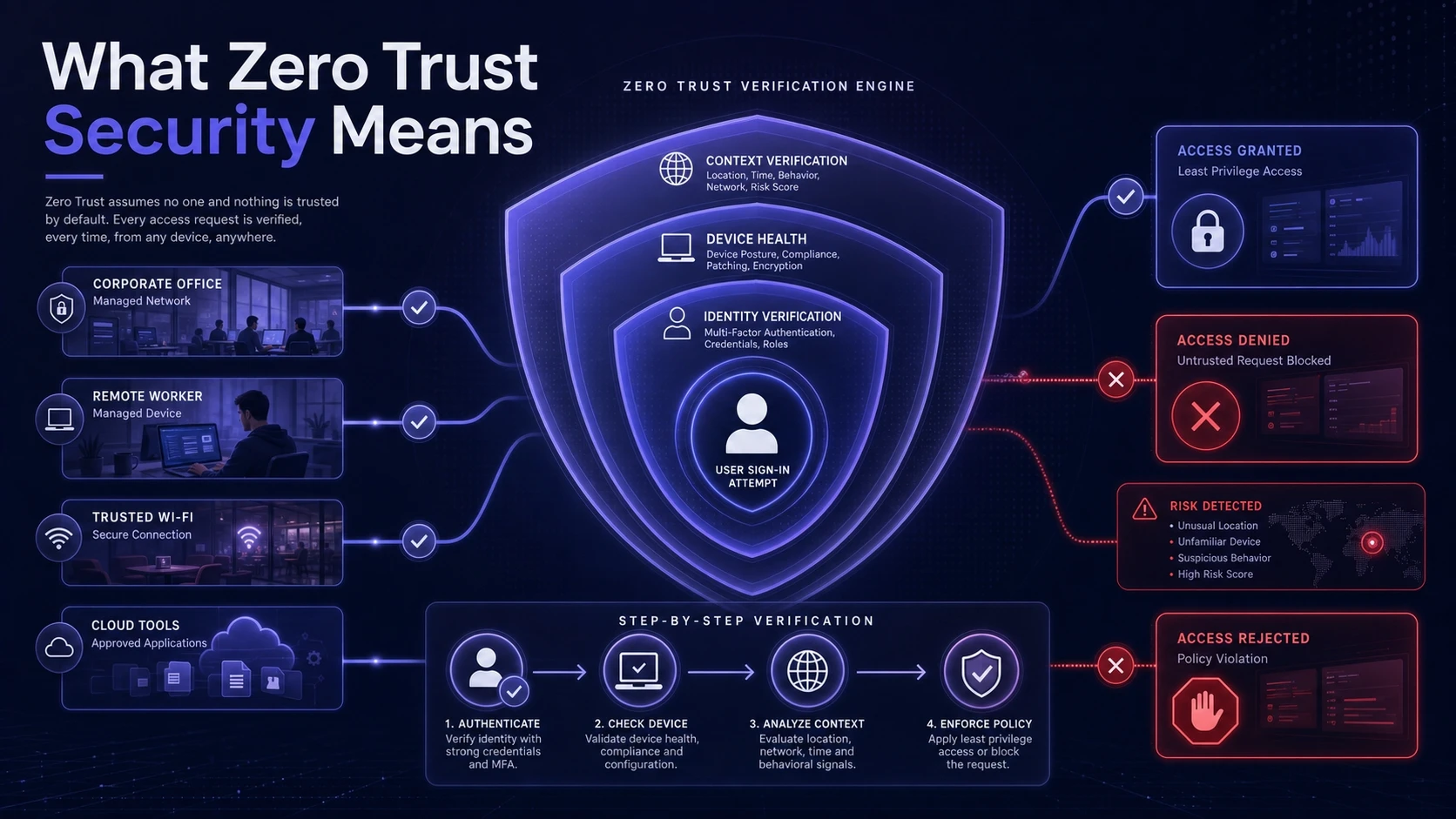
Zero Trust security treats every sign-in and every connection as untrusted until proven otherwise. Instead of assuming your office network, Wi-Fi, or VPN is safe, it verifies each request using identity, device health, and context. This keeps access tight even when people work remotely or use cloud tools.
The goal is to reduce blast radius. If one account, laptop, or app gets compromised, an attacker should not be able to move freely across your systems. Strong authentication and strict permissions turn many large incidents into smaller, containable events.
Why Small Businesses Need It?
Small businesses often run lean IT and security teams. That makes them attractive targets because attackers expect weaker controls, shared passwords, and broad access. Zero Trust security adds structure without requiring enterprise-size budgets.
It also fits how modern work happens. Cloud software, remote work, contractor access, and mobile devices break the old perimeter model. Zero Trust security protects the way people actually connect and collaborate.
Core Principles In Plain English
Zero Trust security sounds complex, but the principles are simple. Each principle maps to a practical action you can implement with common tools. Start with the ones that close your biggest gaps.
- Verify Every Login: Require strong sign-in checks for email, cloud apps, and admin panels.
- Limit Access By Role: Give people only what they need to do their job, not broad access out of convenience.
- Assume Breach: Build controls as if an attacker already has a foothold and you must contain them fast.
- Continuously Check Risk: Reevaluate access when location, device, or behavior looks unusual.
- Protect Data, Not Just Networks: Secure sensitive files wherever they live, including cloud drives and endpoints.
These ideas work best when identity, devices, and data controls reinforce each other. That is what makes Zero Trust security more than a single product.
Key Building Blocks You Actually Implement
Most small businesses implement Zero Trust security as a set of improvements, not a one-time project. Prioritize identity and endpoint controls first because they reduce risk quickly. Then mature your monitoring, segmentation, and data protections over time.
Identity And Access Management
Identity becomes the new security boundary. Centralize logins using a single identity provider where possible and enforce strong password policies. Require multi-factor authentication for every user, with stronger methods for admins.
Also control privileged access. Admin accounts should be separate from daily accounts and used only when needed. Approval workflows and session logging help prevent silent misuse of high-power credentials.
Device Security And Endpoint Management
Zero Trust security depends on knowing whether a device is healthy. Enforce encryption, screen locks, patching, and modern endpoint protection. Block access from devices that are out of date, jailbroken, or missing critical controls.
Bring-your-own-device can work if it is managed. Use endpoint management to separate work data from personal data and to enforce baseline policies. This reduces data leakage risk without becoming invasive.
Least Privilege And Microsegmentation
Least privilege reduces what an attacker can reach. Apply role-based access control in your cloud apps, file shares, and admin portals. Review access regularly and remove old accounts quickly.
Microsegmentation goes further by separating systems into smaller zones. In small environments this may look like separate networks for staff devices, servers, guest Wi-Fi, and internet of things devices. It makes lateral movement harder and simplifies incident containment.
Continuous Monitoring And Logging
Zero Trust security requires visibility into sign-ins, endpoint events, and key application activity. Centralize logs and set alerts for high-risk events such as impossible travel, repeated failed logins, and new admin creation. Keep logs long enough to investigate incidents properly.
When monitoring is consistent, response becomes faster. It also supports compliance and customer trust because you can show that controls exist and are actively used.
Zero Trust Compared With Traditional Perimeter Security
Many small businesses still rely on a firewall and a VPN as the core of security. Those tools still matter, but they should not be your only gate. Zero Trust security shifts from trusting networks to trusting verified identity and healthy devices.
| Security Area | Traditional Perimeter Approach | Zero Trust Security Approach |
|---|---|---|
| Access Control | Trusts internal network once connected | Verifies each request using identity and context |
| Remote Work | VPN gives broad network reach | App-level access with least privilege |
| Device Risk | Limited device posture checks | Blocks or limits access for unhealthy devices |
| Incident Impact | Attackers can move laterally more easily | Segmentation and least privilege reduce blast radius |
This difference is why Zero Trust security is often described as a mindset rather than a single tool. It is also why rollout is usually incremental and practical.
Common Myths That Slow Adoption
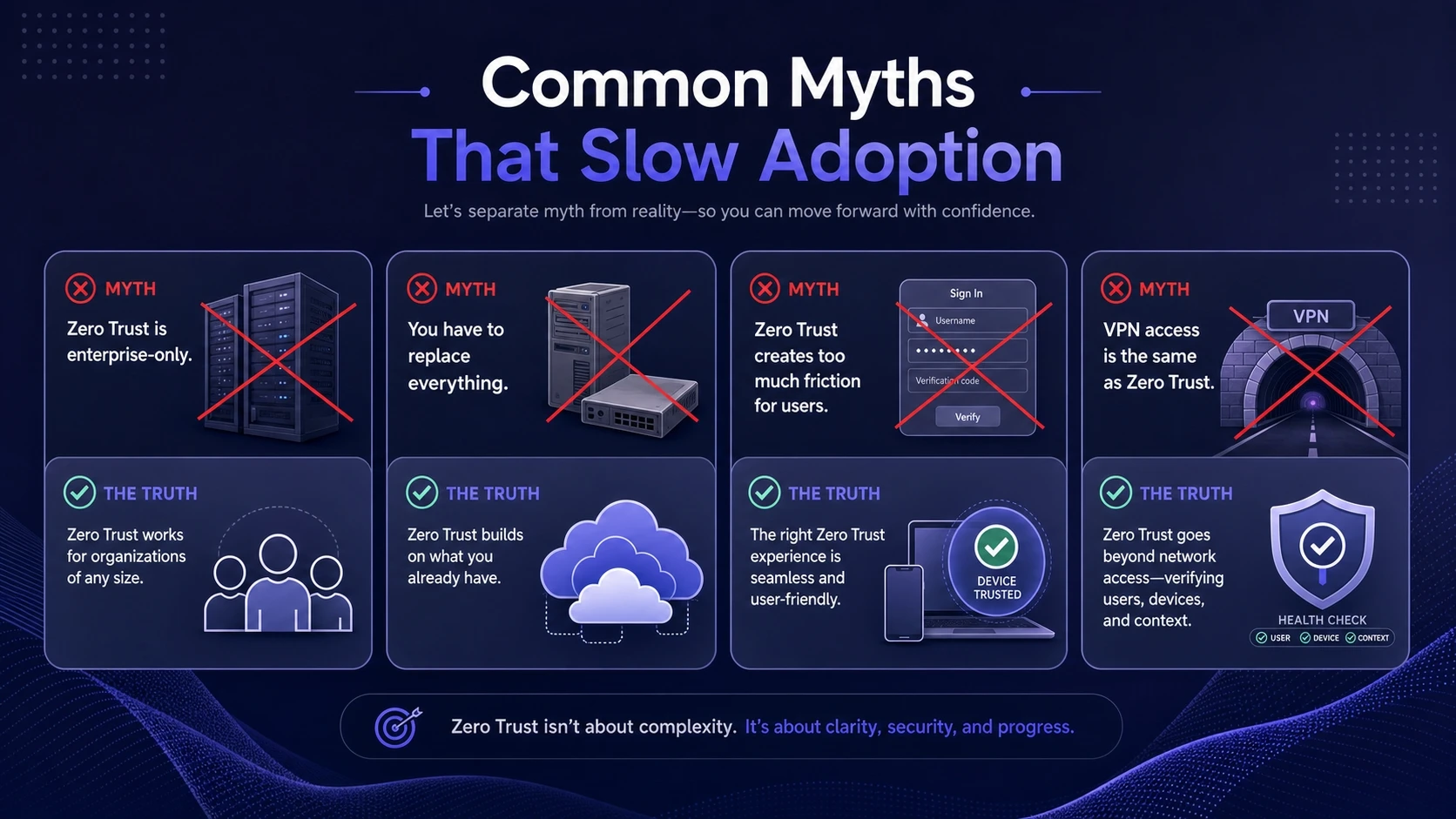
Misunderstandings can delay progress. Clearing them up helps you focus on the controls that matter. Zero Trust security is flexible and works in small environments.
- It Is Only For Enterprises: Small teams can start with multi-factor authentication, endpoint management, and least privilege.
- It Requires Replacing Everything: Many improvements layer onto what you already use, especially cloud identity and device tools.
- It Makes Work Too Hard: Smart policies reduce friction by using device trust and risk signals to avoid constant prompts.
- VPN Equals Zero Trust: VPN is a transport tool and does not automatically enforce least privilege or device health checks.
Once these myths are removed, planning becomes much simpler. You can choose a path that matches your risks and budget.
A Practical Rollout Plan For Small Businesses
The fastest results come from focusing on a few controls that stop the most common attack paths. Build a roadmap that includes both technical changes and operational habits. Keep each phase small so the business can absorb it without disruption.
- Inventory Accounts And Apps: List email, cloud tools, finance systems, domains, and admin consoles, then remove unused accounts.
- Turn On Multi-Factor Authentication: Enforce it everywhere, starting with email, payroll, banking, and any admin access.
- Lock Down Privileged Access: Separate admin accounts, reduce admin count, and require stronger authentication for privileged tasks.
- Standardize Devices: Use endpoint management for patching, encryption, and malware protection, then block access from unmanaged devices.
- Apply Least Privilege In Key Systems: Tighten file sharing, cloud roles, and SaaS permissions, then schedule quarterly access reviews.
- Centralize Logging And Alerts: Collect sign-in logs and endpoint alerts, then set rules for high-risk activities.
- Segment Networks Where It Helps: Separate guest Wi-Fi, staff devices, servers, and special-purpose devices to reduce lateral movement.
After these steps, you have a solid baseline. From there, expand into data loss prevention, stronger conditional access, and more detailed incident playbooks.
Where A Managed IT Partner Fits?

Small businesses often need help choosing tools, setting policies, and maintaining them. A managed IT partner can map Zero Trust security to your real workflows and keep controls consistent as you grow. That includes identity management, endpoint monitoring, backup validation, and security hardening.
If your team wants guidance without building an internal security department, Tech Bonafide can help plan and implement a practical Zero Trust security baseline. Support typically includes access reviews, device compliance policies, monitoring, and ongoing improvements that match your risk level. This kind of partnership is most valuable when you need steady security outcomes, not one-time setup.
Conclusion
Zero Trust security for small businesses means verifying every access request, limiting permissions, and continuously checking risk. It reduces the chance that one compromised login turns into a company-wide incident. With a phased rollout focused on identity, devices, and least privilege, it becomes achievable and sustainable.
Start with the basics you can enforce reliably. Consistency beats complexity, and the long-term payoff is fewer breaches, less downtime, and clearer control over who can access what.
Frequently Asked Questions
Is Zero Trust Security The Same As Multi-Factor Authentication?
No, multi-factor authentication is only one control within Zero Trust security. Zero Trust also includes least privilege, device health checks, segmentation, and continuous monitoring. Multi-factor authentication is a high-impact starting point, but it is not the full model.
Can A Small Business Do Zero Trust Security Without A Big Budget?
Yes, many Zero Trust improvements use tools you may already have in your email and cloud subscriptions. The key is configuring them well and enforcing policies consistently. Prioritize multi-factor authentication, endpoint management, and access reviews before adding more advanced controls.
What Is The First System To Protect With Zero Trust Security?
Start with email and identity because most breaches begin with account takeover. Then move to finance systems, cloud storage, and any admin consoles. Securing identity first reduces risk across many connected apps at once.