

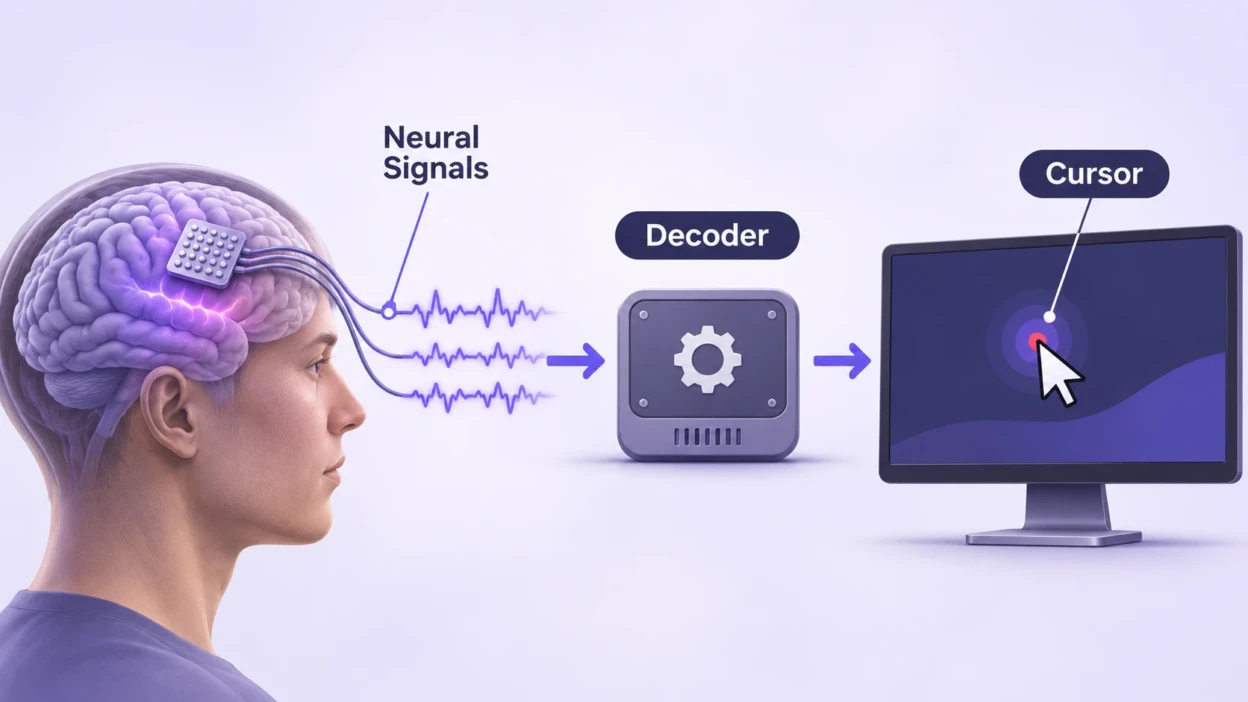
A brain-computer interface (BCI) can move a cursor without a hand touching a mouse. It records patterns of brain activity, uses software to estimate the movement a person is trying to make, and converts that estimate into on-screen motion. The cursor then provides visual feedback, allowing the person and the system to improve control.
This is not a computer reading an unrestricted stream of thoughts. A cursor BCI learns a limited relationship between measurable neural patterns and intended actions, such as moving toward a target, stopping or clicking. The details depend on whether the signals come from electrodes on the scalp, the surface of the brain or within brain tissue.
What Signals Does a BCI Record?
Neurons communicate through electrical and chemical activity. When a person prepares, imagines or attempts a movement, groups of neurons change their activity. A BCI measures some of those changes using electrodes. It does not need to record every neuron or reconstruct every thought.
Scalp electroencephalography, or EEG, detects electrical patterns through electrodes placed on the head. Researchers can use changes in rhythms associated with sensorimotor brain activity. Intracortical systems instead use implanted microelectrodes to record activity from neuronal populations. Electrodes placed on the brain’s surface, a method called electrocorticography or ECoG, are another research approach.
These measurements are not interchangeable. Scalp EEG combines activity from broad brain areas and is affected by noise. Implanted recordings can provide more localized signals but require an invasive procedure. Research published in Proceedings of the National Academy of Sciences demonstrated two-dimensional cursor-related control using noninvasive EEG, showing that implants are not necessary for every form of movement decoding.
How Neural Signals Become Cursor Movement?
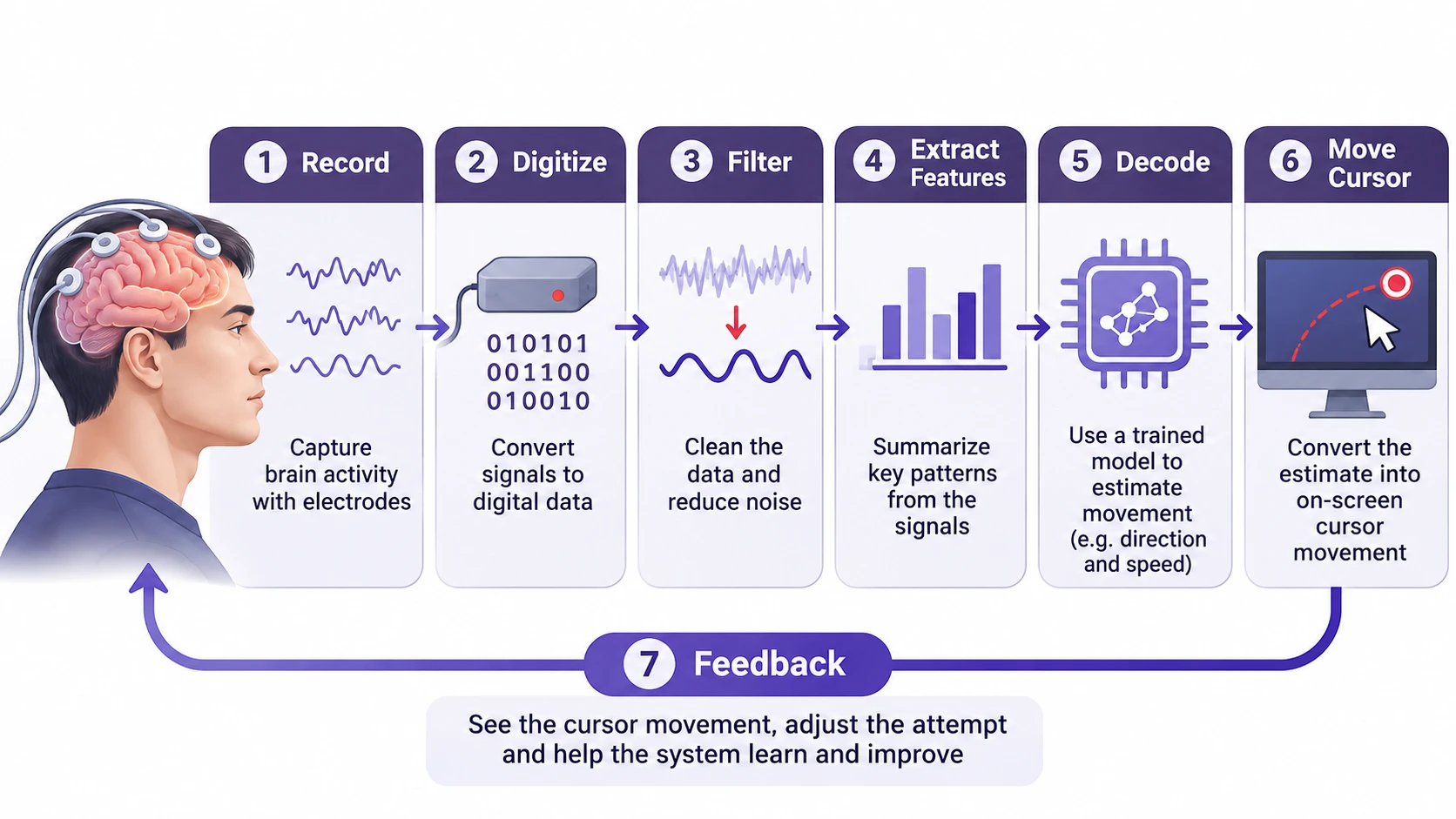
The process is best understood as a repeating loop rather than a single thought becoming a mouse command.
- Record: Electrodes detect changes in electrical activity while the person attempts or imagines a movement.
- Amplify and digitize: Recording electronics turn small electrical signals into digital data the system can process.
- Clean the data: Signal-processing software filters unwanted frequencies and reduces identifiable recording artifacts. It cannot remove every source of noise.
- Extract features: The software summarizes informative patterns, such as the power of selected EEG rhythms or the rate of detected neural events within short time windows.
- Decode: A trained mathematical model estimates a control variable, often horizontal and vertical cursor velocity, from the changing features.
- Move the pointer: Computer software applies that estimate to the on-screen cursor. A separate rule or decoder can handle selecting a target.
- Use feedback: The person sees where the cursor went, adjusts the attempted movement and may participate in recalibration when the signal-to-command relationship changes.
For example, imagine a participant repeatedly trying to move a cursor toward a circle on the right. During calibration, the system associates the recorded activity with that intended direction. Later, when a similar pattern appears, its decoder produces rightward cursor movement. This is a simplified illustration of supervised calibration, not a claim that one neuron or a single word such as “right” controls the pointer.
A peer-reviewed review of BCI mappings describes how recorded neural activity can be mapped to cursor position or velocity and why visual feedback matters for learning to control the system.
How a Decoder Learns Movement Intent?
The decoder is the software that converts features from neural recordings into estimated movement. Its job is not to find a universal brain signal meaning “move left.” It learns patterns that are useful for a particular recording method, task and user.
During an initial calibration, a person may attempt movements toward visible targets while the software collects corresponding neural data. Researchers can fit a model that relates those signals to intended cursor direction or speed. Some systems then update the model while the person practices, because the user also learns how to produce signals that control the interface.
A simple linear decoder can combine several measured features into two outputs: horizontal and vertical velocity. A Kalman filter can also use an estimate from the previous moment to help track movement over time. More complex systems may use recurrent neural networks that account for patterns across successive time windows. No one algorithm is automatically best for every recording method or participant.
Velocity and position are different outputs. With velocity control, a decoder estimates how quickly and in which direction the cursor should travel; the interface updates position over time. With position control, the decoder estimates where the cursor should be. The choice affects how easily a user can start, steer and stop movement.
Early EEG research used changes in mu or beta rhythms to drive cursor movement. A 2004 study of EEG-based cursor control described a system that recalculated cursor movement ten times per second. That update rate describes the historical experiment, not a standard rate for modern BCIs.
How Clicking and Feedback Work?
Moving a pointer is only part of using a computer. A person also needs a reliable way to stop at a small target, select it and avoid accidental clicks.
One approach is a dwell click: the interface selects a target after the pointer remains over it for a defined period. Other systems decode a separate click-related neural pattern. Some research interfaces use an additional control method, such as gaze, to activate or switch between functions. These options should not be mistaken for a single universal BCI design.
Feedback closes the loop. If the cursor overshoots a button, the user can adjust the attempted movement. The software may also adapt its estimates. Researchers therefore test not just whether a direction can be predicted from recorded data, but whether a person can repeatedly reach, stop on and select real targets while watching the screen.
A human intracortical point-and-click study demonstrated that neural signals could support continuous two-dimensional cursor movement and a separate selection command. Its results describe a research interface, not an ordinary consumer mouse replacement.
EEG Versus Implanted BCI Systems
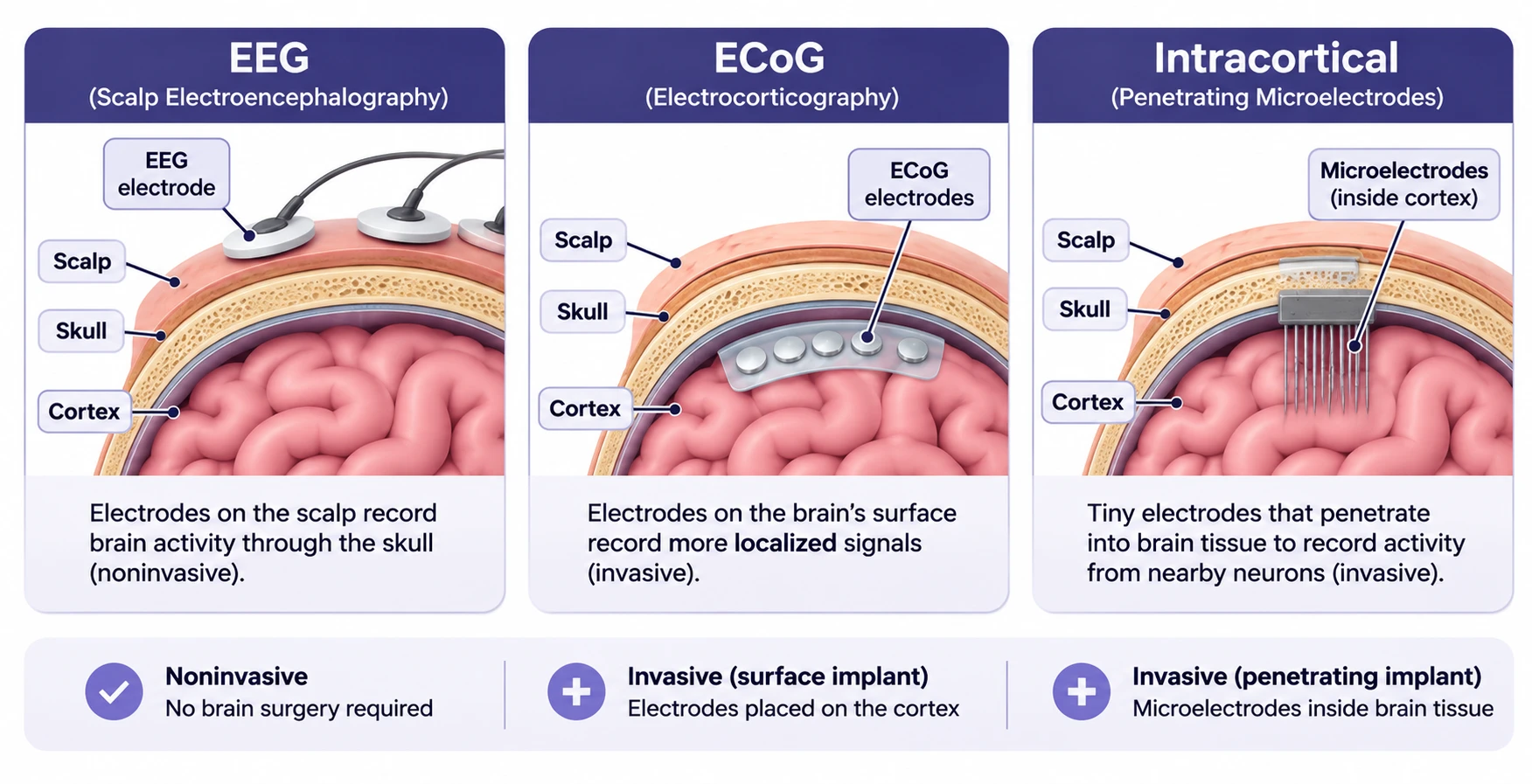
The most important hardware difference is where the electrodes sit. That choice affects signal detail, surgical risk and how a system may be used.
| Recording method | Where signals come from | Main advantage | Main limitation |
|---|---|---|---|
| Scalp EEG | Electrodes outside the skull | No brain surgery required | Less spatial detail and susceptibility to noise |
| ECoG | Electrodes on the brain’s surface | More localized cortical signals than scalp EEG | Requires an invasive procedure |
| Intracortical electrodes | Microelectrodes within brain tissue | Can record fine-grained activity from neural populations | Surgical risks and long-term signal stability challenges |
Implants can offer useful signal detail, but the comparison does not mean an implanted interface will always outperform EEG in every task. Performance depends on the task, participant, decoder, feedback design and the way results are measured. Readers interested in one company’s implant can separately explore TechBonafide’s explanation of Neuralink’s brain chip.
What Human Studies Have Shown?
BCI cursor control has developed through research involving different recording methods and participants. The evidence is stronger than a single product demonstration, but the studies do not establish that the same results will occur for every person.
- Noninvasive control: A 2004 human study showed that users, including people with spinal cord injuries, could control a two-dimensional movement signal using scalp EEG and an adaptive algorithm.
- Point-and-click control: Subsequent intracortical research demonstrated a combination of continuous cursor movement and discrete clicking in people with tetraplegia.
- Independent home use: A study published in June 2026 followed one man with paralysis and severe speech impairment due to amyotrophic lateral sclerosis. He used a multimodal implanted BCI at home for more than 3,800 hours across nearly two years, including cursor control and speech-based computer input. Care partner assistance was still involved in preparing the hardware and starting the system.
The 2026 study, reported in Nature Medicine, is especially relevant because it examined sustained independent use rather than only a short laboratory session. Its speech-recognition accuracy figures must not be presented as cursor accuracy figures; the system used different decoders for different tasks.
These studies establish that trained neural decoders can enable useful computer access in selected research settings. They do not prove that a device is suitable for unsupervised adoption by all people with paralysis or that it restores the underlying nerve and muscle function.
Why Cursor Control Can Be Unreliable?
Even a working BCI may be slower or less predictable than a conventional mouse. The decoded movement is an estimate based on incomplete, changing measurements.
- Signal noise: Electrical interference, movement artifacts and imperfect electrode contact can obscure useful activity, especially in scalp EEG.
- Neural changes: Recorded patterns may shift across sessions, making a previously accurate decoder less reliable.
- Calibration demands: A user may need practice or new calibration data before the cursor responds consistently.
- Stopping and clicking: A system that reaches large targets may still struggle with small buttons, accidental selections or overshooting.
- Practical setup: Sensors, external hardware, software and caregiver support can make home operation more complicated than a research demonstration suggests.
Researchers measure outcomes such as target acquisition, selection accuracy, time to complete a task, unwanted clicks and the effort required for calibration. A paper reporting high performance in one laboratory test should not be read as proof of equal performance in ordinary desktop use. Research on unsupervised recalibration specifically addresses the problem of changing neural signals.
Safety, Privacy and Real-World Limits
Noninvasive EEG avoids implant surgery but still requires compatible recording hardware, trained software and realistic expectations about accuracy. Implanted BCIs introduce additional considerations, including the risks of surgery, infection, device reliability, long-term support and what happens when a research study ends.
Important: An implanted BCI is a medical research decision, not a do-it-yourself computer accessory. Anyone considering participation should discuss the study’s eligibility rules, possible surgical and device risks, expected support, privacy terms and post-trial arrangements with the clinical team before consenting.
Neural recordings also raise privacy questions. Raw signals, processed features and learned decoder settings can all be sensitive data. A 2026 review of implantable BCI data protections discusses gaps in consent, user control and secondary use of neural data. That does not mean current cursor systems can freely read private memories; it means their collected data still deserves careful safeguards.
For researchers, useful questions include whether a participant can correct an incorrect selection, whether data can be deleted or exported, who can access neural recordings, and how continued use is handled if hardware or study funding changes. Clinical research ethics guidance also emphasizes informed consent and post-trial responsibilities.
Conclusion
Brain-computer interfaces turn neural signals into cursor movements by measuring brain activity, extracting informative patterns and using a trained decoder to produce on-screen control commands. Repeated visual feedback helps the user steer and correct those commands, while calibration helps the model remain useful as signals change.
The engineering is more specific, and more limited, than the phrase “control a computer with your mind” suggests. Human studies show meaningful progress, including long-term home use in an individual participant, but signal reliability, accessible setup, surgical risk and privacy remain central to making these systems practical for more people.

Tech Bonafide is the editorial identity of TechBonafide, an independent technology publication covering AI, software, cybersecurity, gadgets, and emerging technology.