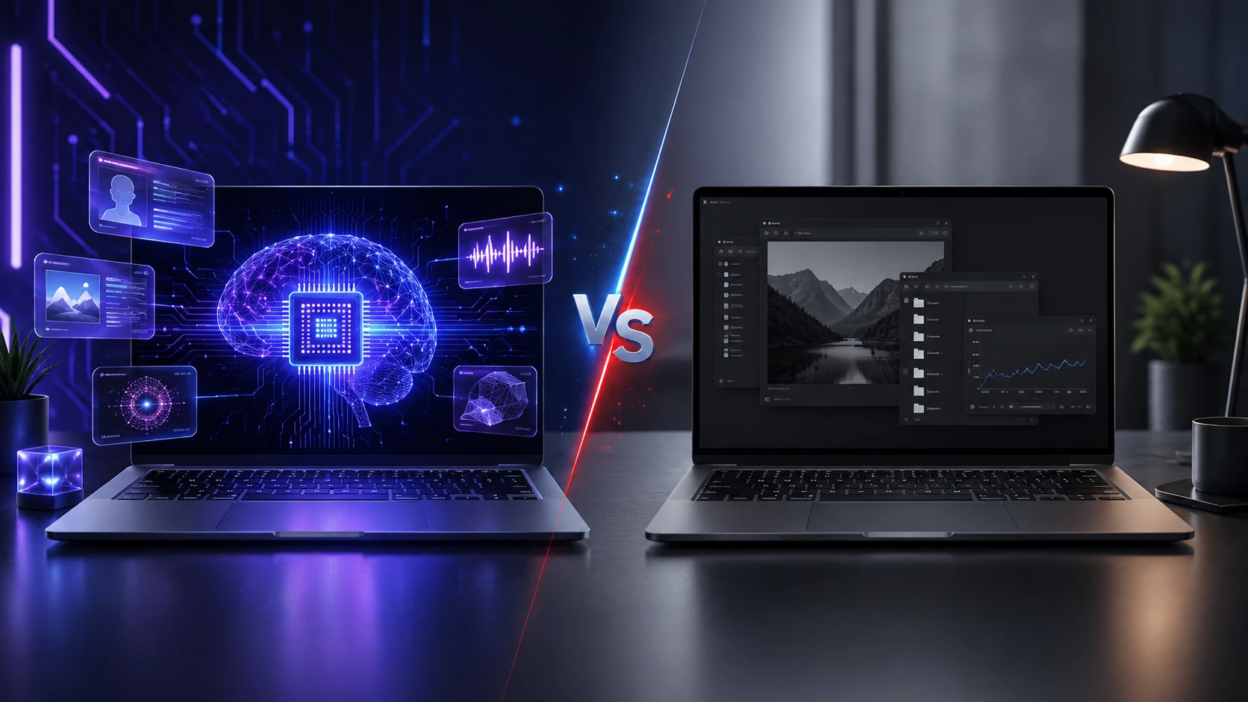
Buying a new laptop now comes with a new question beyond CPU, RAM, and battery life. Should you pick an AI PC with an NPU, or stick with a regular laptop that relies on the CPU and GPU for everything.
What An AI PC Really Means?
An AI PC is a laptop built with a dedicated Neural Processing Unit, often called an NPU. The NPU is designed to run certain AI tasks efficiently, often using less power than a GPU.
This does not mean the laptop is automatically faster at all workloads. It means the system has another specialized engine that can accelerate supported AI features inside the operating system and certain apps.
What An NPU Does And What It Does Not Do?
An NPU is optimized for repetitive math operations used in machine learning models. It is most useful when an AI feature is coded to run on the NPU rather than the CPU or GPU.
It does not replace your CPU for general computing, and it does not replace your GPU for demanding graphics or high end AI generation. Many heavy models still run best on a discrete GPU when available.
Where NPU Acceleration Shows Up?
Most NPU wins come from always on or frequently used AI features. These include webcam effects, microphone noise removal, background blur, live captions, and on device text suggestions when supported.
The practical benefit is smoother performance while keeping power use lower. That can help battery life during meetings or travel days when those features stay active for hours.
Where You May Not Notice A Difference?
If your workflow is web browsing, email, office docs, and streaming, an NPU may sit idle most of the time. In that case, the laptop feels similar to a well matched regular laptop with a modern CPU.
Even some AI branded features still run on the CPU or GPU depending on the app version and drivers. The label AI PC is not a guarantee that every AI function uses the NPU.
AI PC Vs Regular Laptop Performance Differences
 For everyday speed, the CPU and storage matter more than the NPU. A fast SSD, enough RAM, and strong single core performance still drive snappy app launches and multitasking.
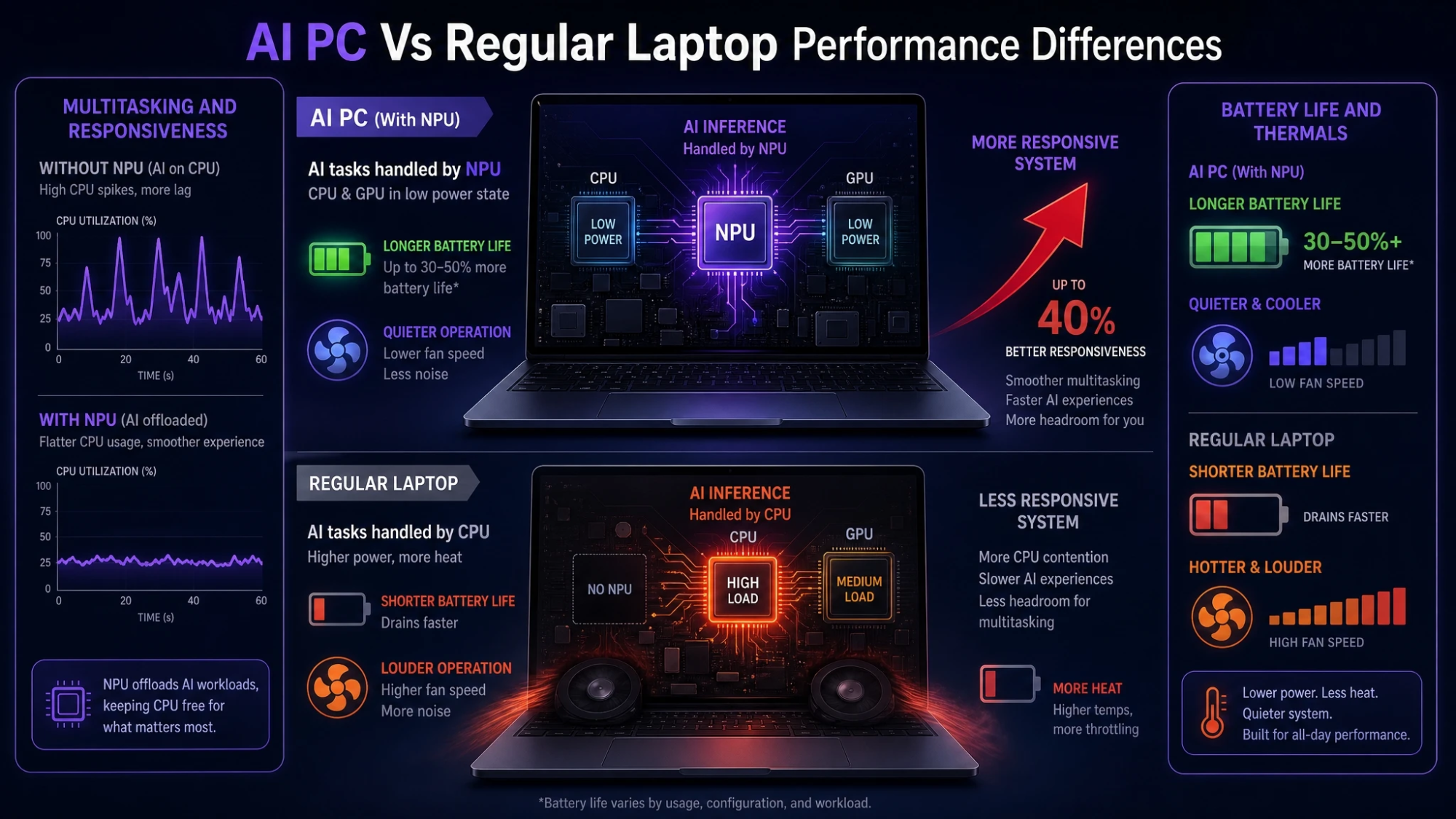
The NPU matters when you regularly use supported AI features during other work. It can keep the CPU free for your main tasks, which can make the whole system feel more responsive in mixed workloads.
Multitasking And Responsiveness
An NPU can reduce spikes in CPU usage when AI effects are active in the background. That is useful during video calls while sharing a screen, running a browser with many tabs, and editing documents at the same time.
A regular laptop can do the same tasks, but it may run warmer or ramp fans more often depending on its CPU and cooling design.
Battery Life And Thermals
Power efficiency is the most realistic advantage of an NPU today. When the NPU handles supported AI inference, the CPU and GPU can remain in lower power states more often.
That can translate into longer battery life and quieter operation during light productivity with AI enhancements enabled. The exact gain varies by chip generation, firmware, and the apps you use.
On Device AI Privacy And Offline Benefits
Many buyers consider an AI PC to keep more processing local. When an AI feature runs on device, it can reduce the need to send audio, text, or images to a cloud service.
On device processing can also work without a reliable connection. That matters for travel, secure environments, and anyone who prefers local inference for sensitive notes or meeting audio.
What Still Goes To The Cloud?
Some features may still call cloud models depending on the app settings. Others use hybrid modes that process part locally and part remotely for better accuracy.
To understand the real privacy story, check whether the feature is described as on device and whether the app offers clear toggles and data controls.
How To Decide If You Need An NPU?
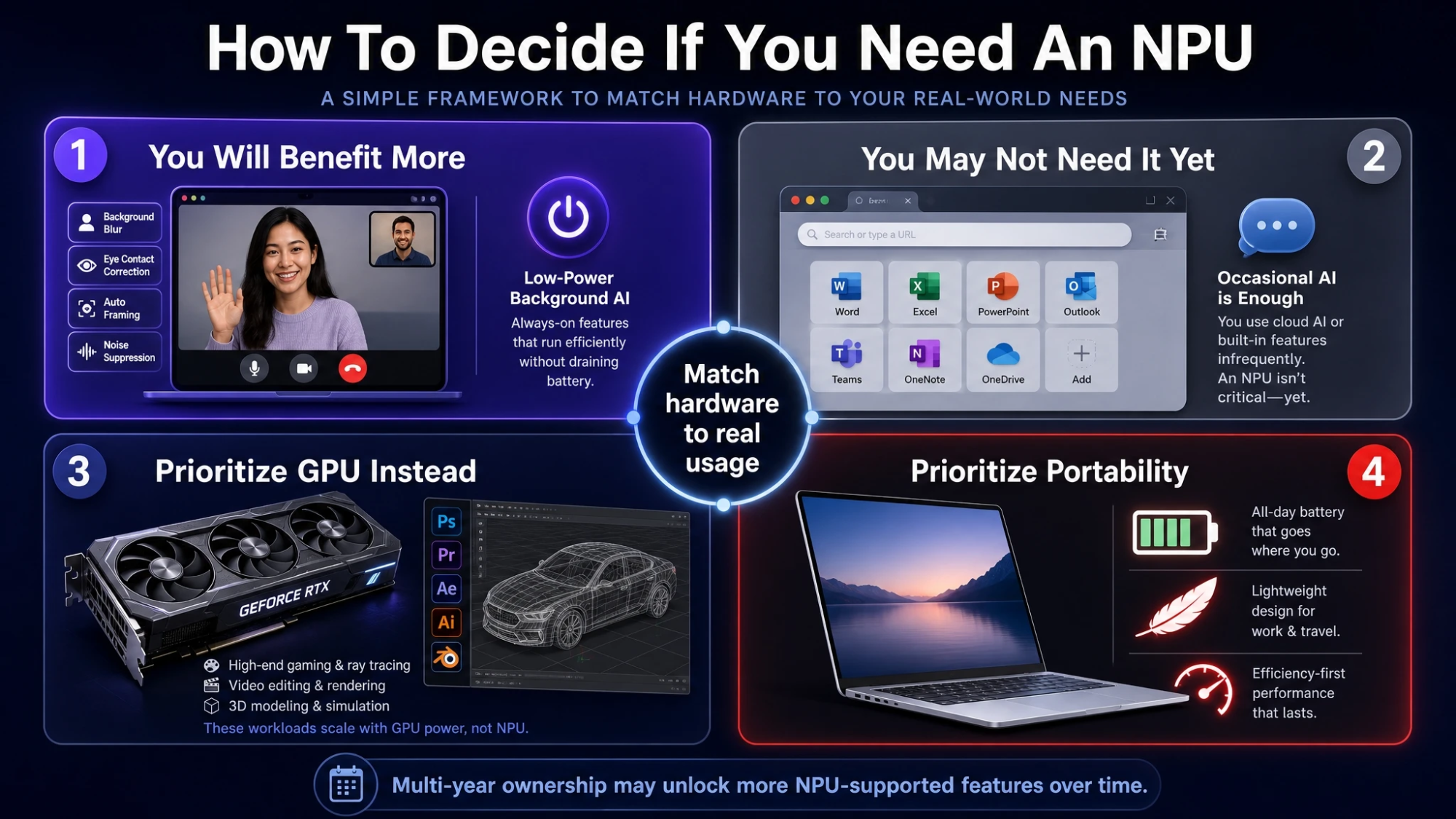 The best choice depends on which AI workloads you use and how you use your laptop. Consider whether your day includes frequent video calls, speech to text, creative tools with AI assistance, or accessibility features that benefit from local processing.
Also weigh how long you keep devices. Over a multi year ownership cycle, software support for NPU acceleration may expand and make the hardware feel more future ready.
- You Will Benefit More: You use meeting tools daily, rely on noise suppression and camera effects, or want lower power AI features running in the background.
- You May Not Need It Yet: Your work is mostly browser and office apps, and you rarely use AI functions beyond occasional prompts.
- You Should Prioritize GPU Instead: You do heavy content creation, 3D work, or advanced local AI generation that scales with a strong discrete GPU.
- You Should Prioritize Portability: You want the lightest device with reliable battery life, and you prefer efficiency even if peak performance is not your top goal.
These checkpoints make it easier to match the hardware to your real usage rather than a marketing label.
Specs That Still Matter More Than NPU
An NPU is one part of the platform. A balanced laptop with weak memory or slow storage can still feel sluggish even with an NPU onboard.
Focus on the fundamentals, then treat the NPU as an added capability when it aligns with your software.
- RAM Capacity: 16 GB is a practical baseline for modern multitasking and lighter creative work, while heavier workflows may need more.
- SSD Speed And Size: A fast NVMe SSD improves boot times, app launches, and large file handling, and enough capacity prevents constant cleanup.
- CPU Class: Look for a modern generation chip with good sustained performance, not just short bursts, especially in thin laptops.
- Display Quality: Brightness, color accuracy, and refresh rate impact comfort and productivity more than many buyers expect.
- Thermal Design: Cooling and chassis design affect real world performance and noise far more than spec sheets suggest.
Once these are solid, an NPU can be a meaningful bonus rather than a distraction.
Quick Comparison Table
This view highlights how AI PCs and regular laptops typically differ in daily use. Actual results depend on the specific chip and the apps you run.
| Category | AI PC With NPU | Regular Laptop |
|---|---|---|
| AI Features In Video Calls | Often smoother with lower power use when supported | Works well but may use more CPU or GPU power |
| Battery Life With AI Effects On | Can last longer during sustained AI inference | Battery impact depends more on CPU and GPU load |
| Local Privacy Friendly Processing | More features can run on device when available | More likely to rely on cloud or CPU based processing |
| Best Fit Workloads | Productivity with always on AI assistance | General computing and budget focused buyers |
Use this as a starting point, then compare specific models based on battery tests, thermals, and the apps you use most.
Compatibility And Software Support Considerations
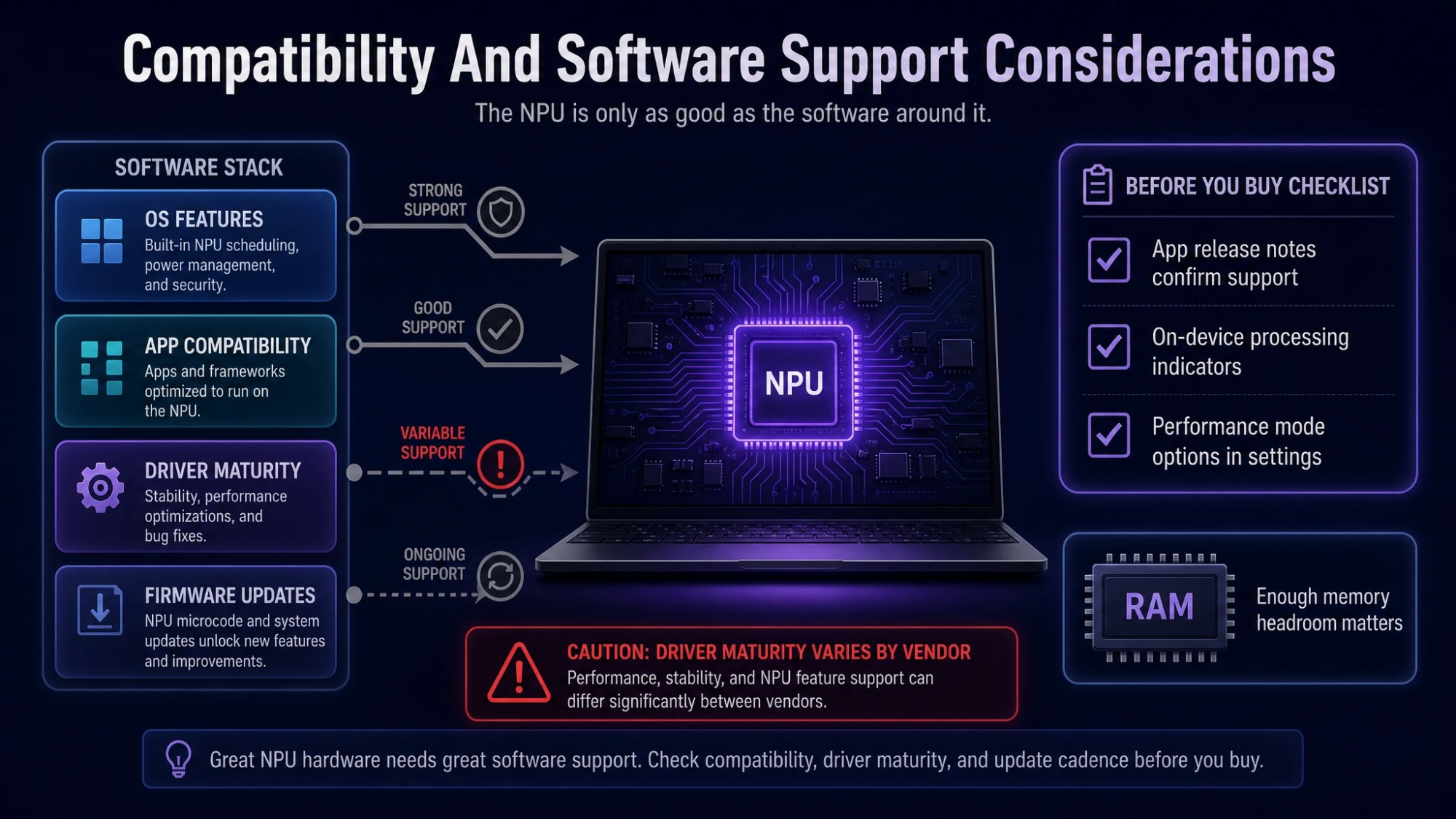 NPU value depends on software support. Some operating system features and popular apps already use NPUs, while others still rely on CPU or GPU paths.
Driver maturity also matters. Early hardware can improve over time through firmware updates and app optimization, but results vary by vendor and model.
What To Check Before You Buy?
Confirm that the AI features you care about are supported on your platform. Look for clear app release notes, settings that indicate on device processing, and performance mode options.
Also check whether the laptop has enough memory headroom. Many AI enhanced workflows benefit from more RAM even when inference runs on an NPU.
Conclusion
An AI PC can be a smart choice when you use supported on device AI features frequently and you care about efficiency, quieter operation, and local processing. The NPU helps most when AI runs in the background while you do other work.
A regular laptop remains a strong buy when you prioritize price, proven performance, and general productivity. If your workloads demand heavy creation or advanced local AI generation, a strong GPU and overall system balance will matter more than the presence of an NPU.
Frequently Asked Questions
Will An NPU Make My Laptop Faster For Everything?
No. An NPU accelerates specific AI tasks that are designed to use it, such as certain audio and video effects. General speed still depends mostly on the CPU, RAM, SSD, and thermal design.
Can A Regular Laptop Run AI Features Without An NPU?
Yes. Many AI features run on the CPU or GPU, and cloud based AI services work on almost any modern laptop. The difference is often efficiency and how well performance holds up during long sessions.
Should Creators And Developers Prefer An AI PC Or A GPU Laptop?
If your work involves heavier local AI generation, 3D rendering, or advanced creative pipelines, a discrete GPU can deliver bigger gains than an NPU. An AI PC is still useful for lightweight inference and background enhancements when the software supports it.