
Teams building internal tools and customer-facing workflows often hit the same wall. Traditional development can be slow and expensive, yet spreadsheets and off-the-shelf apps rarely fit real processes. Low-code and no-code platforms fill that gap, but choosing between them affects governance, scalability, and total cost over time.
What Low-Code Means?
Low-code platforms help you build applications with visual components while still allowing custom code when needed. They typically include drag-and-drop UI builders, workflow automation, database connectors, and APIs. Developers and technical teams use low-code to move faster without giving up control.
Low-code is strongest when requirements change often and the app needs deeper integrations. It also fits regulated environments where code review, testing, and deployment pipelines matter. The goal is faster delivery with fewer repetitive engineering tasks.
What No-Code Means?
No-code platforms focus on building apps without writing code. They rely on prebuilt templates, form builders, rules-based automation, and standardized integrations. Business users can create solutions with minimal technical support.
No-code shines for simple to moderately complex workflows, quick prototypes, and department-level tools. It reduces the dependency on engineering for everyday automation. The tradeoff is less flexibility when the process gets complex or highly customized.
Key Differences That Matter For Business Apps
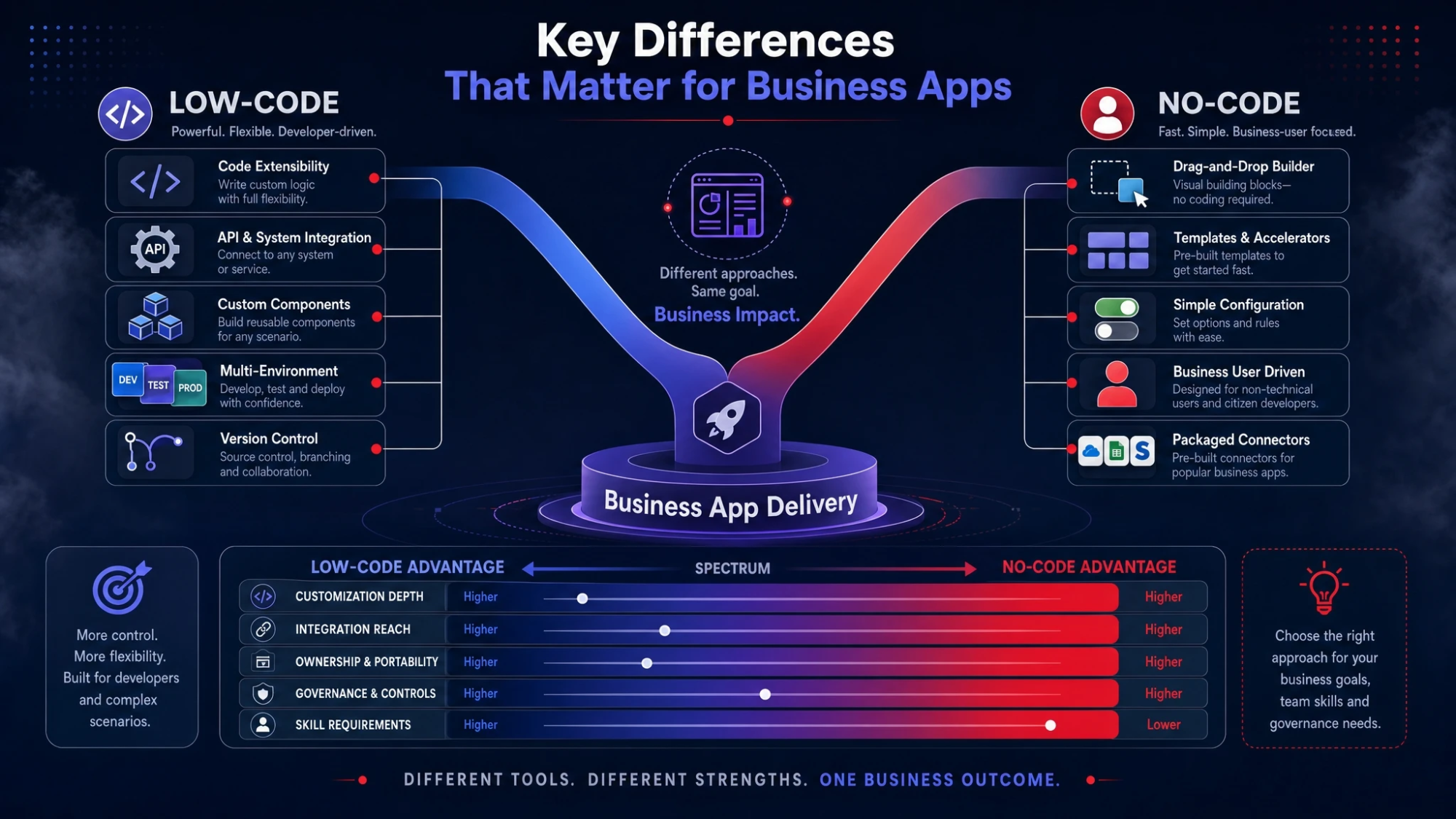
Both approaches aim to speed delivery, but they do it with different assumptions. Low-code assumes you may need custom logic, custom data models, and deeper control. No-code assumes the platform already covers most needs through configuration.
- Customization Depth: Low-code supports custom scripts, components, and advanced logic, while no-code is usually limited to what the builder offers.
- Integration Reach: Low-code often includes robust API tools, webhooks, and middleware patterns, while no-code tends to rely on packaged connectors.
- Ownership And Portability: Low-code may allow exporting code or using standard stacks, while no-code can increase platform lock-in due to proprietary models.
- Governance And Controls: Low-code commonly supports environments, roles, and CI workflows, while no-code may require added guardrails to prevent sprawl.
- Skill Requirements: Low-code favors mixed teams that include developers, while no-code is designed for non-technical builders.
Those differences show up quickly when apps move beyond a single team. They also influence security reviews and long-term maintenance.
Speed To Build And Iterate
No-code is usually the fastest path to a working app. You can assemble screens, forms, and basic automation quickly and validate the workflow in days. That speed is valuable when the process is still being discovered.
Low-code can be nearly as fast in early stages, but it really pays off during iteration. When stakeholders ask for edge-case handling, complex validation, or custom UI behavior, low-code avoids the hard stop that no-code builders often hit. The ability to extend with code keeps momentum when requirements grow.
Scalability And Performance
Business apps often start small and then become critical systems. Scalability means more than handling user volume. It includes data growth, auditability, complex permissions, and reliable integrations with core systems.
Low-code tends to scale better because you can optimize logic, add caching patterns, and integrate with stronger backend services. No-code can scale within the platform limits, but performance tuning is usually constrained. When a workflow becomes mission-critical, those constraints can become expensive.
Security, Compliance & Data Control
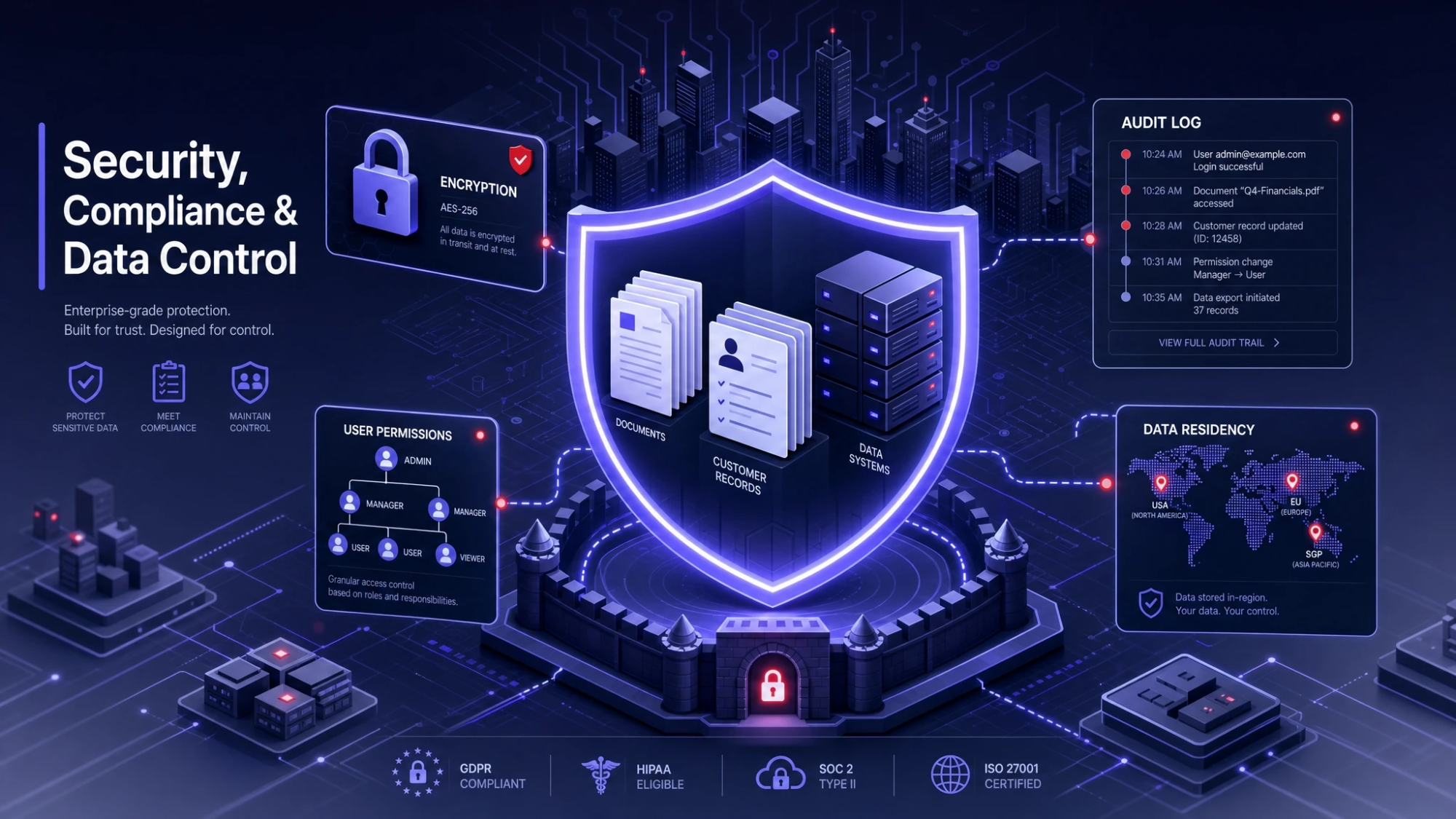
Security is rarely the reason a team chooses a platform, but it often becomes the reason they switch. Business apps handle customer records, contracts, payroll, and operational metrics. The platform must support least-privilege access, encryption, logging, and clear data residency options.
Low-code platforms generally provide more mature governance features for larger organizations. They often support detailed role-based access control, environment separation, and integration with identity providers. No-code platforms can be secure, but organizations must evaluate how permissions, audit logs, and data access work at scale.
Total Cost Of Ownership
Licensing is only a slice of cost. The bigger drivers are maintenance, change management, and the effort required to keep apps aligned with business needs. An app that is cheap to build but hard to evolve becomes costly fast.
No-code can lower upfront costs by reducing the need for development time. Low-code can reduce long-term costs by preventing rewrites and minimizing platform limitations that force workarounds. To compare fairly, include training, governance, integration work, and the cost of handling exceptions.
Team Fit And Operating Model
Choosing low-code vs no-code is also choosing how teams work. No-code empowers business users, but it can create fragmented solutions if there is no central oversight. Low-code encourages collaboration between product owners, analysts, and developers with shared standards.
- Citizen Development Model: Works best with no-code when there are clear templates, data policies, and an approval process.
- Fusion Team Model: Works best with low-code when developers and domain experts co-build and iterate quickly.
- Center Of Excellence Model: Fits both approaches when it defines governance, reusable components, and platform guidelines.
Strong governance keeps speed without turning the app portfolio into unmanageable sprawl. It also reduces operational risk when staff changes.
Low-Code Vs No-Code Comparison Table
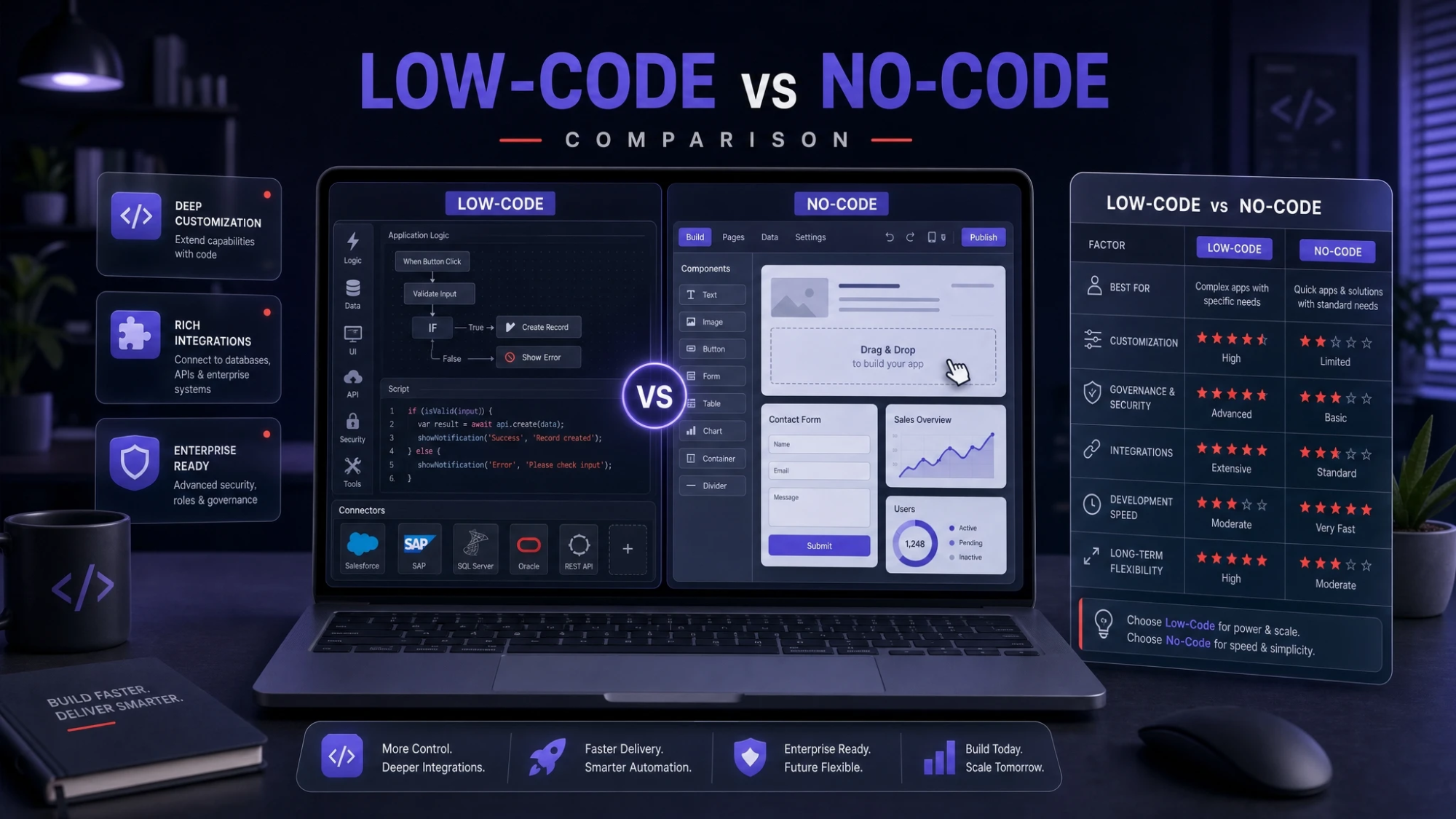
| Decision Factor | Low-Code | No-Code |
|---|---|---|
| Best For | Complex workflows and deep integrations | Simple workflows and rapid departmental apps |
| Customization | Extensible with code and custom components | Limited to platform rules and templates |
| Governance | Stronger controls for environments and roles | Needs added guardrails to avoid sprawl |
| Long-Term Flexibility | Higher due to extensibility and integration options | Lower when requirements exceed platform limits |
Use this table to shortlist options, then validate the fit with a small pilot that includes real integrations and permissions.
When Low-Code Is The Better Choice?
Low-code is the safer bet when the app will touch core systems and must evolve over time. It reduces the chance of hitting platform ceilings and needing a full rebuild. It also supports stronger engineering discipline when the app becomes business-critical.
- Multi-System Integrations: Useful when the app must connect to ERP, CRM, data warehouses, or custom APIs.
- Complex Business Logic: Better when rules include exceptions, approvals, conditional routing, and advanced validation.
- Enterprise Security Needs: A stronger fit when audit trails, SSO, and strict permissions are required.
- Custom UI Requirements: Helpful when the user experience needs bespoke components or accessibility controls.
These conditions signal that extensibility and governance will matter as much as speed. Low-code keeps delivery fast while protecting the future roadmap.
When No-Code Is The Better Choice?
No-code is ideal when time-to-value is the top priority and the workflow is well-defined. It works especially well for automations, intake forms, and lightweight apps used by a single department. It also supports experimentation without heavy engineering investment.
- Internal Requests And Approvals: Good for standardized intake, routing, and notifications with clear rules.
- Operational Dashboards: Useful when the platform can connect to data sources and present reporting quickly.
- Prototype And Validation: Strong when you need to confirm requirements before committing to deeper development.
- Small Team Ownership: Effective when a department can manage changes without a release cycle.
No-code works best with a lightweight governance layer. Standard naming, data access rules, and app review cycles prevent chaos later.
How To Choose Without Regrets?
A strong selection process looks beyond a demo. It tests your real data, real roles, and real integrations. That approach prevents surprises after rollout.
- Define The App Boundary: Clarify users, data sensitivity, integrations, and expected lifespan.
- Map Critical Workflows: Document approvals, exceptions, notifications, and required audit trails.
- Assess Integration Complexity: List systems, authentication methods, API limits, and data synchronization needs.
- Evaluate Governance Features: Check roles, environment separation, logging, and admin controls.
- Run A Pilot Build: Build a thin slice that includes permissions, one integration, and a reporting view.
- Plan Ownership And Support: Decide who maintains the app, how changes are reviewed, and how incidents are handled.
If your organization lacks a structured evaluation process, Tech Bonafide can help with platform selection, solution architecture, and implementation planning. A short discovery engagement often surfaces hidden integration and governance requirements early.
Common Pitfalls To Avoid
Most failed projects are not caused by the platform choice alone. They fail due to unclear ownership, weak data practices, and underestimating long-term change. Avoiding a few pitfalls keeps the build sustainable.
- Ignoring Data Modeling: Poor structure creates reporting issues, duplication, and permission leaks.
- Underestimating Permissions: Role design must match real job functions, not generic user types.
- Building Without Standards: Naming, environments, and reusable components reduce future maintenance.
- Skipping Integration Testing: Authentication, rate limits, and error handling must be validated early.
Address these items upfront and both low-code and no-code can succeed. The right choice then becomes a matter of fit, not luck.
Conclusion
Low-code vs no-code is less about which is better in general and more about what your business app must become. No-code wins when speed and simplicity matter most and the workflow fits within platform boundaries. Low-code wins when integrations, security, customization, and long-term evolution are non-negotiable.
Choose based on governance needs, integration depth, and expected change over time. If you want a guided evaluation and a build plan that reduces risk, Tech Bonafide can support the full journey from requirements to rollout and ongoing optimization.
Frequently Asked Questions
Can Low-Code And No-Code Be Used Together In One Organization?
Yes, many teams use no-code for lightweight departmental apps and low-code for core workflows that require integrations and stronger governance. A shared set of standards for data access, naming, and ownership keeps the portfolio manageable. This hybrid approach often delivers the best balance of speed and control.
Will A No-Code App Need To Be Rebuilt Later?
It depends on how fast requirements grow beyond the platform limits. Rebuild risk increases when you need complex permissions, custom logic, or advanced integrations that the no-code tool cannot support. A careful pilot and clear boundary for the app reduce the chances of a costly rewrite.
What Should Be In A Low-Code Or No-Code Governance Policy?
A practical policy covers app ownership, approval workflows, role-based access rules, data classification, and environment separation. It should also define how integrations are created, how changes are reviewed, and how audit logs are retained. Clear governance protects speed while limiting operational risk.