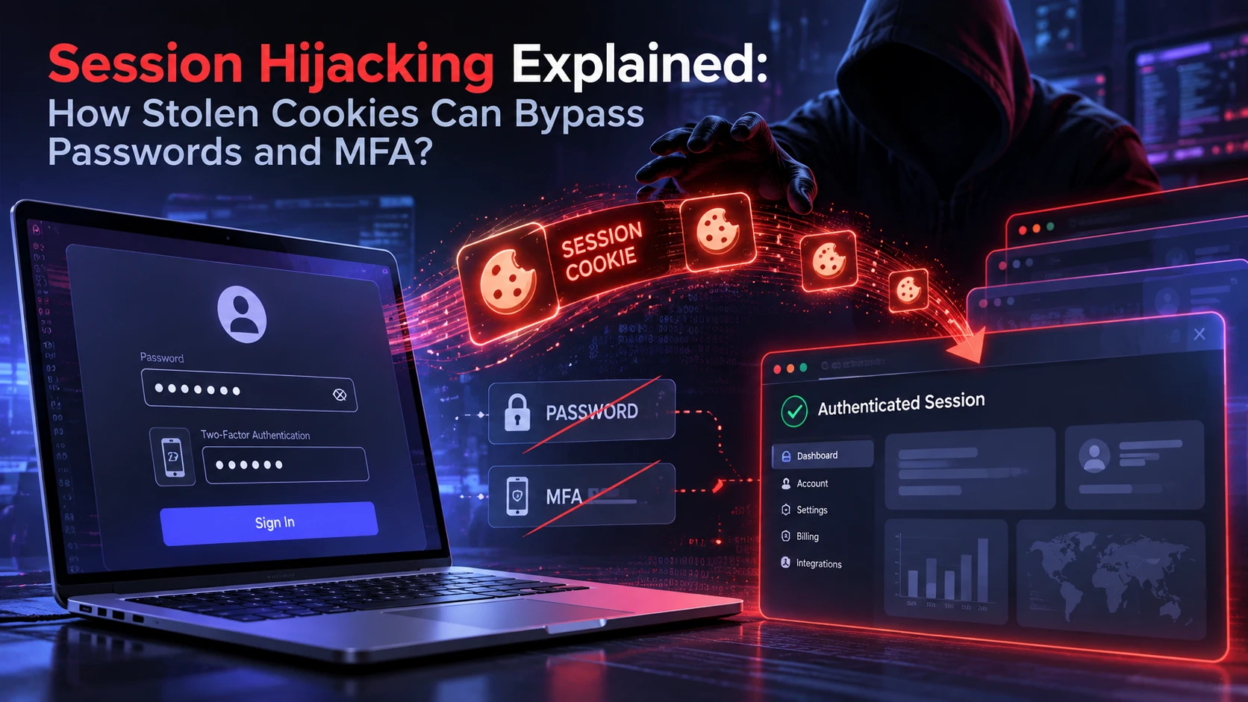
Session hijacking is an account-takeover technique in which an attacker reuses a valid session token to impersonate an authenticated user without needing the password. Many applications accept that token as evidence of an existing login, so theft of the token can let an attacker avoid repeating the normal sign-in checks. Reducing this risk requires protecting both the authentication process and the session lifecycle after login.
What Session Hijacking Means
A web session is the server and browser agreement that a user has already authenticated. The browser stores a session identifier, often in a cookie, and presents it with each request. If someone else obtains that identifier, they can reuse it until it expires or gets invalidated.
This is why a stolen session token can let an attacker avoid repeating the password and MFA checks that originally created the session. MFA can still protect the initial sign-in, but if an application accepts a stolen valid token, the attacker may be able to impersonate the user until that token expires or is revoked.
How Web Sessions and Cookies Work
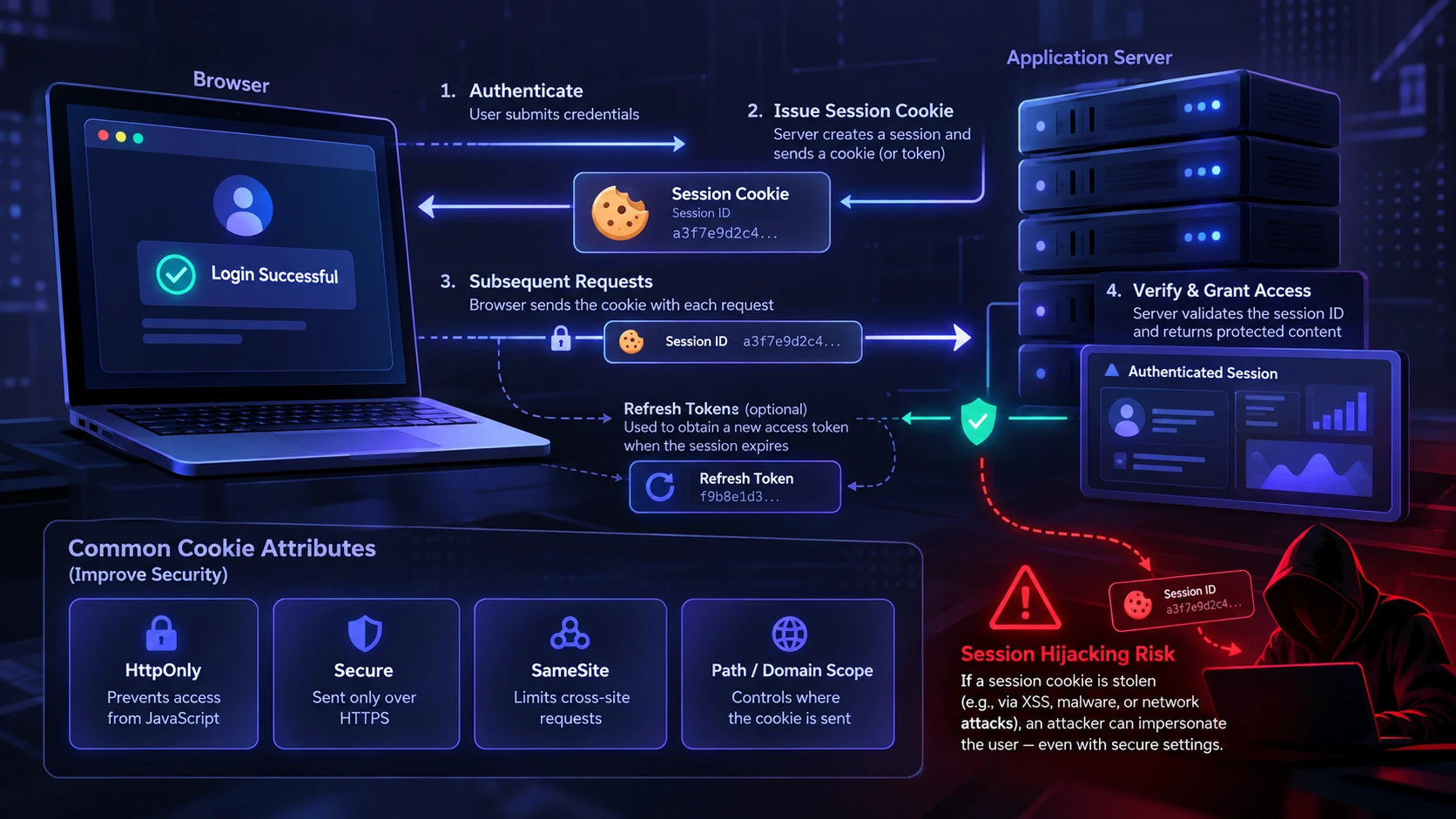
After successful authentication, most applications create a server-side session or issue a signed token. The browser receives a cookie containing a session ID or an access token and stores it according to cookie attributes. Each request carries that cookie, and the server checks it to decide whether the user is authenticated.
Many modern authentication systems also use access tokens and refresh tokens. A stolen access token may remain usable until it expires or is revoked, while a compromised refresh token can potentially be used to obtain new access tokens until the refresh token itself expires, is rotated, or is revoked. The impact therefore depends on the token type and the application’s lifecycle controls.
Common Cookie Attributes That Matter
Cookie settings can reduce theft and replay, but they rarely eliminate it on their own. Secure defaults matter, and gaps are common in custom apps and legacy services.
- HttpOnly: Prevents scripts from reading the cookie through APIs such as Document.cookie, which helps reduce direct cookie theft through client-side script access. It does not eliminate the broader impact of an XSS vulnerability.
- Secure: Restricts the cookie to HTTPS requests, helping prevent exposure over unencrypted HTTP connections.
- SameSite: Controls whether the cookie is sent with cross-site requests and can reduce exposure to certain cross-site request forgery patterns.
- Path and Domain Scope: Keep cookie scope as narrow as practical. Avoid unnecessary Domain scope that exposes a cookie to additional subdomains, and do not treat the Path attribute as a security boundary.
These controls help, but session hijacking still succeeds through other paths such as endpoint compromise, token logging, or network interception in misconfigured environments. Developers can verify the behavior of Secure, HttpOnly, SameSite, Domain, and Path in MDN’s Set-Cookie reference before choosing session-cookie defaults.
Why Stolen Cookies Bypass Passwords and MFA
MFA proves that the person logging in has an extra factor at that moment. Once a session is established, the application typically stops challenging the user until the session expires or a sensitive action requires re-authentication. Attackers focus on the session because it is accepted as an already verified state.
Session theft is different from attacks that manipulate the MFA prompt itself. Our guide to MFA fatigue attacks explains how repeated authentication requests pressure users into approving an attacker’s login and why the resulting session still needs strong post-login protection.
When the stolen token is presented, the server sees a valid session and proceeds. Unless the application binds the session to additional signals and enforces continuous verification, the session remains portable between devices and networks.
Stronger authentication still matters because it can reduce how attackers obtain a valid session in the first place. Our comparison of passkeys vs passwords explains how origin-bound passkeys reduce traditional credential-phishing risk, while session security remains necessary after authentication succeeds.
Session Portability and Trust Assumptions
High-entropy session identifiers are essential because they make guessing valid tokens impractical. However, token entropy cannot protect a session identifier that has already been copied from the legitimate user’s browser or device.
Longer session lifetimes also increase the window in which a stolen token may remain useful. Refresh tokens can extend authenticated access, but their actual lifetime depends on expiration, rotation, revocation, and reuse-detection controls.
Common Ways Session Cookies Get Stolen
Cookie theft usually happens through weaknesses around the endpoint, the browser, or the application itself. Reducing session hijacking requires mapping realistic theft paths and then closing them systematically.
- Malware And Infostealers: Browser data stores can be harvested to extract cookies, tokens, and saved credentials. For a deeper look at this endpoint threat, our guide to infostealer malware explains how stealers collect browser credentials, cookies, tokens, and other sensitive data from compromised devices.
- Adversary-in-the-Middle (AiTM) Phishing: A malicious proxy or relay can sit between the user and a legitimate sign-in service, capture authentication data and the resulting session cookie, and then replay that authenticated session before the token expires or is revoked. Microsoft has documented AiTM phishing and session-cookie theft in real campaigns where authenticated sessions were replayed after users completed MFA.
- Cross-Site Scripting: If tokens are stored in accessible locations or non-HttpOnly cookies, script injection can steal them.
- Unencrypted or Misconfigured Transport: Session data can be exposed when applications use unencrypted HTTP, fail to protect sensitive cookies with the Secure attribute, or maintain legacy endpoints that weaken transport security.
- Token Leakage In Logs: URLs, headers, or debugging output can leak tokens into analytics, support tools, or shared logs.
- Compromised Extensions And Browsers: Rogue add-ons can access session data and exfiltrate it.
If browser add-ons are part of your threat model, our guide to browser extension permissions explains what broad extension access can expose and what users should review before installing or updating an add-on.
Each path points to different defenses, so it helps to separate web app hardening from endpoint security and identity controls.
Where Applications Fail in Session Security
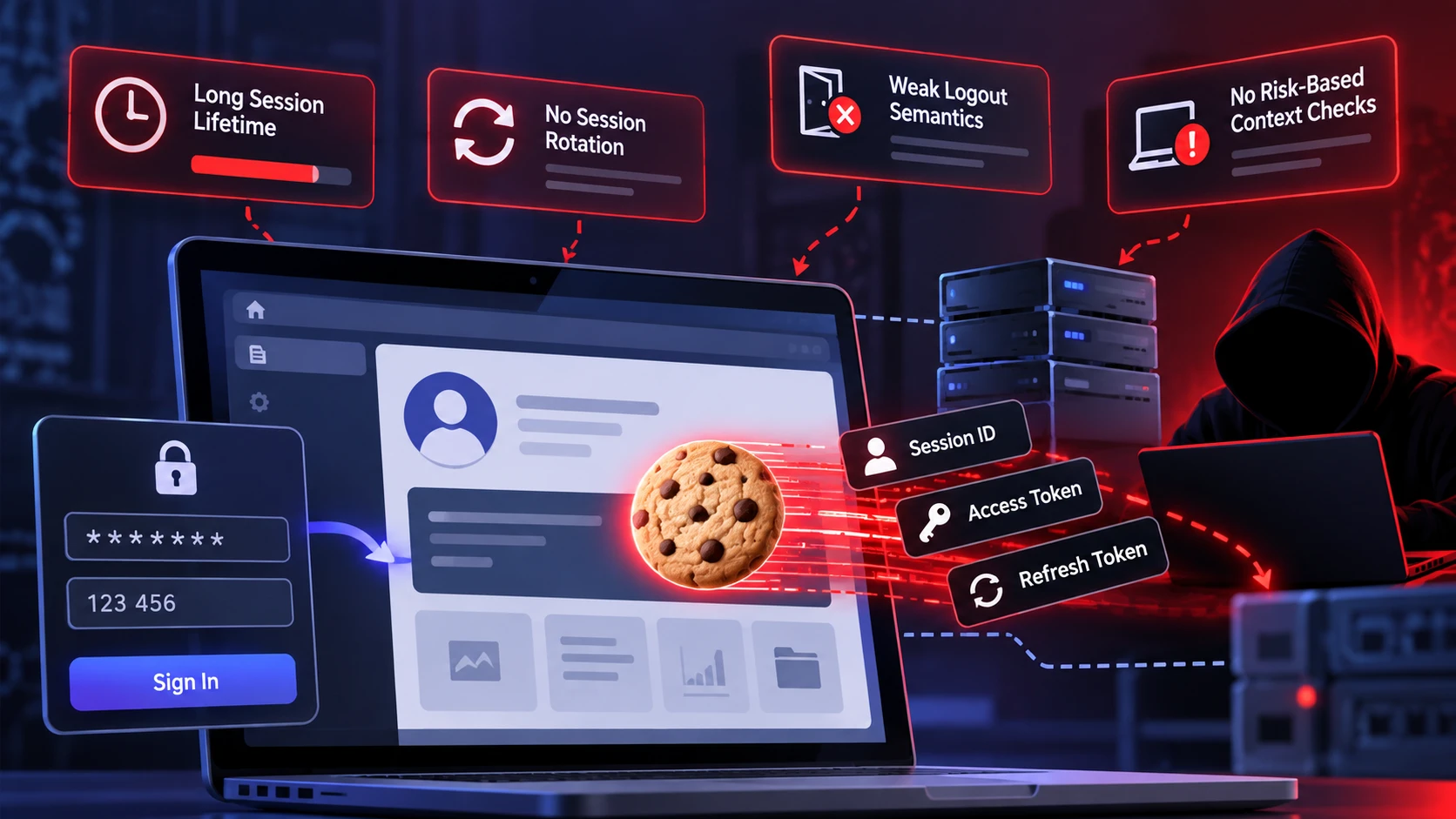
Session security breaks when developers rely on login strength but underinvest in post-login controls. A strong MFA flow cannot compensate for weak session management, missing revocation, or poor cookie settings.
Frequent failure points include sessions that never rotate, tokens that do not expire quickly, and authentication state that remains valid across major context changes. Lack of telemetry and alerting often means hijacks are discovered only after damage occurs.
High-Impact Misconfigurations to Watch
- Long Session Lifetime: Excessive idle and absolute timeouts increase replay windows.
- No Session Rotation: Reusing the same identifier after privilege changes or re-authentication preserves stolen token value.
- Weak Logout Semantics: Client-side logout without server invalidation leaves sessions usable.
- No Risk-Based Context Checks: Applications that never react to meaningful changes in device, network, location, or behavior may miss token replay. Treat these changes as risk signals rather than rigid identity checks, because legitimate users can switch networks, travel, or change devices.
These issues are common in custom portals, internal tools, and older authentication middleware. They are also visible during security assessments that focus on authorization and session state.
Detection Signals for Session Hijacking
Detection is about spotting the difference between normal usage and token replay. Since the attacker often looks like a valid user, you need behavioral and technical signals that indicate session misuse.
- Impossible Travel Patterns: Rapid location changes that do not match expected travel velocity for the same session.
- User Agent And Device Drift: Sudden changes in browser fingerprint, OS, or device type within one session.
- Concurrent Session Activity: Overlapping requests from different networks for the same account or session identifier.
- Unusual Sensitive Actions: Export spikes, permission changes, new API keys, or payout destination edits.
- Refresh Token Anomalies: Refresh requests at odd hours or from new ASNs that do not align with the user baseline.
These signals are indicators rather than proof of session hijacking. Correlate location or device changes with authentication events, token issuance, concurrent activity, privilege changes, and known VPN or mobile-network behavior. Use non-secret session correlators in logs where possible, and avoid recording raw session cookies or access tokens.
Session Hardening Strategies That Actually Work
Effective prevention combines secure session design, runtime validation, and response playbooks. The goal is to make stolen cookies less useful and to limit blast radius when theft occurs.
Practical Controls To Implement
- Use Idle and Absolute Timeouts: Apply risk-appropriate inactivity limits and an absolute maximum session lifetime so active sessions cannot continue indefinitely.
- Rotate Session IDs After Authentication and Privilege Changes: Issue a new session identifier after login, reauthentication, or privilege-level changes so older identifiers lose value.
- Support Server-Side Revocation: Ensure logout, account recovery, administrative resets, and incident-response actions can invalidate affected sessions.
- Use Risk-Based Context Checks Carefully: Evaluate meaningful changes in device, network, location, or behavior without relying on brittle one-signal binding.
- Re-Authenticate for High-Risk Actions: Require fresh authentication or step-up verification before sensitive actions such as payments, credential changes, exports, or key management. OWASP’s reauthentication guidance also recommends fresh authentication after high-risk events such as suspicious-device activity, credential changes, and account recovery.
- Harden Cookie Settings: Use Secure, HttpOnly, an appropriate SameSite value, and the narrowest practical Domain and Path scope for session cookies.
These measures work best when paired with monitoring, alerting, and incident response procedures that are rehearsed, not improvised.
For implementation details on timeouts, session renewal, revocation, logout, and reauthentication, use the OWASP Session Management Cheat Sheet as a technical reference
Session Security Control Matrix
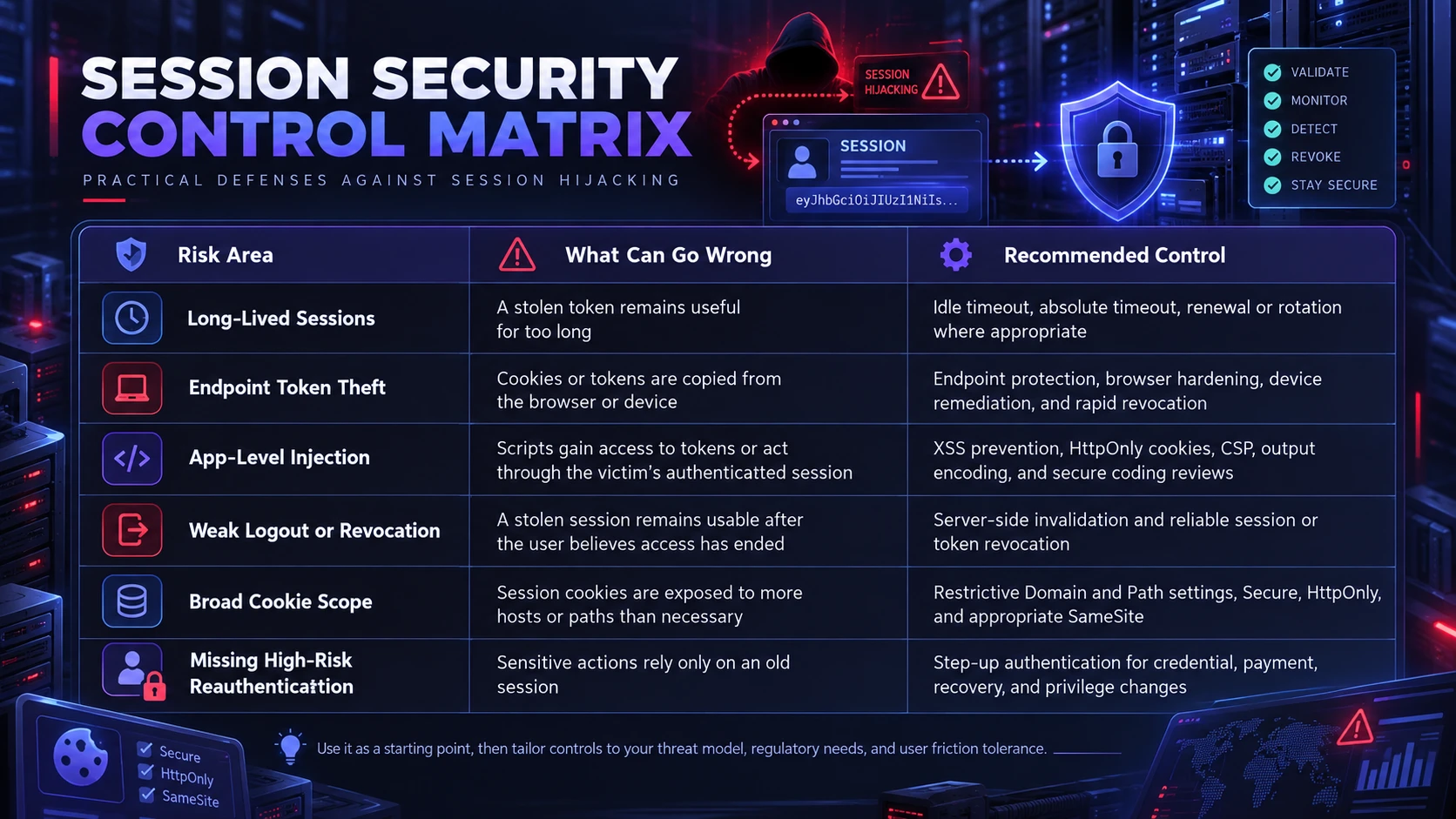
The table below maps common session hijacking risks to defenses and operational checks. It can be used as a lightweight review guide during application releases and security audits.
| Risk Area | What Can Go Wrong | Recommended Control |
|---|---|---|
| Long-Lived Sessions | A stolen token remains useful for too long | Idle timeout, absolute timeout, renewal or rotation where appropriate |
| Endpoint Token Theft | Cookies or tokens are copied from the browser or device | Endpoint protection, browser hardening, device remediation, and rapid revocation |
| App-Level Injection | Scripts gain access to tokens or act through the victim’s authenticated session | XSS prevention, HttpOnly cookies, CSP, output encoding, and secure coding reviews |
| Weak Logout or Revocation | A stolen session remains usable after the user believes access has ended | Server-side invalidation and reliable session or token revocation |
| Broad Cookie Scope | Session cookies are exposed to more hosts or paths than necessary | Restrictive Domain and Path settings, Secure, HttpOnly, and appropriate SameSite |
| Missing High-Risk Reauthentication | Sensitive actions rely only on an old session | Step-up authentication for credential, payment, recovery, and privilege changes |
Use it as a starting point, then tailor controls to your threat model, regulatory needs, and user friction tolerance.
How TechBonafide Can Help Reduce Session Hijacking Risk
Session hijacking spans application security, identity, endpoint protection, and monitoring. A useful review should cover how sessions are created, rotated, expired, revoked, logged, and protected when users move between devices or perform sensitive actions.
For portals that handle customer data, administrative functions, or payment activity, prioritize token lifetime, cookie scope, logout behavior, high-risk reauthentication, endpoint exposure, and suspicious-session detection. Document these controls so incident responders can quickly determine which sessions need to be revoked after suspected compromise.
Conclusion
Session hijacking works because web applications treat session tokens as proof of authentication, even when passwords and MFA are strong. Stolen cookies allow attackers to replay that proof and operate as the user until the session expires or is revoked.
Reducing risk requires appropriate session lifetimes, identifier rotation, reliable revocation, secure cookie settings, endpoint protection, and detection focused on post-login anomalies. Strong login security remains important, but session security determines how much damage a stolen authenticated token can cause and how quickly that access can be contained.
Frequently Asked Questions
Is Session Hijacking the Same As Stealing A Password?
No. Password theft targets credentials used at login, while session hijacking targets the post-login session token that proves the user is already authenticated. MFA can block password-only attacks, but it does not automatically stop a stolen session token from being replayed.
Do Secure and HttpOnly Cookies Fully Prevent Session Hijacking?
They reduce specific theft paths, especially token access through client-side scripts and plaintext transport. They do not stop endpoint malware, adversary-in-the-middle token capture, or token leakage through logs and tooling. Session lifetime, rotation, and revocation still matter.
What Should Be Done Immediately After Suspected Cookie Theft?
Invalidate affected sessions and refresh tokens, then require re-authentication. If endpoint compromise or infostealer malware is suspected, isolate and remediate the device before trusting a new session from it. Review recent sensitive actions, reset credentials where appropriate, rotate exposed API keys or other secrets, and increase monitoring for follow-on activity.