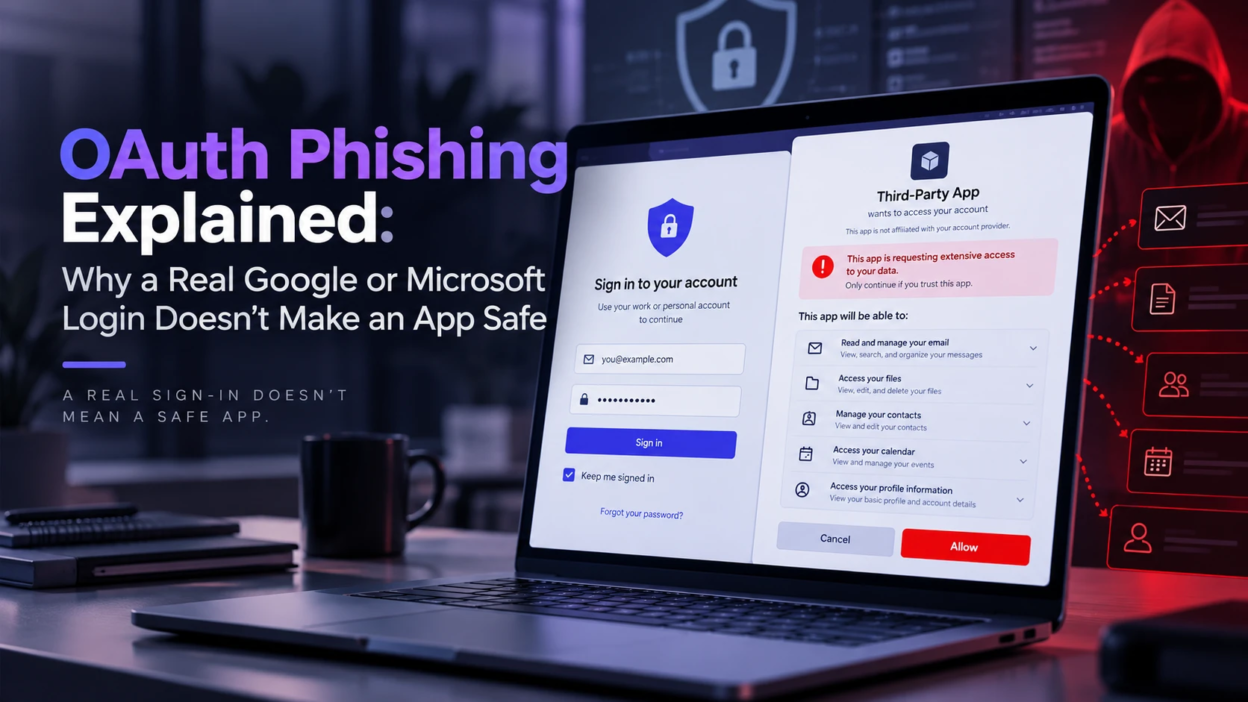
OAuth sign-in feels safer than typing a password into an unfamiliar site because the login page is real. That trust is exactly what OAuth phishing abuses by getting users to approve access rather than steal credentials.
What OAuth Is and Why it Feels Safe?
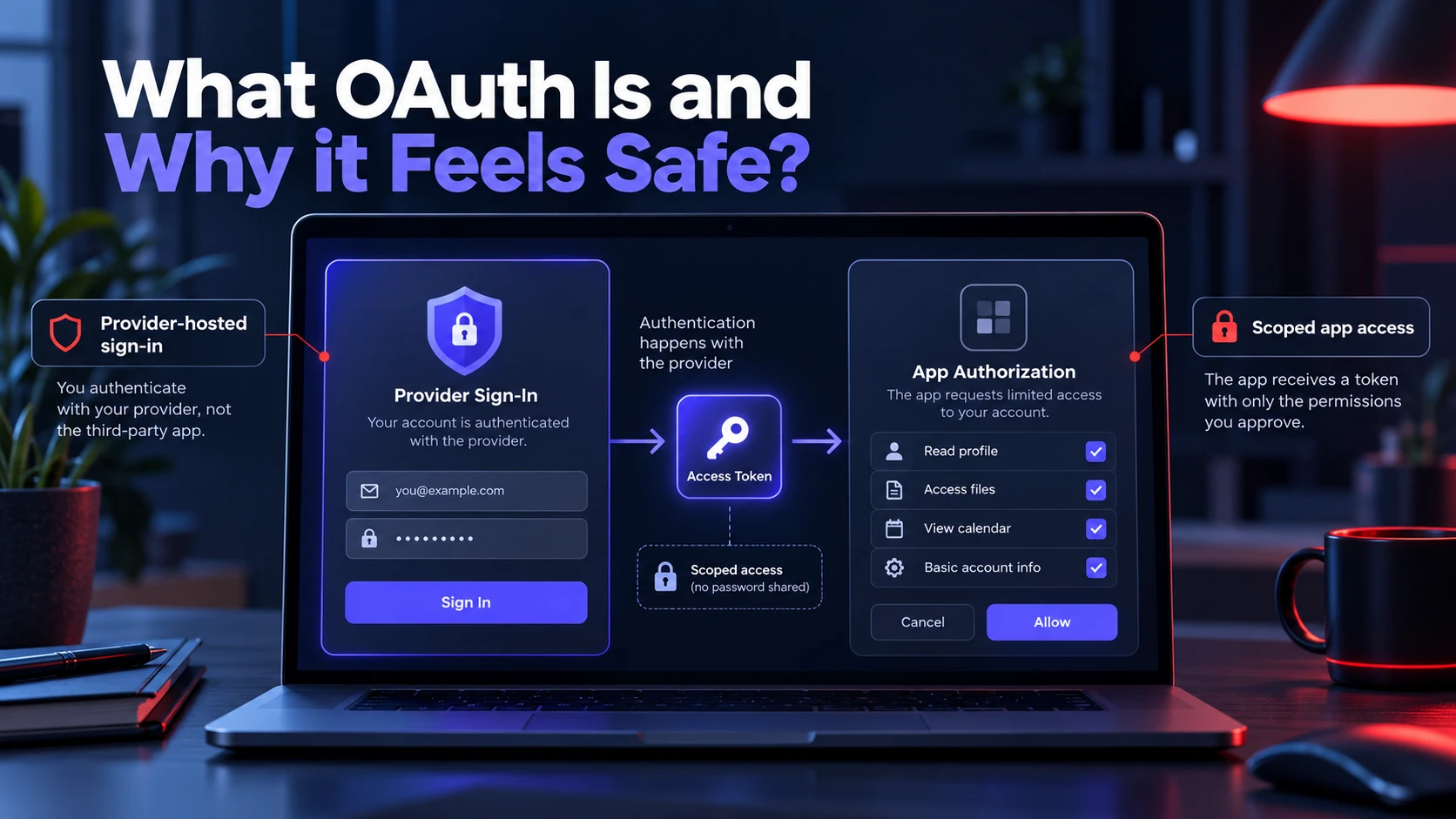
OAuth is an authorization framework that lets an application request scoped access to protected resources without requiring the application to collect the user’s account password. The permissions requested are represented through scopes, which determine what the application is allowed to access or do.
In a standard provider-hosted authorization flow, Google or Microsoft handles the account authentication while the third-party application receives authorization tokens rather than the user’s password. OAuth itself is primarily an authorization framework; sign-in experiences commonly add an identity layer such as OpenID Connect.
What OAuth Phishing Means
OAuth consent phishing is an attack in which a user is tricked into granting permissions to a malicious or attacker-controlled application. Unlike traditional credential phishing, the attack can use a legitimate provider-hosted consent flow, although OAuth abuse can also appear alongside other phishing techniques.
The provider-hosted login can be legitimate while the requesting application is still unsafe. After consent, the application can receive access tokens and, in supported flows, refresh tokens that may enable continued access until the grant is revoked, the token expires, or another provider-specific invalidation condition occurs.
How A Real Login Can Still Lead to Harm
A real Google or Microsoft login only proves you are interacting with the identity provider. It does not prove the requesting app is trustworthy or that its requested access is appropriate.
Attackers register their own apps, brand them to look familiar, and request broad scopes. If a user approves, the app can read mail, access files, or maintain offline access depending on permissions.
Consent Screens Can Hide Risk In Plain Sight
Consent prompts often summarize permissions in user-friendly language. That wording can downplay the operational impact of a scope that enables long-term access or sensitive data reads.
Users also move quickly through prompts when they are trying to reach a document, join a meeting, or complete a workflow. That speed favors the attacker.
Common OAuth Permissions That Create High Exposure
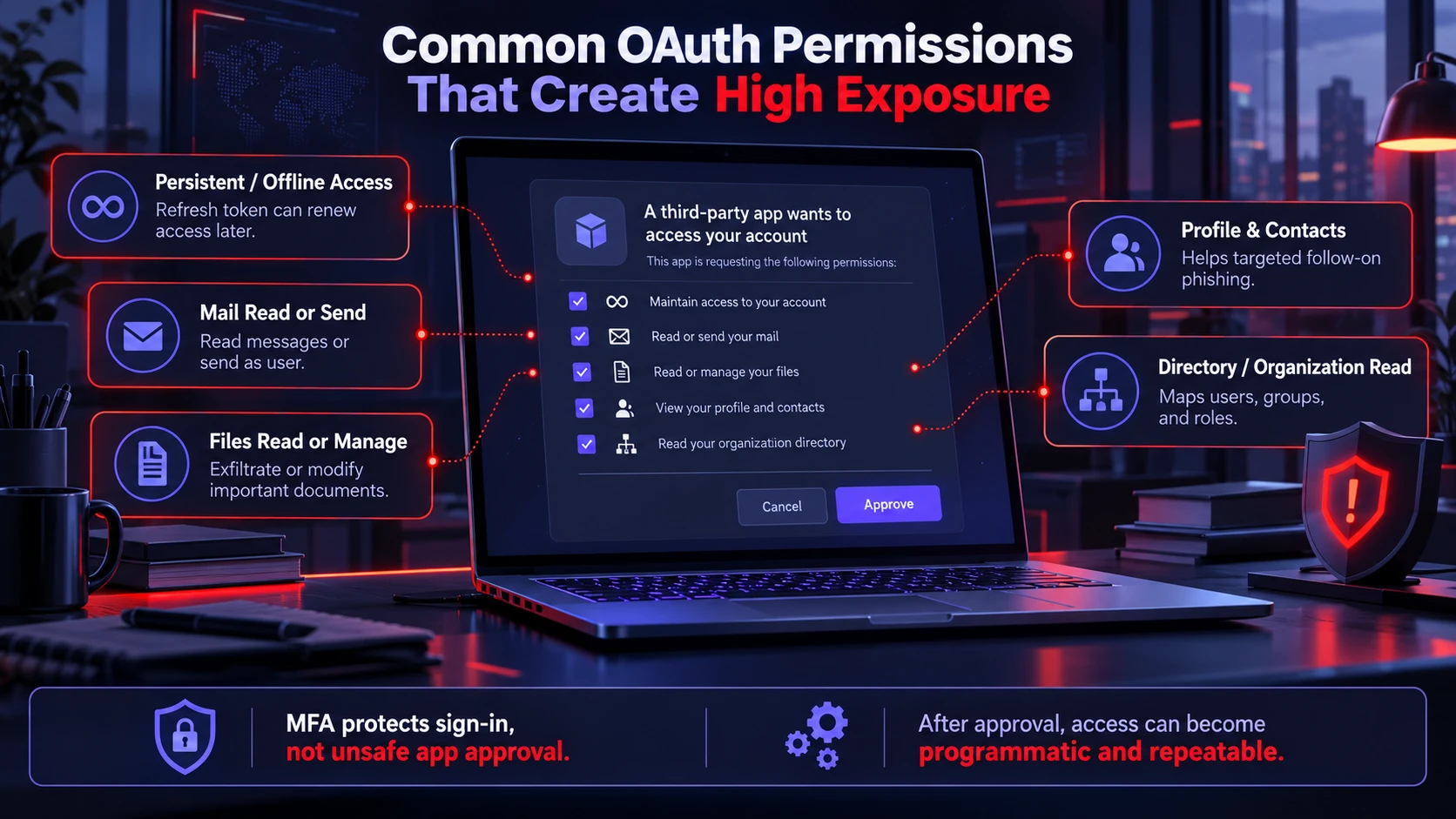
Not every OAuth permission carries the same risk. The potential impact depends on the requested scopes, the type of token issued, the provider’s policies, and whether the grant allows continued access without the user being actively signed in. MFA can protect the authentication step, but it does not by itself prevent a user from approving an unsafe application.
- Persistent or Offline Access: Some OAuth flows can issue refresh tokens that let an application obtain new access tokens when the user is no longer actively present. The exact mechanism and lifetime depend on the identity provider and authorization flow.
- Mail Read or Send Permissions: Depending on the granted scope, an application may be able to read mailbox content, analyze messages, or send mail on the user’s behalf. Read and send permissions are separate capabilities and should be evaluated individually.
- Files Read Or Manage: Enables document exfiltration, shared drive access, and tampering with business-critical content.
- Profile And Contacts Access: Supports targeted follow-on phishing and business email compromise style social engineering.
- Directory Or Organization Read: Helps map users, groups, and roles to pick high-value targets.
Which permissions an ordinary user can approve varies by provider and organization policy. Some higher-impact permissions require administrator consent, while administrators can also restrict the set of applications or permissions users are allowed to approve.
Once these permissions are granted, the attacker does not need to keep tricking the user. The access path becomes programmatic and repeatable.
OAuth Phishing Versus Password Phishing
Traditional phishing tries to steal a username and password with a lookalike page. OAuth phishing leverages legitimate identity flows and converts user trust into delegated access.
The differences matter because defenses that catch fake login pages do not always catch malicious app consent. Many organizations also monitor password resets and MFA prompts more than app authorizations.
| Attack Type | Typical User Experience | Main Security Risk |
|---|---|---|
| Password Phishing | Fake or impersonated sign-in page | Credentials are disclosed to an attacker |
| OAuth Consent Phishing | Legitimate or provider-hosted authorization/consent flow | User grants an attacker-controlled app access to data or actions |
| MFA Fatigue | Repeated or unexpected authentication prompts | User approves an authentication request they did not initiate |
| Token Theft | Often little or no visible warning to the user | A stolen token or session artifact is reused for unauthorized access |
Why OAuth Phishing is Harder to Detect?
The authentication or consent page may genuinely be hosted by Google, Microsoft, or another identity provider, so familiar browser indicators can look normal. Those indicators confirm the site serving the authorization flow; they do not establish that the third-party application requesting permissions is trustworthy.
OAuth tokens also blend into normal application traffic. API calls to Google Workspace or Microsoft 365 can appear legitimate unless you have strong logging, baselines, and alerting for new grants.
For more context on authorization and data exposure at this layer, see our guide to API security basics and the risks behind connected applications
Long Lived Access Changes The Recovery Model
A password change should not be treated as sufficient remediation for a malicious OAuth grant. Token invalidation behavior varies by provider, scope, and account state; for example, Google documents that some refresh tokens can be invalidated by a password change when Gmail scopes are involved, while other revocation conditions also apply. The malicious application grant itself should therefore be investigated and removed.
That is why revocation is a first-class response step. Treat app grants like another form of persistence.
Warning Signs Users and Admins Should Watch
OAuth phishing leaves clues, but they look different from classic phishing. Training should focus on permissions, app identity, and the business context of the request.
- Unexpected Consent Prompt: A request appears when no new tool or workflow was initiated.
- Overly Broad Permissions: The access requested does not match the app’s claimed function.
- Suspicious App or Publisher Details: Look for unfamiliar app names, inconsistent branding, unusual domains, or unverified publishers. A verified publisher can provide additional identity information, but users should still verify that the requested permissions make sense for the task.
- Urgency To Approve: The message pushes immediate action to view a file or fix an account issue.
- New App In Connected Apps List: A recently authorized app appears that nobody recognizes.
The same least-privilege principle applies to other browser-integrated software; our guide to browser extension permissions explains why broad access requests should be reviewed before installation.
These signals are especially important in email-based lures, where a single click leads into a real login and a high-trust consent moment.
How to Reduce Risk in Google and Microsoft Environments?
Mitigation requires both user habits and admin controls. The strongest programs combine least privilege, approval workflows, and rapid visibility into new grants.
This approach also follows the broader principle of Zero Trust security, where users, devices, and applications are not automatically trusted simply because they are already inside the environment.
User Level Protection That Actually Helps
Users should slow down at the consent screen and treat it like signing a legal authorization. If the request does not align with a work task, it should be denied and reported.
It also helps to periodically review connected apps and remove anything unused. This reduces the number of standing authorizations that can be abused later.
Admin Level Controls That Cut Off The Attack Path
Administrators should apply provider-specific controls to third-party application consent. In Microsoft Entra ID, organizations can restrict user consent, limit consent to verified publishers and selected low-impact permissions, and use an admin consent workflow when review is required.
Google Workspace administrators can use API controls and App Access Control to classify third-party applications as Trusted, Limited, Specific Google data, or Blocked, and can restrict access to high-risk OAuth scopes. Consent and application-access events should also be reviewed alongside normal identity and sign-in monitoring.
Incident Response When An OAuth App Was Approved
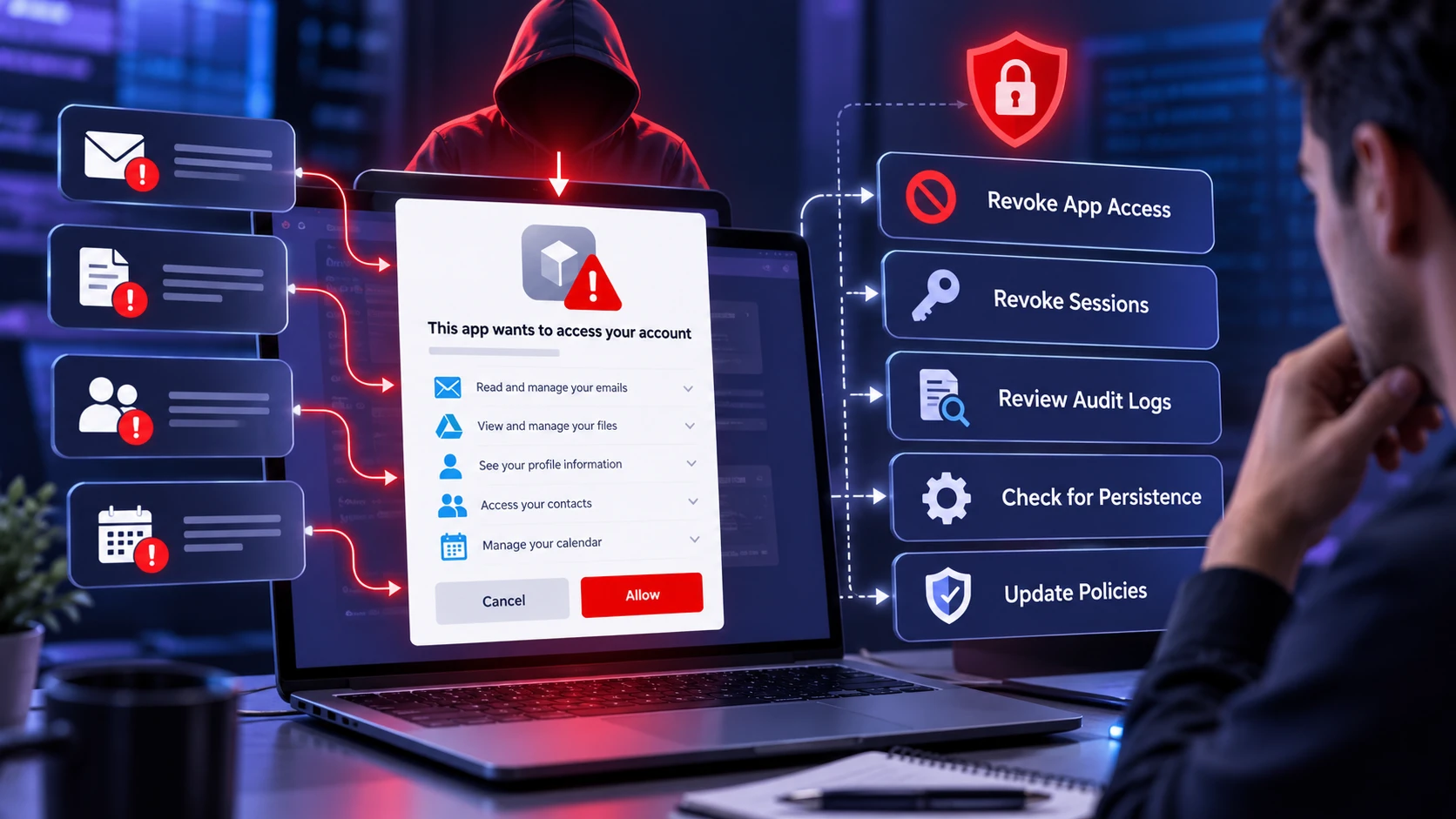
When a suspicious consent is discovered, speed matters. The goal is to remove access, understand what was touched, and prevent re-authorization.
- Disable or Revoke the Malicious App Grant: Remove or disable the application’s authorization using the controls provided by the identity platform. This prevents new authorization activity, but existing access tokens may require additional containment or may remain valid until they expire, depending on the provider.
- Revoke Relevant Sessions and Tokens: Use the provider’s incident-response controls to invalidate sessions or credentials where appropriate. Do not assume that a password reset or ordinary browser sign-out alone removes an OAuth application grant.
- Review Audit Logs: Check consent events, API activity, mailbox actions, and file access for scope-based abuse.
- Hunt For Persistence: Look for inbox rules, forwarding, added OAuth apps, and new delegated permissions.
- Adjust Policies: Tighten app consent settings and add monitoring alerts based on what was observed.
After containment, document the application ID, publisher information, users who granted consent, scopes or permissions granted, token and sign-in activity, and resources that may have been accessed. This evidence helps determine the affected data, additional remediation, and any notification requirements.
Practical Governance for Teams With Many SaaS Tools
Organizations often depend on legitimate third-party SaaS integrations, so OAuth governance needs to distinguish approved business applications from unnecessary or high-risk access. The goal is to preserve useful integrations while limiting permissions and continuously reviewing standing grants.
A helpful approach is to maintain an approved apps catalog, enforce least privilege scopes, and review app access on a regular cadence. When teams need a new integration, they should request it through a defined workflow with security review.
Practical Takeaways for Security Teams
If your environment depends on Google Workspace or Microsoft 365, treat OAuth consent as part of identity and SaaS governance rather than only as an email-security issue. Review who can approve applications, which permissions are permitted, how new grants are logged, and how quickly suspicious access can be revoked.
A practical program should combine least privilege, an approved-app process, regular review of standing grants, user awareness, and an incident-response procedure for suspicious applications. The exact controls should follow the capabilities of the identity platform your organization uses.
Conclusion
OAuth phishing works because it uses a real login and shifts the decision point to consent. The user may never share a password, yet the attacker can still gain durable access through granted scopes and refresh tokens.
Defending against it requires treating app authorizations as sensitive security events. Strong consent governance, careful scope review, and fast revocation procedures close the gap that a real login page cannot.
Frequently Asked Questions
Is OAuth Phishing Still a Threat if MFA is Enabled?
Yes. MFA can protect the authentication step, but a successfully authenticated user may still be able to approve an application if the organization’s consent policy allows it. Organizations should therefore combine MFA with application-consent restrictions, least-privilege permissions, administrator review where appropriate, and monitoring for suspicious grants.
What Should I Check on a Consent Screen Before Approving?
Confirm the app name, publisher details, and whether the access requested matches the task you are trying to complete. Pay close attention to permissions that mention mail, files, directory access, or offline access. If anything feels unnecessary, deny and report it.
After Revoking a Malicious App, Do I Still Need to Reset The Password?
Revoking the app grant is the priority because it removes delegated access. A password reset can still be appropriate if there is any sign of credential exposure or suspicious sign-in activity. It is also smart to review mailbox rules and file access logs to confirm there is no remaining persistence.