
API rate limits protect online services from excessive traffic, unexpected costs, and system overload. When an API returns an HTTP 429 Too Many Requests error, it usually means a client has exceeded a request limit set by the provider. These limits may apply to an API key, user, IP address, endpoint, or shared account quota. Fixing 429 errors requires understanding the provider’s limits, checking retry instructions, and reducing unnecessary requests. This guide explains how API rate limiting works and how to prevent repeated 429 errors using exponential backoff, caching, batching, and better request management.
What API Rate Limits Mean?
An API rate limit is a policy that caps how frequently a client can call an endpoint. Limits are often defined per API key, per IP address, per user, per organization, or per route. The goal is to keep the platform stable and predictable for everyone.
Rate limiting is not only about traffic volume. It also accounts for expensive operations like complex searches, large payload processing, and fan-out queries that hit multiple internal services. Some providers also use weighted limits where different endpoints consume different amounts of budget.
Rate limiting is also an important part of protecting APIs against automated abuse and resource exhaustion. For a wider look at related controls, our guide to API security risks and best practices explains authentication, authorization, data exposure, and techniques for managing excessive API traffic.
Why You Get 429 Too Many Requests?
A 429 response usually means your request rate exceeded the allowed threshold. The provider may enforce a strict ceiling, or it may apply dynamic throttling during high load periods. In either case, retries without control can worsen the issue by creating a retry storm.
According to MDN’s documentation of the HTTP 429 Too Many Requests status code, this response indicates that a client has sent too many requests within a given time. The exact limits and methods used to identify clients depend on the API provider.
HTTP 429 errors can also occur when multiple applications, background jobs, or microservices share the same API credentials. For example, if five workers each send 25 requests per minute, their combined traffic reaches 125 requests per minute. This can exceed a shared limit even when each worker appears to be operating normally. Developers should check whether quotas apply to individual API keys, accounts, endpoints, or organizations, then coordinate request traffic across connected systems. Centralized rate limiting and concurrency controls help prevent one application from consuming the request allowance needed by others.
How Rate Limits are Commonly Enforced?
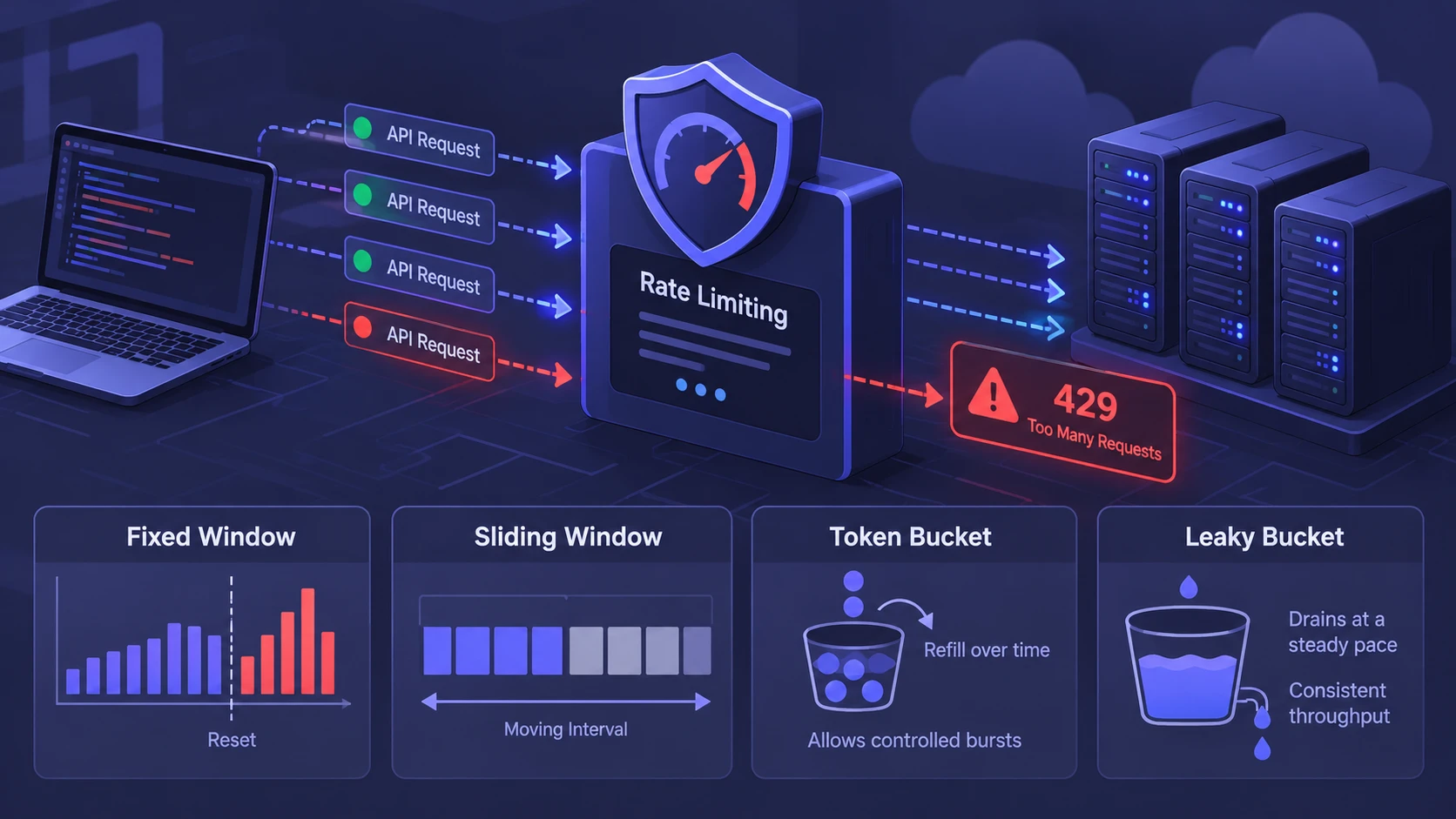
Providers implement rate limits using algorithms designed to balance fairness and burst handling. Understanding the typical patterns helps you choose the right mitigation. It also helps you interpret response headers that describe remaining quota and reset timing.
- Fixed Window: A counter resets at a boundary, which can cause spikes right after reset.
- Sliding Window: Requests are counted across a moving interval, smoothing out boundary effects.
- Token Bucket: Tokens refill over time, allowing controlled bursts while limiting sustained rate.
- Leaky Bucket: Requests drain at a steady pace, producing consistent throughput with limited bursts.
These approaches may be combined with per-route limits and global account-level quotas. That is why you can see 429 on one endpoint while other endpoints remain available.
In modern cloud applications, API gateways often help enforce throttling policies before requests reach backend services. Developers who want to understand these traffic-management components can read our comparison of API gateways and load balancers, including how the two technologies differ in routing, request controls, and backend traffic distribution.
Read the Headers Before You Retry
When an API returns an HTTP 429 error, response headers can help developers determine when another request may be allowed. The Retry-After header may provide a waiting period in seconds or an HTTP date. Some APIs also return headers such as X-RateLimit-Remaining and X-RateLimit-Reset, which describe remaining requests or quota reset timing. However, header names, units, and supported features vary between providers.
If Retry-After is present, follow the waiting period it specifies before attempting another permitted request. If it is missing, consult the API provider’s rate-limit documentation and check whether a reset time or other retry guidance is available. When retries are appropriate, use a limited retry strategy with exponential backoff and jitter. Repeatedly sending requests without checking the API’s rules can increase throttling and may violate the provider’s usage policy.
Developers who need to interpret retry instructions can consult MDN’s Retry-After header documentation. It explains how the header expresses a waiting period through an HTTP date or a number of seconds.
Example: What An HTTP 429 Response Looks Like
Consider an API that allows only a certain number of requests per minute. If a client exceeds that limit, the server might return a response similar to the following example.
HTTP/1.1 429 Too Many Requests
Content-Type: application/json
Retry-After: 60
{
"error": "rate_limit_exceeded",
"message": "Too many requests. Try again later."
}
In this illustrative response, HTTP status code 429 indicates that the client has exceeded a request limit. The Retry-After: 60 header tells the client to wait 60 seconds before attempting another request. A real API may return different headers, response messages, or retry instructions. Developers should always check the specific provider’s documentation before implementing automatic retries.
Quick Checklist to Fix 429 Errors
Most 429 problems come from predictable causes such as bursts, unbounded concurrency, and inefficient request patterns. This checklist focuses on changes that typically reduce error rates quickly. After applying them, monitor request volume, latency, and success rate together.
- Cap Concurrency: Limit parallel requests per API key and per host to prevent sudden spikes.
- Honor Retry Signals: Use Retry-After and reset headers rather than guessing timing.
- Add Jitter: Randomize delays so multiple clients do not retry at the same time.
- Reduce Call Frequency: Cache, batch, and avoid polling when webhooks are available.
- Coordinate Shared Quotas: Track total API usage across applications, workers, and scheduled jobs. Use centralized request budgeting and provider-approved workload separation so multiple systems do not unexpectedly exceed shared limits.
Once the immediate fire is out, the next step is designing a durable approach that keeps you under limits even as traffic grows.
Implement Exponential Backoff With Jitter
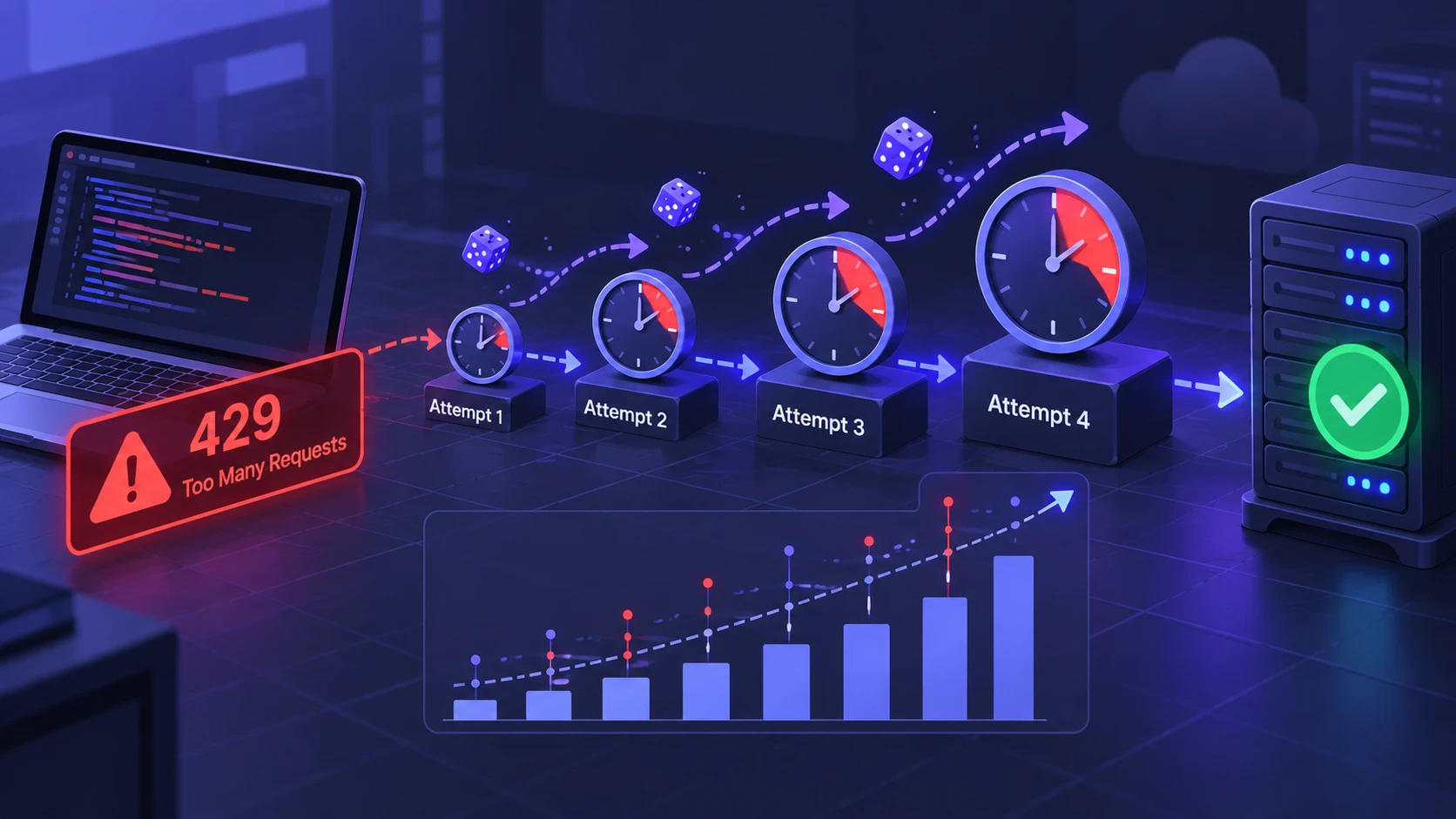
Exponential backoff with jitter is a common way to manage retryable API throttling errors when the provider permits retries. Instead of resending failed requests immediately, the client increases the delay between attempts up to a defined maximum. Jitter adds randomness to those delays, reducing the chance that multiple clients will retry at the same moment. However, a provider’s Retry-After instructions and quota reset rules must take priority over a shorter calculated delay. Retries should also have a maximum attempt count or total time limit to prevent unnecessary traffic and long-running failures.
- Start With A Small Delay: Pick a base delay that matches the API’s typical reset timing and your user experience needs.
- Increase Delay on Each 429: Multiply the delay by a factor such as 2 until a maximum delay is reached.
- Add Randomness: Apply full jitter or equal jitter so retries spread out across a time range.
- Set A Retry Ceiling: Stop retrying after a bounded number of attempts and surface a clear error upstream.
Backoff should be paired with good observability. Log attempt counts, chosen delays, and any rate limit headers so you can tune behavior without guesswork.
For a deeper technical explanation, AWS provides guidance on exponential backoff and jitter, including how randomized retry delays help reduce contention when multiple clients retry failed operations.
Batch Requests and Collapse Duplicates
Many integrations waste quota by sending multiple requests that could be combined. If the API supports bulk endpoints, prefer them for reads and writes. If bulk operations are not available, you can still reduce calls by collapsing duplicate lookups within a short time window.
Deduplication is especially important in event-driven pipelines where the same object can trigger multiple processing paths. A shared in-memory cache or distributed cache can prevent repeated reads for the same identifier. If consistency requirements are strict, keep cache TTLs short and invalidate on updates.
Use Caching the Right Way
Caching can reduce repeated API requests and improve response speed, but the caching strategy must match how frequently the data changes. Use supported cache-control headers and conditional requests with ETag and If-None-Match where appropriate. When data has not changed, a server may return HTTP 304 Not Modified instead of sending the full response body. However, conditional requests may still count toward an API’s rate limit, depending on the provider. Developers should confirm the quota rules before assuming that HTTP 304 responses reduce request usage.
Cache design should be explicit about what is safe to reuse. Cache public reference data longer, and cache personalized or sensitive data carefully with appropriate scoping. Avoid caching error responses unless the API specifies a safe retry window.
Prevent Polling and Prefer Push Signals
Polling is a common source of unnecessary API calls. If the provider offers webhooks, event streams, or change notifications, use them to receive updates only when something changes. This reduces baseline traffic and leaves more quota for interactive actions.
If polling is unavoidable, adapt the polling interval to real activity. Use longer intervals during idle periods and back off automatically when receiving 429 responses. That keeps throughput stable while still meeting freshness needs.
Control Rate Limits Across Distributed Systems
Rate limit bugs frequently show up after scaling. A single-instance client might stay under limits, but a scaled deployment multiplies call volume. Without coordination, each instance believes it is safe to send requests, while the shared quota is exceeded.
A shared token bucket implemented in Redis or another centralized store can coordinate spending across instances. Another approach is a queue-based worker system that enforces global throughput by controlling worker count and per-worker pacing. If you run Kubernetes, combine horizontal autoscaling with request budgets that prevent scale-out from instantly overwhelming an API.
The way applications scale can also influence how quickly shared API quotas are consumed. Our serverless vs containers comparison explains how these deployment models handle workload scaling, infrastructure management, and operational requirements. Understanding these differences can help teams coordinate API traffic across distributed applications.
Compare Fix Options and When to Use Them
Different fixes target different bottlenecks. The table below summarizes practical approaches, where they fit best, and what to watch for. Use it to choose a primary strategy and one secondary safeguard.
| Approach | Best When | Important Limitation |
|---|---|---|
| Exponential backoff with jitter | Temporary throttling can be resolved through provider-approved retries | Does not bypass fixed quotas or replace Retry-After instructions |
| Caching and conditional requests | Frequently requested data changes infrequently | Cache invalidation matters, and conditional requests may still consume quota |
| Batching and bulk endpoints | Multiple supported operations can be combined | Large batches may trigger payload limits or increase failure impact |
| Global rate limiting and queueing | Multiple workers or services share the same quota | Requires coordination and monitoring to prevent excessive queue delays |
After picking an approach, validate it with load tests that mirror real concurrency. Track not only 429 counts, but also end-to-end latency and backlog depth.
Design Requests to Spend Less Quota
Efficient request design is a long-term solution because it reduces steady-state usage. Prefer fetching only needed fields when the API supports partial responses. Use server-side filtering and pagination correctly, and avoid fetching the same pages repeatedly when a cursor can resume where you left off.
Write operations deserve extra care because retries can create duplicates. Use idempotency keys when available and ensure your client can safely retry without double-charging, double-creating, or double-sending messages. Where idempotency is not provided, implement application-level safeguards such as unique constraints.
AWS discusses the importance of making retries safe with idempotent APIs, particularly when an operation could accidentally create duplicate resources after a failed response. This principle is especially important for payment processing, order creation, and other API requests that change data.
When You Should Request Higher Limits
Some applications may continue approaching API request limits even after caching, batching, and retry optimization. If an integration regularly reaches its permitted quota during legitimate business operations, developers should review the provider’s available usage plans and quota-increase process. Some providers offer higher limits through paid plans, account upgrades, or support requests, while others impose fixed restrictions. Approval is not guaranteed, so teams should document actual usage patterns and confirm the available options before planning around a higher quota.
For example, the GitHub REST API rate-limit documentation explains primary and secondary limits, how to inspect remaining request allowances, and what developers should do when limits are exceeded. It demonstrates why developers must check the rules of their particular API rather than assume all providers follow identical policies.
Before contacting support, gather evidence such as your peak requests per minute, endpoints involved, and the mitigation steps already deployed. Also document how you handle backoff and how you prevent retry storms. This reduces back-and-forth and increases trust.
Operational Monitoring That Catches 429 Early
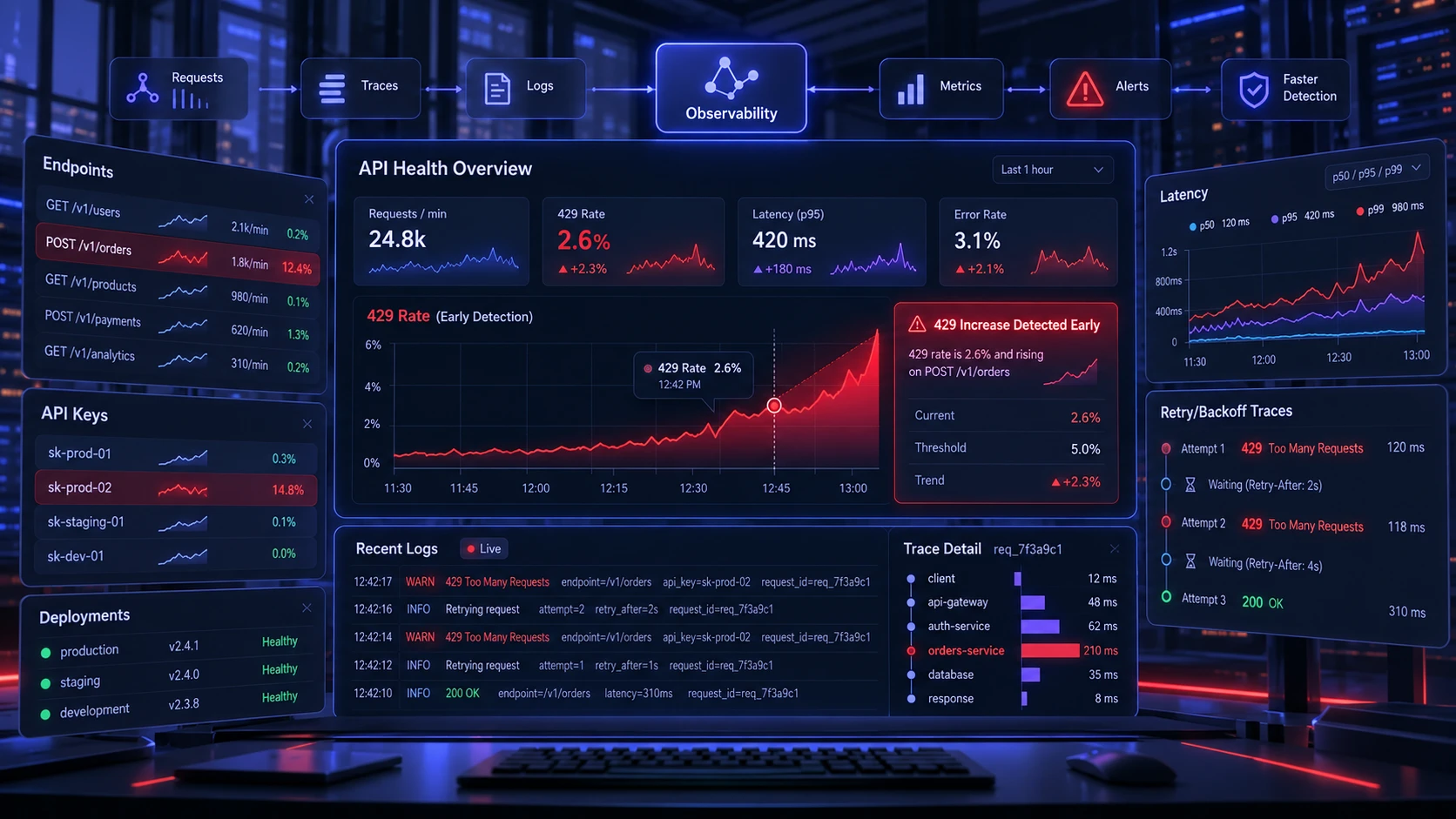
Rate limit issues are easier to fix when you spot them before users do. Track 429 rate by endpoint, by API key, and by deployment. Alert on sudden changes in error rate and on rising latency, since throttling often correlates with slower responses.
Log response headers related to quota and include request identifiers for tracing. Correlate client-side retries with server responses so you can see whether backoff is working. If the provider returns a request ID, store it to speed up support investigations.
Tracking HTTP 429 errors is part of a broader approach to application reliability. Our explanation of observability and monitoring describes how system measurements, logs, and operational visibility help developers identify failures, examine their causes, and improve service performance.
Conclusion
API rate limits are a normal part of reliable platforms, and 429 errors are a signal to change how your client behaves. The fastest fixes are honoring retry headers, implementing exponential backoff with jitter, and limiting concurrency. Durable improvements come from caching, batching, reducing polling, and coordinating rate budgets across distributed services.
Treating API quotas as shared resources helps developers build more reliable integrations and reduce unnecessary throttling. By monitoring request usage, following provider-specific retry instructions, and improving request efficiency, teams can lower the frequency and impact of HTTP 429 errors. Although rate limits cannot always be avoided, careful traffic management makes them easier to diagnose and handle without disrupting users or overloading connected services.