A failed software release can cause application downtime, increased error rates, slower performance, and unexpected problems for users. Choosing the right deployment strategy helps engineering teams control these risks and recover when a new version does not work as expected.
Blue-green and canary deployment are two common approaches to safer software releases. Blue-green deployment typically maintains separate environments and switches production traffic to a tested version, while canary deployment gradually exposes a new version to a limited portion of production traffic.
This blue-green vs canary deployment comparison explains how both strategies work, what happens when a release fails, how rollback and database changes affect recovery, and which approach may be more suitable for different applications and engineering teams.
What Blue-Green Deployment Means?
Blue-green deployment runs two production environments that are as identical as possible. One environment serves all live traffic while the other receives the new version. When validation passes, traffic switches from the old environment to the new one using a load balancer, DNS, or a gateway.
Keeping the previous environment available can simplify rollback because traffic may be redirected to the earlier application version without rebuilding it. However, the actual recovery time depends on the routing mechanism, the health of the previous environment, and application compatibility. DNS-based traffic changes may take additional time to reach some users because of caching, while incompatible database changes or irreversible external operations can prevent a complete recovery.
For a practical explanation of how separate environments support controlled releases and rollback, review the AWS blue-green deployment guidance. It explains how production traffic can be redirected between application environments and why keeping the previous environment available can help with recovery.
What Canary Deployment Means?
Canary deployment introduces a new application version to a limited portion of production traffic while the stable version continues serving the remaining traffic. Engineering teams monitor the new version for errors, performance changes, and unexpected user behavior before increasing its exposure. Depending on the infrastructure, traffic may be divided through load balancers, ingress controllers, service meshes, or other supported routing mechanisms. Feature flags can also control which users receive new functionality, although feature-level exposure and routing requests between application versions are not necessarily the same operation.
Canary reduces blast radius by design, but rollback can be more complex because both versions run at the same time. That means you must plan carefully for session handling, caching, and consistency across versions.
To see how a canary release works in a containerized environment, explore the official Kubernetes canary deployment tutorial. The tutorial demonstrates how stable and canary application versions can run together, receive production traffic, and be adjusted or rolled back based on deployment results.
What Happens When A Release Goes Wrong?

Failures during deployment usually appear as increased error rates, latency spikes, broken user flows, or corrupted business events. The strategy determines how quickly you can isolate the faulty version and how many users see the failure. It also affects how confident you can be that rollback truly returns the system to a stable state.
To make either approach safe, focus on fast detection, bounded impact, and reliable recovery. That requires good health checks, strong monitoring, and pre-defined rollback criteria that engineers trust during an incident.
Failure Modes in Blue-Green Deployment
In a conventional blue-green deployment with an all-at-once traffic switch, a serious defect in the new environment can affect a large portion of users immediately after cutover. Problems may involve application errors, incorrect configuration, unavailable dependencies, or incompatible database operations. If the previous environment remains healthy and the application data is compatible, reverting the traffic route can reduce the duration of the incident. Some blue-green implementations also support gradual or canary-style traffic shifting, allowing teams to limit initial exposure instead of moving all traffic at once.
- Traffic switch misconfiguration: Requests can route to the wrong target, bypass security controls, or break sticky sessions after cutover.
- Hidden environment drift: Differences in secrets, config, or infrastructure between blue and green can surface only at switch time.
- Warmup and cache misses: Cold caches and unprimed dependencies can cause latency spikes right after the switch.
- Database incompatibility: Schema changes that are not backward compatible can make rollback unsafe or incomplete.
- Background job duplication: Workers running in both environments can double-process events if not coordinated.
These issues are manageable when you standardize environment parity and treat data changes as first-class deployment artifacts. That preparation is where many teams either win or lose the rollback battle.
Traffic routing is an important part of reliable blue-green deployment because the selected infrastructure controls how requests reach each application environment. For a closer look at these components, read TechBonafide’s API gateway vs load balancer comparison, which explains their different responsibilities in modern cloud applications.
Failure Modes in Canary Deployment
Canary failures often look subtle at first because the new version serves only a slice of traffic. That can be a benefit, but it can also delay detection if your metrics are not segmented by version. The longer both versions run, the more important version-aware tracing and logs become.
- Insufficient signal quality: Low canary traffic can make error spikes statistically noisy, which slows decision-making.
- Uneven user exposure: A routing rule can unintentionally concentrate risk on a specific region, device type, or high-value cohort.
- Session and state conflicts: Users can bounce between versions and encounter inconsistent behavior without strong stickiness rules.
- Cache pollution: Shared caches can mix old and new formats, causing intermittent failures even after rollback.
- Feature flag interactions: Flags combined with partial traffic can create unexpected execution paths that did not appear in testing.
Canary is safest when it is treated as a disciplined experiment. That means clear guardrails, measurable success criteria, and a fast stop button that is tested regularly.
Canary deployments depend on reliable monitoring data to distinguish application regressions from normal performance fluctuations. Understanding the difference between monitoring known indicators and investigating unexpected system behavior is also valuable. TechBonafide’s guide to observability vs monitoring explains these concepts and their role in understanding system health.
Rollback and Recovery Differences
Blue-green rollback generally involves redirecting production traffic from the new environment to the previous stable environment. This can simplify recovery when both environments remain operational and database changes are backward compatible. However, recovery is not necessarily immediate. Traffic routing delays, existing connections, schema changes, and external operations may continue affecting users even after the previous application version becomes active.
DNS-based traffic switching introduces an additional consideration because some clients may continue using cached routing information after records change. The AWS documentation on DNS-based blue-green routing explains how DNS time-to-live settings and client caching can influence the speed of a traffic transition or rollback.
Canary rollback focuses on stopping further exposure to the faulty version. Depending on the deployment platform, engineers may change traffic weights, disable the canary release, or scale down the new application instances after redirecting traffic. Because the faulty version initially handles a limited portion of requests, the potential impact may be smaller. However, shared databases, cached information, and external transactions can still require investigation or corrective action.
For either strategy, a reliable recovery plan should include verified rollback procedures, compatible database migrations, clear incident ownership, automated health checks, and post-rollback validation of critical application functions.
Database Changes When A Release Goes Wrong
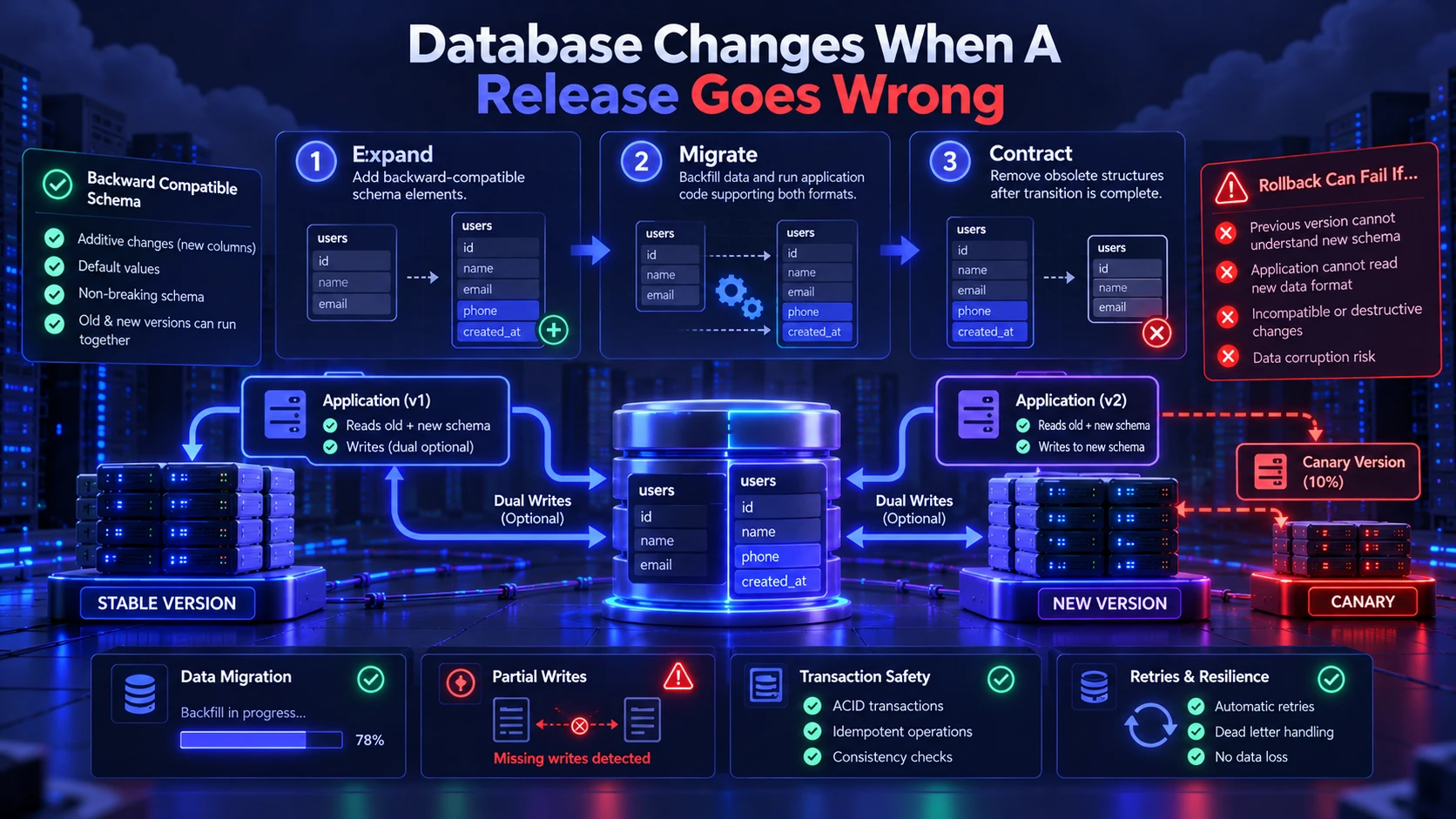
Database changes can make deployment rollback difficult when a new application version modifies a schema or data format that the previous version cannot understand. One commonly used approach is the expand-and-contract migration pattern. Engineers first introduce backward-compatible database structures, update application code to support the transition, migrate or backfill data where necessary, and remove obsolete structures only after dependent application versions no longer require them.
This staged approach helps reduce compatibility problems during blue-green and canary deployments. However, database migration safety still depends on application behavior, data transformations, transaction handling, and whether rollback has been tested under realistic conditions.
For an implementation example, Prisma’s expand-and-contract migration guide demonstrates a staged approach to changing database structures while preserving existing application data. The guide illustrates how schema changes and data migration can be coordinated rather than relying on a single destructive update.
Both blue-green and canary benefit from backward compatible schemas, but canary adds additional pressure because two versions may run concurrently. When dual writes are required, ensure the system can tolerate partial writes and retries without corrupting domain state.
Observability and Guardrails That Make Both Safer
Reliable deployment monitoring helps engineering teams detect problems before they develop into larger incidents. Where supported, application logs, traces, and performance metrics should identify the deployed version so engineers can compare stable and new releases. Important indicators include error rates, request latency, resource utilization, failed transactions, and business-critical application functions.
Teams should define measurable release acceptance criteria before deployment. A canary rollout may pause when monitoring data is inconclusive, while blue-green deployments may require successful health checks and application tests before production traffic is switched. Automated rollback can reduce response time, but teams must validate that monitoring signals are reliable enough to support automated decisions.
- Version tagged metrics: Track error rates, p95 latency, and throughput by version and by route.
- Automatic rollback triggers: Define thresholds that revert traffic when they are crossed for a sustained window.
- Progressive exposure rules: Increase traffic only when stability holds, not on a fixed timer.
- Synthetic checks: Validate critical paths like login, checkout, and search continuously during rollout.
- Change correlation: Tie alerts to the exact commit, build, and config diff that shipped.
These guardrails reduce mean time to detect and mean time to recover. They also create better post-incident learning because evidence is consistent and attributable.
Teams using Kubernetes-based progressive delivery can review the Argo Rollouts analysis documentation for examples of metric-driven rollout evaluation. Argo Rollouts supports analysis templates and configurable success or failure conditions, helping engineers automate supported deployment decisions using measurable signals.
Blue-Green vs Canary Deployment: Key Differences
The right choice is often determined by how much control you have over traffic routing and how risky your data changes are. Blue-green is attractive when you want a decisive cutover with a fast, simple rollback. Canary is attractive when you can observe safely and want to limit impact while validating in production.
| Decision Factor | Blue-Green Deployment | Canary Deployment |
|---|---|---|
| Deployment Approach | Runs separate old and new environments, typically followed by traffic cutover | Introduces the new version to a limited portion of production traffic |
| Initial User Exposure | Can affect most users after an all-at-once switch | Limits initial exposure to selected users or requests |
| Rollback Process | Redirects traffic to the retained stable environment | Redirects canary traffic to the stable version |
| Recovery Limitations | Routing delays and incompatible data can complicate rollback | Shared state and partial transactions may require cleanup |
| Infrastructure Requirements | Often requires capacity for two environments during deployment | Requires capacity for concurrent versions and controlled routing |
| Monitoring Requirements | Health checks and validation before and after cutover | Version-aware metrics and monitoring at each rollout stage |
| Operational Complexity | Requires environment consistency and reliable traffic switching | Requires traffic management, monitoring, and progressive rollout controls |
| Database Compatibility | Older application version must remain compatible with shared data | Concurrent application versions must handle shared data safely |
| Best Use Case | Applications needing a controlled environment replacement | Applications benefiting from gradual production validation |
Use this comparison to align release mechanics with your incident response goals. The next step is choosing the strategy that matches your architecture and team maturity.
How to Choose the Safer Strategy for Your Team?
Choosing between blue-green and canary deployment should be based on repeatable criteria, not preference. Focus on the risk profile of the change, your observability quality, and your ability to automate rollback. A consistent decision rubric also helps during high-pressure releases.
- Choose blue-green when: You can maintain near-identical environments, you need a clean cutover, and rollback must be immediate and simple.
- Choose canary when: You can split traffic reliably, you have strong monitoring by version, and you want to validate behavior under real load safely.
- Use hybrids when: You want canary inside a green environment, then a final cutover once the canary proves stable.
Many engineering teams end up using both patterns across different services. The key is to standardize tooling so strategy choice does not create a bespoke deployment pipeline every time.
The underlying infrastructure also influences deployment complexity and resource requirements. Teams running containerized services may use different rollout tools and scaling mechanisms from teams managing traditional virtual machines. TechBonafide’s comparison of containers vs virtual machines explains their architectural and operational differences.
Practical Example: What Happens When A Deployment Fails?
Consider a hypothetical e-commerce application releasing a new checkout service. The updated version contains a defect that causes some payment requests to fail. The engineering team’s deployment strategy affects how widely the problem spreads and how quickly further exposure can be stopped.
- Blue-Green Deployment Scenario: The new checkout service is deployed to the green environment and tested before an all-at-once production traffic switch. After cutover, monitoring detects an increased payment failure rate. Engineers redirect traffic to the previous blue environment. If the old environment remains healthy and the shared data is compatible, this can restore the previous application behavior. However, any failed or partially processed payment operations still require investigation.
- Canary Deployment Scenario: The new checkout service initially receives an illustrative 5% share of production requests. Monitoring identifies an increased failure rate in the new version before the rollout expands. Engineers stop further canary traffic and retain the stable version for subsequent requests. This may reduce the incident’s initial scope, but requests already processed by the faulty version may still need remediation.
- Key Lesson: Blue-green deployment can simplify environment-level rollback, while canary deployment can reduce initial exposure to an undetected defect. Neither approach automatically reverses database changes, payment transactions, or other external side effects. The safest choice depends on application architecture, monitoring quality, and recovery requirements.
Release Engineering Practices That Reduce Damage
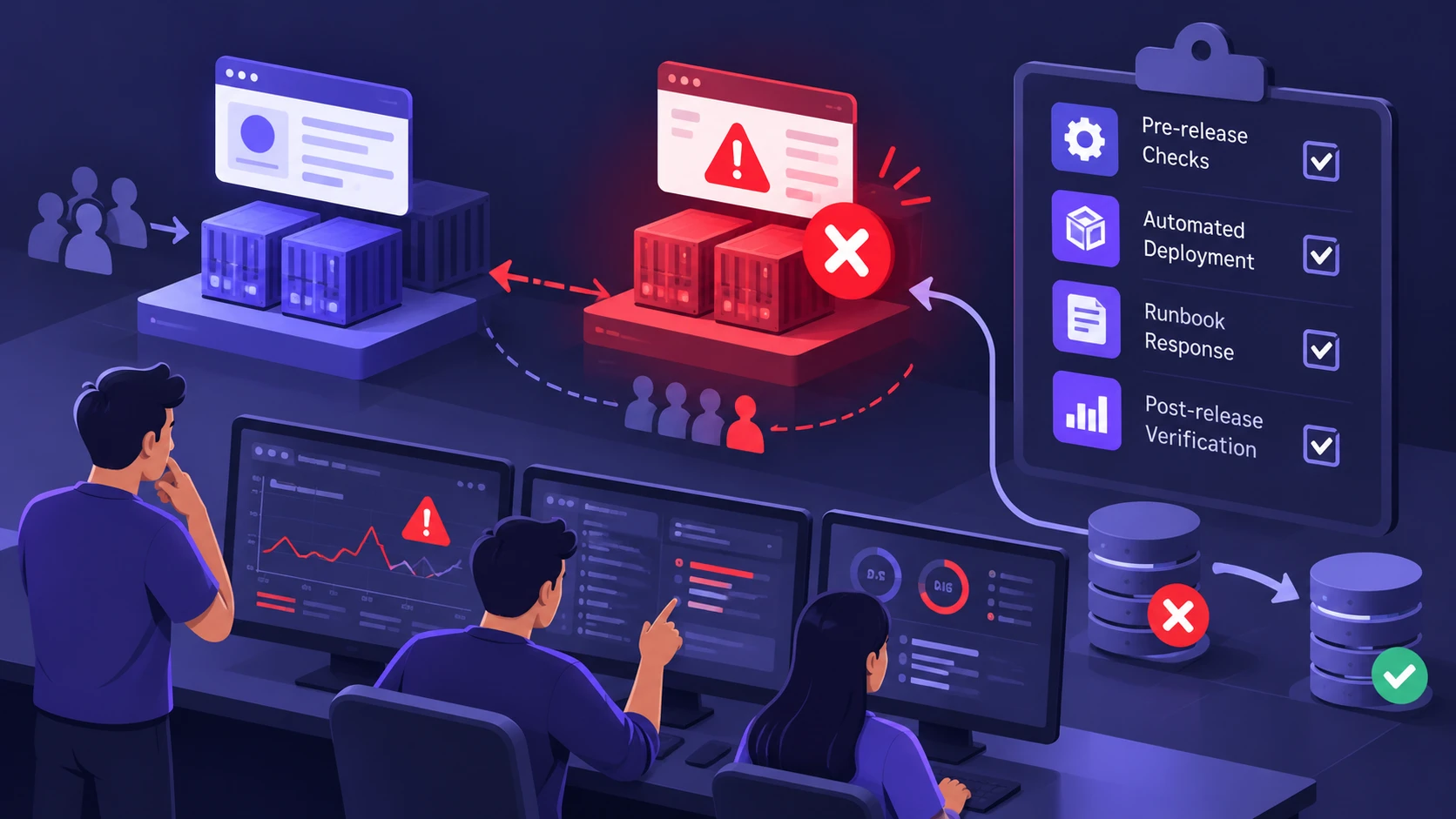
A strategy is only as strong as the process around it. Teams that handle failed releases well practice rollback regularly and treat deployment automation as production-critical code. They also limit the size of changes and keep release notes and runbooks updated.
Engineers who are still learning CI/CD, infrastructure automation, monitoring, and incident response can strengthen their understanding through structured practice. TechBonafide’s practical DevOps learning roadmap covers essential learning areas and explains how to evaluate technical skills for production environments.
- Small batch releases: Ship fewer changes per deploy to reduce debugging time and lower incident scope.
- Pre-release checks: Run contract tests, schema validation, and configuration diff reviews before exposing traffic.
- Runbook driven response: Document exactly how to pause rollout, revert, and verify recovery.
- Post-release verification: Confirm business signals like signups, payments, and message delivery, not only HTTP health.
Building reliable release processes requires a combination of deployment automation, infrastructure management, monitoring, and incident response planning. Engineering teams should regularly review their release procedures, test rollback scenarios, and improve deployment safeguards based on observed failures. For additional technical guidance, explore TechBonafide’s DevOps and cloud computing articles covering automation, infrastructure, and production reliability.
Conclusion
Blue-green and canary deployment offer different approaches to controlling software release risks. Blue-green deployment can simplify rollback by retaining a previous application environment, but an all-at-once traffic switch may expose many users to an unexpected problem. Canary deployment limits initial exposure and supports gradual validation, although it requires reliable monitoring, traffic management, and compatibility between application versions. Neither strategy guarantees immediate or complete recovery from a failed release.
When a release goes wrong, the best outcome comes from backward compatible data changes, version-aware observability, and automated rollback rules. Pick the approach that matches your architecture today, then improve the guardrails so every release becomes easier to ship and safer to recover.
Frequently Asked Questions
Which is Safer: Blue-Green or Canary Deployment?
Canary deployment is usually safer for user impact because it limits initial exposure. Blue-green can be safer for operational simplicity because rollback can be a single traffic switch. The safest choice depends on data compatibility and the quality of version-aware monitoring.
Can Blue-Green Deployment Fail Even If Rollback is Fast?
Yes, because data and side effects can outlive the traffic switch. If the new release writes incompatible data or triggers irreversible actions, switching back may not restore normal behavior. Backward compatible migrations and idempotent workflows reduce that risk.
Do You Need Feature Flags With Canary Deployment?
Not always, but feature flags can improve control when code paths must be enabled gradually. The key is to keep flags well-governed and avoid complex interactions that make incidents harder to diagnose. Pair flags with clear ownership and planned removal dates.
Can Blue-Green and Canary Deployment Be Used Together?
Yes. Some deployment platforms support a hybrid approach that combines separate application environments with gradual traffic shifting. For example, a team may deploy a new application version into a separate environment, direct a limited portion of production traffic to it, monitor the results, and complete the traffic transition after validation. This approach can offer both environment separation and progressive release control, although it also increases requirements for routing, monitoring, and operational coordination.