Installing a new game should feel exciting, but fake game download pages can turn a simple installation into a security risk. Scammers create convincing copies of official gaming websites to distribute malware, unwanted software, and fake login forms. Learning how to identify suspicious URLs, misleading download buttons, unusual installers, and unnecessary permission requests can help you avoid these threats. This guide explains how to verify a game download page before installing anything and what to do if you have already interacted with a suspicious website.
Why Fake Download Pages are So Convincing?
Scammers copy real game branding, reuse screenshots, and mimic store layouts to earn quick trust. They also exploit urgency with phrases about limited access, early builds, or required updates.
Microsoft’s guidance on avoiding unwanted software recommends downloading applications from trusted sources and keeping device security protection enabled. These precautions are especially important when visiting unfamiliar game download websites that may distribute malware, deceptive installers, or potentially unwanted programs.
Many fake game download pages lead users toward malicious installers, unwanted browser notifications, or convincing imitation login screens. Some harmful downloads may install information-stealing software designed to collect browser credentials, session cookies, or other sensitive information. TechBonafide’s guide on how infostealer malware steals saved passwords explains how these infections work and why compromised gaming accounts can create wider security risks.
URL and Domain Red Flags
The address bar is usually the fastest place to catch a fake game download page. Attackers rely on users not reading the domain carefully, especially on mobile where the full URL can be hidden.
- Look for Misspellings: Small changes such as swapped letters, missing characters, or extra words can signal a copycat domain.
- Watch for Strange Subdomains: A long prefix before a familiar-looking name can be used to mislead, especially when the real brand is not the actual registered domain.
- Avoid Unrelated Domains: A game page hosted on a random coupon, blog, or file-sharing domain is a high-risk sign.
- Be Careful With Short Links: Redirect chains can hide the final destination until after you click.
If the URL feels off, stop and search the publisher site directly in a new tab, then navigate from there.
An HTTPS connection does not automatically mean a download website is legitimate. Scam websites can also use encrypted connections. Check the actual registered domain rather than relying on the padlock or security icon. When a game uses a third-party store or launcher, confirm that the publisher’s official website links to that distribution platform. A verified publisher-to-store connection is more reliable than judging the domain name by appearance alone.
Page Design and Content Warning Signs
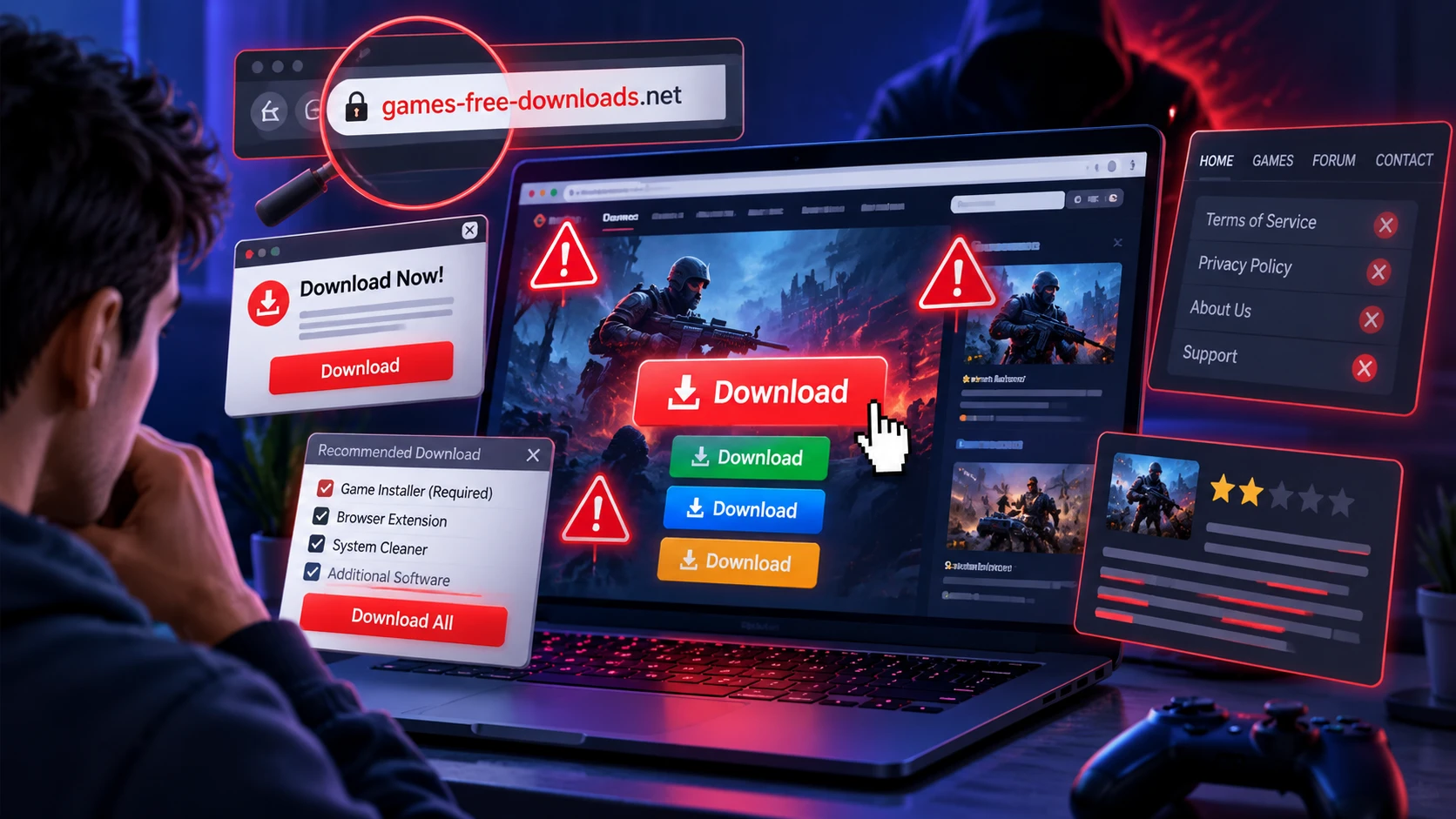
Fake game download pages may copy official store layouts, promotional artwork, screenshots, and familiar branding. Some copies contain inconsistent fonts, broken elements, or unusual page layouts, but visual quality alone cannot confirm whether a website is safe. A professional-looking page may still be fraudulent, so compare its domain, publisher information, support links, and download process with the official source.
Text quality matters too. Poor grammar, awkward wording, and repetitive claims about being safe can be warning signs, especially when paired with aggressive calls to download immediately.
- Too Many Download Buttons: Multiple bright buttons scattered across the page often lead to ads or bundled installers.
- Missing Legal Pages: No clear terms, privacy policy, or publisher information usually indicates low accountability.
- Unclear Ownership: No studio name, no address, and no support channel makes it harder to verify legitimacy.
Trust is built through consistent identity and transparent details, not through flashy visuals.
Download Button Tricks and Installer Traps
A common trick is placing the real download link in a small area while the main button triggers an unrelated file. Another is using a fake progress bar that ends by pushing an executable you did not request.
Be cautious when an unfamiliar website requires a separate download manager, an unverified launcher, or additional software before installing a game. However, a small installer is not automatically malicious because legitimate gaming platforms may use lightweight launchers to download larger game files. The important checks are whether the installer comes from a verified source, matches the publisher’s instructions, and avoids unrelated software or suspicious system changes.
- Unexpected File Types: Check whether the downloaded file matches the publisher’s stated installation method. Browser-based games generally run directly in a supported browser, while downloadable PC games may use official installers or launchers. Treat unexpected browser extensions, scripts, or executable files from unverified websites as warning signs.
- Suspicious File Names: Malware distributors may disguise harmful files as game updates, patches, or installation tools. However, words such as setup or patcher are not automatically malicious. Verify the file name, extension, digital signature when available, and download source before running an installer.
- Forced Extra Software: Bundled offers, toolbars, and security scans are often monetization layers for potentially unwanted programs.
If a page will not let you download without accepting add-ons, treat it as untrustworthy.
Not every separate launcher is dangerous. Some legitimate gaming services use their own applications to manage downloads and updates. For example, Epic Games provides official instructions for downloading the Epic Games Launcher. Before accepting a launcher from another website, confirm that the official publisher directs users to that installation method.
Required Permissions and System Access
Legitimate gaming platforms generally request permissions related to their actual features and installation requirements. Suspicious websites may instead pressure users to enable browser notifications, disable security protection, or run unfamiliar commands before downloading. Some scams also imitate human-verification checks to make these instructions appear legitimate. TechBonafide’s explanation of fake CAPTCHA malware attacks shows how deceptive verification screens can lead to malicious downloads or unsafe system commands.
On mobile, pay attention when a download asks for access to SMS, accessibility services, contacts, or device administrator features. Those permissions can support credential theft or persistent control.
- Notification Spam Prompts: Requests to allow notifications before you can download are commonly tied to ad fraud and phishing.
- Security Override Instructions: Any page telling you to turn off built-in protection is a major warning.
- Unrelated Permissions: If the game needs your messages or full device control, the goal is probably not gaming.
Permissions should match gameplay needs, not marketing needs.
If you accidentally allow notifications from a suspicious gaming website, review your browser settings and revoke that permission. Google Chrome’s instructions for managing website notifications explain how to find notification controls under Settings, Privacy and security, Site settings, and Notifications on desktop. Removing unwanted permissions can help prevent further deceptive alerts and notification spam.
How to Verify A Download Page Safely?
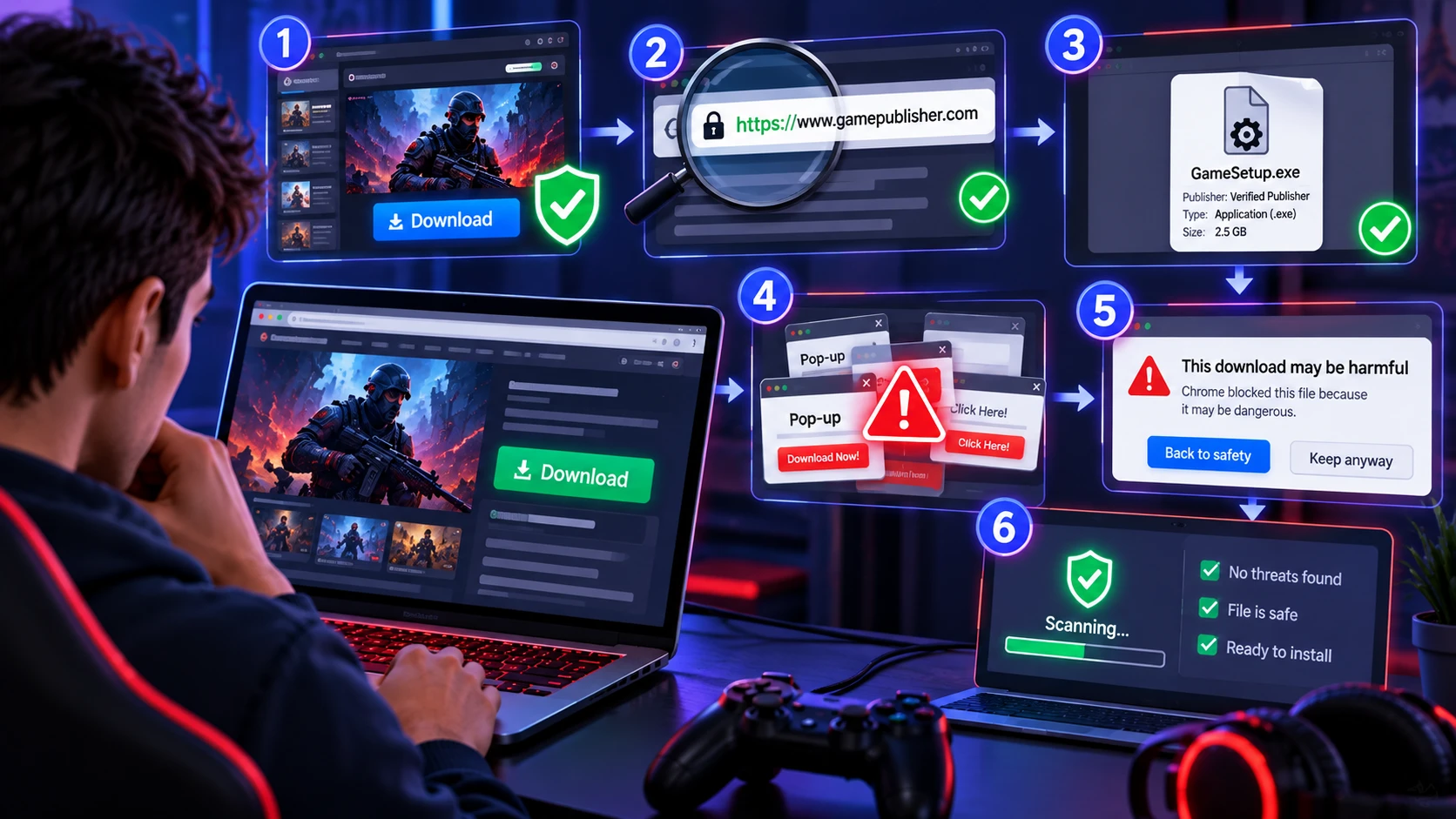
Verification does not require special tools, but it does require slowing down. Use a consistent routine that checks the source, the file, and the surrounding signals.
- Start From the Official Publisher: Open the game developer’s official website or a trusted gaming platform directly instead of following unfamiliar advertisements, shortened links, or pop-ups.
- Verify the Download Destination: Confirm that the publisher links to the selected store, launcher, or download website. Carefully inspect the domain for misspellings, misleading subdomains, and unrelated addresses.
- Review the Installer Details: Check the file extension, publisher information, expected installation process, and digital signature when available. Do not assume that a download is trustworthy simply because its name or size looks correct.
- Watch for Suspicious Website Behavior: Leave pages that demand unrelated software, trigger repeated redirects, display fake security warnings, or require browser notification permissions before continuing.
- Check Browser and Security Warnings: Keep browser protections enabled and pay attention to phishing, malware, and unsafe-download warnings. Avoid bypassing warnings merely because a website claims the download is safe.
- Scan Before Installation: Use an updated security program to check downloaded files. Remember that a clean scan reduces uncertainty but does not guarantee that an installer is harmless.
Once this routine becomes habit, most fake pages become easy to spot quickly.
Browser security tools provide another layer of protection during download verification. Google Safe Browsing helps identify potentially dangerous websites and downloads and can display warnings before users interact with known threats. However, the absence of a warning does not guarantee that a website or downloaded file is safe, so manual source verification remains important.
Fake Game Download Page Red Flags: Quick Comparison
| What You Notice | What It Often Means | What to Do Next |
|---|---|---|
| Domain has unusual spelling or extra words | Possible impersonation of an official gaming website | Visit the publisher’s official website directly |
| Download triggers repeated redirects or pop-ups | Possible deceptive advertising or malicious download flow | Close the page and avoid interacting further |
| Unknown website offers a small launcher or installer | Potentially unwanted software or an unverified download method | Verify the launcher through the official publisher |
| Page requires notifications before downloading | Possible browser notification spam or phishing | Deny permission and leave the website |
| Website instructs you to disable antivirus protection | Possible attempt to bypass security controls | Do not follow the instructions |
| Download unexpectedly requests a browser extension | Possible unauthorized browser access or data collection | Reject the extension and verify the download source |
| Website uses HTTPS but has an unverified publisher | Encrypted connection without proven website legitimacy | Confirm the official domain and distribution method |
How to Protect Your Device and Gaming Accounts?
Even a legitimate download can be risky if your device is not prepared. Good baseline security reduces damage if you accidentally click the wrong thing.
- Use A Standard User Account: Avoid daily browsing on an admin account so silent installs have fewer privileges.
- Keep System Updates Current: Many drive-by installs rely on old browser and OS vulnerabilities.
- Enable Built-In Protection: Real-time scanning and reputation checks catch many known installers and trojans.
- Protect Game Accounts: Enable multi-factor authentication wherever it is available and use strong, unique passwords for gaming and email accounts. CISA’s Secure Our World guidance recommends stronger authentication, updated software, and better phishing awareness as essential online security practices.
Protecting gaming accounts requires more than avoiding fake password forms. Some malware can also steal active session cookies, potentially allowing attackers to access an account without repeating the normal login process. TechBonafide’s guide on how stolen session cookies can bypass passwords and MFA explains why reviewing active sessions, signing out compromised devices, and securing the original device are important after a suspected infection.
What to Do After Visiting a Fake Game Download Page?
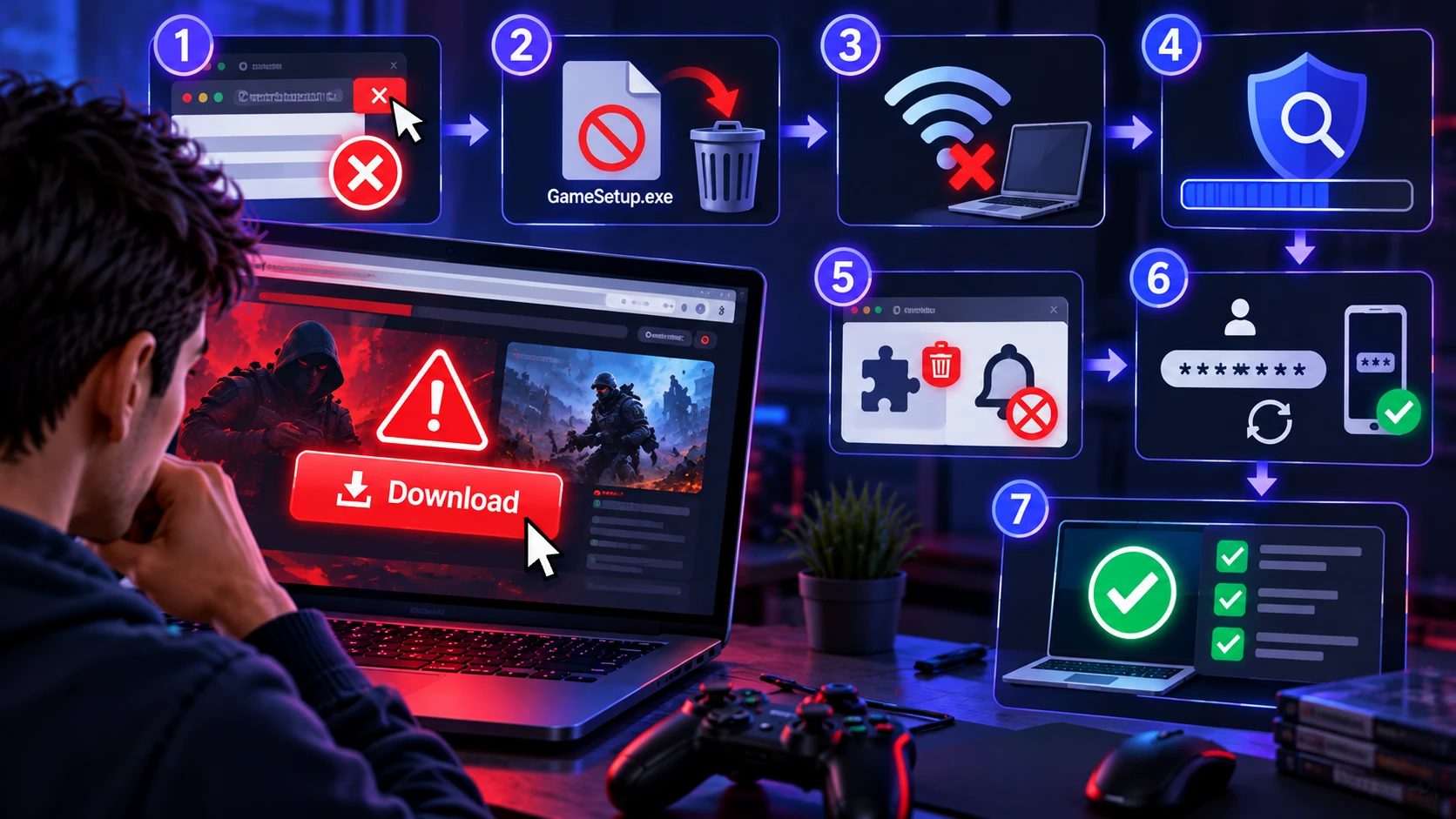
The correct response depends on whether you only opened a suspicious page, downloaded a file without running it, or executed an installer. These situations carry different levels of risk. Focus first on stopping additional interaction, identifying what happened, and checking whether your device or accounts may have been compromised.
- If You Only Opened the Page: Close the suspicious tab without accepting permissions, entering credentials, or running downloaded files. Review browser notifications and recent downloads if the page behaved unexpectedly.
- If You Downloaded A File But Did Not Run It: Do not open the file. Delete the suspicious download and check your device for unwanted files or browser changes. Downloading a file does not automatically mean malware has executed.
- If You Ran A Suspicious Installer: Disconnect the affected device from the internet if compromise is suspected. Avoid signing into sensitive accounts on that device until it has been checked.
- Run A Security Scan: Use an updated, trusted security tool to scan the device and follow its remediation instructions. Persistent or difficult-to-remove threats may require an offline scan or professional assistance.
- Review Browser Extensions and Permissions: Remove unfamiliar extensions, revoke unwanted notification permissions, and check whether browser settings have changed.
- Protect Compromised Accounts: From a trusted device, change potentially exposed passwords, enable multi-factor authentication, and sign out of unfamiliar or compromised account sessions.
- Confirm Recovery: Watch for repeated security alerts, unauthorized logins, unexpected programs, or persistent browser changes. Seek professional help if the device still behaves suspiciously after cleanup.
Browser extensions deserve particular attention after visiting an untrusted download page because some extensions can access browsing information or modify website content. If you notice an unfamiliar extension, review its permissions before deciding whether to keep it. TechBonafide’s guide to browser extension permissions explains which access requests may create privacy and security risks.
If the device shows persistent pop-ups, unknown apps, or disabled security settings, it can help to get a professional assessment and cleanup workflow.
Windows users dealing with suspected persistent malware can review Microsoft’s official Microsoft Defender Offline scan instructions. This option runs a security scan outside the normal Windows environment and may help investigate threats that interfere with ordinary scanning. Save important work before starting because the process requires restarting the device.
Frequently Asked Questions
Can A Fake Game Download Page Infect My Device Without Installing Anything?
Simply opening a suspicious website does not necessarily mean your device has been infected. However, malicious websites may attempt to exploit browser vulnerabilities or trigger deceptive downloads. Keep your browser updated, avoid suspicious prompts, and review security warnings if a website behaves unexpectedly.
Does HTTPS Mean A Game Download Website is Safe?
No. HTTPS encrypts the connection between your browser and a website, but it does not confirm that the website belongs to a legitimate gaming publisher. Always verify the actual domain and official download source.
Are Game Launchers Safe to Download?
Legitimate gaming platforms often use dedicated launchers to install and update games. A launcher is not automatically harmful, but you should obtain it through the publisher’s official website or verified distribution platform and review unexpected software or permission requests.
Conclusion
Fake game download pages often use copied branding, misleading buttons, suspicious redirects, and urgent messages to encourage unsafe downloads. Checking the real publisher, verifying the download source, reviewing file permissions, and keeping browser protection enabled can significantly reduce the risk. However, no single warning sign or security check guarantees that a website is safe.
Stick to a repeatable verification routine and only install from sources you can confirm. When something feels off, stopping is the safest move, and it costs far less time than recovering from malware or an account takeover.