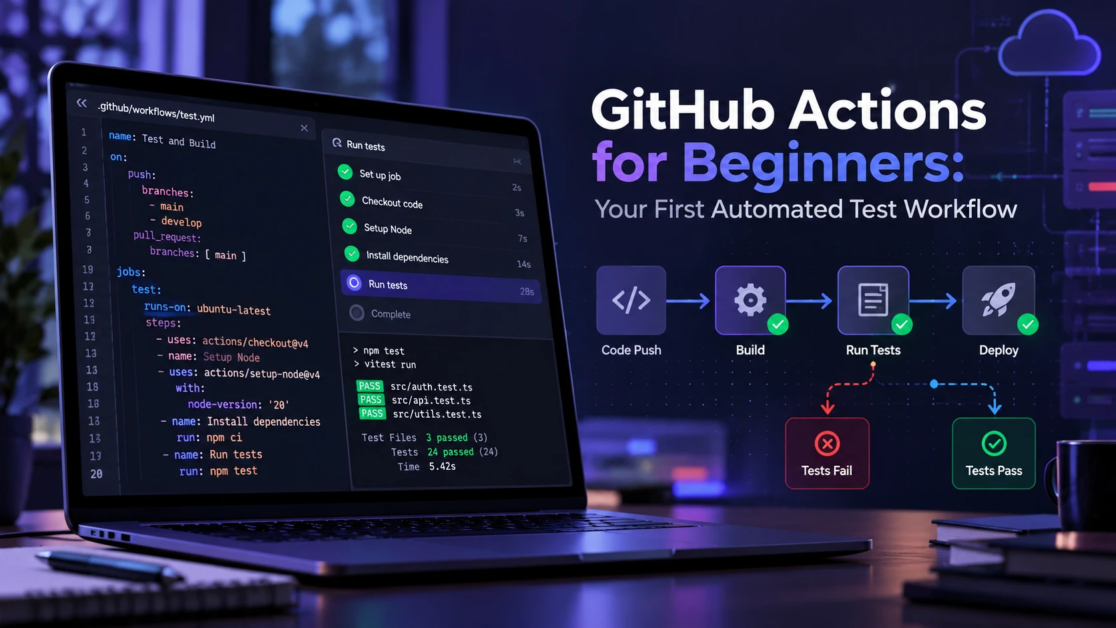
People searching for Droven.io DevOps guides often want a clear starting point for learning Linux, Git, automation, containers, and cloud computing. The Droven.io website publishes technology-related content, but a complete, dedicated DevOps training curriculum could not be confirmed during this review. Rather than assuming that specific courses are available, this article provides an independent, step-by-step DevOps roadmap for beginners. It explains what to learn first, which skills to practice, and how to check your progress before moving to more advanced topics.
What DevOps Means for Beginners?
DevOps is a way of working where development and operations share responsibility for building, shipping, and running software. The goal is reliable releases, faster feedback, and fewer surprises in production.
For beginners, DevOps is less about job titles and more about core practices. You learn how code moves from a laptop to an environment, how it is tested and packaged, and how it is monitored after release. For a deeper explanation of the teamwork, automation, and continuous improvement behind these activities, read TechBonafide’s guide to DevOps principles and practices.
How to Use Droven.io DevOps Guides Without Getting Overwhelmed?
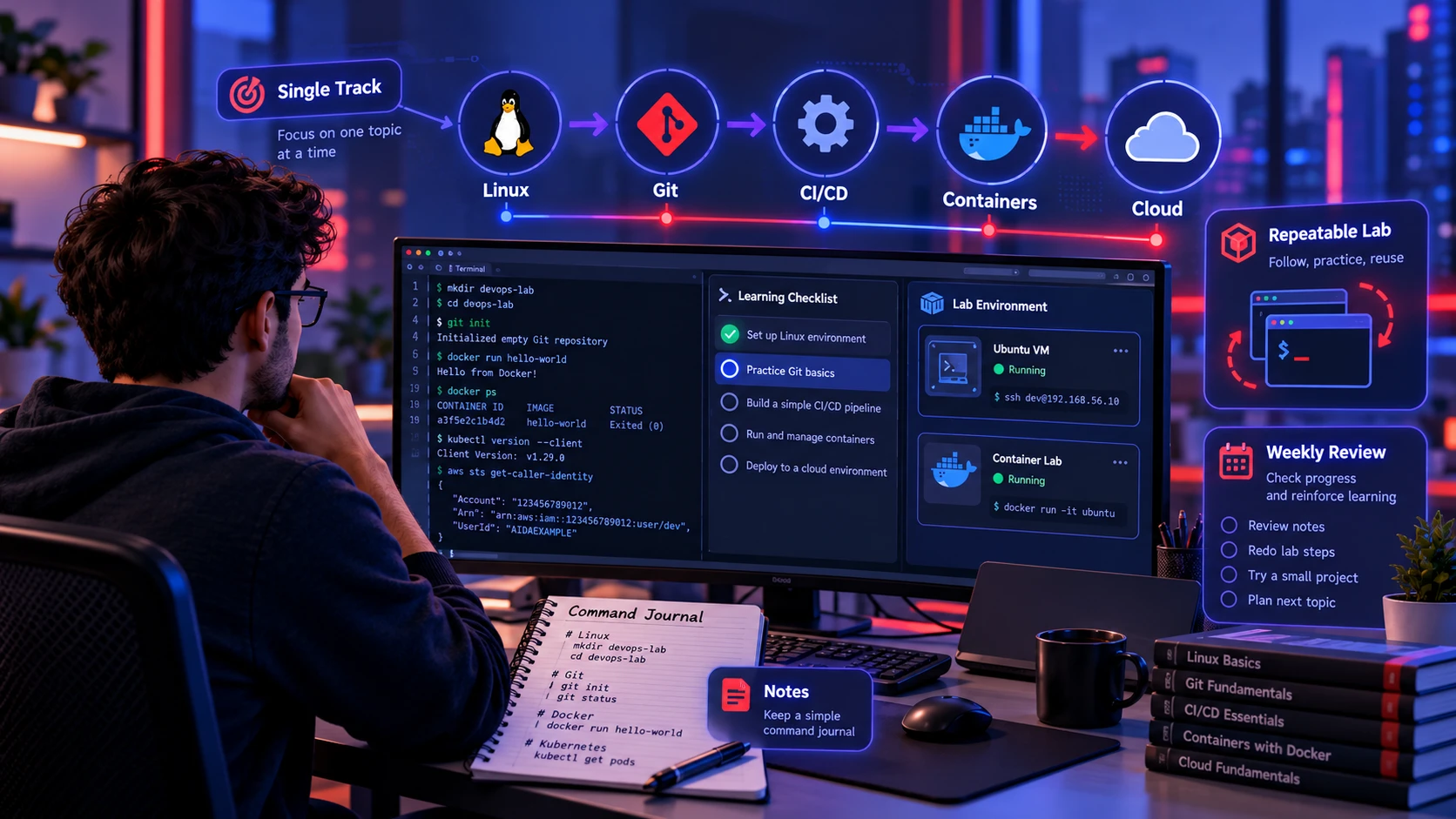
Guides work best when you read with a purpose and apply each concept in a small lab. Focus on one topic at a time and keep notes in a single place so you can reuse commands and patterns.
Before following any DevOps tutorial, check whether it includes clear steps, the required tools, expected results, and troubleshooting advice. Choose one topic, complete a small exercise, and record what worked. For example, after reading a Git tutorial, create a repository, make a commit, and review your changes. Move to the next topic only when you can repeat the basic task without copying every instruction.
- Pick A Single Track: Stick to one path such as Linux to Git to CI/CD to containers to cloud rather than jumping across topics.
- Build A Repeatable Lab: Use a local VM or containers so you can reset and practice without fear of breaking a real environment.
- Keep A Command Journal: Save the commands that worked and add one sentence about what each command does.
- Review Weekly: Re run key exercises each week so knowledge stays active.
A useful learning roadmap should work even when one website does not cover every required topic. If you want to assess which subjects and practical exercises may be available, read our review of Droven.io DevOps tutorial coverage. The learning path below focuses on what beginners should practice, regardless of which tutorial provider they choose.
Learning Path Overview
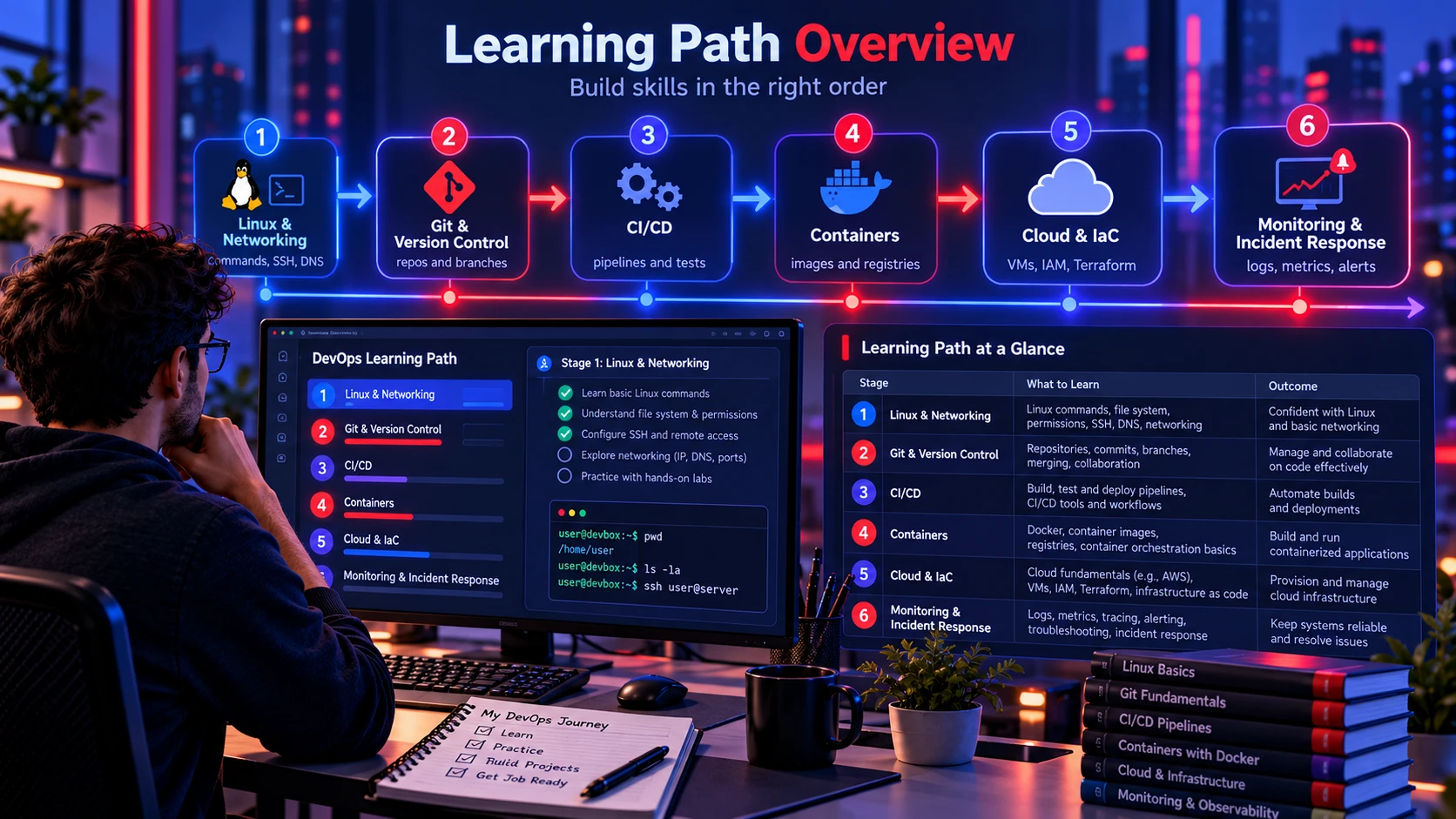
The fastest route is the one that builds dependencies in the right order. Linux and networking basics support everything else. Git supports collaboration and deployment automation. CI/CD and containers support repeatability. Cloud and Infrastructure as Code support scalable environments.
The table below maps the path into stages with goals, what to practice, and the outcome you should aim for.
| Stage | What to Learn | Practical Outcome |
|---|---|---|
| 1. Linux & Networking | Linux commands, SSH, permissions, processes, DNS, HTTP | Inspect a Linux system and troubleshoot basic connectivity |
| 2. Git & Version Control | Repositories, commits, branches, merges, pull requests | Create a repository and manage changes |
| 3. CI/CD | Automated testing, pipelines, build artifacts, secret handling | Run automated checks after a code push |
| 4. Containers | Dockerfiles, images, registries, container networking | Build and run a containerized application |
| 5. Cloud & Infrastructure as Code | Virtual machines, cloud networking, IAM, Terraform basics | Describe and review a simple infrastructure configuration |
| 6. Monitoring & Incident Response | Logs, metrics, alerts, basic troubleshooting | Detect a simulated application failure and find its cause |
Stage 1: Linux and Networking Basics
Start with Linux because most DevOps work touches servers, containers, or cloud VMs. You need comfort with the terminal, file paths, services, logs, and permissions. This reduces confusion later when tools fail and you need to inspect what happened.
Pair Linux practice with lightweight networking knowledge. DNS, ports, TLS basics, and HTTP status codes show up daily in deployment and troubleshooting.
- Core Commands: Practice ls, grep, sed, awk, find, tar, and curl until you can combine them confidently.
- Users And Permissions: Learn chmod, chown, sudo rules, and how to avoid running everything as root.
- Processes And Services: Get comfortable with ps, top, systemd units, and reading service logs.
- Networking Checks: Use dig to inspect DNS records, ping to test basic reachability when ICMP traffic is allowed, traceroute to investigate network paths, ss to inspect listening ports and connections, and curl to test HTTP endpoints. Some utilities may need to be installed separately.
Once these basics feel natural, most later topics become simpler because you can verify what is happening on the system.
Stage 2: Git and Source Control Workflows
DevOps relies on version control for more than application code. Pipelines, deployment scripts, and infrastructure definitions should live in repositories so changes are reviewable and reversible.
Learn a clean workflow that matches common team practices. Use branches for work in progress, pull requests for review, and tags for release points. To practice creating a repository and saving code changes, follow the Pro Git beginner guide, which explains essential commands and repository setup.
- Branching And Merging: Practice feature branches, rebasing when appropriate, and resolving conflicts calmly.
- Commit Quality: Write small commits with clear messages so teammates can understand intent.
- Release Markers: Use tags and changelogs to map code changes to deployments.
This stage sets you up to automate builds and releases with less friction.
Stage 3: CI/CD Fundamentals
Continuous integration and continuous delivery (CI/CD) help teams build, test, and release software through repeatable processes. Continuous integration (CI) automatically builds and tests code when changes are submitted to a repository. Continuous delivery (CD) keeps tested software ready for release, often with a final approval before production deployment. Continuous deployment goes one step further by automatically releasing changes that pass the required checks.
Focus on the mechanics before advanced patterns. Learn how runners execute jobs, how build artifacts move between stages, and how secrets are supplied securely during automated workflows. The official GitHub Actions quickstart demonstrates how to create and run a basic workflow. Use that example to understand how a code change triggers an automated task.
- Pipeline Stages: Build, test, security checks, and packaging are a strong default sequence.
- Artifacts And Caching: Store build outputs and use caching carefully to speed up runs without hiding issues.
- Environment Variables: Separate config from code and avoid committing secrets into repositories.
- Failure Triage: Read logs from top to bottom, identify the first real error, and reproduce locally when possible.
With CI/CD in place, you can iterate quickly and reduce manual release steps that cause mistakes.
Stage 4: Containers And Image Security
Containers package applications with the runtime dependencies they need, helping teams reduce differences between development, testing, and deployment environments. However, containers do not remove every compatibility issue. The host operating system, processor architecture, networking, and runtime configuration can still affect application behavior. Beginners should learn how container images are built, how image layers work, and how registries store and distribute those images.
Prioritize secure, minimal images and predictable builds. Use trusted base images, pin dependencies where appropriate, avoid unnecessary root privileges, and keep runtime images small. Beginners can follow the official Docker getting started tutorials to learn how containers run, how application images are built, and how those images can be shared.
- Dockerfile Basics: Learn COPY vs ADD, build context, layers, and multi stage builds for smaller images.
- Runtime Configuration: Use environment variables and mounted config files rather than baking secrets into images.
- Debugging Tools: Learn docker logs, exec, inspect, and how to confirm ports and health checks.
When an application behaves consistently across compatible environments, automated testing and deployment become easier to manage. However, containers and virtual machines solve different infrastructure problems. Read our comparison of containers and virtual machines to understand their differences in isolation, resource usage, and deployment requirements.
Stage 5: Cloud And Infrastructure as Code
Cloud platforms provide managed services, computing resources, networking, and identity controls that support modern applications. Beginners do not need to master every service. Start with virtual networks, compute instances, storage, load balancers, and identity and access management (IAM). Cloud environments can also generate unexpected charges when resources are left running, so basic cost awareness matters from the beginning. Our guide to managing cloud costs with FinOps explains how budgets, resource tracking, and cost visibility help teams control spending.
Infrastructure as Code (IaC) uses configuration files to define and manage infrastructure in a consistent, repeatable way. Tools such as Terraform allow teams to review planned changes before creating or updating resources. Store infrastructure configuration in version control, protect state files, and check the effects of changes before applying them. Reverting a configuration does not always reverse infrastructure changes safely, especially when databases, storage, or other stateful resources are involved.
For a practical introduction to managing infrastructure through configuration files, the Terraform infrastructure as code tutorial explains how Terraform defines resources, previews planned changes, and tracks infrastructure state. Beginners should first practice with disposable resources and review every planned change before applying it.
- Cloud Basics: Learn regions, availability zones, security groups, and least privilege access.
- IaC Workflows: Store configs in Git, plan changes before applying, and keep state secured.
- Secrets Management: Use a proper secrets store rather than plain text environment files in repos.
Cloud automation also requires careful protection of database passwords, API tokens, and deployment credentials. Sensitive information should not be stored directly in public repositories or exposed through application logs. Our article about automated secrets management in DevOps explains how secrets stores, access controls, and credential rotation help protect automated workflows.
Stage 6: Monitoring, Logging And Incident Readiness
Shipping software is only half the job. You need visibility into what the system is doing. Monitoring tells you when something is wrong. Logging helps you understand why it happened.
Start simple with metrics, logs, and alerts that map to user impact. Then add dashboards for key services and a clear on call style checklist for triage.
- Golden Signals: Track latency, traffic, errors, and saturation to understand service health. Google’s SRE monitoring guide explains these four measurements and how they help teams identify performance and reliability problems.
- Log Structure: Use consistent fields so you can filter quickly during incidents.
- Actionable Alerts: Alert on symptoms users feel, not every internal event.
Monitoring and logging help teams understand application health, investigate errors, and respond to service problems. As systems become more complex, observability adds ways to understand behavior through information such as metrics, logs, and traces. Our monitoring vs. observability explainer explains how these concepts differ and why both matter for reliable operations.
Beginner DevOps Project: Build and Monitor a Simple Application
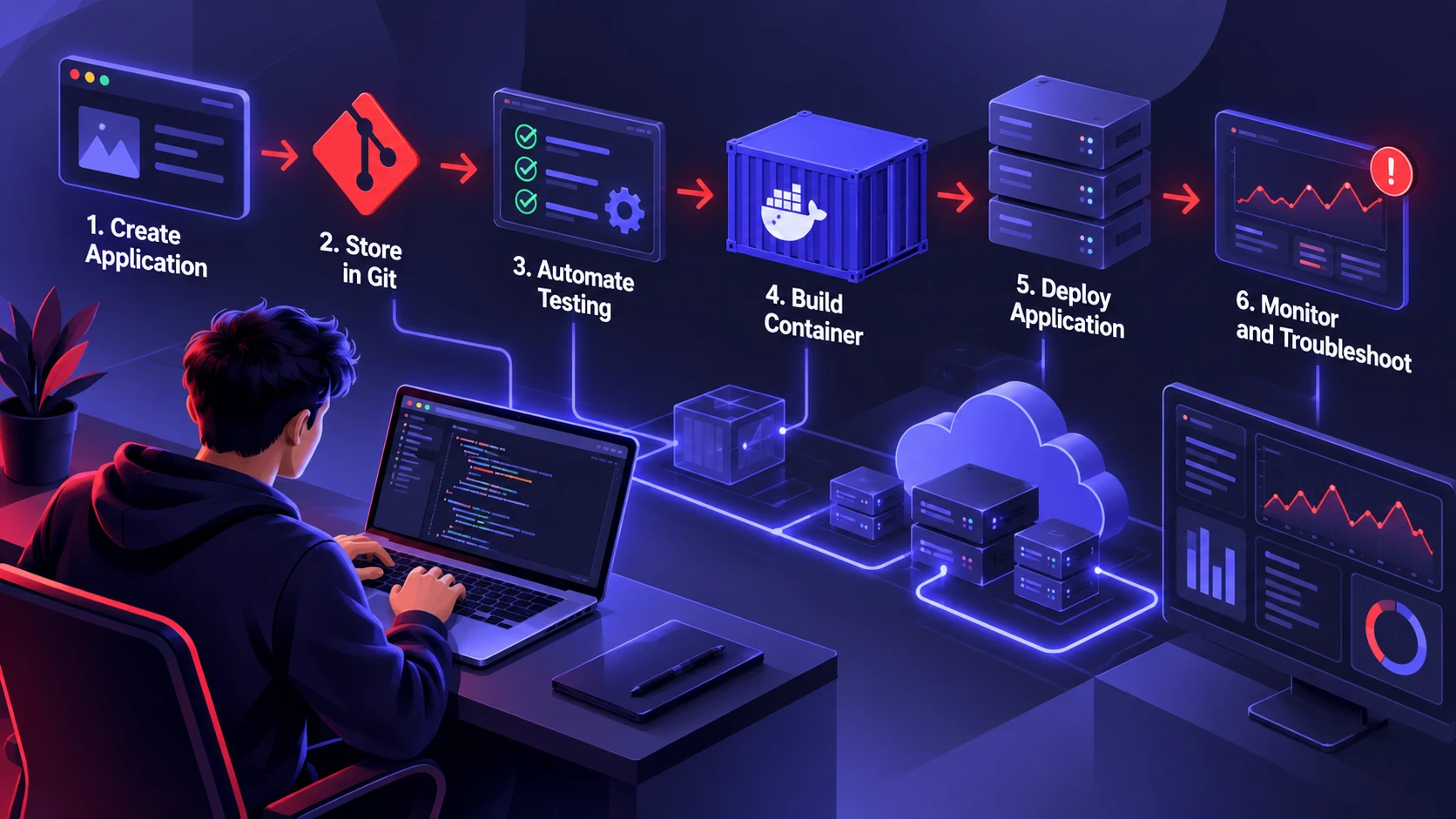
Learning DevOps tools individually is useful, but completing a small project helps you understand how they work together. You do not need a complex application or expensive cloud services to start. A simple web application in a local test environment can teach the main steps of software delivery.
Follow this beginner project:
- Create a Small Application: Build or download a simple web application with a basic home page and one automated test.
- Store Your Code in Git: Create a repository, add the application files, make your first commit, and practice creating a branch.
- Automate Testing: Use a CI/CD tool such as GitHub Actions to run the application’s test after each code push.
- Build a Container Image: Write a Dockerfile, build the image, and run the application locally. Confirm that the expected port is accessible.
- Test Deployment and Monitoring: Deploy the application to an isolated local VM or another suitable test environment. Check application logs, test a health endpoint, and simulate a safe failure to practice troubleshooting.
How to Know Your First Project is Complete
A successful beginner project should produce results you can demonstrate rather than a collection of installed tools.
- Your application runs in a local test environment.
- Your Git repository records the code and configuration changes.
- Your CI pipeline reports whether the automated test passes or fails.
- Your container image builds successfully and runs the application.
- You can inspect logs and identify a simple application or deployment error.
- Your documentation explains how to repeat the setup.
Keep credentials out of the repository, avoid exposing test applications to the public internet unnecessarily, and remove temporary resources after practicing. If you later move the project to a cloud provider, review its usage limits and possible charges first.
Completing this project gives you practical evidence of your beginner DevOps skills and helps you identify which subjects need further study.
Common Mistakes Beginners Should Avoid
Most beginner pain comes from skipping fundamentals or trying to learn too many tools at once. A small set of skills, practiced deeply, beats shallow knowledge of dozens of platforms.
Keep your learning grounded in outcomes. Aim for repeatable builds, consistent environments, and measurable improvements in reliability and speed.
- Tool Collecting: Avoid switching tools constantly before you understand the underlying concepts.
- Skipping Security Basics: Learn secrets handling, least-privilege access, safe credential storage, and patching habits early. The OWASP CI/CD Security Cheat Sheet explains common pipeline security risks and practical protection methods.
- Repeated Manual Tasks: Document tasks that you perform frequently, then automate the steps that are predictable, safe, and worth repeating. Test your automation in a controlled environment before using it on important systems.
- Ignoring Documentation: Maintain a small README for your lab so you can rebuild it later.
Correcting these mistakes early keeps your progress smooth and your confidence steady.
Conclusion
Learning DevOps becomes easier when you follow a structured path and test what you learn. Begin with Linux and networking, build confidence with Git, practice CI/CD automation, and learn how to package applications using containers. After mastering these foundations, explore cloud services, Infrastructure as Code, and monitoring. Use Droven.io or other learning resources only after checking whether their available tutorials match your goals and provide useful practical exercises.
Your most important goal is to connect these skills through real projects. Build a small application, automate its tests, deploy it to a safe environment, and learn how to investigate problems. By completing one stage at a time and documenting your progress, you can develop useful DevOps skills without trying to master every tool at once.
Frequently Asked Questions
How Long Does It Take to Learn DevOps as A Beginner?
There is no fixed timeline for learning DevOps. Progress depends on your technical background, available practice time, and the complexity of the projects you attempt. Start with Linux, networking, and Git before moving to CI/CD, containers, cloud computing, and monitoring. Measure your progress by the tasks you can complete independently, such as creating a Git repository, running an automated pipeline, and deploying a containerized application. Learning becomes more valuable when you can explain and troubleshoot each step.
Which Skills Should I Learn First Before CI/CD?
Start with Linux command line basics and Git workflows. You will also benefit from understanding how an application is built and tested, even at a basic level. These skills make pipeline logs and failures much easier to interpret.
Do I Need Programming Knowledge to Learn DevOps?
You do not need advanced programming knowledge to begin learning DevOps, but basic scripting skills are helpful. Start with simple Bash commands and learn how variables, conditions, and scripts work. Basic Python knowledge can also help you automate repetitive tasks and understand application behavior. As you progress, focus on reading configuration files, understanding build errors, and writing small automation scripts rather than mastering multiple programming languages at once.
Do I Need Kubernetes to Get Started in DevOps?
No, Kubernetes is helpful but not required at the beginning. Containers, CI CD, and cloud fundamentals usually provide a stronger base first. Once you can build images, deploy consistently, and monitor services, Kubernetes becomes easier to learn and apply correctly.