


TheTechyX.com provides two free browser tools for everyday technology tasks. Its Strong Password Generator creates random password candidates using your chosen length and character settings. Its Download Time Calculator estimates how long a file may take to download based on its size and your internet speed.
These tools solve different problems. One helps you create new account credentials, while the other helps you plan downloads of games, software updates, videos, and other files. Both are available through TheTechyX.com’s tools directory without requiring registration. However, a generated password is not automatically guaranteed to be secure, and a calculated download time is not a promise of actual performance.
This guide explains how each tool works, how to use its visible controls, what earlier basic checks established, and which limitations matter before relying on the results.
What Do the Two TheTechyX.com Tools Do?
TheTechyX.com lists both utilities in its Free Tech Tools directory, alongside a Screen PPI Calculator and a Data Storage Converter. The website describes these tools as free and browser-based.
Although both tools use simple inputs to produce an output, they serve different purposes.
| Feature | Strong Password Generator | Download Time Calculator |
|---|---|---|
| Main purpose | Create a new random password. | Estimate how long a file transfer may take. |
| User inputs | Password length and character preferences. | File size, internet speed, and their units. |
| Output | A password candidate. | An estimated download duration. |
| Main limitation | Visible output alone cannot prove secure randomness or private processing. | The calculation cannot predict changing network conditions. |
| Best use | Creating an account password for later secure storage. | Planning a game download, update, installer, or other transfer. |
Neither tool replaces a complete password-management system or a real internet speed test. Understanding that distinction helps prevent mistakes when choosing what to use.
How to Use TheTechyX.com Strong Password Generator?
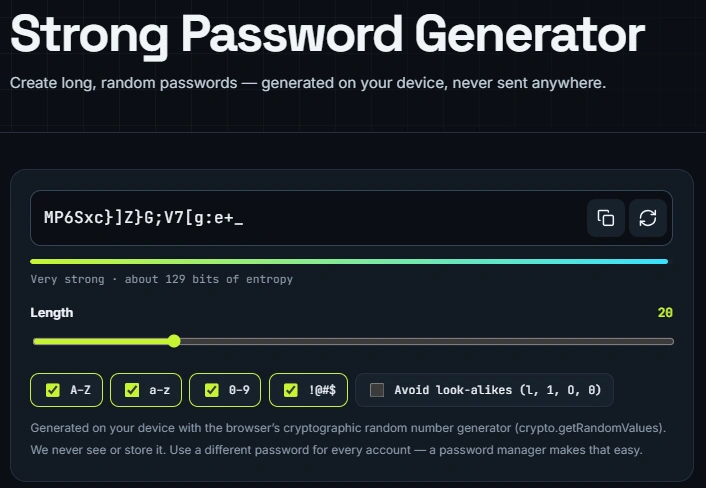
The Strong Password Generator lets users choose the length and character types for a new password. Its visible options include uppercase letters, lowercase letters, numbers, symbols, and an option to avoid characters that look similar.
Its main advantage is convenience. Instead of thinking of a password yourself, you can request a randomly generated combination that does not depend on familiar names, dates, or simple keyboard patterns.
Step 1: Choose Your Password Settings
- Open the generator: Visit the Strong Password Generator page in your browser.
- Set the password length: Choose a long password, such as 20 characters, if the account you are securing allows it.
- Select character types: Enable uppercase letters, lowercase letters, numbers, and symbols where those characters are accepted by the account.
- Consider look-alike characters: Use the option to exclude easily confused characters if you expect to type the password manually.
- Generate a password: Use the page’s available generation controls and check that the result matches your chosen length and settings.
For example, a 20-character password created from multiple character groups can be much harder to guess than a short password based on a person’s name or birthday, provided the generator uses a secure random process.
Adding symbols is not a substitute for sufficient length and randomness. The NIST Digital Identity Guidelines emphasize password length and discourage services from imposing mandatory mixtures of character types. NIST specifies a 15-character minimum for passwords used as a single authentication factor in systems covered by its guidelines.
Step 2: Save the New Password Properly
Creating a password is only the first step. You also need a reliable way to retrieve it when signing in again.
- Use a different password for every important account.
- Save the password in a trusted password manager or appropriately secured credential store.
- Avoid saving passwords in unprotected text files or sharing them in messages.
- Enable multifactor authentication where the account supports it.
- Change a password promptly if it has been exposed or compromised.
A dedicated password manager can generate, store, and autofill credentials in one workflow. TechBonafide’s password manager versus browser password saving comparison explains the differences between common storage approaches.
If the receiving website rejects certain symbols or sets its own password-length limits, adjust the generator settings to match. Avoid repeatedly shortening passwords simply because a shorter option is easier to remember.
How Secure and Private is the Password Generator?
TheTechyX.com states that its password generator creates passwords on the user’s device rather than sending them to its servers. The tool page specifically names the browser’s crypto.getRandomValues() function as its source of random values.
What Does Browser-Based Randomness Mean?
According to MDN’s Web Crypto API documentation, crypto.getRandomValues() provides cryptographically strong random values that applications can use for security-related purposes.
That is an appropriate type of browser capability for password generation. However, naming a cryptographic function does not prove that a particular website uses it correctly. The quality of the implementation, its character-selection method, and the handling of generated values also matter.
TheTechyX.com’s privacy policy says inputs and generated passwords are not transmitted to or stored by the website. The same policy also describes possible collection of website-usage data through cookies, analytics, and advertising services.
These are the website operator’s published statements. They do not constitute an independent audit of its code, browser requests, or third-party scripts.
Important: Do not enter an existing account password into an unfamiliar online generator. A password generator is intended to create a new secret, not verify an existing one. For sensitive accounts, generating and saving credentials directly inside a trusted password manager reduces the need to handle passwords across separate websites.
A password that looks random is not necessarily proof of secure generation. Likewise, several different outputs do not establish that the underlying process is cryptographically safe. Such conclusions require more extensive technical verification.
How to Use TheTechyX.com Download Time Calculator?
The Download Time Calculator estimates the duration of a file transfer using the file size and the internet connection speed entered by the user.
It can help answer practical questions such as whether a large game update might finish before an evening gaming session or whether a software download is likely to take minutes or hours.
To use the calculator:
- Open the calculator: Visit the Download Time Calculator page.
- Enter the file size: Type the size of your game, application, update, or other file.
- Select the correct file-size unit: Make sure the selected unit matches the number you entered, such as MB or GB.
- Enter your connection speed: Use your measured download speed or another clearly understood speed assumption.
- Check the speed unit: Internet connection speeds are commonly expressed in Mbps, meaning megabits per second.
- Calculate the result: Select Calculate and review the estimated transfer duration.
- Allow for slower conditions: Treat the result as a mathematical estimate rather than an exact completion time.
For a more useful speed input, follow TechBonafide’s guide on how to check your current internet speed. A recent measurement can be more informative than simply entering the maximum speed advertised by your internet provider.
The calculator itself is not an internet speed test. It works with the figures you provide rather than directly measuring your connection or monitoring an active download.
How Does the Download Time Calculation Work?
The calculation is based on the relationship between file size and transfer speed:
Download time in seconds = File size in megabits ÷ Transfer speed in megabits per second.
The most common source of confusion is the difference between bits and bytes. Internet speeds are usually measured in megabits per second (Mbps), while file sizes are commonly expressed in megabytes (MB) or gigabytes (GB).
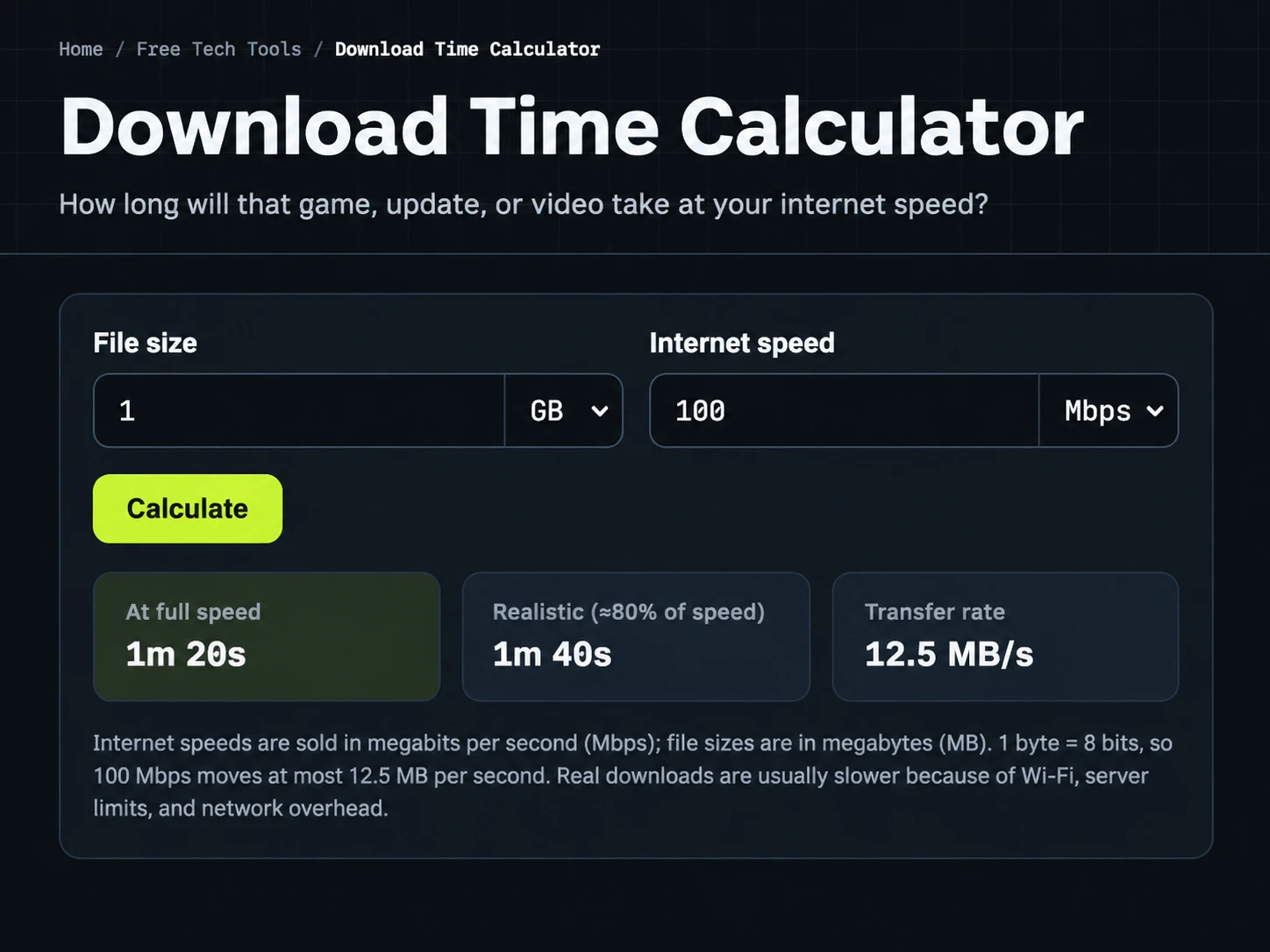
Because one byte contains eight bits, a connection transferring data at 100 Mbps has a theoretical maximum rate of 12.5 MB per second before accounting for transmission overhead and other limitations.
For decimal file sizes, 1 GB equals 1,000 MB or 8,000 megabits. Therefore:
- File size: 1 GB = 8,000 megabits.
- Connection speed: 100 Mbps.
- Calculation: 8,000 ÷ 100 = 80 seconds.
- Estimated time: 1 minute and 20 seconds.
If the effective speed falls to 80 Mbps, the same file takes 100 seconds, or 1 minute and 40 seconds, under the same simplified assumptions.
Examples at Different File Sizes and Speeds
The following examples use decimal gigabytes, constant transfer speeds, and no protocol overhead. They are calculated illustrations, not measured download benchmarks.
| File Size | Speed | Calculated Time |
|---|---|---|
| 1 GB | 100 Mbps | 1 minute 20 seconds |
| 1 GB | 80 Mbps | 1 minute 40 seconds |
| 5 GB | 50 Mbps | 13 minutes 20 seconds |
| 20 GB | 100 Mbps | 26 minutes 40 seconds |
These examples show why the speed input matters. When the file size stays the same, cutting the transfer rate in half doubles the theoretical download time.
Another source of disagreement is decimal versus binary storage notation. A file measured as 1 GiB contains more bytes than a decimal 1 GB file, so it takes slightly longer to transfer at the same speed. If a calculated result differs from another tool, check whether both are interpreting the original size in the same units.
For more detail, see TechBonafide’s explanation of Mbps and the difference between bits and bytes.
Why Actual Downloads Can Take Longer Than Estimated?
A calculator assumes a transfer rate. Real connections do not always maintain that rate throughout a download.
Several factors can make a file take longer than the mathematical result:
- Wi-Fi conditions: Distance from the router, interference, and weak signal quality can reduce effective transfer speed.
- Network congestion: Other users and devices may share the available bandwidth.
- Server limitations: The website or service supplying the file may deliver data more slowly than your connection can receive it.
- Protocol overhead: Network communications require additional information beyond the file’s contents.
- Changing transfer speeds: Connection performance may rise or fall while the download is running.
- Installation after downloading: Games and software updates may still need to unpack, verify, or install files after the transfer finishes.
For example, a connection advertised at 100 Mbps might not deliver a steady 100 Mbps from a particular download server. Entering a lower measured or sustained speed can produce a more realistic estimate, but it still cannot account for every interruption.
For troubleshooting persistent differences between expected and actual transfer speeds, TechBonafide’s guide on measuring internet speed is a useful starting point.
What Did the Earlier Basic Tool Checks Show?
TechBonafide’s existing TheTechyX.com review documents basic functionality checks of the website’s four free utilities, including the two discussed here. The checks compared selected outputs against expected values.
For the Download Time Calculator, the recorded input was a 1 GB file and a 100 Mbps connection. The tool displayed 1 minute and 20 seconds at full speed, and 1 minute and 40 seconds under an approximately 80% speed assumption. Those values agree with the corresponding calculations.
For the Strong Password Generator, the documented check used a 20-character length with uppercase letters, lowercase letters, numbers, and symbols enabled. Three different 20-character outputs were observed, each containing the selected types of characters.
These results support a limited conclusion: both tools produced the expected visible outputs for the selected checks. They do not prove that every input combination works correctly or that the password generator’s underlying randomness and privacy protections have been independently validated.
The distinction matters because a calculator can return a correct result for one test while still having problems with other units or unusual values. Similarly, several different passwords are not enough to establish the quality of the security implementation.
Common Mistakes and When to Use Another Option
The most useful approach is to match the tool to the problem and understand its limits before relying on an output.
- Confusing Mbps with MB/s: The units are not interchangeable. At the same numerical value, megabytes per second represent eight times as many bits as megabits per second.
- Using advertised speed as a guaranteed rate: Internet plans describe service capabilities, not the exact speed of every download server.
- Ignoring file-size units: Check whether the displayed size means decimal GB or binary GiB before comparing estimates.
- Reusing a generated password: A strong password reused across accounts can expose multiple accounts after one service suffers a credential breach.
- Forgetting to save a generated password: Store the credential securely before depending on it for future sign-ins.
- Assuming visible randomness proves security: A secure-looking output is not a substitute for reviewing implementation and data-handling practices.
For an important account, a well-maintained password manager with an integrated generator is generally the more practical option. It reduces manual copying and provides a consistent way to store and retrieve unique passwords.
For a large download, use the calculator to plan, then compare its result with a recent speed test and the transfer rate shown by the actual downloading application. If the application is also installing or verifying files, treat that extra work separately from the network transfer.
Neither tool needs to be complicated to be useful. The important part is knowing what each result represents and what it cannot tell you.
Final Takeaway
TheTechyX.com Strong Password Generator and Download Time Calculator provide two straightforward online utilities. The first creates password candidates from selected character settings. The second estimates transfer duration from file size and internet speed.
Both tools performed as expected in the limited checks documented by TechBonafide, but those checks do not establish comprehensive reliability or independent security certification. Use the password generator with appropriate credential-storage precautions, and treat download estimates as planning figures rather than guaranteed completion times.
For everyday tasks, the tools can be convenient. For important account security or decisions that depend on precise network performance, confirm the relevant details using more specialized tools and reliable measurements.

Tech Bonafide is the editorial identity of TechBonafide, an independent technology publication covering AI, software, cybersecurity, gadgets, and emerging technology.