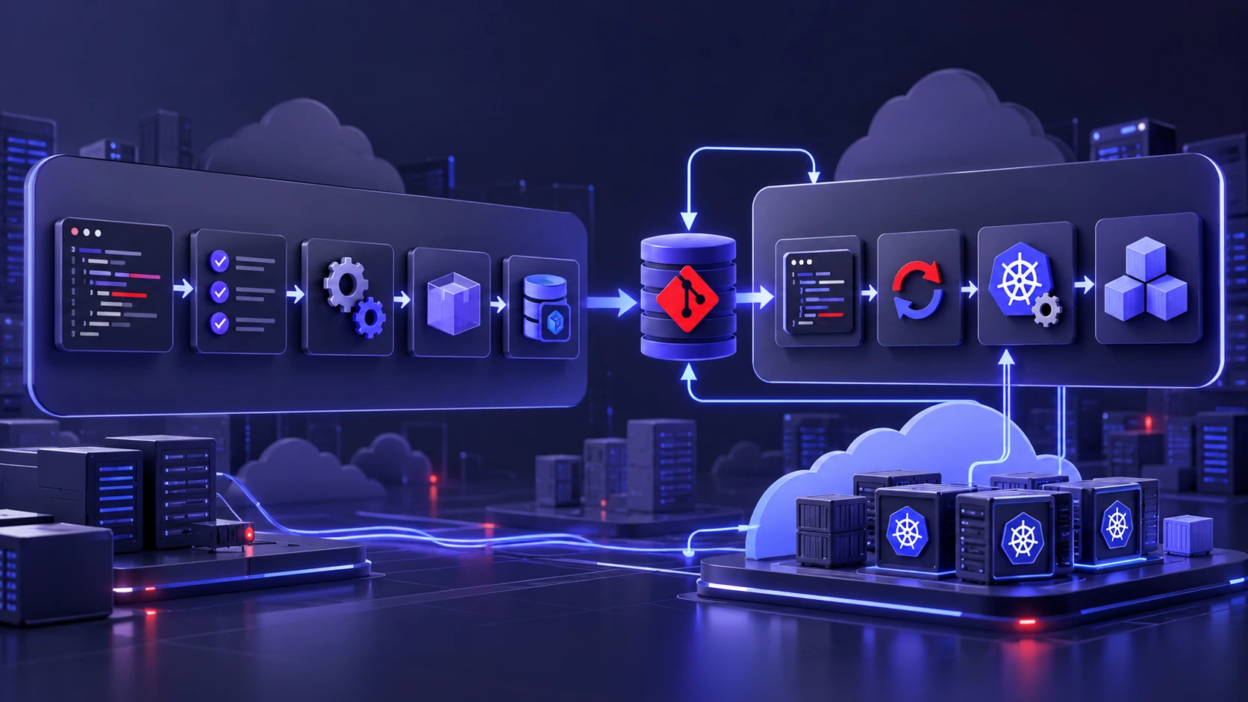
GitOps and CI/CD are closely related DevOps practices, but they are not direct alternatives. CI/CD automates software integration, testing, and delivery, while GitOps uses declarative configuration, version control, and continuous reconciliation to manage deployed environments.
Understanding the differences between GitOps and CI/CD helps teams choose the right deployment workflow, improve operational consistency, and reduce configuration drift. This guide compares their responsibilities, explains how they work together, and highlights when each approach provides the most value.
What CI/CD Means in DevOps?
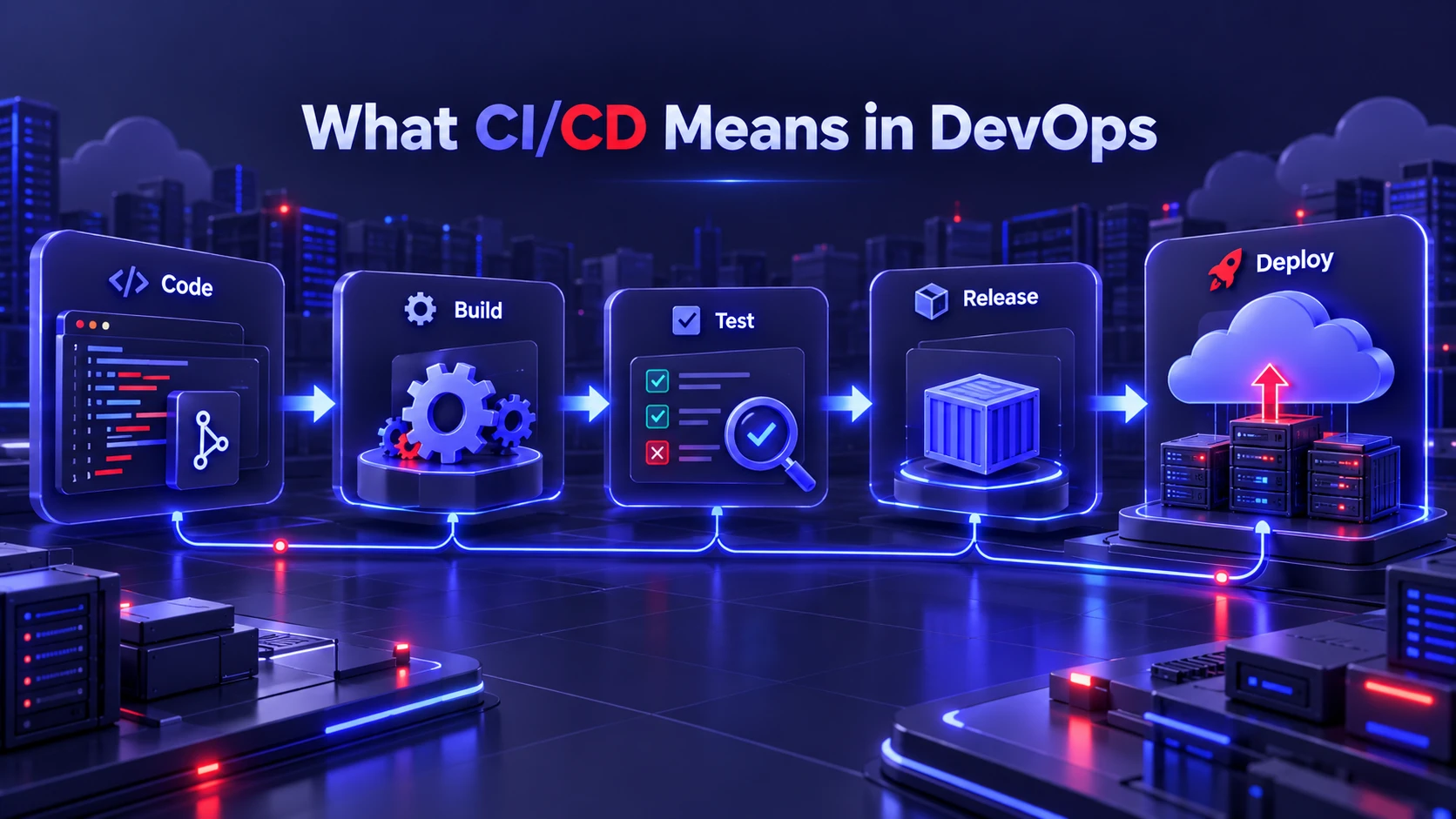
CI/CD stands for continuous integration and continuous delivery or continuous deployment. Continuous integration (CI) involves regularly merging code changes into a shared repository and checking them through automated builds, tests, and other quality checks.
Continuous delivery keeps validated software ready for release, although deploying it to production may still require manual approval. Continuous deployment goes further by automatically releasing changes that pass the required pipeline checks. These practices help development teams deliver updates consistently while reducing repetitive manual work.
In practical terms, CI/CD pipelines run repeatable jobs that turn source code into deployable artifacts. Those artifacts may include container images, software packages, or compiled binaries, depending on the technology stack. Pipeline automation helps teams apply consistent checks to each change and reduce errors introduced by repetitive manual processes.
For an example of how automated workflows support software integration, testing, and deployment, see the official GitHub Actions documentation.
What GitOps Means and Why Teams Use It?
GitOps is an operating model in which desired system configuration is defined declaratively, versioned, and automatically reconciled with the running environment. Rather than relying on direct manual changes, teams manage approved configuration through version-controlled workflows, while automated controllers apply and maintain the declared state.
The OpenGitOps principles describe four core requirements: declarative configuration, versioned and immutable desired state, automatic pulling of that state, and continuous reconciliation.
GitOps is most commonly associated with Kubernetes, where controllers such as Argo CD and Flux compare the desired configuration with the actual running state. These controllers apply approved configuration changes and can detect differences, commonly called configuration drift.
GitOps also improves change traceability because declared updates can be reviewed and versioned. However, Git history alone does not capture every runtime event, and a GitOps controller does not automatically guarantee that every deployment will succeed. Teams still need appropriate monitoring, access controls, and validation procedures.
GitOps vs CI/CD: Core Differences
CI/CD answers how software is built and validated, while GitOps answers how environments are configured and kept consistent. CI/CD pipelines are typically event-driven jobs that run, finish, and produce outputs. GitOps controllers run continuously and focus on convergence between declared and actual state.
Another difference is where control lives. CI/CD often has permission to push changes into environments, which can expand the blast radius of a misconfiguration. GitOps favors limited, well-scoped automation in the environment itself, reducing credential sprawl and improving traceability.
| Comparison Factor | CI/CD | GitOps |
|---|---|---|
| Primary Purpose | Automate software integration, testing, building, and delivery | Manage desired deployment configuration and keep environments aligned |
| Execution Model | Pipelines run after events such as commits, pull requests, or scheduled triggers | Controllers continuously check and reconcile desired and actual states |
| Deployment Approach | May use direct deployment or integrate with a GitOps workflow | Commonly uses controllers that pull declared configuration and apply changes |
| Source of Truth | Pipeline configuration, source repositories, and release artifacts | Version-controlled declarative configuration |
| Configuration Drift | Drift correction requires additional automation or operational processes | Reconciliation can detect and correct drift in managed resources |
| Auditability | Pipeline logs, approvals, build results, and deployment records | Git history, reviews, controller events, and deployment status |
CI/CD and GitOps overlap in software delivery and deployment, but their responsibilities are not identical. A CI/CD pipeline may build and test an application, publish a versioned artifact, and update deployment configuration. A GitOps controller can then apply that configuration and continue monitoring the environment for drift.
Rather than replacing CI/CD, GitOps can provide the deployment and configuration-management layer within a broader continuous delivery workflow. This combination is particularly useful for teams managing Kubernetes applications across multiple environments.
How GitOps and CI/CD Work Together
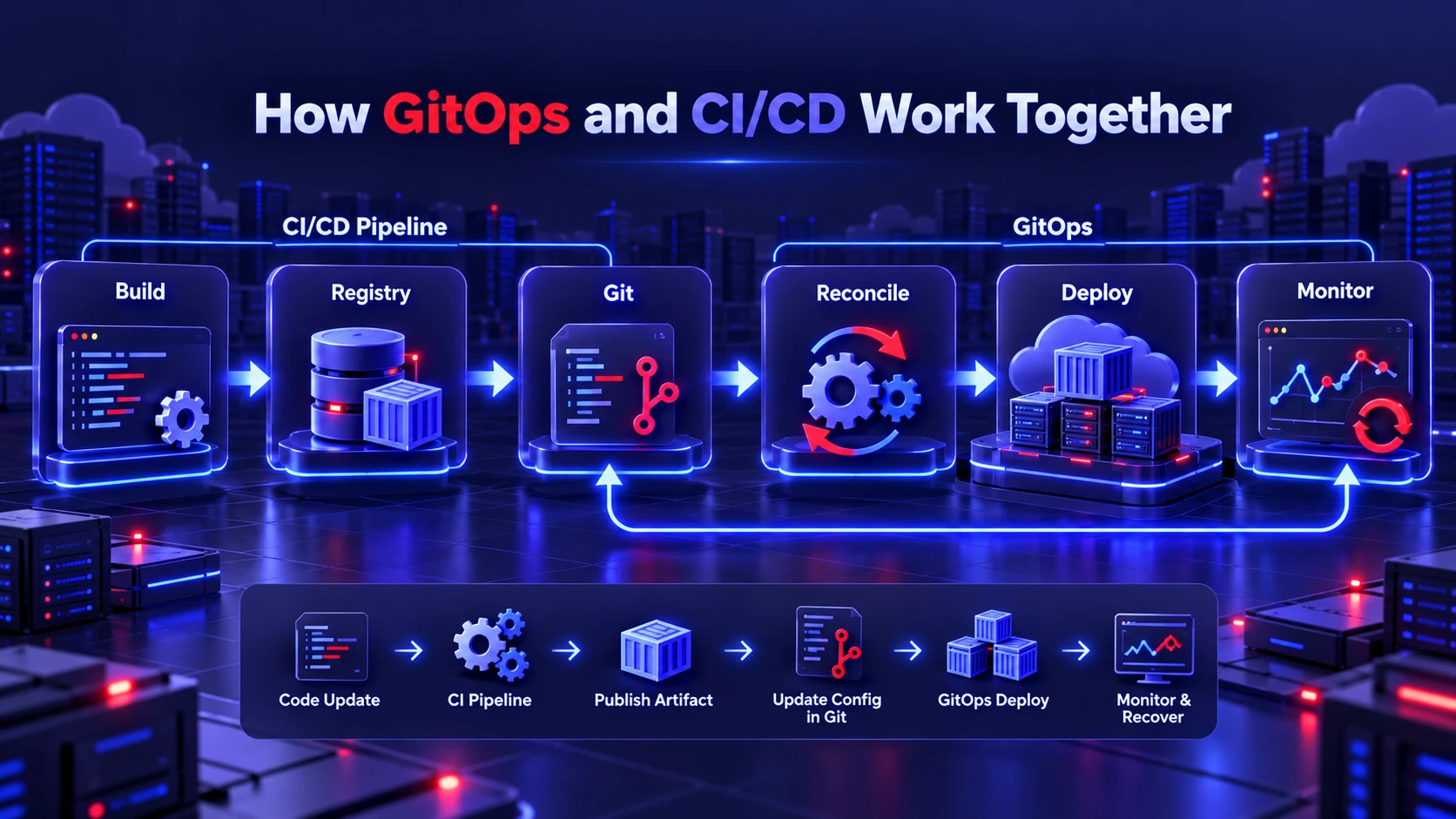
The cleanest integration is to let CI handle code quality and artifact creation, then let GitOps handle deployment and ongoing state management. CI produces versioned artifacts and updates deployment manifests in Git. GitOps then detects the Git change and reconciles the target environment accordingly.
This split keeps responsibilities crisp. CI/CD tools remain focused on software supply chain automation, while GitOps provides operational consistency, drift control, and a reliable rollback path tied to Git history.
Common Integration Flow
- Validate and build: CI runs tests, security checks, and builds a versioned artifact such as a container image.
- Publish artifacts: The pipeline pushes the artifact to a registry and records immutable identifiers like digests.
- Update desired state in Git: A commit updates deployment manifests or Helm values to reference the new artifact version.
- Reconcile into environments: A GitOps controller pulls the updated configuration and applies it to the cluster, then keeps it aligned.
- Monitor and recover when necessary: Monitor application health, deployment status, and reconciliation results. If an update causes problems, restore a previously approved configuration through Git and allow the controller to reconcile it. Verify the recovery because reverting configuration does not automatically reverse database migrations, restore deleted data, or guarantee application recovery.
With this pattern, deployment is driven by approved configuration changes rather than a CI pipeline directly updating production resources. The separation can improve operational consistency and make deployment changes easier to review.
Container images are commonly used as versioned deployment artifacts in these workflows. To understand how containers differ from traditional virtual machines, read our comparison of containers vs virtual machines.
Practical Example: Deploying a Kubernetes Application
Consider a development team releasing a new version of a web application using GitHub Actions and Argo CD.
- Code update: A developer merges an approved change into the application’s repository.
- CI pipeline: GitHub Actions runs automated tests and builds a container image.
- Artifact publishing: The pipeline publishes the image to a container registry with an immutable identifier.
- Configuration update: An approved change updates the Kubernetes deployment manifest in the environment repository to reference the new image.
- GitOps deployment: Argo CD detects the updated desired configuration and synchronizes the Kubernetes environment.
- Monitoring: The team checks application health, deployment status, and reconciliation results.
In this example, CI/CD handles code validation and artifact preparation, while GitOps manages deployment configuration and ongoing reconciliation. The workflow creates a clear connection between an approved code change and the application running in the target environment.
Where GitOps Fits In A Modern DevOps Toolchain
GitOps connects version-controlled configuration with automated runtime management. In Kubernetes environments, teams may use manifests, Helm charts, Kustomize overlays, and policy definitions to describe the desired application configuration. GitOps controllers then work to keep managed resources aligned with that configuration.
Kubernetes provides official guidance on declarative management of Kubernetes objects, explaining how configuration files can describe and manage resources. GitOps builds on declarative management by adding automated source synchronization and ongoing reconciliation.
Many organizations split repositories by responsibility. Application teams may own application source code and build pipelines, while platform teams maintain shared cluster configuration and operational policies. GitOps can help establish clear ownership by making configuration changes reviewable and traceable through version control.
For additional context on how GitOps connects with platform engineering, infrastructure as code, and automation practices, explore our article on DevOps automation trends.
Best Practices for Using GitOps With CI/CD
Combining GitOps and CI/CD works best when teams design for traceability, least privilege, and predictable promotion. A few practical practices reduce surprises and speed up incident response.
- Keep environments declarative: Treat manifests, values, and policies as code that must go through review and version control.
- Use immutable artifact references: Prefer digests or pinned versions so the deployed artifact cannot change without a Git commit.
- Separate build and deploy permissions: CI pipelines should not require broad production cluster permissions when GitOps controllers handle deployment. Apply least-privilege access and manage credentials through dedicated security controls. For additional guidance, see our article on automated secrets management in DevOps.
- Define promotion rules: Promote from dev to staging to production through controlled Git changes, not manual cluster edits.
- Monitor drift and reconciliation failures: Track deployment health, synchronization status, and controller errors so teams can investigate failed updates quickly. GitOps tools can generate notifications when reconciliation fails. For example, the official Flux alerts documentation explains how teams can configure notifications for important controller events.
These practices align with secure software delivery, while preserving the fast feedback loops that make DevOps effective.
Security and Compliance Advantages
GitOps can improve deployment security by reducing the need for CI runners to hold direct production deployment credentials. In a pull-based GitOps workflow, an authorized controller retrieves declared configuration and applies approved changes using appropriately scoped permissions.
However, the overall security of the delivery system still depends on repository protection, secret management, controller permissions, and identity controls. Teams using GitHub Actions can also review OpenID Connect authentication for cloud deployments to reduce reliance on long-lived cloud credentials.
GitOps can support security reviews and compliance processes by recording approved configuration changes in version control. Pull-request reviews, branch protection, signed commits, and automated policy checks can help teams establish documented change-management procedures.
However, Git history is not a complete record of the running environment. Organizations should also retain deployment logs, controller events, access records, and relevant monitoring data. Sensitive credentials should be managed through appropriate secret-management systems rather than committed to repositories as plaintext. These additional controls improve traceability and help support incident investigations and compliance requirements.
Common Pitfalls and How to Avoid Them?
The most common issue is treating GitOps as a replacement for testing. GitOps does not validate application correctness, so CI must remain rigorous with unit tests, integration tests, and security scanning. GitOps should deploy only what has already passed required gates.
Another pitfall is mixing manual changes with Git-managed state. Manual kubectl edits can create drift that either gets overwritten or hides misconfigurations. Teams should enforce policies that discourage direct edits, and they should route changes through pull requests.
A third issue is unclear repository strategy. Too many repos can create overhead, while a single repo can create noisy changes and access complexity. A balanced approach is to separate application source from environment configuration, with clear ownership and review rules.
When to Choose GitOps, CI/CD, or Both?
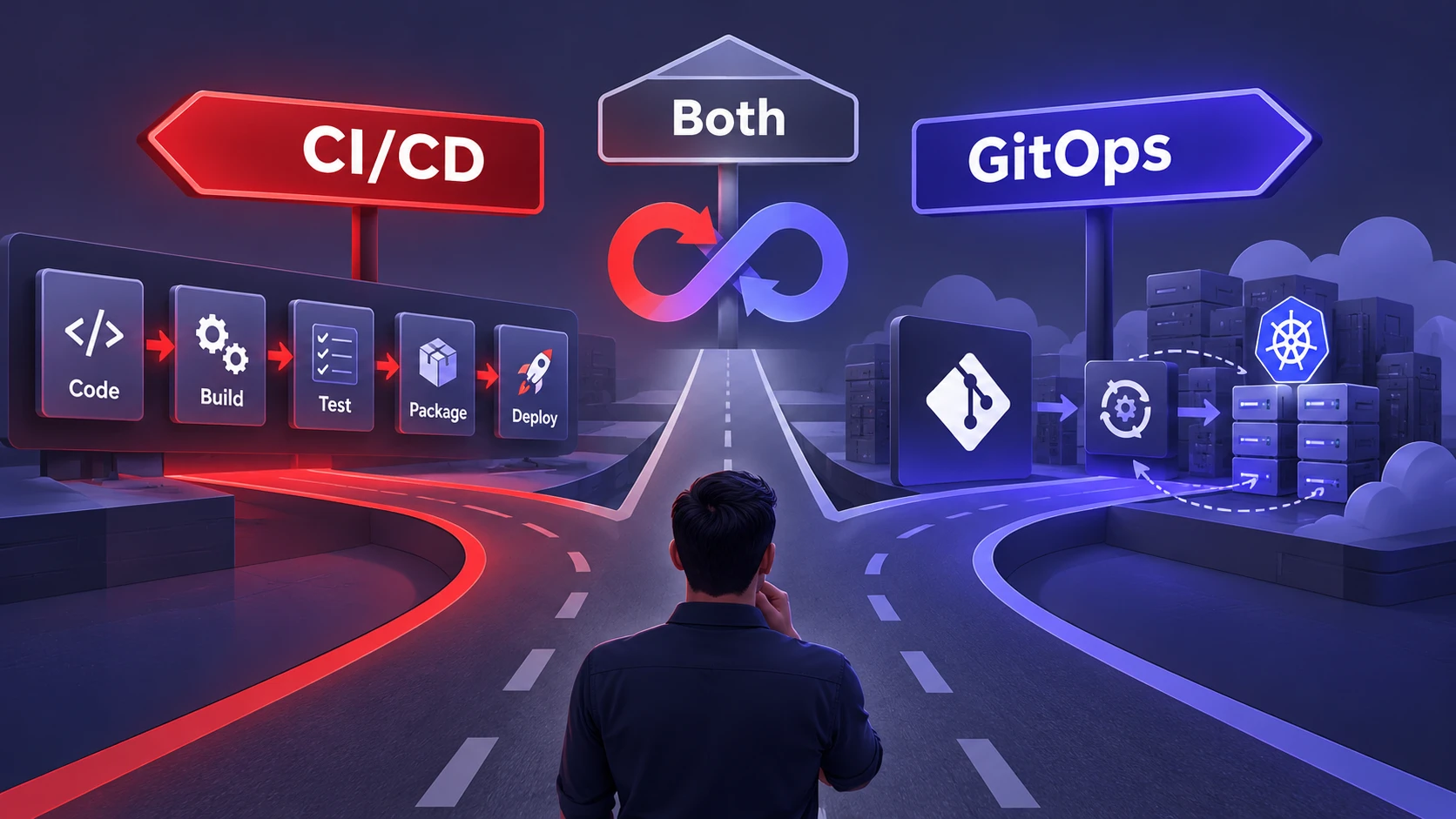
CI/CD is essential for any team that wants consistent builds, testing, and packaging. GitOps becomes most valuable when operational consistency, Kubernetes deployments, multi-environment promotion, or strict audit requirements matter. In most cloud-native stacks, both are used together because they cover different layers of the delivery lifecycle.
Teams that are early in DevOps maturity can start by strengthening CI and adding delivery automation. GitOps can then be introduced for one service or one environment to standardize deployment and reduce configuration drift. This phased adoption reduces risk while building confidence in the workflow.
GitOps vs CI/CD: Which Approach Fits Your Team?
| Team Requirement | Recommended Approach | Why It Fits |
|---|---|---|
| Automated code builds and testing | CI | Validates code changes and creates repeatable build results |
| Frequent software releases | CI/CD | Automates release preparation and deployment stages |
| Kubernetes configuration management | GitOps | Maintains declared configuration and supports continuous reconciliation |
| Multiple deployment environments | CI/CD + GitOps | Combines automated artifact creation with environment-specific configuration control |
| Configuration drift detection | GitOps | Controllers compare actual and desired managed states |
| Controlled releases with approvals | CI/CD + GitOps | Combines pipeline quality checks with reviewed configuration changes |
The choice depends on the team’s infrastructure, deployment frequency, operational requirements, and existing automation. Organizations should evaluate their release process before adopting additional tools, since GitOps introduces controllers, repository-management responsibilities, and operational complexity alongside its benefits.
GitOps and CI/CD Implementation Checklist
Before combining GitOps and CI/CD, teams should review their existing delivery workflow and identify which responsibilities belong in the build pipeline and which belong in the deployment environment.
Use the following checklist when planning implementation:
- Evaluate the existing pipeline: Identify how code is tested, packaged, and released.
- Choose a configuration repository strategy: Decide where deployment manifests, environment settings, and policies will be maintained.
- Select suitable GitOps tooling: Evaluate controllers such as Argo CD or Flux based on infrastructure requirements and operational experience.
- Define access controls: Limit deployment permissions and protect sensitive credentials.
- Validate deployment changes: Add appropriate tests, configuration checks, and approval requirements.
- Monitor reconciliation: Track deployment health, configuration drift, and controller failures.
- Test recovery procedures: Verify how the team restores working application versions and handles changes that cannot be reversed through Git alone.
A phased implementation is generally easier to manage than an organization-wide migration. Teams can begin with one application or non-production environment, evaluate the results, and expand once the process is reliable.
Conclusion
GitOps and CI/CD are complementary practices that address different parts of modern DevOps. CI/CD creates validated, versioned artifacts, while GitOps governs how those artifacts are deployed and kept in the desired state. Used together, they improve deployment reliability, reduce drift, and make rollbacks and audits far more straightforward.
The strongest implementations keep responsibilities clear, permissions tight, and environment changes fully reviewable in Git. With that foundation, teams can ship faster while improving control and operational confidence.
Frequently Asked Questions
Is GitOps a Replacement for CI CD?
GitOps does not replace CI/CD because it does not build, test, or package software. It focuses on deploying and reconciling environment state from Git. Most teams use CI/CD for artifact creation and GitOps for controlled deployments.
Do GitOps Workflows Require Kubernetes?
Many GitOps tools are designed around Kubernetes, but the operating model is not limited to it. Any system that can be expressed as declarative state and reconciled automatically can follow GitOps principles. Kubernetes is simply the most common and mature target.
How Do Rollbacks Work With GitOps And CI CD Together?
A common recovery approach is to revert the deployment configuration in Git to a previously approved version. The GitOps controller then attempts to reconcile the environment with that desired configuration. However, actual recovery depends on controller settings, available artifacts, and application behavior. Database changes, persistent data, and external services may require separate recovery procedures. CI/CD helps by maintaining validated, versioned artifacts that can be redeployed when necessary.