DNS over HTTPS (DoH) and DNS over TLS (DoT) are two protocols designed to protect DNS queries from interception and tampering. Both encrypt communication between a device and its DNS resolver, but they differ in how they transmit requests, which network ports they use, and how administrators can manage their traffic. DoH typically operates over HTTPS on port 443, while DoT commonly uses a dedicated TLS connection on port 853. Understanding these differences can help individuals and businesses choose the right approach for DNS privacy, security, performance, and network management.
What DNS Encryption Changes?
Before comparing encrypted DNS protocols, it helps to understand how standard DNS resolution works. The Domain Name System translates readable website addresses into IP addresses so devices can locate online services. For a more detailed explanation, read our guide on how the Domain Name System works
Encrypted DNS improves privacy, but it does not provide complete online anonymity. Although DoH and DoT protect DNS queries between the client and the recursive resolver, the resolver can still process the requested domain names. Network observers may also identify connections through destination IP addresses and other visible traffic metadata. Depending on the connection, an unencrypted TLS Server Name Indication (SNI) can reveal a website’s hostname. Technologies such as Encrypted Client Hello (ECH) may provide additional protection, but encrypted DNS alone does not hide every aspect of browsing activity.
DNS Over HTTPS (DoH) Explained

DNS over HTTPS (DoH) sends DNS queries and receives responses through encrypted HTTPS connections, typically using TCP port 443. It carries DNS messages within HTTP requests and responses, allowing DNS traffic to share infrastructure commonly used for secure web browsing. Because DoH uses HTTPS, it can be less obvious to distinguish from other encrypted web traffic using basic network monitoring. However, network administrators may still identify or restrict specific DoH resolvers through endpoint policies, destination information, or other network controls.
Because DoH uses HTTPS, network devices may have fewer straightforward ways to identify DNS traffic through basic port-based monitoring. This can improve privacy against passive observers on local networks, although it may complicate network-level troubleshooting and DNS policy enforcement. The official DNS over HTTPS specification (RFC 8484) explains how DNS messages are exchanged using HTTPS and outlines important operational and security considerations.
DNS Over TLS (DoT) Explained
DNS over TLS (DoT) encrypts DNS queries and responses using Transport Layer Security (TLS). By default, it operates over TCP port 853, which is dedicated to encrypted DNS traffic. This makes DoT connections easier for network administrators to recognize and manage through firewall rules and network monitoring. Although administrators can identify the connection as encrypted DNS traffic, they generally cannot read the protected DNS queries without access to the relevant decrypted information.
DoT can simplify encrypted DNS traffic identification on managed networks because it commonly uses the dedicated TCP port 853. Administrators can apply network controls and managed resolver settings to support consistent DNS policies. The official DNS over TLS specification (RFC 7858) defines the protocol’s connection requirements, encrypted transport behavior, and default port.
Privacy Differences That Matter
Both DoH and DoT prevent on-path observers from reading DNS queries in plaintext. The meaningful privacy differences show up in who can enforce resolver choice, how much DNS is centralized, and how much your local network can observe.
The main privacy difference between DoH and DoT is how their encrypted traffic appears on the network, rather than the strength of their encryption alone. DoH commonly shares HTTPS port 443 with regular web traffic, making it harder to identify using simple port-based monitoring. DoT generally uses port 853, allowing network administrators to recognize and restrict encrypted DNS connections more easily. However, both protocols protect DNS queries in transit when configured securely, and neither prevents the selected DNS resolver from receiving the queries it processes.
- Local Network Privacy: DoH is harder to distinguish from other HTTPS traffic, while DoT is more visible as DNS-related traffic.
- Resolver Trust: Both shift trust toward the chosen resolver, so the provider’s policies, logging, and jurisdiction still matter.
- Policy Enforcement: DoT is simpler to enforce at the network edge, while DoH often shifts control toward the endpoint or application.
That tradeoff is why the same protocol can be a privacy win on public Wi-Fi and a governance problem on a managed corporate network. Public Wi-Fi networks can expose users to additional threats, including fake hotspots that imitate legitimate networks. Although encrypted DNS helps protect DNS queries from local interception, it cannot prevent every attack involving malicious wireless access points. Our guide to evil twin Wi-Fi attacks explains how these threats work and what users can do to reduce the risks.
Security Differences That Matter
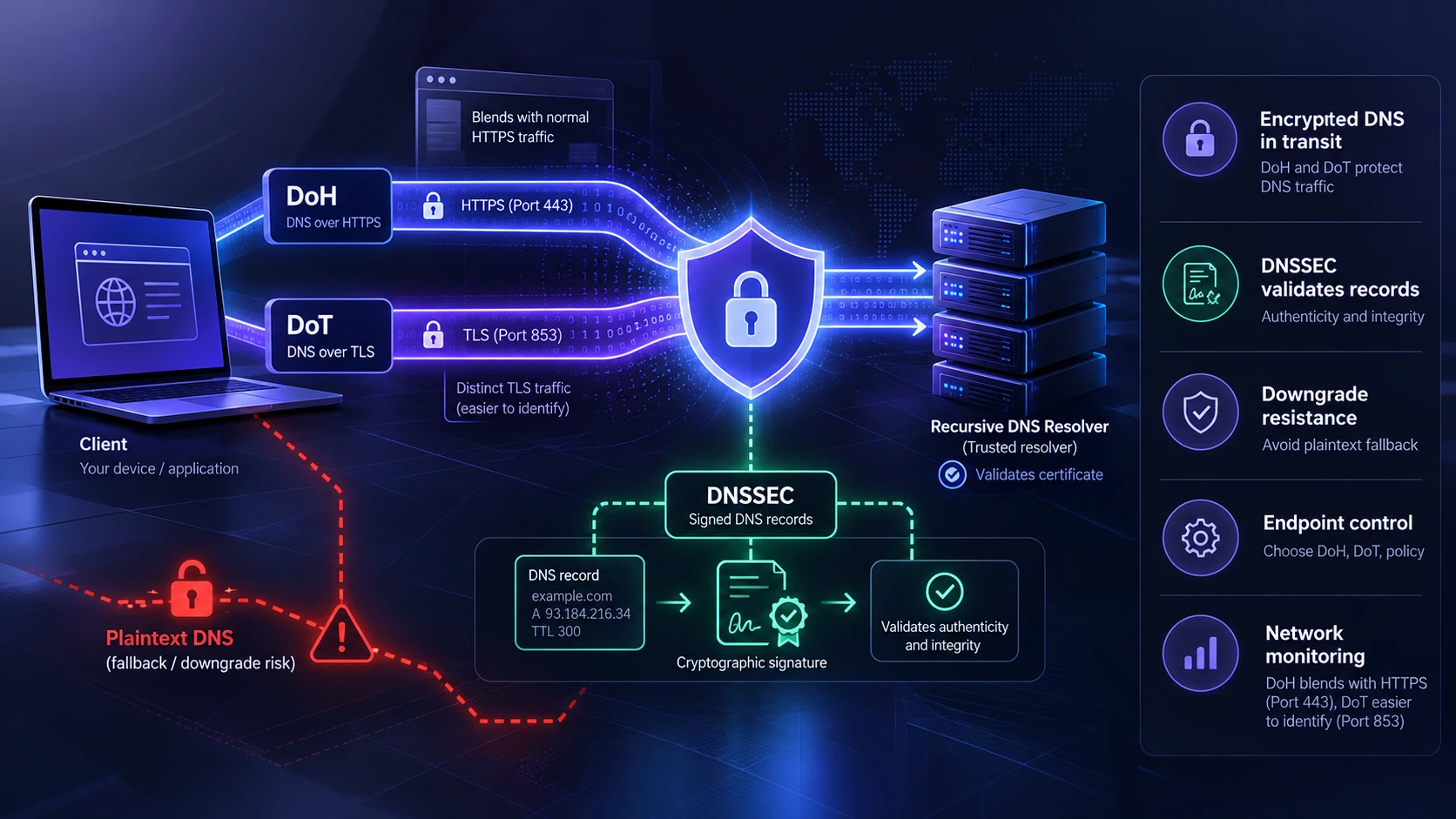
Encryption protects confidentiality and integrity of the DNS channel, but security depends on implementation details. Certificate validation, correct resolver configuration, and prevention of downgrade attacks matter more than the protocol name.
DoH and DoT vs DNSSEC: What is the Difference?
DNS over HTTPS and DNS over TLS protect the communication channel between a DNS client and its recursive resolver. They encrypt DNS requests and responses to reduce exposure to network interception and tampering.
DNS Security Extensions (DNSSEC) serve a different purpose. DNSSEC uses cryptographic signatures to help validating resolvers verify that DNS records originate from the appropriate authoritative source and have not been modified. Cloudflare’s DNSSEC documentation provides additional information about how DNS records are authenticated using digital signatures.
DoH and DoT do not automatically provide DNSSEC validation. Similarly, DNSSEC does not encrypt DNS queries or hide them from network observers.
These technologies can work together. Organizations can use DoH or DoT to protect DNS traffic in transit while relying on DNSSEC-validating resolvers to strengthen the authenticity and integrity of DNS responses.
DoT’s dedicated channel can be simpler to secure at the network layer with explicit allow and deny rules. DoH inherits web security behaviors and can benefit from mature HTTPS tooling, but it can also be misused by malware that hides DNS activity inside normal HTTPS flows.
- Downgrade Resistance: Ensure fallback to plaintext DNS is disabled or tightly controlled to avoid silent regressions.
- Endpoint Control: DoH can be controlled by the browser or application, which may bypass operating system DNS policies.
- Network Monitoring: DoT is easier to observe as DNS without content inspection, while DoH reduces protocol-level visibility.
In practice, well-managed endpoints and a trusted resolver provide more security than relying on a protocol choice alone.
Performance and Reliability Considerations
Performance differences are usually small, but they can show up on high-latency networks or on constrained devices. Connection reuse, resolver proximity, and caching behavior tend to dominate perceived speed.
DoH often benefits from HTTP features such as multiplexing and connection pooling. DoT can be very efficient as well, especially when the client keeps a warm TLS connection and uses modern TLS settings.
Network Management and Compliance Impact
Organizations often need consistent DNS policies for threat blocking, content filtering, and incident response. DoT’s dedicated port makes its traffic easier to identify at the network level, while DoH can also support centralized management through browser and endpoint policies. For example, Mozilla’s official Firefox DNS over HTTPS policy documentation explains how administrators can configure approved resolvers, restrict user changes, and manage fallback behavior.
DoH can create challenges for centralized DNS management when browsers or applications use external resolvers that bypass an organization’s approved DNS infrastructure. However, DoH itself does not prevent centralized administration. Businesses can use browser policies, endpoint management tools, and approved encrypted DNS resolvers to maintain consistent security controls. For example, managed browsers can be configured to use a specific DoH resolver, restrict unauthorized changes, or apply appropriate fallback rules. Both DoH and DoT can support enterprise DNS policies when properly deployed.
DoH vs. DoT: Key Differences
| Comparison Factor | DNS over HTTPS (DoH) | DNS over TLS (DoT) |
|---|---|---|
| Encryption Method | DNS queries carried through HTTPS | DNS queries protected using TLS |
| Default Port | TCP 443 | TCP 853 |
| Traffic Identification | Harder to distinguish using port-based monitoring | Easier to recognize through its dedicated port |
| Privacy Protection | Encrypts client-to-resolver DNS communication | Encrypts client-to-resolver DNS communication |
| Resolver Control | Can be configured by browsers, apps, or operating systems | Commonly configured through operating systems or network settings |
| Enterprise Management | Supports centralized control through managed client policies | Supports centralized control through managed clients and network policies |
| Network Blocking | May require resolver-specific or more advanced controls | Can often be restricted using port 853 rules |
| Troubleshooting | Application-level settings may complicate diagnosis | Dedicated port can simplify network-level identification |
| Performance | Depends on resolver, HTTP connection reuse, and caching | Depends on resolver, TLS connection reuse, and caching |
| Best Fit | Browser-level privacy and compatible managed deployments | Environments that benefit from a distinct encrypted DNS channel |
This side-by-side view helps narrow the choice based on how much control you want at the endpoint versus the network.
How to Choose Between DoH and DoT?
DoH is a practical option for personal devices and browsers that support encrypted DNS because it protects DNS lookups while using standard HTTPS connections. DoT is also a strong privacy choice, particularly when users prefer DNS settings managed at the operating system or network level. For business environments, either protocol can work effectively if administrators can control resolver selection, enforce security policies, and monitor configuration compliance. The better choice depends on device compatibility, network restrictions, resolver trust, and operational requirements.
A strong approach is to decide who should control DNS selection and what auditing is required. Then choose the protocol that matches those operational needs without weakening privacy more than necessary.
- Personal Devices and Public Networks: Prefer DoH when you want resilient encrypted DNS that is less likely to be blocked.
- Business Networks With Security Controls: Choose managed DoT or DoH based on the organization’s approved DNS infrastructure, endpoint management capabilities, filtering requirements, and monitoring policies. DoT offers easier port-based identification, while managed DoH can also support centralized resolver settings and security controls.
- Hybrid and Remote Work: Standardize resolver settings through device management and pick the protocol that integrates cleanly with your security stack.
Whichever option you choose, ensure the resolver is reputable and aligns with your privacy expectations.
Browser privacy also depends on protections beyond encrypted DNS, including tracker blocking, secure connections, and appropriate browser settings. Some browsers provide built-in encrypted DNS options that allow users to manage how DNS requests are handled. To learn more about these features, explore our guide to internet browsers for privacy.
Best Practices for Secure DNS Configuration
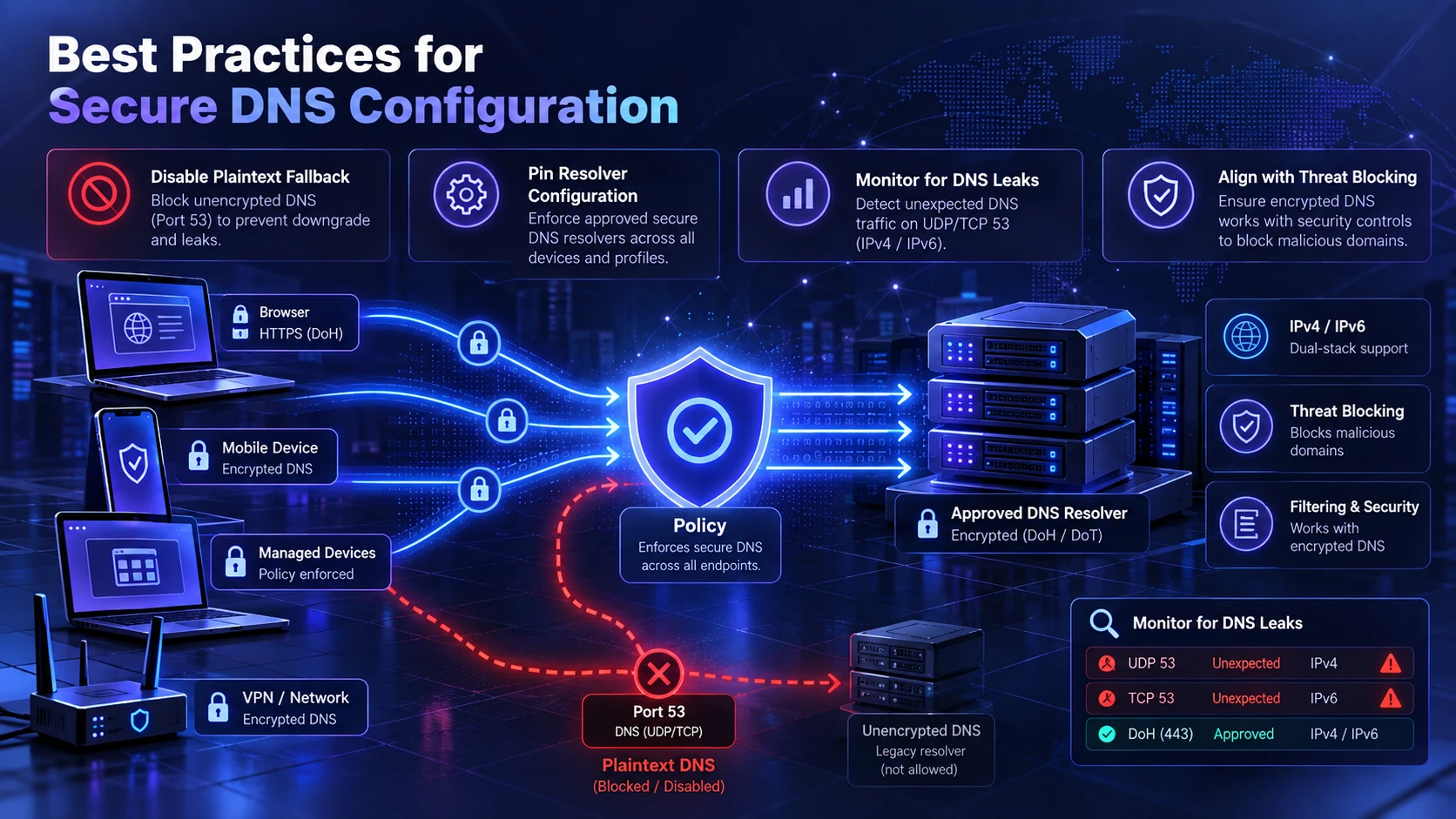
Protocol choice is only part of a secure DNS strategy. Incorrect resolver settings or permissive fallback behavior can cause devices to send DNS queries without the intended protection. The IETF’s strict privacy and opportunistic privacy guidance explains the security tradeoff between requiring authenticated encryption and allowing less secure connections when encrypted DNS is unavailable. Organizations should select fallback policies based on their security requirements and operational needs.
Organizations can improve encrypted DNS security by applying consistent configurations across browsers, operating systems, VPNs, and network devices. Security teams should verify resolver settings, monitor unexpected plaintext DNS traffic, and confirm that encrypted DNS does not bypass approved filtering or threat detection systems. Regular testing helps identify configuration problems before they affect privacy or network reliability.
- Disable Plaintext Fallback: Configure clients to avoid reverting to legacy DNS unless you explicitly allow it for break-glass scenarios.
- Pin Resolver Configuration: Use managed profiles or policies so browsers and apps do not silently override system DNS settings.
- Monitor for DNS Leaks: Check whether devices send DNS queries over traditional UDP or TCP port 53 when encrypted DNS is required. Also verify that browsers, applications, and VPN configurations use approved resolvers. Review both IPv4 and IPv6 network paths where applicable, and investigate unexpected resolver changes or plaintext fallback.
- Align with Threat Blocking: If you rely on DNS-based protection, ensure your encrypted DNS path still supports your security controls.
These checks reduce surprises and keep encryption benefits intact over time.
In business environments, device management platforms can help administrators maintain consistent security configurations across employee laptops and mobile devices. These tools support centralized policy deployment and compliance management. Our overview of Microsoft Intune and endpoint management explains how organizations can manage device settings and enforce security requirements across their systems.
Conclusion
DNS over HTTPS and DNS over TLS both provide important improvements over traditional plaintext DNS by encrypting communication between devices and DNS resolvers. DoH typically uses HTTPS on port 443, making its traffic less distinguishable through basic port-based monitoring. DoT generally uses port 853, making encrypted DNS connections easier for network administrators to identify and manage.
Neither protocol is universally better for privacy or security. The right choice depends on resolver trust, device compatibility, network management requirements, and whether encryption can be enforced consistently. For stronger DNS protection, use reputable resolvers, verify certificate authentication, prevent unwanted plaintext fallback, and consider DNSSEC validation where appropriate. A properly configured and maintained DNS environment matters more than choosing a protocol based on its name alone.
Frequently Asked Questions
Is DNS Over HTTPS Always More Private Than DNS Over TLS?
Not always. DoH can be harder for local networks to distinguish as DNS traffic, which can reduce casual observation, but your resolver still sees queries. Privacy depends heavily on resolver trust, logging policies, and whether plaintext fallback is prevented.
Can I Use Both DoH and DoT at the Same Time?
Yes, a device or network can use both DoH and DoT in different parts of its DNS configuration. For example, an operating system may use DoT while a web browser sends its own DNS queries through DoH. A local DNS forwarder may also use one encrypted protocol to communicate with an upstream resolver while clients use another. However, running both without coordinated settings can create inconsistent resolver selection, filtering behavior, and troubleshooting results. Organizations should manage these configurations carefully to maintain consistent DNS policies.
Will Encrypted DNS Stop My ISP From Seeing What Sites I Visit?
Encrypted DNS can prevent your ISP from reading DNS queries in plaintext, but it does not hide the IP addresses you connect to. With HTTPS, the page content is encrypted, yet connection metadata can still reveal patterns. For stronger privacy, combine encrypted DNS with sound browser, VPN, and device security practices.
Is DNS Over HTTPS More Secure Than DNS Over TLS?
Neither DoH nor DoT is inherently more secure when both use properly authenticated TLS connections and trusted DNS resolvers. DoH sends DNS requests over HTTPS, typically on port 443, while DoT uses a dedicated encrypted DNS channel, generally on port 853. Their main differences concern traffic identification, network management, and application support. Certificate validation, resolver trust, secure configuration, and prevention of unwanted plaintext fallback are more important security factors than the protocol choice alone.